
A Zendesk ticket queue dashboard for the support floor's Apple TV
Zendesk teams work out of views, and every agent sees a slightly different slice. A Zendesk dashboard on the Apple TV in the support area shows the shared picture: how many tickets are unsolved at each priority, which urgent ones are getting old, and which group is carrying the backlog.
- Read-only
- API key connection
- One connection per workspace
Popular Zendesk dashboards
What teams running Zendesk put on the screen, and what you would ask DJ Agent to get it.
Aging ticket watch
For support leads and the agents on shift
A breach rarely starts as a crisis. It starts as an urgent ticket nobody picked up for three hours, and a screen that lists the oldest ones by age gets them claimed before the clock runs out.
- New tickets still untouched after 2 hours
- Urgent and high tickets unsolved for more than 4 hours
- The five oldest unsolved urgent tickets, with subject and age
- Pending tickets waiting on the customer for more than 3 days
Ask DJ Agent“List our oldest unsolved urgent and high priority Zendesk tickets with subject and age, and flag any New ticket older than 2 hours.”
Backlog by Zendesk group
For support managers balancing tiers and specialist groups
Groups are how Zendesk routes work, so a backlog is usually one group's problem, not the whole team's. Seeing Billing at 41 while Tier 1 sits at 12 is the cue to move people before the queue moves customers.
- Unsolved tickets in each group
- Urgent tickets inside each group
- Tickets with no group assigned yet
Ask DJ Agent“Rank our Zendesk groups by unsolved tickets, and show how many tickets have no group assigned.”
Solved, created, and CSAT pulse
For the whole support org, plus anyone walking past
Solved versus created in the last 24 hours tells you whether the backlog is shrinking today. Pair it with the week's good and bad satisfaction ratings and the team sees the effort and the result on one screen.
- Tickets solved in the last 24 hours
- Tickets created in the last 24 hours
- Satisfaction this week: good ratings as a share of good plus bad
- Total unsolved tickets right now
Ask DJ Agent“Show Zendesk tickets solved and created in the last 24 hours, total unsolved, and CSAT for the last 7 days from good and bad ratings.”
Where tickets come from
For support ops and whoever staffs chat and phones
Zendesk records the channel every ticket arrived through. When messaging overtakes email on a Monday morning, the staffing plan should change the same day, not at the monthly review.
- Tickets created this week by channel: email, web form, chat and messaging, voice, API
- Share of this week's tickets from each channel
- The busiest channel over the last 24 hours
Ask DJ Agent“Chart Zendesk tickets created this week by channel (email, web form, messaging, voice, API) with the week's total.”
What Dance Party reads from Zendesk
Dance Party reads Zendesk through its REST API as the Zendesk user whose email you enter, so it sees the tickets that user can see. Every request is a read. Ticket counts come from Zendesk search, which returns an exact total; ticket lists show up to 100 tickets per widget.
Tickets, through Zendesk search
Zendesk API docs ↗- Status and priorityNew, open, pending, on-hold, solved, and closed, at urgent, high, normal, or low.
- Group, assignee, and brandWhich group and agent own a ticket, and which brand it belongs to.
- Channel and tagsHow the ticket arrived (email, web form, messaging, voice, API) and its tags.
- Created, updated, and solved timesFor age, today's volume, and trends, including relative filters like older than 4 hours.
- Satisfaction ratingGood, bad, or offered on solved tickets, for a CSAT tile.
Groups
Zendesk API docs ↗- GroupsEvery group's name, so a board can be scoped to Billing, Tier 2, or Escalations.
Views
Zendesk API docs ↗- View titles and conditionsThe filters behind your shared and personal views, so a screen can follow the same rules. Zendesk's own view counts are not read.
How to connect Zendesk
Before you start
- An owner or admin of your Dance Party workspace makes the Zendesk connection.
- A Zendesk admin to turn on API token access and create the token
- The email of the Zendesk agent or admin the token should read as. Pick someone whose access covers every group the screen should count
- Any Zendesk Support or Suite plan, Team and up
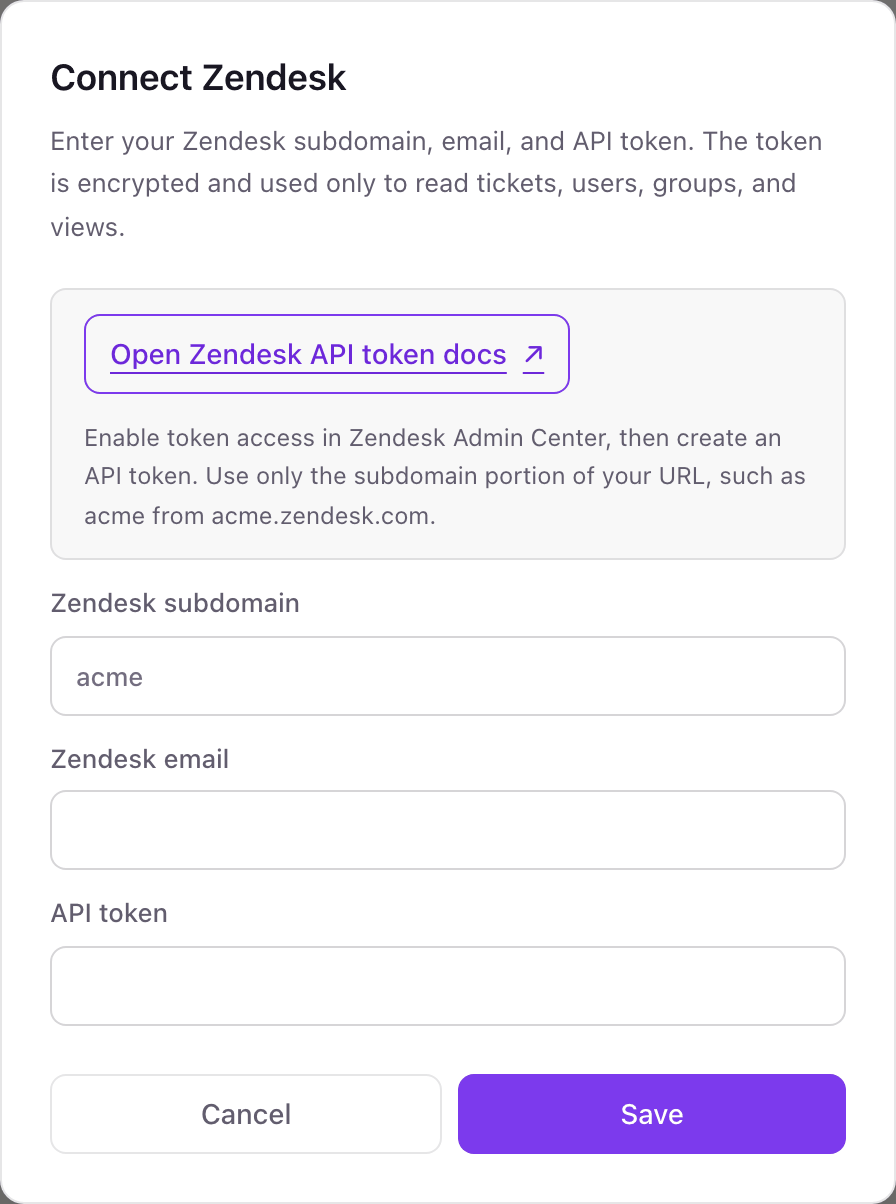
- 1In Dance Party, go to Integrations and click Connect Zendesk; the pop-up asks for Zendesk subdomain, Zendesk email, and API token.
- 2In Zendesk Admin Center, open Apps and integrations, then APIs, then API tokens. Turn on token access if it is off, click Add API token, give it a description like Dance Party, and click Save.Open Zendesk API token docs ↗
- 3Copy the token before you close that window. Zendesk never shows the full token again.
- 4Back in the pop-up, enter only the subdomain (acme from acme.zendesk.com), the Zendesk email the token should read as, and the token. Click Save.
- 5Dance Party signs in as that user to check the token, and the Zendesk card shows Connected.
One Zendesk connection per workspace
A workspace connects one Zendesk account, meaning one subdomain. Several brands inside that account are fine, since search can filter by brand. A second, separate Zendesk instance needs its own Dance Party workspace.
Zendesk API tokens are not scoped: a token can do whatever the user behind the email can. Dance Party only sends read requests and never replies, reassigns, or edits a ticket. To cut access, deactivate the token under Apps and integrations, APIs, API tokens, or disconnect from the Integrations page.
From Zendesk to your office display
Once Zendesk shows Connected, the rest happens in plain English. No code, no drag-and-drop.
1. Describe it. Tell DJ Agent what you want to see.
New dashboard+ WidgetDescribe a widget in DJ Agent, or click + WidgetDJ AgentDATA SOURCESZendeskConnectedList our oldest unsolved urgent and high priority Zendesk tickets with subject and age, and flag any New ticket older than 2 hours.Send2. It gets built. The widget lands on your board with real Zendesk data.
New dashboard+ WidgetOldest urgent ticketsLive5h 12m#48213 Card charged twiceBilling · Urgent4h 38m#48240 SSO login loop for whole teamTechnical · Urgent3h 05m#48266 Export stuck at 99%Technical · High2h 47m#48271 Invoice shows wrong VATBilling · High1h 20m#48290 Cannot add seatsAccounts · HighDJ AgentDATA SOURCESZendeskConnectedList our oldest unsolved urgent and high priority Zendesk tickets with subject and age, and flag any New ticket older than 2 hours.Send3. Put it on a screen. Pair an Apple TV with the six-character code it shows, then assign the dashboard.

Zendesk dashboard questions
Can I put a Zendesk queue on a TV in the support area?
Yes. Connect Zendesk, describe the queue you want, and assign the dashboard to the Apple TV in that room. Ticket counts update on their own, down to every 5 minutes.
Can a Zendesk dashboard show SLA breaches?
Not directly. Zendesk search does not return SLA policy targets, so Dance Party cannot read them. Ticket age is the stand-in teams use: urgent tickets unsolved for more than 4 hours, or New tickets nobody has touched in 2 hours.
Can the screen match one of our Zendesk views?
Yes, by its filters. Describe the view, for example unsolved urgent tickets in the Billing group, and the widget runs the same filter through Zendesk search. Zendesk's own view counts are not read.
Why does the dashboard show fewer tickets than Zendesk does?
The Zendesk email you connected with limits what the token sees. If that agent is restricted to certain groups, tickets in other groups are not counted. Reconnect with an admin's email to count everything.
Can Dance Party reply to or change Zendesk tickets?
No. It only reads. It cannot reply, change status, reassign, add tags, or delete anything, even though the token itself is not limited to reading.
What happens when Zendesk retires API tokens?
Zendesk says all API tokens stop working on April 30, 2027, and from July 28, 2026 it deletes tokens unused for 30 days. A token Dance Party reads with on every refresh stays in use until that final date.
Can I show CSAT from Zendesk?
Yes. Dance Party counts solved tickets rated good and bad over the period you pick and shows the share rated good. It works on any plan that sends Zendesk satisfaction surveys.
More integrations
Put Zendesk on every office display
Connect Zendesk, describe the dashboard, and it runs on an Apple TV, refreshing on its own.
Get Started