
Intercom inbox dashboards, from Fin to the team, on Apple TV
In Intercom, Fin answers first and teammates pick up what Fin routes to them. A shared Intercom dashboard on an Apple TV shows both halves: how many conversations Fin handled this week, how many are open and waiting on a person, and which team inbox is filling up.
- Read-only
- API key connection
- One connection per workspace
Popular Intercom dashboards
What teams running Intercom put on the screen, and what you would ask DJ Agent to get it.
Fin and the team
For support leaders and whoever owns Fin's content
Every conversation Fin resolves is one a teammate never touched. A weekly goal for Fin's resolved share keeps the content team honest, and the routed-to-team count shows what the humans are really absorbing.
- Conversations Fin AI Agent took part in this week
- How many of those Fin resolved, confirmed or assumed
- How many Fin routed to a team
Ask DJ Agent“Show how many Intercom conversations Fin took part in this week, the share Fin resolved against a 60% goal, and how many Fin routed to a team.”
Longest-waiting conversations
For the agents on shift
Intercom tracks when each conversation started waiting on your team. Listing the longest waits by channel and team inbox tells the next free teammate exactly which one to open.
- Open conversations ordered by how long they have waited for a reply
- Channel for each one: chat, email, WhatsApp, SMS, or phone
- The team inbox it sits in, and its priority
Ask DJ Agent“List the Intercom conversations that have been waiting longest for a reply, with channel, team inbox, and wait time.”
Team inbox load
For support managers
Assignment rules route Intercom conversations to team inboxes, and one inbox usually backs up first. Ranking open conversations by team shows where to lend a person before customers feel it.
- Open conversations assigned to each team
- Open conversations with no team yet
- Snoozed conversations per team
Ask DJ Agent“Rank our Intercom teams by open conversations assigned to them, and show how many open conversations have no team.”
Who is on and who is away
For team leads covering a shift across time zones
Intercom's away mode decides who gets new conversations. A wall of teammates with their away status answers the question every lead asks at 9 a.m. and again after lunch: who is actually taking chats right now.
- Teammates with an inbox seat, and whether away mode is on
- Teammates available per team
- Count of teammates away right now
Ask DJ Agent“Show every Intercom teammate with an inbox seat as a tile, green when available and amber when away mode is on.”
What Dance Party reads from Intercom
Dance Party reads Intercom through its REST API with the access token of an app you create in your own workspace. Counts come from Intercom's conversation search, which reports an exact total. It reads conversation titles and states, never message bodies, and never replies, closes, or assigns.
Conversations
Intercom API docs ↗- StateOpen, snoozed, and closed counts for the whole workspace or one team.
- Assignment and priorityThe team and teammate each conversation is assigned to, and whether it is marked priority.
- Waiting since and channelHow long a conversation has waited on your team, and whether it came in by chat, email, WhatsApp, SMS, or phone.
- Fin AI AgentWhether Fin took part and how it ended: resolved, or routed to a team.
- RatingsHow many conversations got each rating score, so good and poor ratings can be counted over a period.
Teammates and teams
Intercom API docs ↗- TeammatesName, away mode, whether they hold an inbox seat, and their teams.
- TeamsTeam names and members, for per-team boards.
Contacts and companies
Intercom API docs ↗- ContactsTotal users and leads, and the most recent ones with when they were created and last seen.
- CompaniesCompany names, user count, size, and industry.
How to connect Intercom
Before you start
- An owner or admin of your Dance Party workspace makes the Intercom connection.
- An Intercom teammate who can create an app in your workspace's Developer Hub
- Your workspace's data region if it is hosted in Europe or Australia
- Works on any Intercom plan. Fin tiles need Fin AI Agent switched on
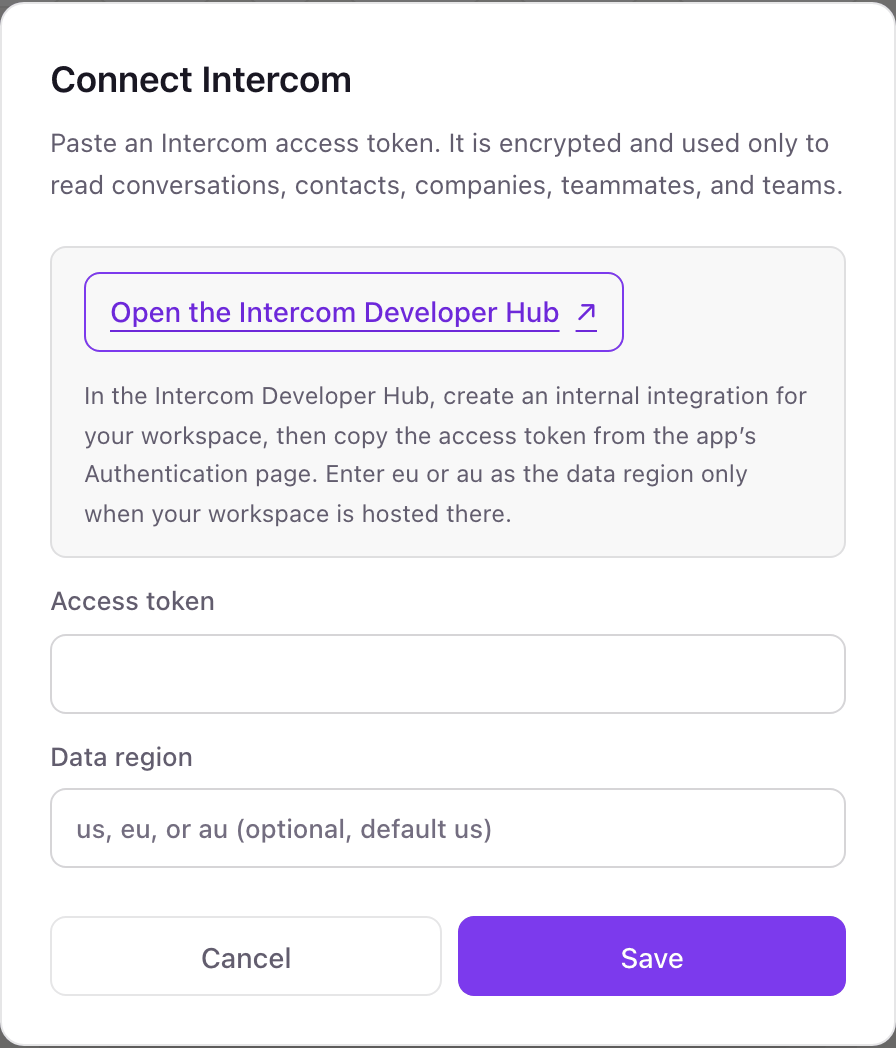
- 1Click Connect Intercom on the Dance Party Integrations page; the pop-up asks for an Access token and an optional Data region.
- 2Open the Intercom Developer Hub, click New app, name it Dance Party, and create it as an internal integration for your workspace.Open the Intercom Developer Hub ↗
- 3In the app, go to Configure, then Authentication. Leave only read permissions (Read conversations, Read admins, Read and list users and companies) and copy the Access token.
- 4Paste it into Access token. Type eu or au in Data region only if your workspace is hosted there; leave it blank for the US. Click Save.
- 5Dance Party reads the teammate and workspace the token belongs to, and the Intercom card shows Connected.
One Intercom connection per workspace
A Dance Party workspace connects one Intercom workspace. If you run a second Intercom workspace, for a separate product or a regional team, connect it from a second Dance Party workspace.
The token carries the permissions you give the Dance Party app in Intercom, so keep them to read. Dance Party only reads, using Intercom's search and list endpoints. Delete the app in the Developer Hub to revoke the token, or disconnect from the Integrations page.
From Intercom to your office display
Once Intercom shows Connected, the rest happens in plain English. No code, no drag-and-drop.
1. Describe it. Tell DJ Agent what you want to see.
New dashboard+ WidgetDescribe a widget in DJ Agent, or click + WidgetDJ AgentDATA SOURCESIntercomConnectedShow how many Intercom conversations Fin took part in this week, the share Fin resolved against a 60% goal, and how many Fin routed to a team.Send2. It gets built. The widget lands on your board with real Intercom data.
New dashboard+ WidgetFin resolved this weekLiveResolved by Fin, of 1,240 Fin conversations56%/ 60%93% to goalDJ AgentDATA SOURCESIntercomConnectedShow how many Intercom conversations Fin took part in this week, the share Fin resolved against a 60% goal, and how many Fin routed to a team.Send3. Put it on a screen. Pair an Apple TV with the six-character code it shows, then assign the dashboard.

Intercom dashboard questions
Can I show my Intercom inbox on an Apple TV?
Yes. Connect Intercom with an access token, describe the inbox view you want, and assign it to a screen. Conversation counts can refresh every 5 minutes.
Can it show how Fin AI Agent is doing?
Yes, as counts. Dance Party counts conversations Fin took part in and how they ended, resolved or routed to a team. It does not read Intercom's Fin reports, so figures can differ slightly from them.
Can it show median first response time?
No. Dance Party counts conversations by state, team, channel, and wait, but does not read Intercom's response-time reports. Longest current wait is the closest tile it can show.
Does Dance Party read our customers' messages?
No. It reads conversation titles, subjects, states, and assignments, not message bodies. Teammate names appear only if you put a team board on screen.
Our Intercom workspace is hosted in Europe. Does that work?
Yes. Type eu in the Data region field when you connect, or au for Australia. US workspaces leave it blank.
Can Dance Party reply to, close, or assign Intercom conversations?
No. It only reads. It never sends a message, closes a conversation, changes an assignee, or edits a contact.
More integrations
Put Intercom on every office display
Connect Intercom, describe the dashboard, and it runs on an Apple TV, refreshing on its own.
Get Started