
Freshdesk helpdesk dashboards on the office Apple TV
Freshdesk sorts every ticket into Open, Pending, Resolved, and Closed, and stamps each one with a due-by time. A Freshdesk dashboard on an Apple TV puts those on the office display: the open and pending queue, the urgent tickets closest to due, and which agents are switched on to take new tickets.
- Read-only
- API key connection
- One connection per workspace
Popular Freshdesk dashboards
What teams running Freshdesk put on the screen, and what you would ask DJ Agent to get it.
Due-by watch on hot tickets
For agents on shift and the support lead
Freshdesk's SLA policies set a due-by time on every ticket. Showing the urgent and high tickets from the latest activity with minutes left, or minutes over, turns the SLA into something the room can see.
- Urgent and high priority tickets among the latest 100 updated
- Time left until each ticket's due-by, or how far past it
- Ticket subject and status, Open or Pending
Ask DJ Agent“From recently updated Freshdesk tickets, list the urgent and high priority ones that are still open, with subject and time until their due-by.”
Who is taking tickets
For team leads running assignment
Freshdesk only auto-assigns to agents whose availability is switched on. A wall that shows who is on and off catches the classic morning problem: half the team back from a meeting and still set to unavailable.
- Each agent's availability for ticket assignment
- Count of agents available right now
- Occasional agents, shown separately from full-time seats
Ask DJ Agent“Show each Freshdesk agent as a tile, green when available for assignment and grey when not, and count how many are available.”
Latest customer feedback
For the whole support team
A thank-you from a customer lands in a survey report nobody opens. Putting the newest satisfaction comment on screen, with the agent it was for, is the cheapest morale boost a support team has.
- The most recent satisfaction survey comment
- The agent and group the rating was for
- When it came in
Ask DJ Agent“Show the newest Freshdesk satisfaction survey comment on screen with the agent's name, and rotate through the last five.”
What Dance Party reads from Freshdesk
Dance Party reads Freshdesk through its v2 REST API with one agent's API key, and sees what that agent can see. Status totals come from Freshdesk search and cover the whole helpdesk; ticket lists read the 100 most recently updated tickets among those created in the last 30 days. Every request is a read.
Tickets
Freshdesk API docs ↗- Counts by statusOpen, Pending, Resolved, and Closed totals for the whole helpdesk.
- Recently updated ticketsSubject, status, priority (Low to Urgent), created and updated times, and due-by, for tickets opened in the last 30 days.
Agents and groups
Freshdesk API docs ↗- AgentsName, availability for assignment, and whether they are an occasional agent.
- GroupsGroup names, used to label the group on each satisfaction rating.
Satisfaction
Freshdesk API docs ↗- Survey responsesRecent satisfaction comments with the agent, group, and ticket they belong to, where your plan has classic surveys.
How to connect Freshdesk
Before you start
- An owner or admin of your Dance Party workspace makes the Freshdesk connection.
- A Freshdesk Growth, Pro, or Enterprise plan. Free and Sprout plans have no API key
- The API key of a verified Freshdesk admin. An agent-scoped key only sees its own tickets and under-counts
- Your Freshdesk subdomain, the acme in acme.freshdesk.com
- 1In Dance Party Integrations, click Connect Freshdesk; the pop-up has two fields, Freshdesk subdomain and API key.
- 2In Freshdesk, signed in as an admin, click your profile picture, choose Profile Settings, then click View API key and complete the captcha.How to find your Freshdesk API key ↗
- 3Copy the key. Enter only the subdomain in Freshdesk subdomain, paste the key in API key, and click Save.
- 4Dance Party reads one ticket to check the key, and the Freshdesk card shows Connected.
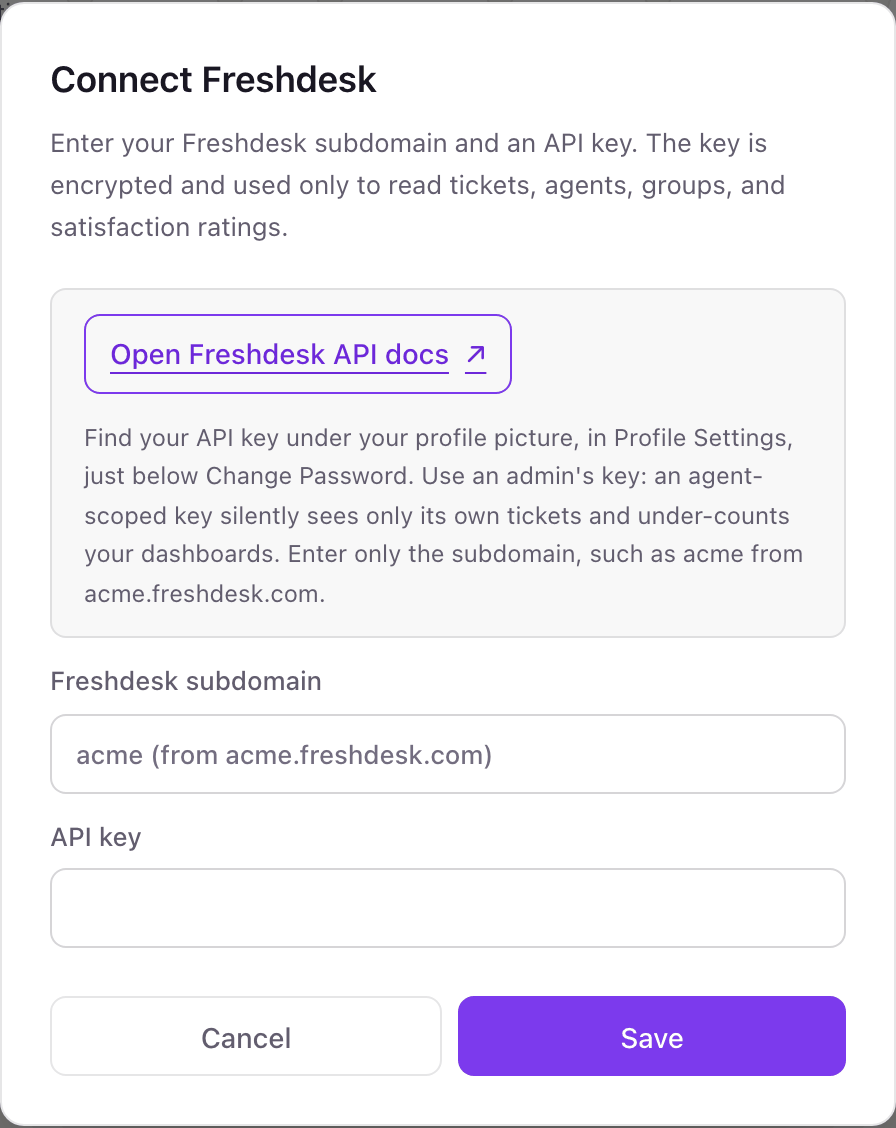
One Freshdesk connection per workspace
A workspace connects one Freshdesk helpdesk, one subdomain. Every group and product inside it can be on screen. A second Freshdesk account, say for another brand with its own subdomain, needs a second Dance Party workspace.
A Freshdesk API key acts with its agent's role, and Freshdesk has no read-only key. Dance Party only sends GET requests. To revoke it, reset the API key in that agent's Profile Settings, which also cuts off any other app using the same key.
From Freshdesk to your office display
Once Freshdesk shows Connected, the rest happens in plain English. No code, no drag-and-drop.
1. Describe it. Tell DJ Agent what you want to see.
New dashboard+ WidgetDescribe a widget in DJ Agent, or click + WidgetDJ AgentDATA SOURCESFreshdeskConnectedFrom recently updated Freshdesk tickets, list the urgent and high priority ones that are still open, with subject and time until their due-by.Send2. It gets built. The widget lands on your board with real Freshdesk data.
New dashboard+ WidgetHot ticketsLiveOverdue 38m#20931 Payment page returns 500Urgent · OpenDue in 22m#20944 Cannot reset 2FAUrgent · OpenDue in 1h 10m#20952 Shipping label not printingHigh · OpenDue in 3h#20960 Refund status questionHigh · PendingDJ AgentDATA SOURCESFreshdeskConnectedFrom recently updated Freshdesk tickets, list the urgent and high priority ones that are still open, with subject and time until their due-by.Send3. Put it on a screen. Pair an Apple TV with the six-character code it shows, then assign the dashboard.

Freshdesk dashboard questions
Can I show Freshdesk tickets on a TV in the support room?
Yes. Connect Freshdesk, describe the board, and send it to the Apple TV in that room. Freshdesk widgets can refresh every 5 minutes.
Why should I use an admin's Freshdesk API key?
Because the key sees only what its agent sees. An agent limited to their own or their group's tickets makes every count read low, with no error to warn you.
Can it show average first response time or SLA compliance?
No. Dance Party does not read Freshdesk's analytics reports. It can show due-by times on recently updated tickets, which is how most teams watch SLAs from the floor.
Can it show our CSAT score?
Not as a score. Dance Party reads recent satisfaction survey comments with the agent and group, on plans with classic surveys. If your plan has none, the feedback tile stays hidden instead of showing an error.
Does it work on the Freshdesk Free plan?
No. Freshdesk gives API keys on Growth, Pro, and Enterprise, and on older paid plans except Sprout.
Can Dance Party change Freshdesk tickets?
No. It only reads. It cannot reply, change status or priority, reassign, or delete a ticket.
More integrations
Put Freshdesk on every office display
Connect Freshdesk, describe the dashboard, and it runs on an Apple TV, refreshing on its own.
Get Started