
Front shared inbox dashboards for an Apple TV on the team's wall
Front teams split work across shared inboxes like support@ and billing@, and the risk is always the conversation nobody has claimed. A Front dashboard on the Apple TV by the team shows unassigned and unreplied counts per inbox, who is carrying the most open conversations, and this week's response times.
- Read-only
- API key connection
- One connection per workspace
Front dashboard examples
What teams running Front put on the screen, and what you would ask DJ Agent to get it.
Backlog by shared inbox
For support and operations leads
In Front every inbox is its own queue, and billing@ can drown while support@ is clear. Bars per inbox show which address needs hands before anyone opens Front.
- Open conversations in each shared inbox
- Unassigned conversations per inbox
- The inbox with the most unreplied conversations
Ask DJ Agent“Chart open conversations in each of our Front shared inboxes, and call out the inbox with the most unassigned.”
Teammate workload
For team leads assigning new conversations
Front lets anyone assign to anyone, so load drifts to whoever answers fastest. A ranked list of open conversations per teammate shows who is buried and who can take the next one.
- Open conversations assigned to each teammate
- Whether each teammate is set to available
- Total open and assigned across the team
Ask DJ Agent“Rank our Front teammates by open conversations assigned to them, busiest first, for the support@ inbox.”
Weekly response scorecard
For the support team and its manager
Front Analytics already measures first response, resolution time, and SLA breaches. Putting last week's numbers on the wall makes them the team's scoreboard instead of a report one person reads on Monday.
- Average first response time, last 7 days
- Average resolution time, last 7 days
- CSAT satisfaction percentage from Front surveys
- SLA breaches this week
Ask DJ Agent“Show Front's average first response time, average resolution time, CSAT satisfaction, and SLA breaches for the last 7 days in our timezone.”
Tagged queues to watch
For support, success, and whoever owns escalations
Front teams tag what matters: VIP, bug, refund, churn risk. Counting open conversations by tag puts the handful that need a senior person on screen, however many inboxes they came through.
- Open conversations carrying each tag you name
- Unreplied conversations tagged VIP
- Snoozed conversations under an escalation tag
Ask DJ Agent“List open Front conversations for our VIP, Bug, Refund, and Churn risk tags, with the unreplied VIP count first.”
What Dance Party reads from Front
Dance Party reads Front with a company API token you create with Read only permissions, so Front itself refuses any write. Counts come from Front search totals, workload from one search per teammate, and KPIs from Front's analytics reports. It never reads message contents or contacts.
Conversation counts
Front API docs ↗- Status countsOpen, unassigned, unreplied, waiting, snoozed, assigned, resolved, and archived, company-wide.
- Scoped countsThe same counts for one shared inbox or one tag.
Teammates
Front API docs ↗- WorkloadOpen conversations per teammate, busiest first, for up to 15 teammates, with their availability. Names show as first name and last initial.
Inboxes and tags
Front API docs ↗- Shared inboxesInbox names, to scope any count. Private inboxes appear only if their owner allows API access.
- TagsTag names and colours.
Analytics
Front API docs ↗- Response and resolutionAverage first response, response, handle, and resolution time over 1 to 90 whole days.
- Volume and qualityMessages received and sent, resolved on first reply, CSAT satisfaction, and SLA breaches.
How to connect Front
Before you start
- An owner or admin of your Dance Party workspace makes the Front connection.
- A Front admin, since only admins can create API tokens
- Any paid Front plan. Front shares one API rate limit across your company, 50 requests a minute on Starter
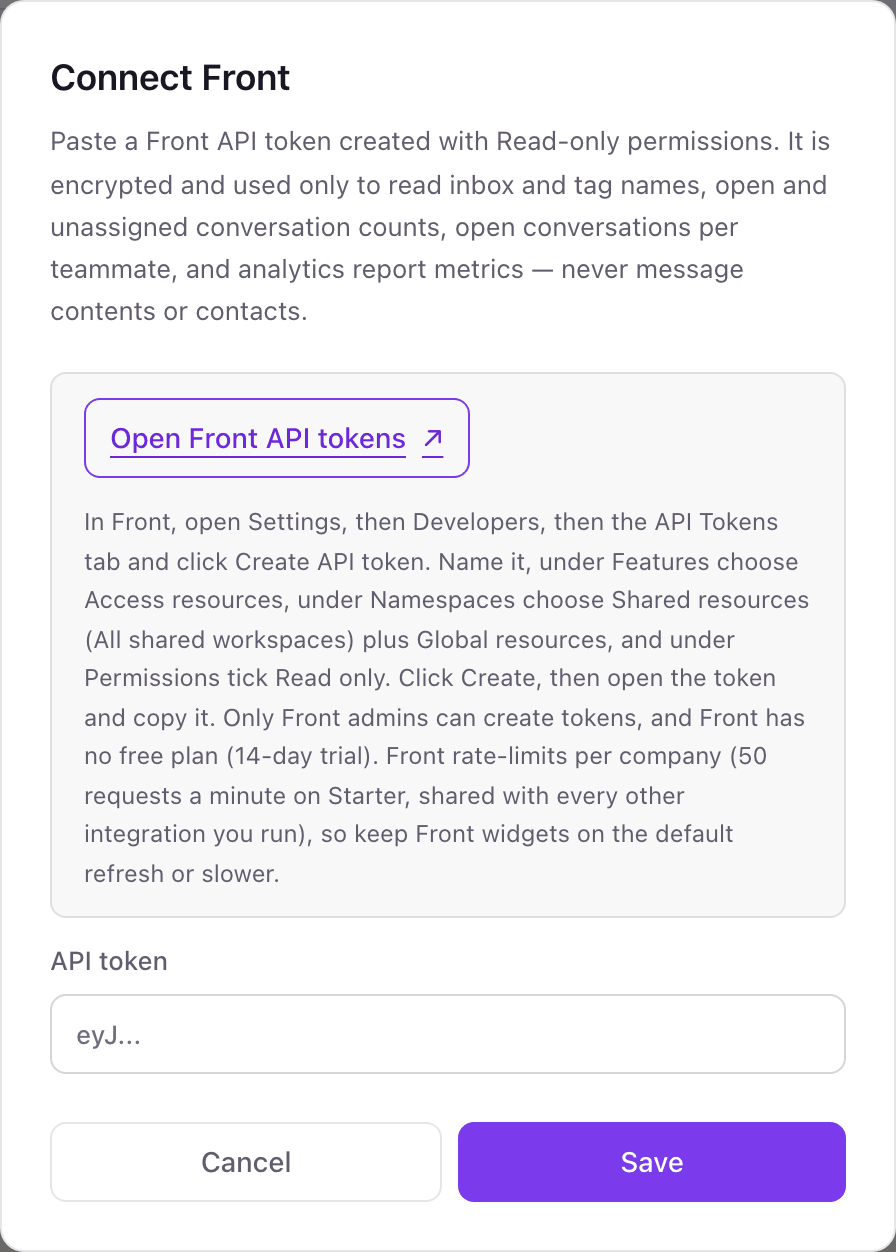
- 1From Integrations in Dance Party, click Connect Front; the pop-up asks for one thing, an API token.
- 2In Front, open Settings, then Developers, then the API Tokens tab, and click Create API token.Open Front API tokens ↗
- 3Name it Dance Party. Under Features choose Access resources, under Namespaces choose Shared resources (All shared workspaces) plus Global resources, and under Permissions tick Read only. Click Create.
- 4Open the new token, copy it, paste it into API token, and click Save.
- 5Dance Party reads your inbox list to prove the token works, and the Front card shows Connected.
One Front connection per workspace
Front tokens belong to a company, so a Dance Party workspace connects one Front company with all of its shared inboxes and workspaces. Any shared inbox in it can have its own screen.
The token is created with Read only permissions, so Front rejects any attempt to send, assign, tag, or archive. Dance Party never reads message bodies or contacts. Delete the token under Settings, Developers, API Tokens to revoke it.
From Front to your office display
Once Front shows Connected, the rest happens in plain English. No code, no drag-and-drop.
1. Describe it. Tell DJ Agent what you want to see.
New dashboard+ WidgetDescribe a widget in DJ Agent, or click + WidgetDJ AgentDATA SOURCESFrontConnectedChart open conversations in each of our Front shared inboxes, and call out the inbox with the most unassigned.Send2. It gets built. The widget lands on your board with real Front data.
New dashboard+ WidgetOpen by inboxLive214open across 6 inboxessupport@billing@orders@partners@returns@press@DJ AgentDATA SOURCESFrontConnectedChart open conversations in each of our Front shared inboxes, and call out the inbox with the most unassigned.Send3. Put it on a screen. Pair an Apple TV with the six-character code it shows, then assign the dashboard.

Front dashboard questions
Can I put a Front shared inbox on a TV for the team?
Yes. Connect Front with a Read only API token, describe the inbox board, and put it on the Apple TV nearest the team that works those inboxes.
Why is the open count different from what I see in Front?
Front's open status is company-wide. A teammate who uses Archive in my inbox still leaves the conversation open for everyone, and private inboxes are left out unless their owner allows API access.
Will Dance Party use up our Front API rate limit?
It shares it, so it reads sparingly. A queue count takes one to three requests, teammate workload up to 16, and analytics widgets refresh hourly or slower. Keep Front widgets on the default refresh or slower.
Do the analytics match Front's own reports?
Yes, when the timezone matches. Front computes KPIs over whole days in a timezone, so tell DJ Agent yours. Front measures segments, so open at the end of the week is not the same as open right now.
Can Dance Party read our emails?
No. It reads counts, inbox and tag names, teammates' first names and last initials, and analytics totals. It never reads message contents, attachments, or contacts.
Can Dance Party reply to or change Front conversations?
No. The token is Read only, so Front itself blocks any write, and Dance Party only reads.
More integrations
Put Front on every office display
Connect Front, describe the dashboard, and it runs on an Apple TV, refreshing on its own.
Get Started