
A Gorgias ticket dashboard for the CX floor, on Apple TV
Gorgias is the helpdesk a lot of Shopify brands run support in, and the question on a busy day is simple: is the team keeping up with what just came in? Dance Party reads your newest Gorgias tickets and puts the open versus closed split on an Apple TV dashboard in the office display rotation, where the CX team can see it without opening the helpdesk.
- Read-only
- API key connection
- One connection per workspace
Gorgias dashboard examples
What teams running Gorgias put on the screen, and what you would ask DJ Agent to get it.
Fresh-ticket backlog check
For CX leads and the agents on shift
Gorgias lists tickets newest first, so the open count inside the latest 100 climbs the moment a shipping delay or a promo floods the inbox. It is an early signal, hours before a weekly report would show it.
- Tickets still open among the 100 newest
- Tickets closed among the 100 newest
- Share of the newest tickets already closed, against a target you set
Ask DJ Agent“Show how many of our 100 newest Gorgias tickets are closed, against a target of 90.”
BFCM orders and tickets board
For ecommerce ops and CX during Black Friday Cyber Monday
On a peak weekend orders and tickets rise together. With Shopify connected too, one screen shows whether support is keeping pace with the order volume or falling behind it.
- Orders placed today and today's sales (from Shopify)
- Unfulfilled orders waiting to ship (from Shopify)
- Open tickets among the 100 newest in Gorgias
Ask DJ Agent“Put Shopify orders and sales today, unfulfilled orders, and open Gorgias tickets among the newest 100 on one BFCM board.”
Support pod status wall
For support managers and the ops desk
A tile that turns amber when too many new Gorgias tickets sit open is easier to act on than a number. Pair it with the store's unfulfilled count and the team sees both queues at a glance.
- Open tickets among the 100 newest, with a threshold that turns the tile amber
- Closed tickets among the 100 newest
- Whether the Gorgias helpdesk account reads as active
- Unfulfilled Shopify orders, when Shopify is connected
Ask DJ Agent“Make a status wall: open and closed Gorgias tickets among the newest 100, amber above 35 open, plus unfulfilled Shopify orders.”
What Dance Party reads from Gorgias
Dance Party reads Gorgias over its REST API with the email and API key you save, and only sends GET requests. Today that is a narrow read: ticket status counts and the account itself. It never reads customer names or message bodies.
Tickets
Gorgias API docs ↗- Status counts on the newest 100 ticketsHow many of the 100 most recently created tickets are open and how many are closed. Only the counts leave Gorgias.
Account
Gorgias API docs ↗- Helpdesk accountYour Gorgias domain and whether the account is active. Dance Party reads it when you click Save to prove the key works.
How to connect Gorgias
Before you start
- An owner or admin of your Dance Party workspace makes the Gorgias connection.
- A Gorgias account owner or admin, since only they can open the REST API settings and create a key
- Your Gorgias subdomain: the part before .gorgias.com in your helpdesk address
- 1In Gorgias, click the Settings icon at the bottom left, then Account, then REST API. Under Password (API Key), click Create API Key and copy it. The same page shows the email to use as the username.Gorgias guide to REST API credentials ↗
- 2Back in Dance Party, go to Integrations and click Connect Gorgias.
- 3Fill in Gorgias subdomain (for acme.gorgias.com, type acme), Account email, and API key. The pop-up's Open Gorgias API docs button explains the same fields.Open Gorgias API docs ↗
- 4Click Save. Dance Party reads your Gorgias account once to check the key, then the card shows Connected.
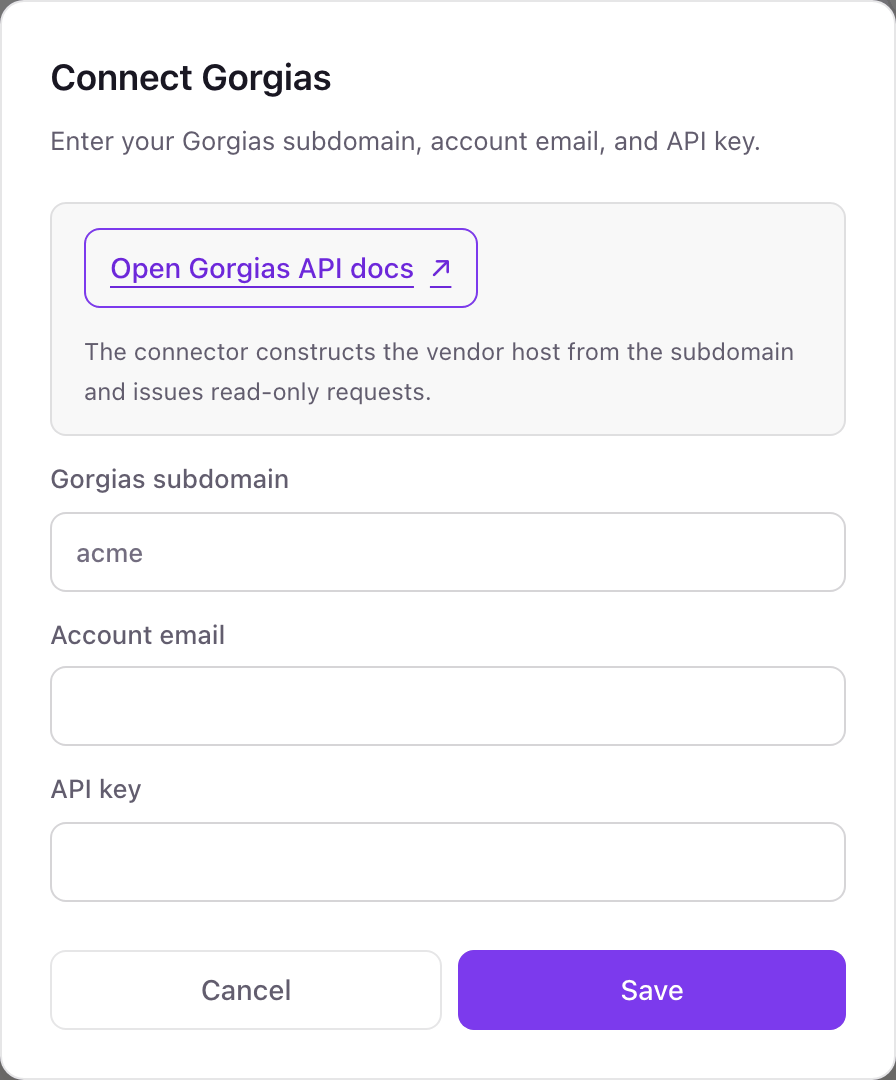
One Gorgias connection per workspace
A Dance Party workspace connects one Gorgias helpdesk. A brand group running separate Gorgias accounts per store needs a Dance Party workspace for each helpdesk it wants on screen.
Gorgias has no read-only key: a REST API key carries the full access of the user who created it. Dance Party keeps it encrypted and uses it for GET requests only. To cut it off, click Reset next to the key in Settings, Account, REST API. Gorgias invalidates the old key at once.
From Gorgias to your office display
Once Gorgias shows Connected, the rest happens in plain English. No code, no drag-and-drop.
1. Describe it. Tell DJ Agent what you want to see.
New dashboard+ WidgetDescribe a widget in DJ Agent, or click + WidgetDJ AgentDATA SOURCESGorgiasConnectedShow how many of our 100 newest Gorgias tickets are closed, against a target of 90.Send2. It gets built. The widget lands on your board with real Gorgias data.
New dashboard+ WidgetNewest tickets closedLiveClosed out of the latest 100 Gorgias tickets72/ 9080% to goalDJ AgentDATA SOURCESGorgiasConnectedShow how many of our 100 newest Gorgias tickets are closed, against a target of 90.Send3. Put it on a screen. Pair an Apple TV with the six-character code it shows, then assign the dashboard.

Gorgias dashboard questions
Can I show a Gorgias support dashboard on an Apple TV?
Yes. Connect Gorgias with your subdomain, email and API key, ask DJ Agent for the ticket view you want, and assign it to a screen running the Dance Party Apple TV app.
Which Gorgias tickets does the count cover?
The 100 most recently created tickets. Gorgias returns tickets newest first, and Dance Party counts how many of those 100 are open and how many are closed.
Can it show CSAT, first response time or agent stats from Gorgias?
Not today. The Gorgias connection reads ticket status counts and the account, not the Statistics reports, so satisfaction scores, response times and per-agent numbers stay in Gorgias.
Can I put Gorgias tickets next to Shopify orders?
Yes, with Shopify connected as well. One widget can combine the Gorgias open count with Shopify orders today and unfulfilled orders.
Who in Gorgias can create the API key?
The account owner or an admin. Agents do not see the REST API page in Gorgias settings.
Can Dance Party reply to or close Gorgias tickets?
No. It only sends GET requests to Gorgias. It cannot reply, close, tag, assign or merge a ticket.
More integrations
Put Gorgias on every office display
Connect Gorgias, describe the dashboard, and it runs on an Apple TV, refreshing on its own.
Get Started