
xAI Usage dashboard for Grok API billing, on Apple TV
xAI Usage is the billing side of the Grok API, and it matters most when credits run low, because xAI stops serving requests once prepaid credits are gone and the spending limit is reached. Dance Party reads your xAI team's billing with a management key and puts it on the office display as an Apple TV dashboard: credits left, spend by Grok model, and this period against its limit.
- Read-only
- API key connection
- Multiple accounts
Popular xAI Usage dashboards
What teams running xAI Usage put on the screen, and what you would ask DJ Agent to get it.
Grok credits and limits
For whoever owns the xAI bill
When prepaid credits hit zero and the soft limit is reached, Grok calls start failing in production. Credits, accrued spend, and both limits on one tile give the team days of warning instead of an outage.
- Prepaid credit balance
- Spend accrued in the current billing period
- Soft and hard spending limits, and the effective limit
Ask DJ Agent“Show our xAI prepaid credit balance, spend accrued this billing period, and our soft and hard spending limits, and turn the credits red under $200.”
Grok spend by model
For AI engineers choosing between Grok models
xAI bills each model and request type as its own line. Ranking spend by model shows whether the reasoning model is carrying traffic a faster, cheaper model could handle.
- Spend in USD grouped by model and request type
- The same split for a day, week, or month
- Each model's share of the period's spend
Ask DJ Agent“Rank our xAI spend by Grok model for the last 30 days.”
This billing period against the spending limit
For finance and engineering leads
The invoice preview is what xAI will bill this cycle so far. Watching it approach the effective limit tells the team to raise the limit or slow a job before requests are refused.
- Invoice preview total for the current billing cycle
- Effective spending limit for the team
- Line items on the preview
Ask DJ Agent“Show our xAI invoice preview for this billing period as progress toward the effective spending limit.”
Monthly xAI invoices
For finance and the head of engineering
Six months of invoices side by side answer the budget question plainly: is Grok spend growing with the product, or flat while usage moved elsewhere.
- Invoice totals for past billing cycles
- Line items on each invoice
- The latest invoice against the one before
Ask DJ Agent“Show our last six xAI invoice totals by month as bars.”
What Dance Party reads from xAI Usage
Dance Party reads your xAI team through the xAI Management API billing endpoints. It reads spend, credits, invoices, and limits. It never reads your payment method or billing address, and it never tops up credits or changes a limit.
Usage
xAI Usage API docs ↗- Spend over timeGrok API spend in USD by hour, day, week, or month for up to a year, optionally grouped, for example by model.
Credits, limits, and invoices
xAI Usage API docs ↗- Prepaid balanceYour prepaid credit balance and the individual credit changes behind it.
- Invoice previewWhat the current billing period has accrued so far, with line items and the effective spending limit.
- Spending limitsThe soft and hard spending limits configured for the team.
- InvoicesPast invoices with line items and totals, for all cycles or a chosen month.
How to connect xAI Usage
Before you start
- An owner or admin of your Dance Party workspace makes the xAI Usage connection.
- Access to the xAI Console for the team, with permission to create management keys
- A management key and the team's Team ID. A Grok API key, including the one you use for DJ Agent, is rejected by the billing API
- 1From Integrations in Dance Party, click Connect xAI Usage, or Add account when a team is already there. Type an Account name for this xAI team.
- 2Click Open xAI Management Keys. Click Create management key, name it Dance Party, and set Billing to Read only. Copy the key into Management key.Open xAI Management Keys ↗
- 3Click Find xAI Team ID. On the Team settings page, copy the Team ID into Team ID.Find xAI Team ID ↗
- 4Click Save. Dance Party reads your prepaid credit balance to prove the key and Team ID work together, and the account appears on the card.
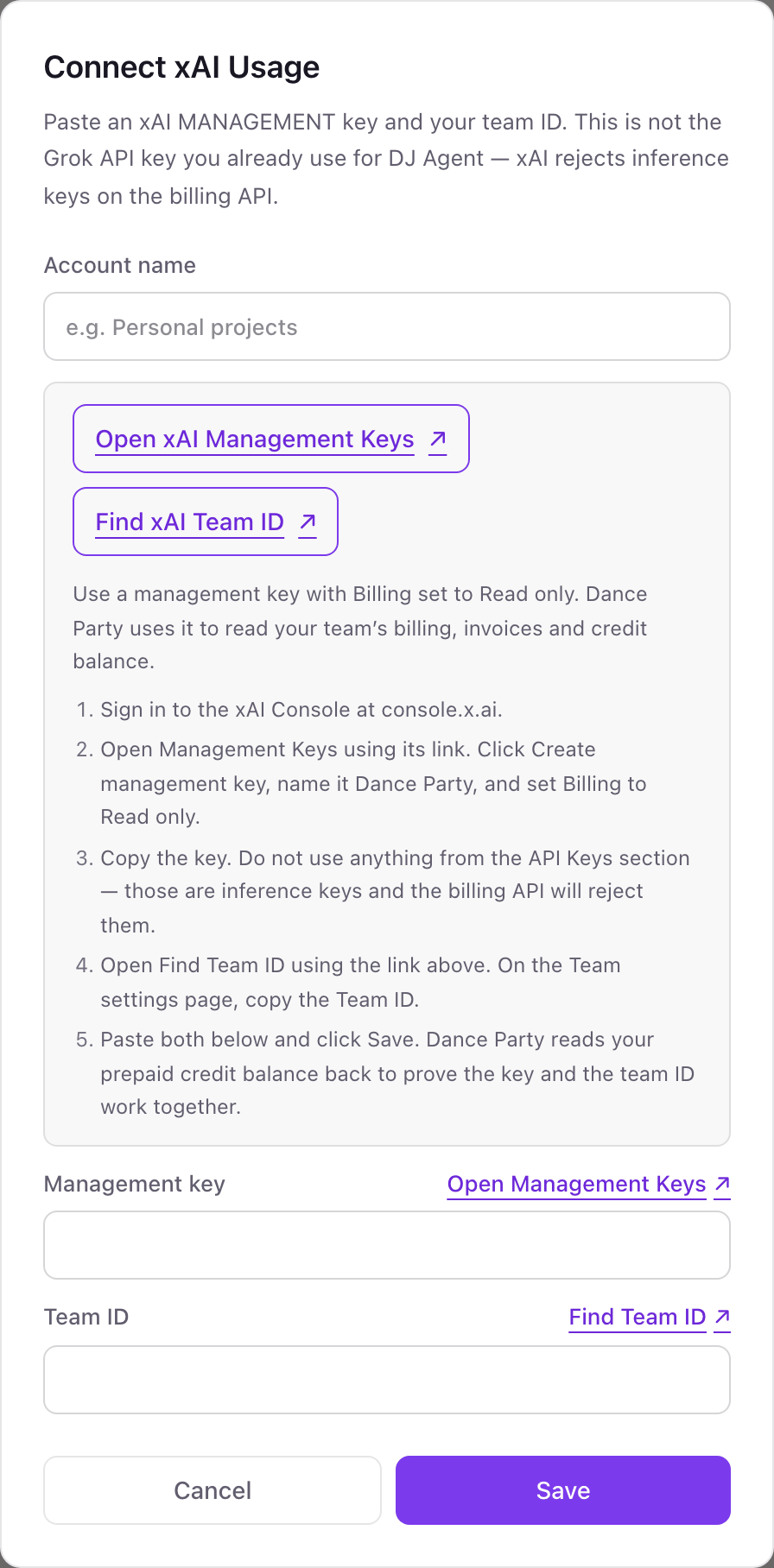
Connecting more than one xAI Usage account
A management key and Team ID read one xAI team's billing, so each team becomes its own named account. If you run separate xAI teams for production and experiments, or one per client, add each with a name you will recognize on a board. Names are unique in the workspace, and a widget can read up to five teams at once.
Dance Party only sends billing reads. It never calls xAI's top-up, spending-limit, payment-method, or billing-info updates, and it does not read your card or billing address. Delete the key on the Management Keys page to cut access at any time.
From xAI Usage to your office display
Once xAI Usage shows Connected, the rest happens in plain English. No code, no drag-and-drop.
1. Describe it. Tell DJ Agent what you want to see.
New dashboard+ WidgetDescribe a widget in DJ Agent, or click + WidgetDJ AgentDATA SOURCESxAI UsageConnectedShow our xAI prepaid credit balance, spend accrued this billing period, and our soft and hard spending limits, and turn the credits red under $200.Send2. It gets built. The widget lands on your board with real xAI Usage data.
New dashboard+ WidgetxAI billing statusLive$412.50Prepaid credits$1,388.20Accrued this period$2,500Soft limit$4,000Hard limitDJ AgentDATA SOURCESxAI UsageConnectedShow our xAI prepaid credit balance, spend accrued this billing period, and our soft and hard spending limits, and turn the credits red under $200.Send3. Put it on a screen. Pair an Apple TV with the six-character code it shows, then assign the dashboard.

xAI Usage dashboard questions
Can I show Grok API spend on an office display?
Yes. Connect your xAI team with a management key and Team ID, ask DJ Agent for the board, and assign it to a screen running the Dance Party Apple TV app.
Why does my Grok API key fail to connect?
Grok API keys are for inference. xAI's billing API only accepts a management key, created in the xAI Console under Settings, Management Keys, together with your Team ID.
Can it warn us before xAI credits run out?
Yes. Dance Party reads the prepaid credit balance and the spending limits, so a board can turn amber or red at a threshold you name in the prompt.
Does Grok used inside Cursor or other tools show up here?
No. Grok calls made through another product are billed by that product, not your xAI team. Use the Cursor integration for Cursor's spend.
Can I connect more than one xAI team?
Yes. Each team is a named account with its own management key and Team ID. A widget can compare or total up to five of them.
Can Dance Party top up credits or change our spending limit?
No. It only reads billing data. The top-up, spending-limit, and payment-method endpoints are never called.
More integrations
Put xAI Usage on every office display
Connect xAI Usage, describe the dashboard, and it runs on an Apple TV, refreshing on its own.
Get Started