
Langfuse metrics as an Apple TV dashboard for your AI team
Langfuse is where teams building LLM features trace every model call, which makes it the best record of what an AI product costs and how fast it answers. Dance Party reads the project's aggregate metrics and puts cost by model, token volume, and p95 latency on the office display as an Apple TV dashboard, without ever reading a prompt or a response.
- Read-only
- API key connection
- One connection per workspace
Popular Langfuse dashboards
What teams running Langfuse put on the screen, and what you would ask DJ Agent to get it.
LLM cost by model
For AI engineers and product leads
Langfuse prices every generation it traces, so it can show which model is actually eating the budget across providers. That list is where a model swap or a smaller prompt pays off first.
- Total cost per model over the last 7 or 30 days
- Input and output tokens per model
- Observation count per model
Ask DJ Agent“Rank our Langfuse models by total cost over the last 7 days, with token counts for each.”
Daily LLM spend in production
For engineering leads and finance
A prompt change that doubles output tokens shows up as a step in the daily cost line the next morning. Filtering to the production environment keeps staging experiments out of the number.
- Total cost per day for up to 90 days
- Filtered to one Langfuse environment, such as production
- Total tokens per day next to cost
Ask DJ Agent“Chart daily Langfuse total cost for the production environment over the last 30 days.”
Model latency watch
For on-call engineers for AI features
Users feel p95 latency, not the average. One tile per model, amber or red past a threshold you choose, catches a slow provider before support tickets do.
- p95 latency per model in milliseconds
- Average latency per model
- Observation count behind each figure
Ask DJ Agent“Show one status tile per Langfuse model with its p95 latency over the last 24 hours, amber above 5 seconds and red above 10.”
Traced calls per hour
For the team running an LLM feature
Observation volume by the hour shows the shape of a normal day. A flat hour in the middle of the afternoon usually means the feature is down or the tracing broke, and both are worth knowing fast.
- Observations per hour for the last 8 to 24 hours
- Tokens per hour
- Cost per hour
Ask DJ Agent“Show Langfuse observations per hour for the last 8 hours as bars, with the total as the headline.”
What Dance Party reads from Langfuse
Dance Party reads one Langfuse Cloud project through the Metrics API, which returns aggregates over observations. It reads counts, tokens, cost, and latency. It never reads prompts, outputs, individual traces, or user data.
Metrics API
Langfuse API docs ↗- Usage summaryObservation count, input, output, and total tokens, input, output, and total cost in USD, and average and p95 latency, for a window of up to 90 days.
- Usage over timeThe same metrics by hour, day, week, or month.
- Usage by modelThe same metrics grouped by model name, sorted by cost.
- FiltersNarrow any read to one environment, such as production, or one model.
How to connect Langfuse
Before you start
- An owner or admin of your Dance Party workspace makes the Langfuse connection.
- A Langfuse Cloud project in the EU, US, Japan, or US HIPAA region. Self-hosted Langfuse is not supported
- A project API key pair, the public key and the secret key, created by a project member allowed to manage API keys
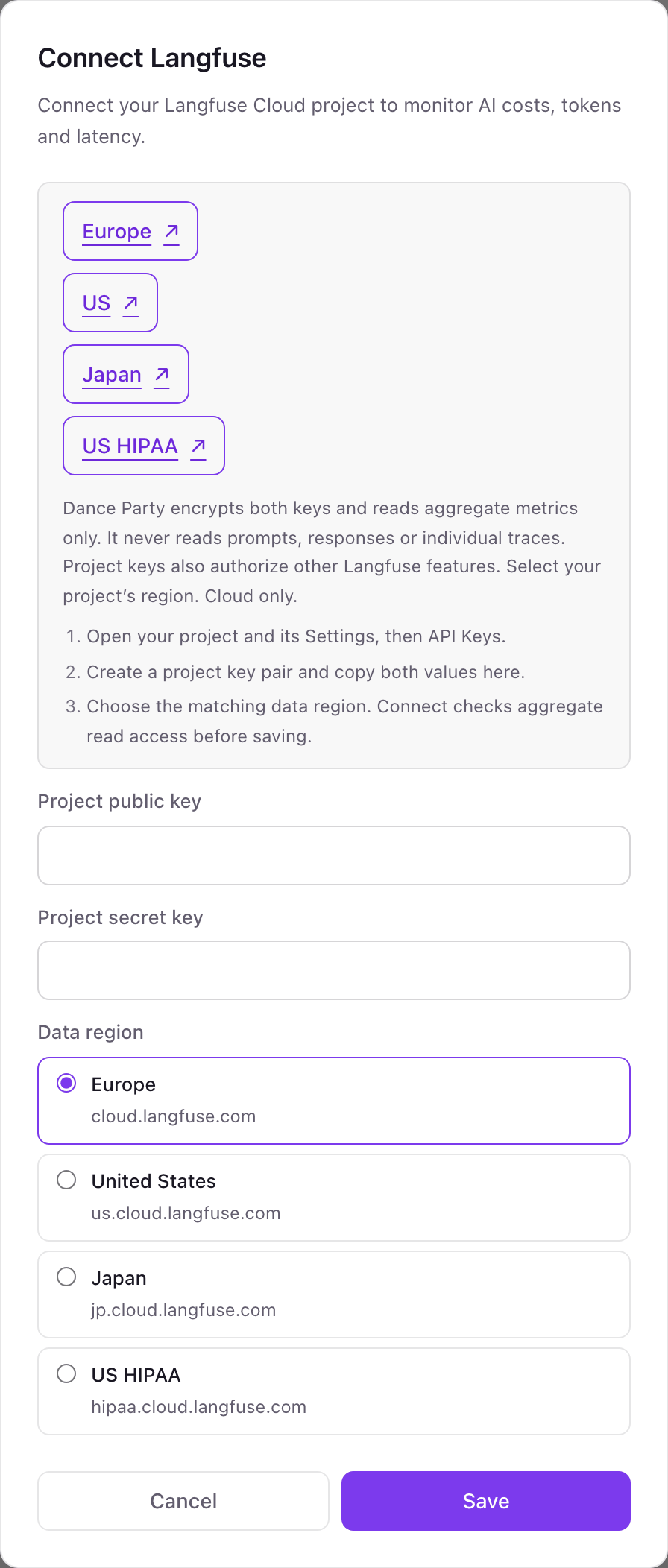
- 1Click Connect Langfuse on the Integrations page in Dance Party. The pop-up links to Langfuse Cloud in Europe, the US, Japan, and US HIPAA, so open the one your project lives in.Open Langfuse Cloud (Europe) ↗
- 2Open your project, then Settings, then API Keys, and create a new key pair.
- 3Copy the two values into Project public key and Project secret key.
- 4Under Data region, choose the region your project lives in, then click Save. Dance Party checks it can read aggregate metrics before the card shows Connected.
One Langfuse connection per workspace
A workspace connects one Langfuse project, because Langfuse keys belong to a single project in a single region. Teams that trace each product in its own Langfuse project use a separate Dance Party workspace for each.
Langfuse project keys have no read-only option and can also reach other Langfuse features. Dance Party encrypts the pair and only calls the aggregate Metrics API, never trace, prompt, or dataset endpoints. Delete the key pair in project Settings, API Keys to revoke access.
From Langfuse to your office display
Once Langfuse shows Connected, the rest happens in plain English. No code, no drag-and-drop.
1. Describe it. Tell DJ Agent what you want to see.
New dashboard+ WidgetDescribe a widget in DJ Agent, or click + WidgetDJ AgentDATA SOURCESLangfuseConnectedRank our Langfuse models by total cost over the last 7 days, with token counts for each.Send2. It gets built. The widget lands on your board with real Langfuse data.
New dashboard+ WidgetLangfuse cost by model, 7 daysLive1claude-sonnet-4-5$8422gpt-5$6113gpt-5-mini$2684text-embedding-3-small$1215claude-haiku-4-5$84DJ AgentDATA SOURCESLangfuseConnectedRank our Langfuse models by total cost over the last 7 days, with token counts for each.Send3. Put it on a screen. Pair an Apple TV with the six-character code it shows, then assign the dashboard.

Langfuse dashboard questions
Can I put Langfuse metrics on an office display?
Yes. Connect the project with its key pair, describe the board to DJ Agent, and it runs on any screen with the Dance Party Apple TV app. Boards grouped by model should refresh hourly or slower.
Does Dance Party read our prompts or model outputs?
No. It only calls Langfuse's Metrics API, which returns counts, tokens, cost, and latency. Prompts, responses, traces, and user IDs are never requested.
Does it work with self-hosted Langfuse?
No. Dance Party connects to Langfuse Cloud in the EU, US, Japan, or US HIPAA regions only.
Where does the cost number come from?
From Langfuse. It is the total cost Langfuse calculates for traced generations, in USD, so calls you do not trace or models without a price in Langfuse will not be counted.
Can I split production from staging?
Yes. Every read can be filtered to one Langfuse environment, so a board can show production only.
Can I connect more than one Langfuse project?
One project per Dance Party workspace. Use a separate workspace for each additional project.
More integrations
Put Langfuse on every office display
Connect Langfuse, describe the dashboard, and it runs on an Apple TV, refreshing on its own.
Get Started