
Cursor team dashboard for the engineering office display, on Apple TV
Cursor is where a lot of engineering teams now write code, and the admin view of it answers two questions leaders keep asking: are people using the seats, and what is the usage-based bill doing. Dance Party reads your Cursor team with a read-only team key and puts active developers, accepted AI edits, agent requests, and spend per member on the office display as an Apple TV dashboard.
- Read-only
- API key connection
- Multiple accounts
Popular Cursor dashboards
What teams running Cursor put on the screen, and what you would ask DJ Agent to get it.
Cursor spend by developer
For engineering managers and finance
Cursor tracks usage-based spend per member, and a few heavy agent users usually drive most of it. Ranking spend this cycle next to each person's limit shows who is about to hit a cap before their work stops.
- Spend per member in the current billing cycle
- Each member's effective spend limit
- Fast premium requests per member
- The date the current cycle started
Ask DJ Agent“Rank our Cursor team members by spend this billing cycle, and show each person's spend limit next to their name.”
Daily active Cursor users
For the CTO and developer productivity team
A rollout is only real when people open the editor every day. Active developers per day, next to the seat count, shows whether adoption is holding after the launch week.
- Developers active in Cursor each day
- Total seats on the team
- Agent, chat, and Cmd+K requests per day
Ask DJ Agent“Show how many of our Cursor seats were active each day this week as bars, with the seat total as the headline.”
Cursor seat check
For IT and whoever renews the Cursor contract
Unused seats are the easiest line to cut at renewal, and people near their spend limit are the easiest support ticket to prevent. Four counts cover both.
- Seats on the team, from the member list
- Members active in the last 7 days
- Members with no activity in the last 7 days
- Members within 10% of their spend limit
Ask DJ Agent“Show our Cursor seat count, how many members were active and inactive in the last 7 days, and how many are close to their spend limit.”
Cursor agent activity feed
For engineering teams trying agent workflows
Agent mode changes how people work more than tab completion does. A short list of who leaned on agents this week, and which model they used most, starts the right hallway conversations.
- Agent requests per developer over the last 7 days
- Accepted lines added per developer
- Each developer's most used model
Ask DJ Agent“List the five Cursor users with the most agent requests this week, with accepted lines added and their most used model.”
What Dance Party reads from Cursor
Dance Party reads your Cursor team through Cursor's Admin API with a team API key. A key with the read:* scope covers everything it reads, and it never removes members or changes spend limits.
Members and spend
Cursor API docs ↗- MembersEveryone on the team with name, email, and role, which is your seat list.
- SpendSpend per member in the current billing cycle, fast premium requests, and each member's spend limit.
Daily usage
Cursor API docs ↗- Coding activityPer developer, per day: lines added and deleted, accepted lines, applies, accepts, and rejects.
- Requests by kindAgent, chat, composer, and Cmd+K requests, tab completions shown and accepted, and the most used model.
- Tokens by userToken totals per developer over up to 30 days, with service accounts kept separate from people.
How to connect Cursor
Before you start
- An owner or admin of your Dance Party workspace makes the Cursor connection.
- A Cursor team plan and an admin on that team to create the key
- A team API key with the read:* scope. A key made under a personal account is a User key and is rejected
- 1Under Integrations in Dance Party, click Connect Cursor, or Add account to bring in another team. Type an Account name for this Cursor team.
- 2Click Open the Cursor dashboard and sign in as a team admin. Go to the Team tab, then Integrations / API keys, and create a new key there.Open the Cursor dashboard ↗
- 3Give the key the read:* scope. Use admin:* only if read:* is not available to you.
- 4Paste the key into Team API key and click Save. Dance Party reads your member list to prove the key works, and the account appears on the card.
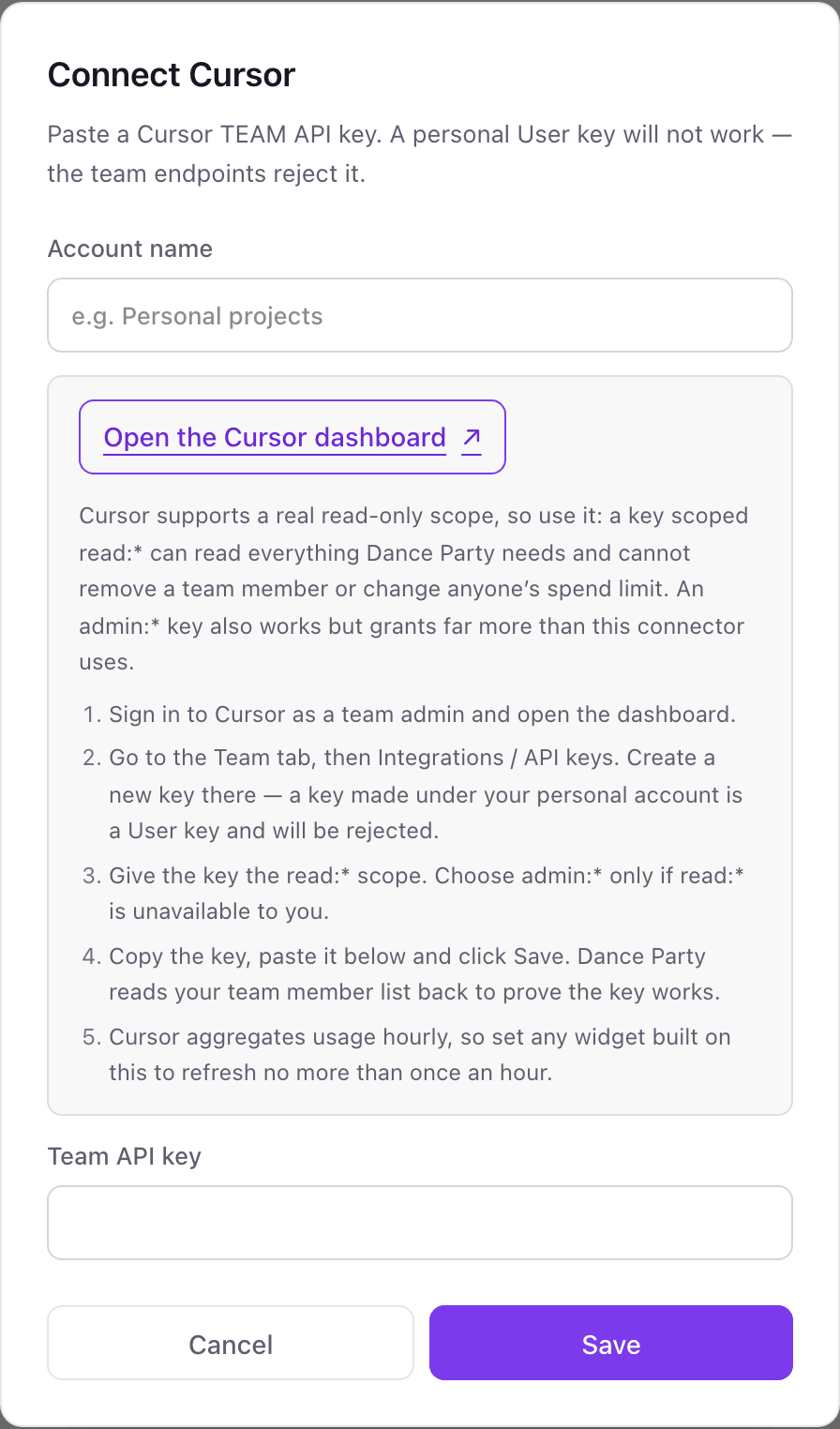
Connecting more than one Cursor account
A Cursor team API key reads one team, so each Cursor team is its own named account. Companies with a separate team per business unit, or one inherited through an acquisition, add each team with its own name and can put them on one board. Names are unique in the workspace, and a widget can read up to five teams.
With the read:* scope the key itself cannot remove a team member or change anyone's spend limit, and Dance Party only sends reads. Revoke the key from the team's API keys page in the Cursor dashboard at any time.
From Cursor to your office display
Once Cursor shows Connected, the rest happens in plain English. No code, no drag-and-drop.
1. Describe it. Tell DJ Agent what you want to see.
New dashboard+ WidgetDescribe a widget in DJ Agent, or click + WidgetDJ AgentDATA SOURCESCursorConnectedRank our Cursor team members by spend this billing cycle, and show each person's spend limit next to their name.Send2. It gets built. The widget lands on your board with real Cursor data.
New dashboard+ WidgetCursor spend this cycleLive1Dana Ortiz$1842Sam Whitfield$1423Priya Shah$964Marcus Lee$615Jo Kim$27DJ AgentDATA SOURCESCursorConnectedRank our Cursor team members by spend this billing cycle, and show each person's spend limit next to their name.Send3. Put it on a screen. Pair an Apple TV with the six-character code it shows, then assign the dashboard.

Cursor dashboard questions
Can I put a Cursor usage dashboard on an Apple TV?
Yes. Connect your Cursor team with a team API key, describe the board to DJ Agent, and assign it to a screen running the Dance Party Apple TV app.
How often do Cursor numbers refresh?
Hourly at most. Cursor aggregates usage every hour and asks integrations not to poll faster, so Cursor widgets should refresh once an hour or slower.
Why won't my Cursor API key connect?
It is probably a User key. Dance Party needs a team API key created by a team admin under the Team tab, and the read:* scope is enough.
Does Cursor spend include what we pay OpenAI or Anthropic directly?
No. Cursor spend is what Cursor bills you. Direct API spend with OpenAI, Anthropic, or xAI is separate money, and each has its own Dance Party integration, so adding them on one board is not double counting.
Can I connect more than one Cursor team?
Yes. Each team is a named account with its own key. A widget can compare or total up to five teams.
How far back can a Cursor board look?
Up to 30 days per read. Cursor's Admin API rejects longer ranges for daily usage and usage events.
More integrations
Put Cursor on every office display
Connect Cursor, describe the dashboard, and it runs on an Apple TV, refreshing on its own.
Get Started