
OpenAI Usage dashboard: API spend and tokens on Apple TV
OpenAI Usage is the bill that grows with every feature your team ships on GPT models. Dance Party reads it with a Read Only admin key and puts it on the office display as an Apple TV dashboard: daily API spend against the budget, which models and line items cost the most, and token traffic by the hour, for one OpenAI organization or several.
- Read-only
- API key connection
- Multiple accounts
Popular OpenAI Usage dashboards
What teams running OpenAI Usage put on the screen, and what you would ask DJ Agent to get it.
OpenAI budget tracker
For engineering leads and finance
OpenAI charges by the token, so one busy week can blow through a month's plan. A spend bar next to the budget means the team sees the curve bend on day 12, not on the invoice.
- API spend month to date, summed from OpenAI's daily cost buckets
- Progress against a monthly budget you set
- Spend yesterday compared with the daily average
Ask DJ Agent“Show our OpenAI API spend this month against a $6,000 budget, and yesterday's spend next to the daily average.”
Cost by OpenAI line item
For the platform and ML team
OpenAI bills input tokens, output tokens, and each model separately. Ranking the line items shows whether the money goes to one expensive model's output or to a batch job nobody turned off.
- Spend per line item for the last 7 or 30 days
- Spend per project in the organization
- Each line item's share of total spend
Ask DJ Agent“Rank our OpenAI costs by line item for the last 7 days, most expensive first.”
Model requests by the hour
For on-call engineers running AI features
Cost arrives in daily buckets, but OpenAI reports requests and tokens by the hour or minute. An hourly bar chart shows a stuck retry loop or a traffic spike from a launch while it is still happening.
- Model requests per hour over the last 8 to 24 hours
- Input and output tokens per hour
- Requests split by model or by API key
Ask DJ Agent“Show OpenAI model requests per hour for the last 8 hours as bars, with total tokens for the period.”
Token volume this month
For product and engineering leadership
Tokens are the unit behind every OpenAI invoice line. Input, output, and cached input side by side show whether prompt caching is paying off as usage grows.
- Total tokens month to date across the organization
- Input tokens and output tokens
- Cached input tokens, the share OpenAI bills at a discount
Ask DJ Agent“Show OpenAI tokens this month: total, input, output, and cached input.”
What Dance Party reads from OpenAI Usage
Dance Party reads the OpenAI organization Usage and Costs endpoints with an Admin API key created at the Read Only permission level. It sees spend and token counts. It never sees prompts, responses, or files.
- Daily spendCost per day in USD for up to 31 days, from OpenAI's daily cost buckets.
- Spend by project or line itemThe same daily cost grouped by project ID or by line item, such as a model's input or output tokens.
Completions usage
OpenAI Usage API docs ↗- Tokens and requestsInput, output, and cached input tokens and model requests, in minute, hour, or day buckets.
- BreakdownsUsage grouped or filtered by model, project, user, API key, or batch jobs.
- Month to dateComplete token totals for the current calendar month (UTC), recomputed on every refresh.
How to connect OpenAI Usage
Before you start
- An owner or admin of your Dance Party workspace makes the OpenAI Usage connection.
- An OpenAI API organization, and someone with the Owner role in it to create the key
- An organization Admin API key set to Read Only. A project key (sk-proj-) or the key you use for DJ Agent will not work
- 1Open Integrations in Dance Party and click Connect OpenAI Usage. For a second organization, the same card shows Add account.
- 2Type an Account name that says which OpenAI organization this is, such as Production or Research.
- 3Click Open OpenAI Admin Keys. Click Create new admin key, name it Dance Party, and set permissions to Read Only.Open OpenAI Admin Keys ↗
- 4Paste the key into Admin API key (Read Only) and click Save.
- 5Dance Party reads one day of costs to prove the key works. The card then lists the account name and shows how many accounts are connected.
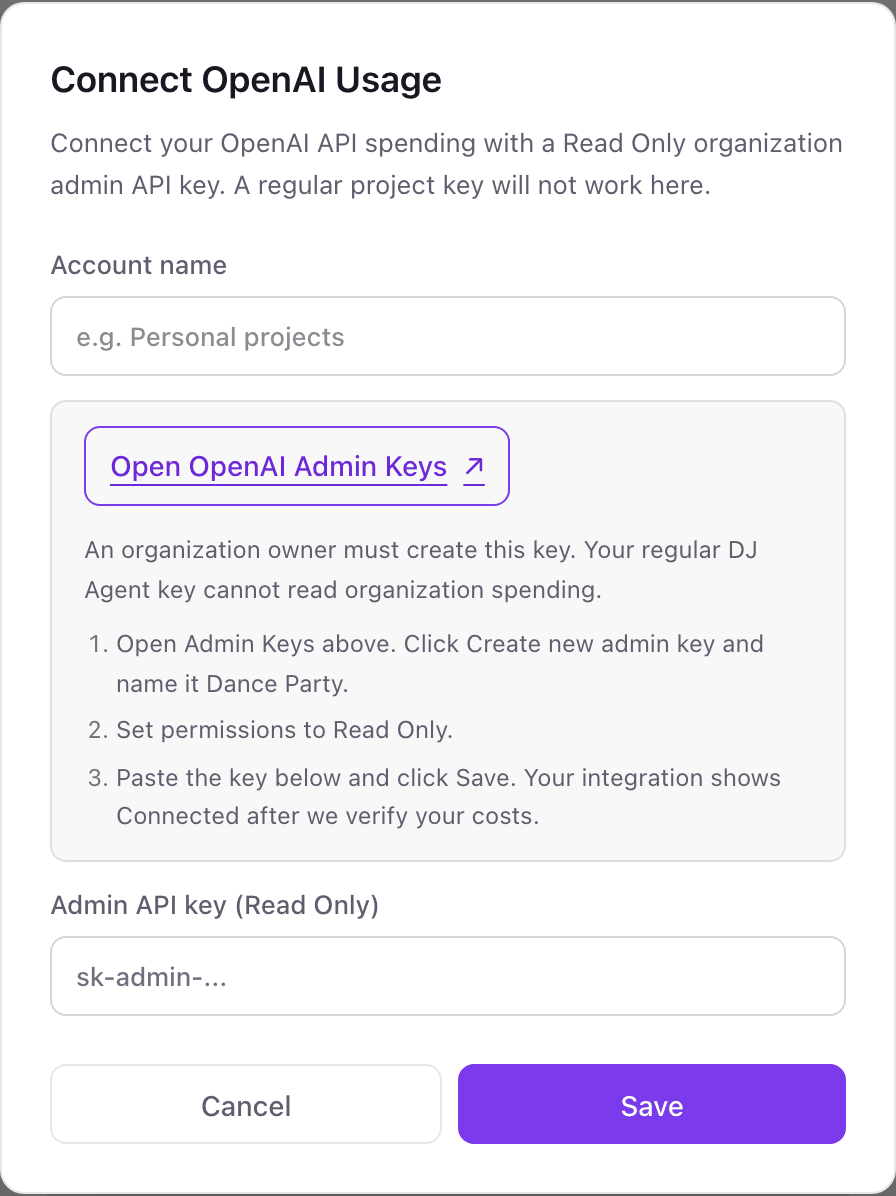
Connecting more than one OpenAI Usage account
Each OpenAI organization is its own named account in Dance Party, because an admin key only sees the organization it was created in. Companies that split production and research into separate orgs, or agencies that run one org per client, add each with its own name. Names are unique in the workspace, and one widget can read up to five accounts side by side.
Read-only by design and by credential. A Read Only admin key cannot create keys, invite users, or change limits, and Dance Party only sends reads. Delete the key on OpenAI's Admin Keys page at any time and the account stops refreshing.
From OpenAI Usage to your office display
Once OpenAI Usage shows Connected, the rest happens in plain English. No code, no drag-and-drop.
1. Describe it. Tell DJ Agent what you want to see.
New dashboard+ WidgetDescribe a widget in DJ Agent, or click + WidgetDJ AgentDATA SOURCESOpenAI UsageConnectedShow our OpenAI API spend this month against a $6,000 budget, and yesterday's spend next to the daily average.Send2. It gets built. The widget lands on your board with real OpenAI Usage data.
New dashboard+ WidgetOpenAI spend, SeptemberLiveMonth to date vs budget$4,812/ $6,00080% to goalDJ AgentDATA SOURCESOpenAI UsageConnectedShow our OpenAI API spend this month against a $6,000 budget, and yesterday's spend next to the daily average.Send3. Put it on a screen. Pair an Apple TV with the six-character code it shows, then assign the dashboard.

OpenAI Usage dashboard questions
Can I show our OpenAI API spend on an office display?
Yes. Connect an OpenAI organization with a Read Only admin key, ask DJ Agent for the board, and assign it to a screen running the Dance Party Apple TV app.
Why doesn't my regular OpenAI API key work here?
Project keys can call models but cannot read organization usage or costs. OpenAI answers those endpoints only for an organization Admin API key, which an organization Owner creates.
Can I connect more than one OpenAI organization?
Yes. Add each organization as a named account, such as Production and Research. A widget can compare up to five accounts or add them into one total, and removing an account never swaps in another one's numbers.
Does it show OpenAI spend for today?
Partly. OpenAI reports cost in daily buckets, so today's dollar figure fills in as the day goes. Token and request counts are available by the hour or minute for live traffic boards.
Does it include ChatGPT Business or Enterprise seats?
No. It reads the API platform organization's usage and costs. ChatGPT workspace seats and their usage are not part of this connection.
Can Dance Party see our prompts or change our OpenAI settings?
No. The Usage and Costs endpoints return counts and dollars only, and a Read Only admin key cannot change keys, members, projects, or limits.
More integrations
Put OpenAI Usage on every office display
Connect OpenAI Usage, describe the dashboard, and it runs on an Apple TV, refreshing on its own.
Get Started