
GitHub Copilot adoption dashboard on Apple TV and the office display
GitHub Copilot seats are bought for a whole organization, and the question after rollout is always the same: how many people use it, and for what. Dance Party reads your organization's Copilot usage metrics and seat billing and puts active users, seat use, and code added by language on the office display as an Apple TV dashboard, in aggregate, with no per-person rows.
- Read-only
- API key connection
- One connection per workspace
Popular GitHub Copilot dashboards
What teams running GitHub Copilot put on the screen, and what you would ask DJ Agent to get it.
Copilot seat utilization
For engineering leadership and whoever owns the GitHub bill
Every Copilot seat is a line on the GitHub invoice. Active against inactive seats this billing cycle is the number that decides the next renewal, and pending invitations show who never got started.
- Total Copilot seats in the organization
- Seats active and inactive this billing cycle
- Pending invitations and pending cancellations
- Seats added this cycle
Ask DJ Agent“Show our GitHub Copilot seats: total, active this cycle, inactive this cycle, and pending invitations.”
Copilot daily active users, 28 days
For developer experience and platform teams
Adoption after a rollout either settles into a habit or fades after the first two weeks. The 28-day line of daily active users shows which one is happening, and weekends make the rhythm easy to read.
- Daily active users for each day in GitHub's 28-day report
- Weekly and monthly active users on the latest day
- Monthly active chat and agent users
Ask DJ Agent“Chart GitHub Copilot daily active users over the latest 28-day report, labeled with the report's last day.”
Code added with Copilot by language
For engineering managers across stacks
Copilot lands differently in a TypeScript front end than in a Go service. Lines added by language show where it is pulling weight and which teams might need a better setup.
- Lines of code added with Copilot, by language
- Code generation and acceptance activity, by language and model
- Activity by IDE and by Copilot feature
Ask DJ Agent“Rank languages by lines of code added with GitHub Copilot over the latest 28-day report.”
Copilot adoption goal
For the whole engineering org
A rollout target like 90 percent of seats active each month is easy to state and hard to track. The goal bar keeps it visible until it is met.
- Monthly active users from the latest report
- Total seats from Copilot billing
- Progress toward an adoption target you set
Ask DJ Agent“Show GitHub Copilot monthly active users against a target of 270, which is 90% of our 300 seats.”
What Dance Party reads from GitHub Copilot
Dance Party reads two organization-level Copilot reports through GitHub's REST API with a fine-grained token set to read-only. Everything it reads is aggregated for the organization. It never reads individual seat rows or per-person usage.
Copilot usage metrics
GitHub Copilot API docs ↗- Active usersDaily, weekly, and monthly active users, plus monthly active chat and agent users, for each day of the latest 28-day report or a single day.
- Activity and codeUser-initiated interactions, code generation and acceptance activity, and lines suggested, added, and deleted.
- BreakdownsThe same totals by IDE, by Copilot feature, and by language and model.
Copilot seats
GitHub Copilot API docs ↗- Seat breakdownTotal seats, added this cycle, active and inactive this cycle, pending invitations and cancellations, and whether the plan is Business or Enterprise.
How to connect GitHub Copilot
Before you start
- An owner or admin of your Dance Party workspace makes the GitHub Copilot connection.
- A GitHub organization on Copilot Business or Copilot Enterprise, with the Copilot usage metrics policy turned on. Personal Copilot plans are not supported
- An organization owner to create a fine-grained token with Organization Copilot metrics and GitHub Copilot Business set to Read-only. Your organization may need to approve the token or authorize it for SSO
- 1Open Integrations in Dance Party and click Connect GitHub Copilot on its card.
- 2Click Create a GitHub fine-grained token. Name it Dance Party and choose your organization as Resource owner.Create a GitHub fine-grained token ↗
- 3Under Organization permissions, set Organization Copilot metrics and GitHub Copilot Business to Read-only. Leave repository permissions unselected, then generate the token.
- 4Back in Dance Party, type the organization's name in GitHub organization and paste the token into Fine-grained personal access token.
- 5Click Save. Dance Party checks it can read both the usage report and the seat summary before the card shows Connected.
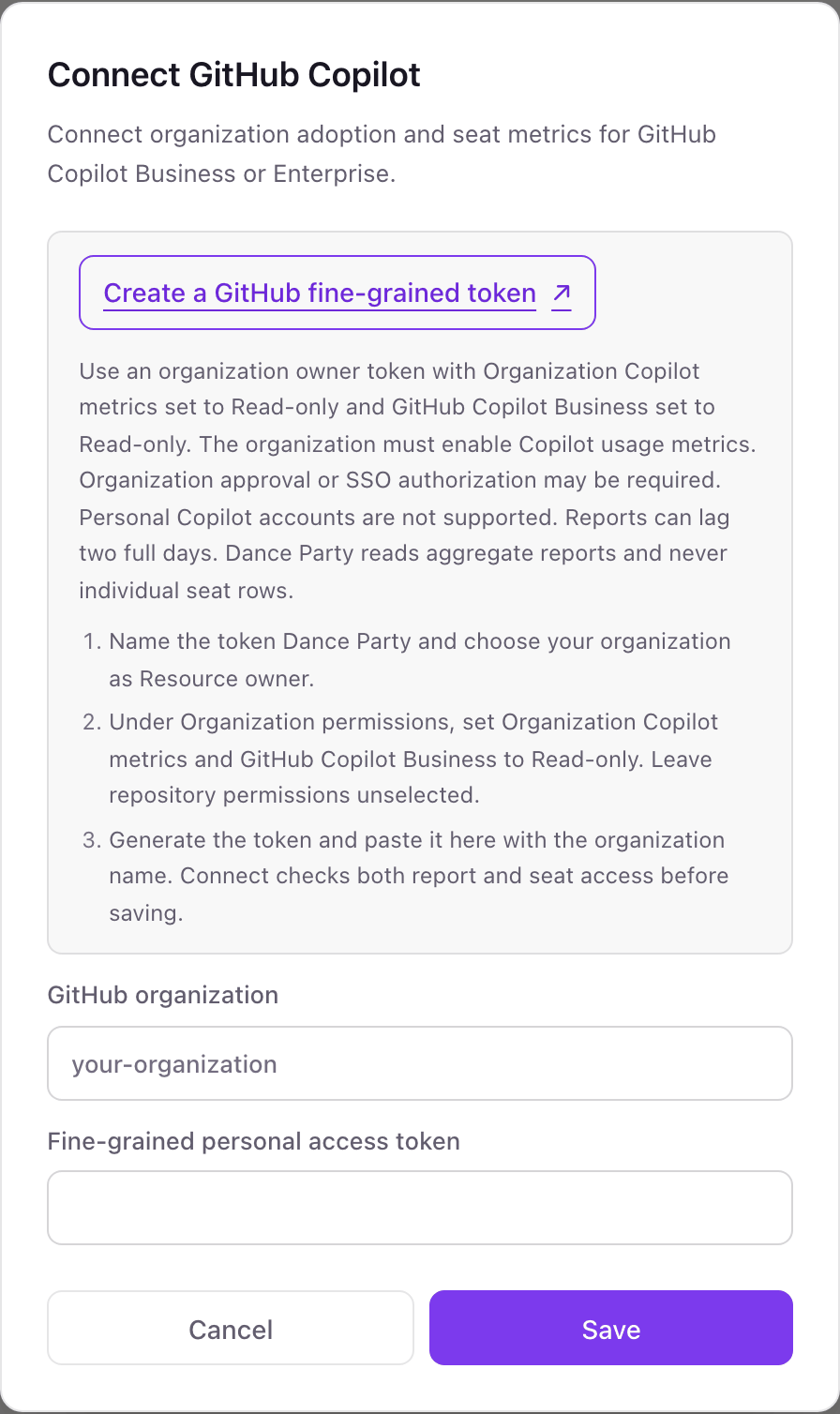
One GitHub Copilot connection per workspace
A workspace connects one GitHub organization's Copilot reports. An enterprise that licenses Copilot across several organizations can give each organization its own Dance Party workspace.
Read-only by credential. The token only holds read access to Copilot metrics and Copilot seat billing, with no repository access, so it cannot assign seats, change policies, or touch code. Revoke it from your GitHub fine-grained tokens settings at any time.
From GitHub Copilot to your office display
Once GitHub Copilot shows Connected, the rest happens in plain English. No code, no drag-and-drop.
1. Describe it. Tell DJ Agent what you want to see.
New dashboard+ WidgetDescribe a widget in DJ Agent, or click + WidgetDJ AgentDATA SOURCESGitHub CopilotConnectedShow our GitHub Copilot seats: total, active this cycle, inactive this cycle, and pending invitations.Send2. It gets built. The widget lands on your board with real GitHub Copilot data.
New dashboard+ WidgetCopilot seats this cycleLive300Total seats268Active this cycle29Inactive this cycle3Pending invitationsDJ AgentDATA SOURCESGitHub CopilotConnectedShow our GitHub Copilot seats: total, active this cycle, inactive this cycle, and pending invitations.Send3. Put it on a screen. Pair an Apple TV with the six-character code it shows, then assign the dashboard.

GitHub Copilot dashboard questions
Can I show GitHub Copilot usage on an office display?
Yes. Connect your organization with a read-only fine-grained token, describe the board, and it runs on any screen with the Dance Party Apple TV app.
Does it show Copilot usage per developer?
No. Dance Party reads GitHub's organization-level reports and aggregate seat counts only. Individual seat rows and per-person usage are never read or shown.
Why are the latest Copilot numbers two days old?
GitHub publishes Copilot usage reports with a lag of up to two full days. Boards show the report's own dates rather than presenting them as today.
Which Copilot plans work?
Copilot Business and Copilot Enterprise organizations with the usage metrics policy enabled. Copilot Free, Pro, and Pro+ on personal accounts have no organization report to read.
Can I connect Copilot for more than one GitHub organization?
One organization per Dance Party workspace. Use a separate workspace for each additional organization.
Can Dance Party change Copilot seats or settings?
No. The token only has read-only Copilot permissions, and Dance Party only sends GET requests.
More integrations
Put GitHub Copilot on every office display
Connect GitHub Copilot, describe the dashboard, and it runs on an Apple TV, refreshing on its own.
Get Started