
Anthropic Usage on the office display: a Claude spend and Claude Code dashboard for Apple TV
Anthropic Usage covers two things engineering leaders ask about Claude: what the API is costing, and whether the team is actually using Claude Code. Dance Party reads both from your Claude Console organization and puts them on the office display as an Apple TV dashboard, from spend by workspace to yesterday's Claude Code sessions, commits, and pull requests.
- Read-only
- API key connection
- Multiple accounts
Popular Anthropic Usage dashboards
What teams running Anthropic Usage put on the screen, and what you would ask DJ Agent to get it.
Claude Code adoption board
For engineering managers and the CTO
Seats are easy to buy and hard to see used. A daily ranking of who ran Claude Code sessions and how many edits they accepted shows where adoption is real and which teams still need a pairing session.
- Claude Code sessions per developer for a given day
- Lines of code added and removed by Claude Code
- Commits and pull requests created through Claude Code
- Edit and Write tool acceptance rate
Ask DJ Agent“Rank our developers by Claude Code sessions yesterday, with lines added and edit acceptance rate next to each email.”
Claude API spend against budget
For engineering leadership and finance
Anthropic reports cost per day, and a month of agent traffic adds up without anyone opening the Console. A bar against the monthly budget turns an invoice surprise into a Tuesday conversation.
- Claude API spend month to date, from the daily cost report
- Progress toward the monthly budget you set
- Spend per day for the last 7 days
Ask DJ Agent“Show our Anthropic API spend this month against an $8,000 budget.”
Spend by Claude Console workspace
For platform teams that give each product its own workspace
Workspaces are how Claude Console teams split keys and limits by product or environment. Spend per workspace shows which product's AI feature is driving the bill, in the names your team already uses.
- Spend per workspace for the last 7 or 30 days
- Workspace names resolved from the organization
- Spend by cost description, such as a model's tokens or code execution
Ask DJ Agent“List our Anthropic workspaces by spend over the last 7 days, and flag any workspace up more than 25% on the week before.”
Claude tokens by the hour
For on-call engineers running Claude in production
Cost only arrives by the day, but the usage report counts tokens by the hour or minute. A 24-hour token line shows a runaway agent loop or a traffic drop while someone can still act on it.
- Input and output tokens per hour for the last 24 hours
- Cache read tokens next to uncached input
- Tokens grouped by model, workspace, or API key
Ask DJ Agent“Chart Claude API tokens per hour over the last 24 hours, and show today's total.”
What Dance Party reads from Anthropic Usage
Dance Party reads your Claude Console organization through Anthropic's Admin API, using only GET requests to the usage, cost, Claude Code, and organization endpoints. It sees counts and dollars, never prompts or model responses.
Usage and cost
Anthropic Usage API docs ↗- Cost reportSpend per day in USD, grouped by workspace or by cost description. Daily granularity only.
- Messages usageTokens in minute, hour, or day buckets, grouped by model, workspace, API key, service tier, context window, or inference region.
Claude Code analytics
Anthropic Usage API docs ↗- Per-developer activityFor one day at a time: sessions, lines added and removed, commits, and pull requests, by user email.
- Tool acceptanceAccepted and rejected Edit, MultiEdit, Write, and NotebookEdit proposals.
- Model breakdownTokens and estimated cost per Claude model for each developer.
Organization
Anthropic Usage API docs ↗- Organization and membersOrganization name, and members with their emails and roles.
- Workspaces and API keysWorkspace names and IDs, and API key names and status, used to label usage and cost.
- Rate limitsThe rate limits configured for the organization.
How to connect Anthropic Usage
Before you start
- An owner or admin of your Dance Party workspace makes the Anthropic Usage connection.
- A Claude Console organization. Anthropic does not offer the Admin API to individual accounts, so a personal Console account cannot connect
- The admin role in that organization, to create an Admin API key starting sk-ant-admin01-. The Claude API key you use for DJ Agent, or a workspace-scoped key, is rejected
- 1Go to Integrations in Dance Party and click Connect Anthropic Usage, or Add account on that card for another Claude Console organization.
- 2Type an Account name for this Claude Console organization, such as Product org or EU entity.
- 3Click Open Claude Console > Settings > Admin keys and sign in as an organization admin. Use Admin keys, not API keys.Open Claude Console Admin keys ↗
- 4Click Create key, name it Dance Party, choose an expiration, and click Create. Copy the secret now, because Anthropic shows it only once.
- 5Paste it into Admin API key and click Save. Dance Party reads your organization name back to prove the key works, and the account appears on the card.
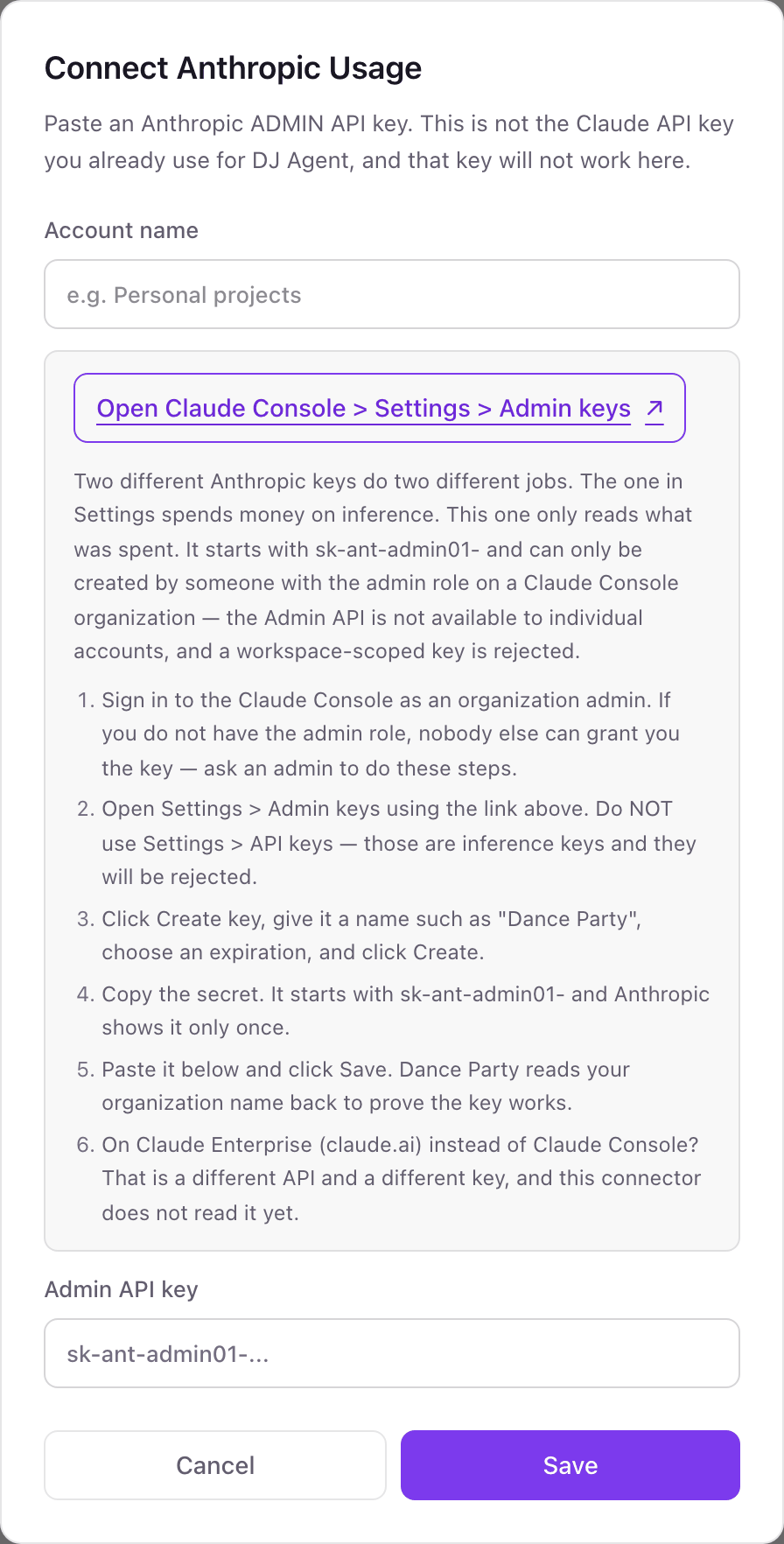
Connecting more than one Anthropic Usage account
An Anthropic admin key reads one Claude Console organization, so each organization becomes its own named account. A company with separate organizations per product, region, or legal entity adds each one and names it. Names are unique in the workspace, only owners and admins add or remove accounts, and one widget can read up to five of them together.
Anthropic admin keys have no read-only setting, so read-only is enforced by Dance Party: it only sends GET requests to usage, cost, Claude Code, and organization list endpoints, and never creates keys or changes members. Give the key an expiration and delete it under Settings > Admin keys whenever you like.
From Anthropic Usage to your office display
Once Anthropic Usage shows Connected, the rest happens in plain English. No code, no drag-and-drop.
1. Describe it. Tell DJ Agent what you want to see.
New dashboard+ WidgetDescribe a widget in DJ Agent, or click + WidgetDJ AgentDATA SOURCESAnthropic UsageConnectedRank our developers by Claude Code sessions yesterday, with lines added and edit acceptance rate next to each email.Send2. It gets built. The widget lands on your board with real Anthropic Usage data.
New dashboard+ WidgetClaude Code sessions, yesterdayLive1maya@northwind.dev192arjun@northwind.dev163lena@northwind.dev134tomas@northwind.dev115grace@northwind.dev8DJ AgentDATA SOURCESAnthropic UsageConnectedRank our developers by Claude Code sessions yesterday, with lines added and edit acceptance rate next to each email.Send3. Put it on a screen. Pair an Apple TV with the six-character code it shows, then assign the dashboard.

Anthropic Usage dashboard questions
Can I put Claude API spend on an Apple TV dashboard in the office?
Yes. Connect your Claude Console organization with an Admin API key, describe the board to DJ Agent, and assign it to a screen running the Dance Party Apple TV app.
Why won't my Claude API key connect?
It is an inference key. Usage and cost reports need an Admin API key from Settings > Admin keys, created by an organization admin, and Anthropic does not offer those to individual accounts.
Can I track Claude Code adoption by developer?
Yes. Dance Party reads Anthropic's Claude Code analytics: sessions, lines added, commits, pull requests, and tool acceptance per user email, one day at a time. Data under an hour old is held back by Anthropic, so boards default to yesterday.
Does it include Claude Code on Amazon Bedrock or Google Cloud, or Claude Enterprise seats?
No. Anthropic's analytics cover Claude Code on the Claude API only. Claude Enterprise usage on claude.ai uses a different API and key that Dance Party does not read yet.
Can I connect more than one Anthropic organization?
Yes. Add each organization as a named account. A widget can compare up to five accounts or total them, and removing one never swaps in another account's numbers.
Why doesn't Claude spend show today's total?
Anthropic's cost report is daily, so today's dollars fill in as the day closes. Tokens are available by the hour or minute, and Priority Tier usage appears in token reports rather than the cost report.
More integrations
Put Anthropic Usage on every office display
Connect Anthropic Usage, describe the dashboard, and it runs on an Apple TV, refreshing on its own.
Get Started