
A Workday headcount dashboard for the office display, on Apple TV
Workday holds the org chart, but most people only see it through a report someone exports once a quarter. Dance Party reads one saved Workday custom report and turns it into an Apple TV dashboard for the office display: headcount by supervisory organization, workers per location, and who starts this week.
- Read-only
- API key connection
- One connection per workspace
Workday dashboard examples
What teams running Workday put on the screen, and what you would ask DJ Agent to get it.
Headcount by supervisory organization
For the leadership team and HR business partners
Workday answers the headcount question per organization, but only for whoever runs the report. On the leadership floor, the split by supervisory org is there every morning, and a team that doubled since spring is obvious without a spreadsheet.
- Active workers in total, counted from the report's rows
- Workers per supervisory organization or cost center
- Full-time versus part-time, from the report's Time Type column
- Employees versus contingent workers, from Worker Type
Ask DJ Agent“From our Workday report, show active workers by supervisory organization as bars, with the total headcount on top.”
Workers by office location
For site leads and workplace teams in each office
Each office wants to see itself. A per-location count from Workday's Location field shows how Austin compares to Toronto and how many people are remote, which is the number facilities and site leads plan desks around.
- Workers per Workday location
- Remote workers as their own group, if your locations carry one
- Workers per location within one organization, when the report is filtered
Ask DJ Agent“Rank our Workday locations by active workers and put the remote group last.”
New starters and work anniversaries
For everyone in the office
A welcome on the screen by reception is the easiest onboarding win there is. With Hire Date in the report, the display names this week's starters and their team, and calls out five- and ten-year anniversaries on the day.
- Workers with a hire date this week, with their organization
- New hires this month as a count
- Work anniversaries this month from Original Hire Date
Ask DJ Agent“Welcome this week's new starters from our Workday report with their team and start day, then list work anniversaries this month.”
What Dance Party reads from Workday
Dance Party reads one saved Workday custom report through Workday's Reports-as-a-Service (RaaS) URL, as JSON, with an Integration System User. Your Workday admin decides which columns the report has. Dance Party runs the report, never edits it, and cannot reach any other Workday data.
The connected report
Workday API docs ↗- Report fieldsThe report's column names, the type of each, and which ones Dance Party treats as sensitive.
- Report rowsUp to 200 rows per widget, with sensitive columns removed before anything is shown.
- Report promptsValues for the report's prompts, such as an effective date or an organization, set per widget.
Counts and totals
- Count by columnRows per value of any column, like workers per location, sorted largest first, top 50.
- Sum of a number columnA total inside each group, such as a headcount column on a report with one row per organization.
How to connect Workday
Before you start
- An owner or admin of your Dance Party workspace makes the Workday connection.
- A Workday administrator with security admin rights, to create the Integration System User and its security group
- One Advanced custom report with Enable As Web Service ticked, shared with that ISU
- Get-only permission on the domains the report reads. Never Put or Modify.
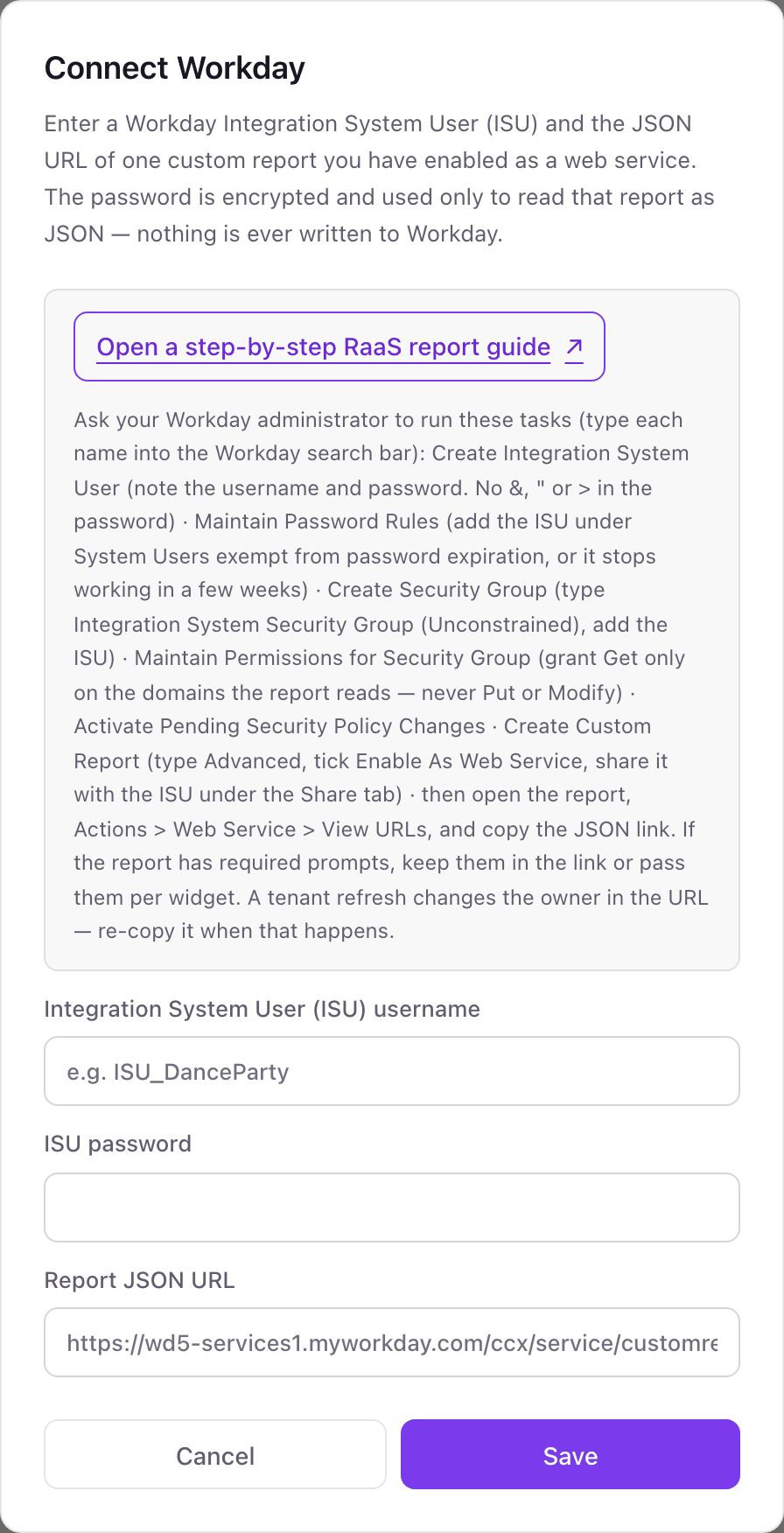
- 1In Dance Party, open Integrations, find the Workday card, and click Connect Workday. The pop-up lists the Workday tasks your admin runs.Open a step-by-step RaaS report guide ↗
- 2In Workday, run Create Integration System User, then Maintain Password Rules to exempt the ISU from password expiration.
- 3Run Create Security Group, choose Integration System Security Group (Unconstrained), add the ISU, grant Get only on the report's domains, and activate the pending security policy changes.
- 4Create the custom report (type Advanced), tick Enable As Web Service, share it with the ISU, then open Actions, Web Service, View URLs and copy the JSON link.
- 5Back in the pop-up, fill Integration System User (ISU) username, ISU password, and Report JSON URL, then click Save. The card shows Connected once Dance Party reads the report.
One Workday connection per workspace
A workspace connects one Workday report through one ISU, and every Workday widget reads that report. Put all the columns your dashboards need in it, such as organization, location, hire date, and worker type. A second report, such as open requisitions, needs a second Dance Party workspace.
Read-only by design. RaaS only runs a saved report, and the ISU's security group has Get access and nothing else. To cut access, your Workday admin disables the ISU or removes it from the security group.
From Workday to your office display
Once Workday shows Connected, the rest happens in plain English. No code, no drag-and-drop.
1. Describe it. Tell DJ Agent what you want to see.
New dashboard+ WidgetDescribe a widget in DJ Agent, or click + WidgetDJ AgentDATA SOURCESWorkdayConnectedFrom our Workday report, show active workers by supervisory organization as bars, with the total headcount on top.Send2. It gets built. The widget lands on your board with real Workday data.
New dashboard+ WidgetWorkers by supervisory organizationLive1,412active workersEngineeringSalesOperationsSupportFinancePeopleDJ AgentDATA SOURCESWorkdayConnectedFrom our Workday report, show active workers by supervisory organization as bars, with the total headcount on top.Send3. Put it on a screen. Pair an Apple TV with the six-character code it shows, then assign the dashboard.

Workday dashboard questions
Can I put a Workday dashboard on an Apple TV?
Yes. Connect one Workday custom report, describe the view to DJ Agent, and assign it to a screen. The Dance Party Apple TV app shows it on the office display and refreshes it on its own.
Will salaries or personal details from Workday show up on the screen?
No. Columns about pay, compensation, email, phone, address, or birth date are dropped before any widget sees them, and cannot be grouped or totaled. A shared office display should stick to headcount, locations, and new starters.
Can the office display show birthdays from Workday?
No. Birth-date columns are removed from the report data. Work anniversaries can show, because they come from the hire date.
Why does Dance Party read only one Workday report?
Each workspace holds one Workday connection, and that connection is one RaaS report. Build the report with every column the dashboards need, and each widget can still pass its own prompt values, like a different effective date.
Does it work for companies with more than 2,000 workers?
Yes, with a summary report. Dance Party reads up to 2,000 rows per report, so a larger company should connect a report with one row per organization and a headcount column, which Dance Party adds up.
Why did my Workday dashboard stop updating?
Usually the report URL or the ISU password changed. A tenant refresh changes the owner in the report URL, so re-copy it from View URLs, and an ISU not exempted in Maintain Password Rules expires after a few weeks.
How often does a Workday widget refresh?
Each widget has its own interval, from every 5 minutes to once a month. Every refresh runs the report live in Workday, so hourly or daily is plenty for headcount.
More integrations
Put Workday on every office display
Connect Workday, describe the dashboard, and it runs on an Apple TV, refreshing on its own.
Get Started