
Greenhouse recruiting dashboards on Apple TV, safe for any office display
Greenhouse is where recruiting teams run every req, stage, and interview kit. Dance Party turns that into a Greenhouse dashboard on Apple TV for the office display: open jobs by department, active candidates in each interview stage, and how many interviews are on the calendar this week. It shows counts only, so no candidate's name ever reaches the wall.
- Read-only
- API key connection
- One connection per workspace
Popular Greenhouse dashboards
What teams running Greenhouse put on the screen, and what you would ask DJ Agent to get it.
Greenhouse hiring funnel
For recruiters, coordinators, and the head of talent
Stages back up quietly. Application Review swelling to 400 while Face to Face sits at 50 means screens are the bottleneck, and the recruiting pod sees it on the wall instead of in Friday's report.
- Active applications in each current interview stage
- Total active candidates across open jobs
- The same funnel for one job, when you name it
Ask DJ Agent“Show our Greenhouse pipeline as a funnel of active candidates by current stage across all open jobs, with the total on top.”
Open reqs by department
For leadership and department heads
Every team lead wants to know where their reqs stand. Open Greenhouse jobs grouped by department show which teams are growing, and the open date shows which reqs have sat the longest.
- Open jobs per department
- Open jobs per office
- Days since each job opened
Ask DJ Agent“Rank departments by open Greenhouse jobs, and flag any job that opened more than 60 days ago.”
Interview week
For interviewers and recruiting coordinators
Interview load is the hidden tax on every team. A count of scheduled interviews today and this week, next to open jobs and pending offers, tells the office how much of its week hiring will take.
- Scheduled interviews today
- Scheduled interviews in the next 7 days
- Offers by status, such as unresolved or accepted
- Open jobs in total
Ask DJ Agent“Show Greenhouse interviews scheduled today and in the next 7 days, unresolved offers, and total open jobs as four tiles.”
One critical role, stage by stage
For a hiring manager and the team the hire will join
When the whole team is waiting on one hire, the pipeline for that single Greenhouse job is the most watched number in the room. Four stages and four counts are enough to know whether the search is on track.
- Active candidates in each stage for one job
- Total active candidates for that job
- Days the job has been open
Ask DJ Agent“For the Greenhouse job Senior Backend Engineer, show active candidates in each stage and how long the job has been open.”
What Dance Party reads from Greenhouse
Dance Party reads Greenhouse through the Harvest API with a key you create, and it only ever sends GET requests. Applications, offers, and interviews are read to be counted, then discarded. Names, emails, and phone numbers are never part of what a widget receives.
Jobs and departments
Greenhouse API docs ↗- Open jobsJob name, departments, offices, the date it opened, and how many openings sit on the req, filled ones included.
- DepartmentsYour department names, used to group and label jobs.
Pipeline
Greenhouse API docs ↗- Candidates by stageA count of active applications in each current stage, for all jobs or one job.
Offers and interviews
Greenhouse API docs ↗- Offers by statusHow many offers sit in each status your account uses. Counts only.
- Upcoming interviewsScheduled interviews today and in the next 7 days, as two counts.
How to connect Greenhouse
Before you start
- An owner or admin of your Dance Party workspace makes the Greenhouse connection.
- A Greenhouse user who can manage all of the organization's API credentials, usually a Site Admin
- A Harvest API key with GET permission on Jobs, Applications, Offers, Scheduled Interviews, and Departments
- 1Open Integrations in Dance Party and choose Connect Greenhouse on its card.
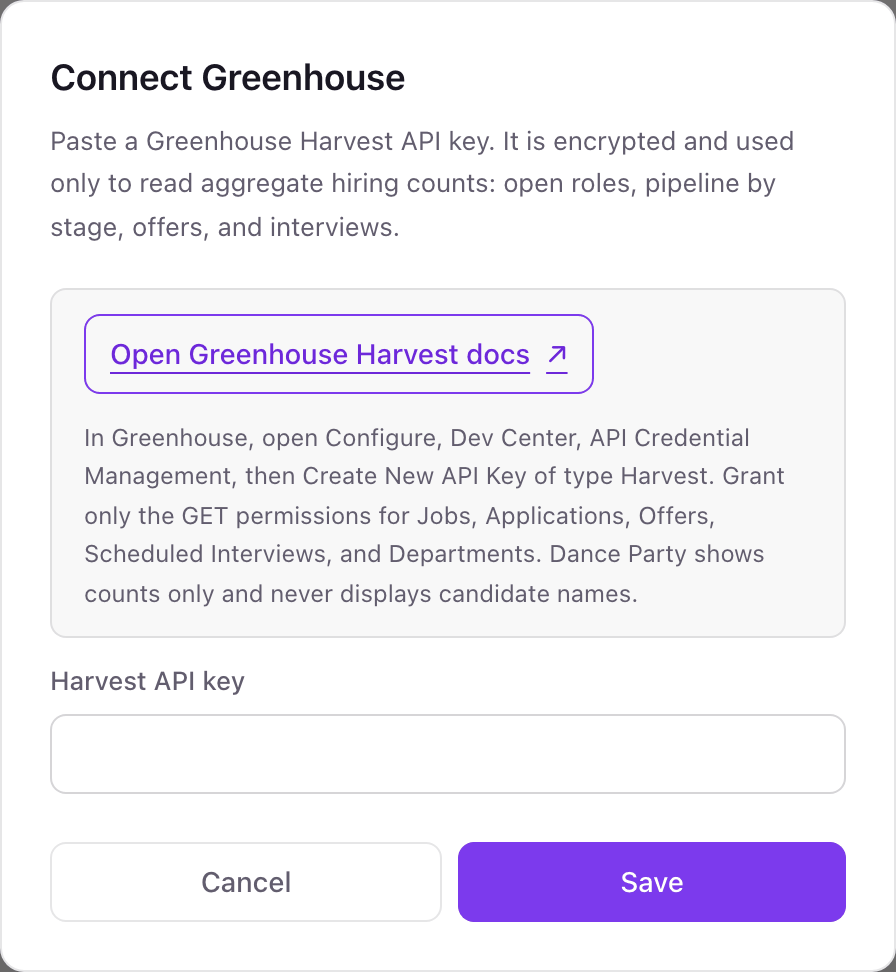
- 2In Greenhouse, click the Configure icon, open Dev Center, then API Credential Management, and create new API credentials of type Harvest named Dance Party.Open Greenhouse Harvest docs ↗
- 3Under Manage permissions, grant only the GET endpoints for Jobs, Applications, Offers, Scheduled Interviews, and Departments, then save.
- 4Copy the key, paste it into Harvest API key, and click Save. The Greenhouse card shows Connected.
One Greenhouse connection per workspace
A workspace connects one Greenhouse organization with one Harvest key. If two business units run separate Greenhouse accounts, the second one needs its own Dance Party workspace.
Read-only. The Harvest key is limited to the GET endpoints you tick, and Dance Party uses it only for counts. To revoke it, delete the credential in Dev Center, API Credential Management.
From Greenhouse to your office display
Once Greenhouse shows Connected, the rest happens in plain English. No code, no drag-and-drop.
1. Describe it. Tell DJ Agent what you want to see.
New dashboard+ WidgetDescribe a widget in DJ Agent, or click + WidgetDJ AgentDATA SOURCESGreenhouseConnectedShow our Greenhouse pipeline as a funnel of active candidates by current stage across all open jobs, with the total on top.Send2. It gets built. The widget lands on your board with real Greenhouse data.
New dashboard+ WidgetPipeline across open jobsLiveApplication Review412 · 54%Recruiter Phone Screen168 · 22%Hiring Manager Screen97 · 13%Face to Face51 · 7%DJ AgentDATA SOURCESGreenhouseConnectedShow our Greenhouse pipeline as a funnel of active candidates by current stage across all open jobs, with the total on top.Send3. Put it on a screen. Pair an Apple TV with the six-character code it shows, then assign the dashboard.

Greenhouse dashboard questions
Will candidate names from Greenhouse show on the office display?
No. Dance Party reads applications, offers, and interviews only to count them. A widget gets stage counts and job details, never a candidate's name, email, or phone number.
Is a Greenhouse dashboard appropriate for a shared screen?
Yes, when it sticks to counts. Open jobs, stage totals, and interview load suit a wall. Job titles do show, so check the list first if you run confidential searches in Greenhouse.
Can I show the pipeline for one Greenhouse job?
Yes. Name the job when you ask DJ Agent, and the funnel counts only active applications for that job.
Can Dance Party show time to hire or source of hire from Greenhouse?
No. It reads open jobs, stage counts, offer statuses, and upcoming interviews. Time to hire and source reports stay in Greenhouse Reports.
Which Greenhouse permissions does the Harvest key need?
GET on Jobs, Applications, Offers, Scheduled Interviews, and Departments. Nothing else, and no POST, PATCH, or DELETE.
Can Dance Party move candidates or change jobs in Greenhouse?
No. It sends only GET requests. It cannot advance, reject, or email a candidate, or edit a job.
More integrations
Put Greenhouse on every office display
Connect Greenhouse, describe the dashboard, and it runs on an Apple TV, refreshing on its own.
Get Started