
BambooHR celebrations and who's out, as an Apple TV dashboard for the office display
The BambooHR Home page already has Celebrations and Who's Out, but only the people who log in see them. Dance Party puts the same BambooHR data on an Apple TV dashboard in the office: today's birthdays and work anniversaries, who is out, and the new hires starting this week, on the office display where everyone walks past.
- Read-only
- API key connection
- One connection per workspace
Popular BambooHR dashboards
What teams running BambooHR put on the screen, and what you would ask DJ Agent to get it.
Birthdays and anniversaries this week
For the whole office
Celebrations only land if people know about them before the cake shows up. A week of birthdays and hire-date anniversaries on the kitchen screen gives the team a day's notice to sign the card.
- Birthdays this week, shown as a month and day, never a year
- Work anniversaries this week, with years at the company from the hire date
- Each person's department
Ask DJ Agent“List BambooHR birthdays and work anniversaries for this week, with each person's department and how many years for anniversaries.”
Who's out today
For managers, reception, and anyone looking for a colleague
Half the "is Sam in today?" questions go away when BambooHR's approved time off is on the wall. Show the name and the day they are back, and leave the leave type off a shared screen.
- People with approved time off today
- The day each person is back
- Company holidays in the next two weeks
Ask DJ Agent“Show who is out today from BambooHR time off with the day they return, without the time off type, and list upcoming company holidays.”
New hire welcome
For the office on a new starter's first day
A first day goes better when people already know your name. BambooHR has the hire date and job title before the laptop is even set up, so the screen by the door can say hello on the morning they start.
- Employees whose hire date is today or this week
- Their job title and department
- New hires this month as a count
Ask DJ Agent“Welcome anyone whose BambooHR hire date is this week, with their job title and department.”
Headcount and open roles
For leadership and the People team
Growth is easier to feel than to count. Active employees next to the open jobs in BambooHR Hiring tells the office how big the team is today and how many seats are about to fill.
- Active employees in total and by department
- Open job openings in BambooHR Hiring, by department and location
- People who joined this quarter
Ask DJ Agent“Show BambooHR active employees, headcount by department, open job openings, and how many people joined this quarter.”
What Dance Party reads from BambooHR
Dance Party reads three things from BambooHR with your API key: the current employee roster, approved time off, and open jobs. The key can only see what its BambooHR user can see, and Dance Party never writes back.
Employee roster
BambooHR API docs ↗- Current employeesName, job title, department, and employment status for active employees.
- Hire datesThe start date behind new-hire welcomes and work anniversaries.
- BirthdaysMonth and day only, and only if the key's access level can see the birthday field.
Time off
BambooHR API docs ↗- Who's outApproved time off in a date range, two weeks ahead by default, with start and end dates.
- Company holidaysHolidays from your BambooHR calendar in the same range.
Hiring
BambooHR API docs ↗- Job openingsOpen jobs with title, department, location, and posted date. Candidates are not read.
How to connect BambooHR
Before you start
- An owner or admin of your Dance Party workspace makes the BambooHR connection.
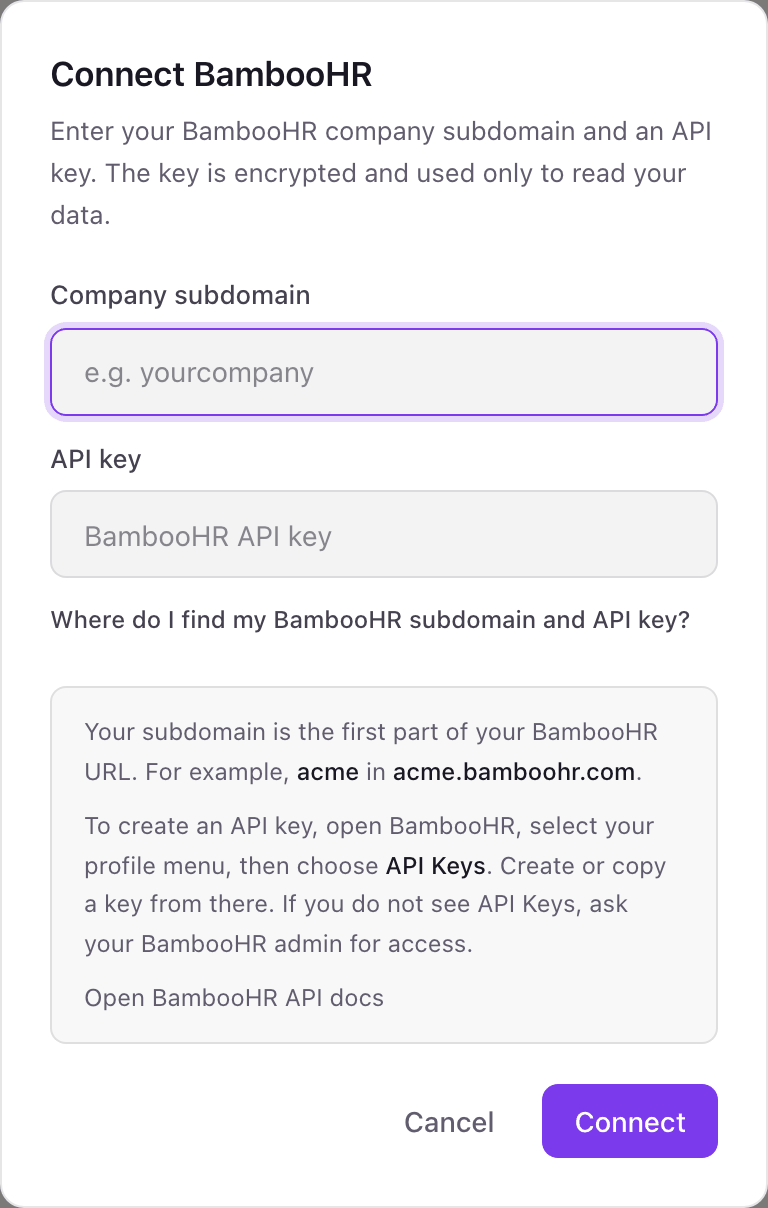
- Your BambooHR company subdomain, the first part of your BambooHR URL
- A BambooHR API key. It carries the access level of the user who creates it, so create it as a user who can see employees, time off, and birthdays.
- BambooHR Hiring turned on, and visible to that user, for open roles
- 1On the Dance Party Integrations page, click Connect BambooHR to open the pop-up.
- 2Enter your Company subdomain, such as acme for acme.bamboohr.com.
- 3In BambooHR, open your profile menu in the top corner, choose API Keys, then add a new key, name it Dance Party, and copy it.Open BambooHR API docs ↗
- 4Paste it into API key and click Connect. The BambooHR card shows Connected.
One BambooHR connection per workspace
A workspace connects one BambooHR company, set by its subdomain. A group with two BambooHR companies needs a second Dance Party workspace for the second one.
Read-only. Dance Party only reads the roster, time off, and job openings with this key. To revoke it, delete the key under API Keys in BambooHR, or deactivate the user who created it.
From BambooHR to your office display
Once BambooHR shows Connected, the rest happens in plain English. No code, no drag-and-drop.
1. Describe it. Tell DJ Agent what you want to see.
New dashboard+ WidgetDescribe a widget in DJ Agent, or click + WidgetDJ AgentDATA SOURCESBambooHRConnectedList BambooHR birthdays and work anniversaries for this week, with each person's department and how many years for anniversaries.Send2. It gets built. The widget lands on your board with real BambooHR data.
New dashboard+ WidgetCelebrations this weekLive5 years todayMaria ChenCustomer SuccessBirthday WedDevon BrooksEngineering1 year ThuAisha RahmanMarketingBirthday FriTom KellerFinance3 years FriLuis OrtegaSalesDJ AgentDATA SOURCESBambooHRConnectedList BambooHR birthdays and work anniversaries for this week, with each person's department and how many years for anniversaries.Send3. Put it on a screen. Pair an Apple TV with the six-character code it shows, then assign the dashboard.

BambooHR dashboard questions
Can I show BambooHR birthdays and anniversaries on a TV in the office?
Yes. Dance Party reads birthdays and hire dates from BambooHR and shows them on any Apple TV running the Dance Party app. Birthdays show as a month and day, never the year.
Is it appropriate to put BambooHR data on a shared office display?
Some of it. Celebrations, new hires, headcount, and who is out are made for a shared wall. Dance Party does not read pay, performance, or personal contact details, and a who's out board should show the return day rather than the reason.
Why are birthdays missing from my BambooHR dashboard?
Usually the key's access level cannot see the birthday field. BambooHR API keys inherit the permissions of the user who created them, so create the key as a user who can see birthdays.
Does the BambooHR integration need an admin?
It needs a BambooHR user who can see the data you want to show. An admin sees everything; a custom access level with employees, time off, and hiring works too.
Can Dance Party show candidates from BambooHR Hiring?
No. It reads open job openings, like title, department, and location, but not applicants or candidate details.
Can Dance Party change anything in BambooHR?
No. It only reads. It cannot approve time off, edit an employee, or post a job.
More integrations
Put BambooHR on every office display
Connect BambooHR, describe the dashboard, and it runs on an Apple TV, refreshing on its own.
Get Started