
Lever pipeline and hiring dashboards for the office display, on Apple TV
Lever tracks every opportunity from new lead to hired, and talent teams live in its pipeline view. Dance Party puts the aggregate version on an Apple TV dashboard for the office display: candidates in each stage, where this week's applicants came from, hires in the last 30 days, and how much of the headcount plan is filled.
- Read-only
- API key connection
- One connection per workspace
Lever dashboard examples
What teams running Lever put on the screen, and what you would ask DJ Agent to get it.
Where this week's candidates came from
For recruiters, sourcers, and everyone asked for referrals
Referrals are the cheapest hires and the easiest ask. Lever tags every opportunity with an origin, so the wall can show applied, sourced, and referred side by side and remind the office that a referral counts.
- Candidates added in the last 7 days that are still active
- The split by origin: applied, sourced, referred, agency, internal, university
- The same count over 30 or 90 days
Ask DJ Agent“Show new Lever candidates from the last 7 days as bars by origin, with referred called out.”
Hires this month
For the whole company
Every hire is news to the team they join. A running count of candidates archived as hired, against the month's plan, keeps recruiting's progress in front of the people who feel it most.
- Candidates archived as hired in the last 30 days
- Hires against a target you set
- Hires in the last 90 days for the quarter view
Ask DJ Agent“Show Lever hires in the last 30 days against a goal of 12.”
Open postings by team
For department heads and the office at large
People ask what the company is hiring for, usually right before they think of a friend. Published Lever postings grouped by team and location answer that at a glance.
- Published postings in total
- Postings per team and per department
- Postings per location and commitment, such as full-time or contract
Ask DJ Agent“List our published Lever postings grouped by team, with the locations for each team and the count.”
Requisition fill tracker
For finance, leadership, and talent partners
The headcount plan lives in Lever requisitions, and fill rate is the number finance asks about every week. Each open requisition's hired-versus-planned headcount shows which searches are behind.
- Headcount hired versus total for each open requisition
- Remaining headcount across the plan
- Requisitions by status: open, on hold, closed, draft
Ask DJ Agent“Show each open Lever requisition with headcount hired out of total, sorted by the most unfilled.”
What Dance Party reads from Lever
Dance Party reads Lever with one API key created with the Select all read preset. Every request names the exact fields it wants, so candidate names, emails, and links never leave Lever. What comes back is counted and summarized.
Opportunities and stages
Lever API docs ↗- Pipeline by stageActive candidates counted per stage, in your Lever stage order, for all postings or one.
- New candidatesActive candidates added in the last 1 to 90 days, split by origin.
- HiresCandidates archived with a hired reason in the last 1 to 90 days, as a count.
Postings
Lever API docs ↗- Published postingsTitle, team, department, location, and commitment, plus tallies by each.
Requisitions
Lever API docs ↗- Requisition fillName, code, status, and headcount hired against total. Needs Requisitions turned on in Lever.
How to connect Lever
Before you start
- An owner or admin of your Dance Party workspace makes the Lever connection.
- A Lever Super Admin, the only role that can create API credentials
- A Lever API key made with the Select all read preset, with confidential data access left off
- A Lever account on the US data centre (hire.lever.co). EU accounts on hire.eu.lever.co are not supported yet.
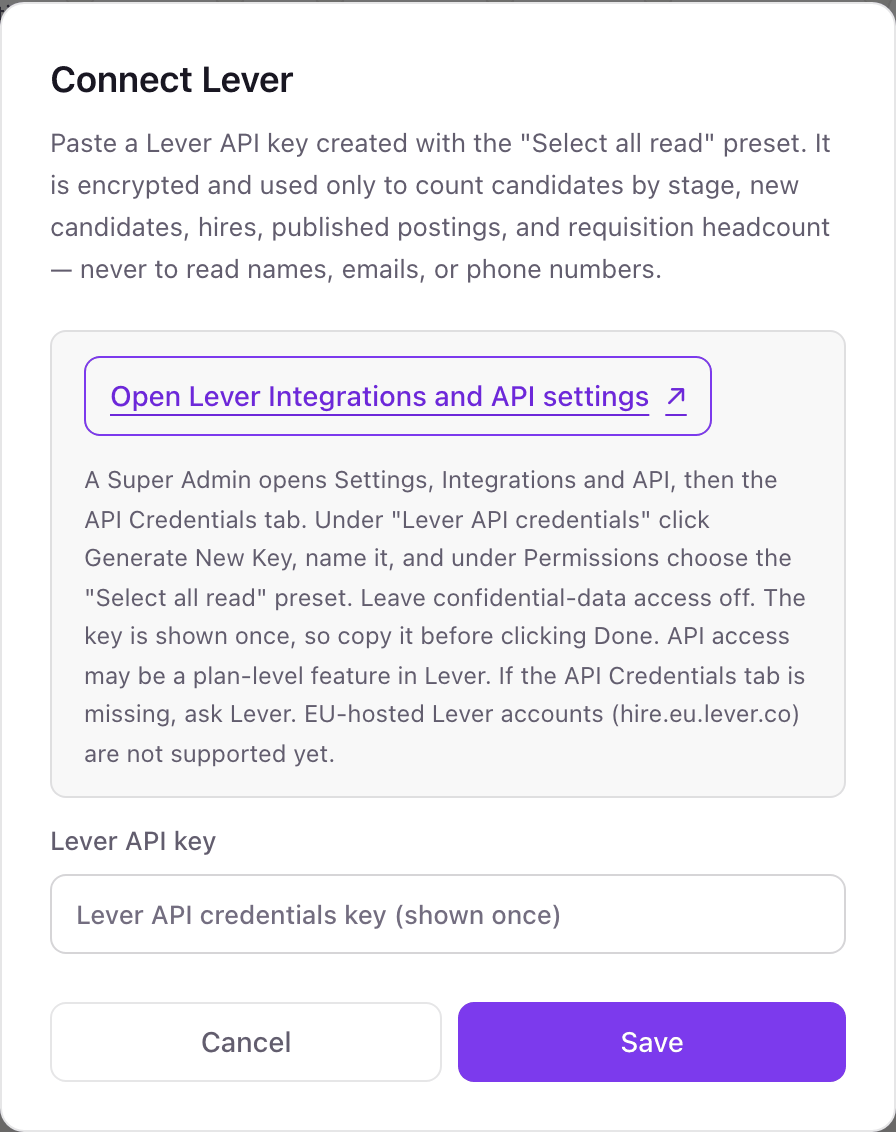
- 1Go to Integrations in Dance Party and click Connect Lever.
- 2In Lever, open Settings, then Integrations and API, then the API Credentials tab. Under Lever API credentials, click Generate New Key and name it Dance Party.Open Lever Integrations and API settings ↗
- 3Under Permissions, choose the Select all read preset and leave confidential data access off.
- 4Copy the key before clicking Done, because Lever shows it only once.
- 5Paste it into Lever API key and click Save. The Lever card shows Connected.
One Lever connection per workspace
A workspace connects one Lever account with one key. A second Lever account, such as a separate EU entity, would need its own Dance Party workspace, and EU-hosted accounts cannot connect yet.
Read-only. The Select all read preset cannot move, archive, or email a candidate, and Dance Party calls only six read endpoints. To revoke access, delete the key on Lever's API Credentials tab.
From Lever to your office display
Once Lever shows Connected, the rest happens in plain English. No code, no drag-and-drop.
1. Describe it. Tell DJ Agent what you want to see.
New dashboard+ WidgetDescribe a widget in DJ Agent, or click + WidgetDJ AgentDATA SOURCESLeverConnectedShow new Lever candidates from the last 7 days as bars by origin, with referred called out.Send2. It gets built. The widget lands on your board with real Lever data.
New dashboard+ WidgetNew candidates by originLive142last 7 daysAppliedSourcedReferredAgencyInternalUniversityDJ AgentDATA SOURCESLeverConnectedShow new Lever candidates from the last 7 days as bars by origin, with referred called out.Send3. Put it on a screen. Pair an Apple TV with the six-character code it shows, then assign the dashboard.

Lever dashboard questions
Does a Lever dashboard on the office display show candidate names?
No. Dance Party asks Lever only for the fields it counts, so names, emails, phone numbers, and profile links never leave Lever. The screen shows counts by stage, origin, and team.
Why are my Lever counts lower than what I see in Lever?
Confidential postings and candidates are left out, because the key has no confidential access. Each count also stops at 500 candidates and shows as 500+ past that.
Can I show one Lever posting's pipeline?
Yes. Name the posting when you ask DJ Agent, and the stage counts cover only candidates on that posting.
Does it work with Lever accounts in the EU?
Not yet. Dance Party reads Lever's US data centre, so accounts on hire.eu.lever.co cannot connect today.
What if the Requisitions widget says not enabled?
Requisitions is turned off for your Lever account. Pipeline, sources, postings, and hires still work without it.
Can Dance Party change anything in Lever?
No. It only reads. It cannot advance or archive a candidate, leave feedback, or edit a posting or requisition.
More integrations
Put Lever on every office display
Connect Lever, describe the dashboard, and it runs on an Apple TV, refreshing on its own.
Get Started