
Twilio messaging and voice dashboards on an Apple TV
Twilio sits behind the texts and calls your product sends, so trouble shows up as a carrier error code or a spend spike long before a customer complains. A Twilio dashboard on an office display's Apple TV keeps today's volume, month-to-date spend, and delivery failures where the engineering and ops teams can see them.
- Read-only
- API key connection
- One connection per workspace
Popular Twilio dashboards
What teams running Twilio put on the screen, and what you would ask DJ Agent to get it.
Twilio spend against budget
For engineering leads and finance
Twilio bills by the message segment and the minute, so a retry loop or a bot signing up with fake numbers shows up first as spend. A month-to-date total against budget catches it days before the invoice does.
- Total Twilio spend this month, subaccounts included
- Spend today
- Month-to-date spend against the budget you set
Ask DJ Agent“Show our Twilio total spend this month against a $5,000 budget, with today's spend underneath.”
SMS error codes
For the engineers who own notifications and 2FA
When texts stop arriving, Twilio's error code says why: 30007 means a carrier filtered it, 30003 means the handset is unreachable, 21610 means the person opted out. Seeing the codes on screen turns a vague complaint into a known cause.
- Delivered, undelivered, and failed among the latest 100 messages
- Error codes on the undelivered and failed ones, most common first
- Outbound versus inbound messages in that sample
Ask DJ Agent“From our last 100 Twilio messages, show how many were delivered, and list the error codes on any undelivered or failed ones.”
Where the Twilio bill goes
For product and finance owners of the Twilio account
One Twilio invoice mixes outbound SMS, MMS, voice minutes, phone number rentals, and more. Splitting this month's spend by usage category shows which product line is driving it.
- This month's spend by usage category
- Message count and voice minutes this month
- Phone number rental cost
Ask DJ Agent“Chart this month's Twilio spend by usage category: outbound SMS, inbound SMS, MMS, voice minutes, and phone numbers.”
Call outcomes
For teams running voice flows or a Twilio contact center
A voice flow can look healthy while a third of callers hit busy or no-answer. Counting outcomes on the latest calls shows the problem while it is happening.
- Completed, no-answer, busy, and failed among recent calls
- Calls started today
- Average duration of completed calls
Ask DJ Agent“Show outcomes of our last 100 Twilio calls: completed, no-answer, busy, and failed.”
What Dance Party reads from Twilio
Dance Party reads Twilio's REST API with your Account SID and Auth Token and only sends GET requests. Usage totals cover the whole month or day. Message and call lists read the newest page, up to 100 records per widget, so they describe recent traffic rather than all history.
Usage and spend
Twilio API docs ↗- Usage recordsCount, usage, and price per category (SMS, MMS, calls, phone numbers, total price) for today or this month.
Messages
Twilio API docs ↗- Recent messagesStatus (queued, sent, delivered, undelivered, failed), direction, date sent, error code, and price.
- From and to numbersAvailable to the widget, though most delivery boards leave them off screen.
Calls
Twilio API docs ↗- Recent callsStatus (completed, busy, no-answer, failed, canceled), direction, start time, duration, and price, filterable by status and start date.
How to connect Twilio
Before you start
- An owner or admin of your Dance Party workspace makes the Twilio connection.
- A Twilio user who can see the Account SID and Auth Token in the Twilio Console
- An active Twilio account. Dance Party checks the account status when you connect
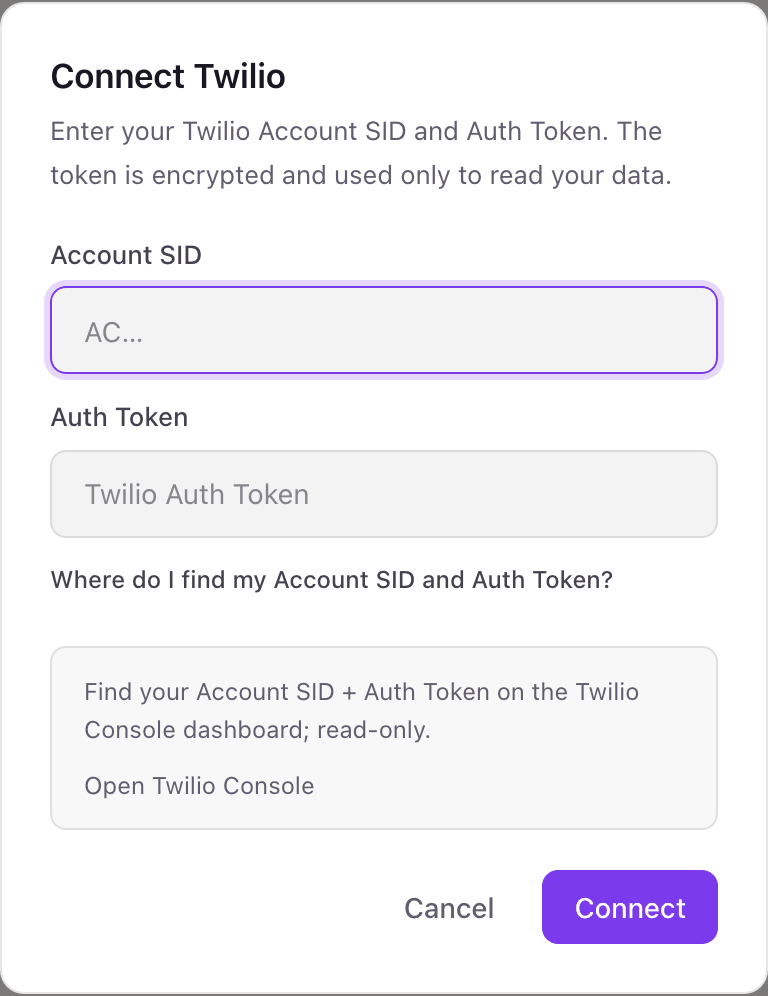
- 1Open Integrations in Dance Party and click Connect Twilio, which opens a pop-up asking for Account SID and Auth Token.
- 2Open the Twilio Console. Under Account Info on the dashboard, copy the Account SID (it starts with AC) and show and copy the Auth Token.Open Twilio Console ↗
- 3Paste them into Account SID and Auth Token and click Connect.
- 4Dance Party checks the account is active, and the Twilio card shows Connected.
One Twilio connection per workspace
A workspace connects one Twilio account SID. Connect the parent account and monthly usage includes every subaccount; message and call lists show the parent's own traffic. To show one product's traffic alone, connect that subaccount's SID and token instead.
Twilio's Auth Token has full access to the account, and Twilio has no read-only version of it. Dance Party only reads usage, messages, and calls, and never sends or buys anything. To cut access, rotate the Auth Token in the Console, and update any other system that uses it.
From Twilio to your office display
Once Twilio shows Connected, the rest happens in plain English. No code, no drag-and-drop.
1. Describe it. Tell DJ Agent what you want to see.
New dashboard+ WidgetDescribe a widget in DJ Agent, or click + WidgetDJ AgentDATA SOURCESTwilioConnectedShow our Twilio total spend this month against a $5,000 budget, with today's spend underneath.Send2. It gets built. The widget lands on your board with real Twilio data.
New dashboard+ WidgetTwilio spend, SeptemberLiveMonth to date against budget$3,412/ $5,00068% to goalDJ AgentDATA SOURCESTwilioConnectedShow our Twilio total spend this month against a $5,000 budget, with today's spend underneath.Send3. Put it on a screen. Pair an Apple TV with the six-character code it shows, then assign the dashboard.

Twilio dashboard questions
Can I show Twilio usage on an Apple TV dashboard?
Yes. Connect Twilio with your Account SID and Auth Token, describe the board, and assign it to a screen. Usage and message widgets can refresh every 5 minutes.
Is the Twilio Auth Token read-only?
No. The Auth Token can do anything on the account. Dance Party uses it only for read requests, and connecting a subaccount keeps its reach to that subaccount.
Can it show SMS delivery rate for the whole month?
Not message by message. Monthly totals come from usage records, which count messages sent but not their outcome. Delivery status and error codes are read from the latest 100 messages per widget.
Does it include subaccounts?
Yes for usage and spend, which Twilio totals across the parent and its subaccounts. Message and call lists belong to whichever account SID you connected.
Can Dance Party send messages or place calls?
No. It only reads. It never sends a message, places a call, buys a number, or changes a setting.
Can it show Twilio Flex or Segment data?
No. The Twilio connection reads Programmable Messaging and Voice usage, messages, and calls. Segment has its own Dance Party integration.
More integrations
Put Twilio on every office display
Connect Twilio, describe the dashboard, and it runs on an Apple TV, refreshing on its own.
Get Started