
Resend delivery health on an Apple TV dashboard
Resend sends the email your product depends on: sign-in links, receipts, alerts. Dance Party reads Resend's own delivery metrics and domain status and puts them on the office display as an Apple TV dashboard, so the team sees bounce and complaint rates next to the limits Resend enforces.
- Read-only
- API key connection
- One connection per workspace
Popular Resend dashboards
What teams running Resend put on the screen, and what you would ask DJ Agent to get it.
Resend limits watch
For engineering and whoever owns email deliverability
Resend's acceptable use policy asks for bounces under 4% and complaints under 0.08%, and an account that crosses them can be suspended. Seeing both rates against those lines every day turns a bad import or a broken signup form into a same-day fix.
- Bounce rate against Resend's 4% line
- Complaint rate against the 0.08% line
- Delivery rate
- Failed and delayed sends
Ask DJ Agent“Show our Resend bounce rate and complaint rate for the last 7 days as tiles, amber past 2% bounces or 0.05% complaints and red past 4% or 0.08%.”
Emails sent per day
For the product and platform team
Send volume tracks product usage. A flat day where Monday usually spikes can mean a queue stopped or a feature broke, and the bar chart shows it at a glance.
- Sent per day for the last 7 or 30 days
- Delivered per day
- Failed per day
Ask DJ Agent“Chart Resend emails sent per day for the last 7 days as bars, with the week's total above the chart.”
Sending domain status
For platform engineers
A domain that drops out of verified status after a DNS change stops sending. Each domain as a row, with its status and region, makes a failed DKIM record visible to whoever is on call.
- Every sending domain in the account
- Verification status: verified, pending, or failed
- Region each domain sends from
- Whether open and click tracking are on
Ask DJ Agent“List our Resend sending domains with their verification status and region, verified in green and anything else in red.”
Bounce and suppression breakdown
For engineering and support
Resend splits bounces into permanent, transient, and undetermined, and counts suppressed sends separately. The split tells you whether to clean a list or wait out a receiving server's hiccup.
- Permanent bounces
- Transient bounces
- Undetermined bounces
- Suppressed sends to addresses that bounced or complained before
Ask DJ Agent“Show Resend bounces for the last 30 days split into permanent, transient and undetermined, plus suppressed sends.”
What Dance Party reads from Resend
Dance Party reads two things from Resend: account-level email metrics and your sending domains. Every request is a GET. It never sends email, and it never reads message bodies, subjects, recipients, or contacts.
Email metrics
Resend API docs ↗- VolumeReceived, sent, delivered, delivery delayed, failed, and suppressed.
- Bounces and complaintsBounced in total and split into permanent, transient, and undetermined, plus complaints.
- RatesDelivery, bounce, and complaint rate as Resend calculates them, in percent.
- Time and domainTotals for a rolling window up to 365 days, or broken down by hour, day, week, month, or sending domain.
Domains
Resend API docs ↗- Sending domainsName, verification status, region, open and click tracking settings, and sending or receiving capability.
How to connect Resend
Before you start
- An owner or admin of your Dance Party workspace makes the Resend connection.
- A Resend API key with Full access. Resend has no read-only key, and a Sending access key cannot read metrics.
- How far back a board can look depends on your Resend plan's data retention
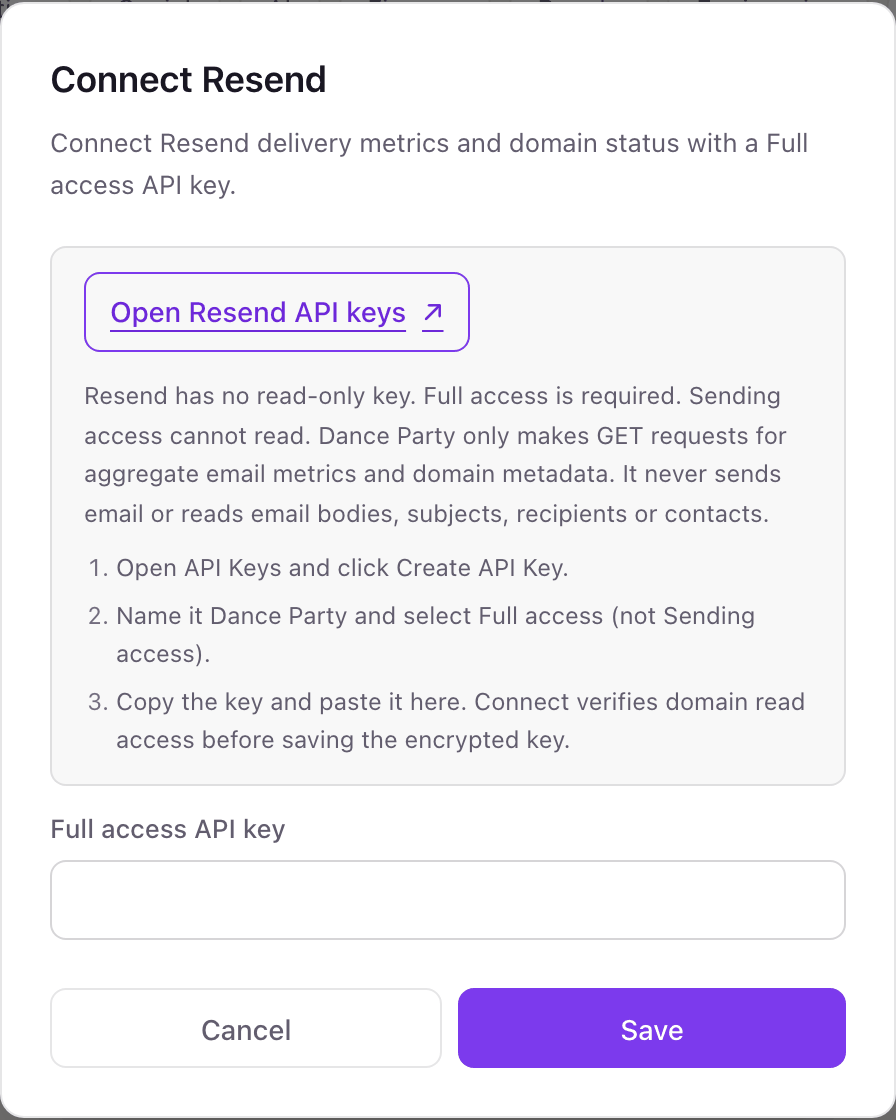
- 1From the Resend card on Dance Party's Integrations page, press Connect Resend. The pop-up links to Resend's API keys page and has one field, Full access API key.
- 2In Resend, open API Keys and click Create API Key.Open Resend API keys ↗
- 3Name it Dance Party and set Permission to Full access, not Sending access.
- 4Copy the key, paste it into Full access API key, and click Save. Dance Party reads your domain list to confirm the key, then saves it encrypted and the card shows Connected.
One Resend connection per workspace
A workspace connects one Resend account, and every sending domain in it is readable, so one key covers your app, marketing, and regional domains. A separate Resend team needs its own Dance Party workspace.
Resend only offers Full access for reading, so the key could do more than Dance Party asks of it. Dance Party makes GET requests for aggregate metrics and domain details only. To cut access, delete the Dance Party key on Resend's API Keys page.
From Resend to your office display
Once Resend shows Connected, the rest happens in plain English. No code, no drag-and-drop.
1. Describe it. Tell DJ Agent what you want to see.
New dashboard+ WidgetDescribe a widget in DJ Agent, or click + WidgetDJ AgentDATA SOURCESResendConnectedShow our Resend bounce rate and complaint rate for the last 7 days as tiles, amber past 2% bounces or 0.05% complaints and red past 4% or 0.08%.Send2. It gets built. The widget lands on your board with real Resend data.
New dashboard+ WidgetAgainst Resend's limitsLiveBounce rate0.61% of 4%Complaint rate0.011% of 0.08%Delivery rate99.2%Delayed318 this weekDJ AgentDATA SOURCESResendConnectedShow our Resend bounce rate and complaint rate for the last 7 days as tiles, amber past 2% bounces or 0.05% complaints and red past 4% or 0.08%.Send3. Put it on a screen. Pair an Apple TV with the six-character code it shows, then assign the dashboard.

Resend dashboard questions
Can I show Resend email metrics on an Apple TV?
Yes. Connect a Full access key, describe the board to DJ Agent, and assign it to a screen running the Dance Party Apple TV app.
Why does Dance Party need a Full access Resend key?
Resend keys come in two permissions, and Sending access can only send. Reading metrics and domains takes Full access. Dance Party uses it for GET requests only.
What bounce and complaint rates does Resend allow?
Under 4% bounces and under 0.08% complaints, per Resend's acceptable use policy. A Dance Party widget can turn amber well before either line.
Does the dashboard show opens and clicks?
No. Dance Party reads delivery metrics: sent, delivered, delayed, failed, suppressed, bounces, complaints, and their rates. Open and click tracking figures are not read.
How current are Resend numbers on the screen?
Within about 15 minutes. Resend caches metrics for up to 15 minutes, so refreshing a Resend widget more often than that shows the same figures.
Can Dance Party see who we email or what we send?
No. It reads aggregate counts and domain settings. Recipients, subjects, message bodies, and contacts are never requested.
More integrations
Put Resend on every office display
Connect Resend, describe the dashboard, and it runs on an Apple TV, refreshing on its own.
Get Started