
Dialpad contact center status, as a dashboard on Apple TV
In a Dialpad Contact Center, operators go on duty, take calls, and drop into wrap-up between them. A Dialpad dashboard on the Apple TV above the floor shows that state for everyone at once, along with the latest calls, so a lead can see coverage without opening Dialpad Analytics.
- Read-only
- API key connection
- One connection per workspace
Popular Dialpad dashboards
What teams running Dialpad put on the screen, and what you would ask DJ Agent to get it.
Contact center floor count
For contact center supervisors
Dialpad tracks whether each operator is on duty, available, on a call, or wrapping up. Counting those states is the fastest read on whether the queue is about to back up.
- Operators on duty
- Operators available for the next call
- Operators on a call or in wrap-up
- Users set to Do Not Disturb
Ask DJ Agent“Count our Dialpad operators who are on duty, available, on a call, and in wrap-up, plus anyone on Do Not Disturb.”
Recent calls on the line
For sales floors and support teams
The latest finished calls, with who took them and how long they ran, give a room a feel for the day's pace. A missed call on the sales line shows up on screen before anyone checks the call history.
- The latest finished calls, newest first
- Direction, who handled it, and duration
- Calls that ended missed or in voicemail
Ask DJ Agent“List our most recent Dialpad calls with direction, who handled them, and duration, and highlight missed calls.”
Latest 100 calls by outcome
For support managers
A run of missed calls or voicemails usually means a gap in coverage, not a bad day. Splitting recent calls by outcome makes the gap visible within the hour.
- Inbound calls answered among the latest 100
- Outbound calls among the latest 100
- Missed inbound calls
- Calls that went to voicemail
Ask DJ Agent“Split our latest 100 Dialpad calls into inbound answered, outbound, missed, and voicemail.”
What Dance Party reads from Dialpad
Dance Party reads Dialpad's API with a company API key. User status comes from the user list, and call boards read the most recent finished calls, up to 100 per widget. It only sends read requests.
Users and operators
Dialpad API docs ↗- AvailabilityWhether each user is on a call, online, or on Do Not Disturb, and their status message.
- Contact center dutyOn duty or off, and the operator state: available, busy, occupied, wrap-up, or unavailable.
- ProfileName, job title, location, and license type, for rosters and team tiles.
Calls
Dialpad API docs ↗- Recent finished callsState, direction, start time, duration, and the user, department, or call center that handled each one. Needs the calls:list scope.
How to connect Dialpad
Before you start
- An owner or admin of your Dance Party workspace makes the Dialpad connection.
- A Dialpad Company Admin, since only they can create API keys
- A Dialpad Pro or Enterprise plan
- The calls:list additional scope on the key for any call board. User status boards work without it
- 1Go to Integrations in Dance Party and click Connect Dialpad; the pop-up has one field, API key or bearer token.
- 2In Dialpad, go to Admin Settings, then My Company, then Authentication, then API Keys, and select Add key.Dialpad API key steps ↗
- 3Name it Dance Party, set the expiration, and under Additional Scopes choose calls:list. Save, then copy the key right away.
- 4Paste the key into API key or bearer token and click Save.
- 5Dance Party reads your user list to check the key, and the Dialpad card shows Connected.
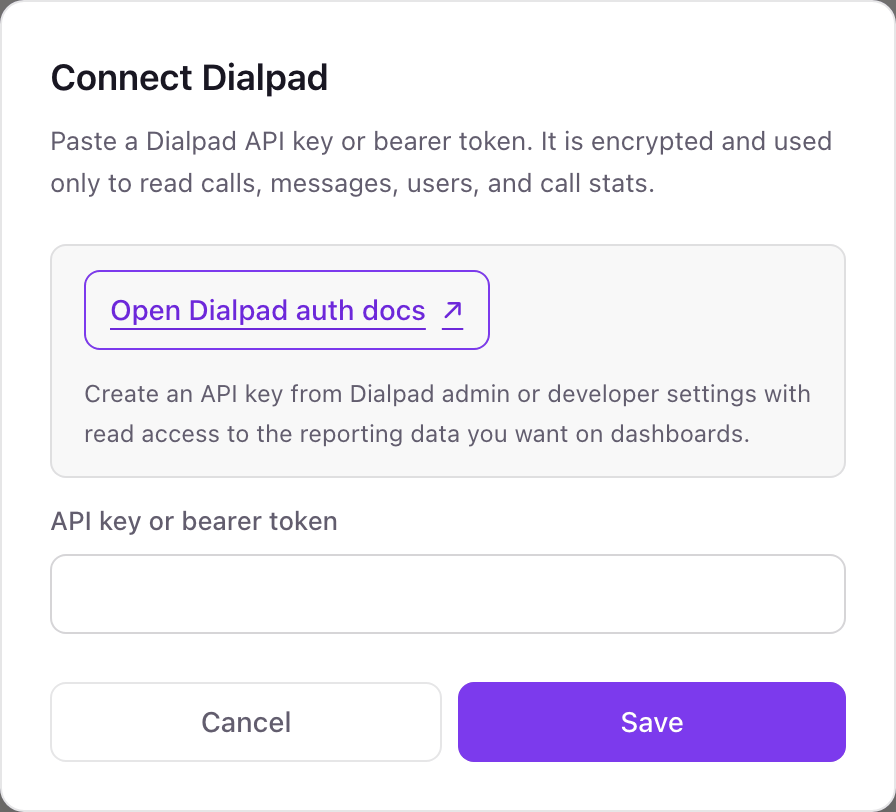
One Dialpad connection per workspace
A workspace connects one Dialpad company. Its offices, departments, and call centers all come through that one key, so a single screen can show the support line and another the sales floor.
Dialpad API keys act for the whole company and Dialpad has no read-only key, so give it an expiration date. Dance Party only reads users and calls and never places a call or changes a setting. Delete the key on the API Keys page to revoke it.
From Dialpad to your office display
Once Dialpad shows Connected, the rest happens in plain English. No code, no drag-and-drop.
1. Describe it. Tell DJ Agent what you want to see.
New dashboard+ WidgetDescribe a widget in DJ Agent, or click + WidgetDJ AgentDATA SOURCESDialpadConnectedCount our Dialpad operators who are on duty, available, on a call, and in wrap-up, plus anyone on Do Not Disturb.Send2. It gets built. The widget lands on your board with real Dialpad data.
New dashboard+ WidgetFloor right nowLiveOn duty18Available7On a call9Wrap-up2DJ AgentDATA SOURCESDialpadConnectedCount our Dialpad operators who are on duty, available, on a call, and in wrap-up, plus anyone on Do Not Disturb.Send3. Put it on a screen. Pair an Apple TV with the six-character code it shows, then assign the dashboard.

Dialpad dashboard questions
Can I put Dialpad call center status on an office display?
Yes. Connect Dialpad with an API key, describe the board, and assign it to the Apple TV above the floor. Operator states can refresh every 5 minutes.
Why do my Dialpad call widgets fail with a permission error?
The key is missing the calls:list scope. Create a new key with calls:list under Additional Scopes and reconnect. User status boards work without it.
Does it show calls in progress?
No. Dialpad's call list only includes calls that have ended. Who is on a call right now comes from each user's status instead.
Can it show Dialpad Analytics like service level or CSAT?
Not yet. Dance Party reads users and recent calls, not Dialpad's analytics exports, so service level, average speed of answer, and CSAT stay in Dialpad.
Can Dance Party make calls or change Dialpad settings?
No. It only reads. It cannot place, transfer, or record a call, and it never changes a user or department.
More integrations
Put Dialpad on every office display
Connect Dialpad, describe the dashboard, and it runs on an Apple TV, refreshing on its own.
Get Started