
Brevo email results on an Apple TV dashboard
Brevo sends two kinds of email for most teams: the campaigns marketing schedules, and the transactional mail your product triggers on its own. Dance Party reads both and puts them on the office display as an Apple TV dashboard: how the last campaigns performed, whether password resets and receipts are landing, and how many email credits the account has left.
- Read-only
- API key connection
- One connection per workspace
Popular Brevo dashboards
What teams running Brevo put on the screen, and what you would ask DJ Agent to get it.
Latest Brevo campaigns
For the email marketing team
Campaign stats move for days after a send. Keeping the last five on the wall means nobody has to open the campaign report to learn that Tuesday's newsletter got twice the clicks of Friday's promo.
- The most recent sent campaigns, newest first, with send date
- Recipients sent and delivered for each
- Unique clicks and click rate on delivered
- Unsubscribes each campaign caused
Ask DJ Agent“List our last five sent Brevo email campaigns with send date, delivered, unique clicks, click rate and unsubscribes.”
Transactional delivery health
For engineering and customer support
When order confirmations or password resets stop arriving, support hears about it first. Delivered, bounced, and blocked counts from Brevo's transactional report show a sending problem before the tickets pile up.
- Transactional emails requested over the last 7 or 30 days
- Delivered, as a count and a share of requests
- Hard and soft bounces
- Blocked sends and unsubscribes
Ask DJ Agent“Show Brevo transactional email for the last 7 days: sent, delivered rate, hard bounces, soft bounces and blocked, with bounces in red if they pass 2%.”
Click rate by campaign
For marketing leadership
Side by side, the last six campaigns show which subject lines and offers your list responds to. It is the chart that settles the argument about whether the promo emails are worth sending.
- Unique clicks divided by delivered, for each recent campaign
- Campaign name and send date
- Delivered count behind each rate
Ask DJ Agent“Chart the click rate of our last six Brevo campaigns as bars, labeled by campaign name, using unique clicks over delivered.”
Email credits left
For the account owner and marketing ops
Brevo plans send from a pool of email credits. A big campaign late in the month can drain it, so the balance on the wall tells the team whether to schedule the send or top up first.
- Email credits remaining on your Brevo plan
- Plan type, such as free, subscription, or pay as you go
- Credits used against the allowance you tell DJ Agent
Ask DJ Agent“Show how many Brevo email credits we have left this month out of our 100,000 allowance, and turn it amber below 20,000.”
What Dance Party reads from Brevo
Dance Party reads three things from Brevo with your API key: account details, transactional email statistics, and your recent email campaigns. It uses only Brevo's read endpoints. It never sends mail, edits contacts, or changes a campaign.
Account
Brevo API docs ↗- Plan and creditsCompany name, plan type, and remaining email credits.
Transactional email
Brevo API docs ↗- Aggregated reportRequests, delivered, opens, unique opens, clicks, unique clicks, hard and soft bounces, blocked, and unsubscribes over the last 1 to 90 days.
Email campaigns
Brevo API docs ↗- Recent campaignsUp to 50 newest campaigns with name, subject, status, and send date.
- Campaign statisticsSent, delivered, unique clicks, hard and soft bounces, and unsubscriptions for each campaign.
How to connect Brevo
Before you start
- An owner or admin of your Dance Party workspace makes the Brevo connection.
- In Brevo, the account owner or a user with the API keys permission, since only they can create keys
- A Brevo v3 API key, which starts with xkeysib-. An SMTP key will not work.
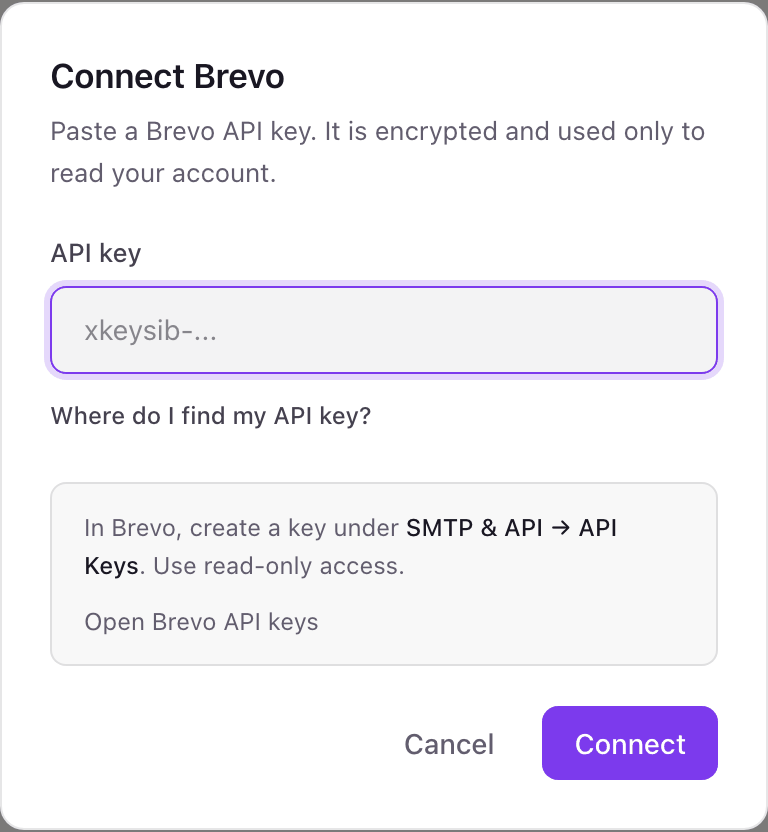
- 1Find the Brevo card under Integrations in Dance Party and press Connect Brevo. A small pop-up asks for a single API key.
- 2In Brevo, open SMTP & API, go to the API keys tab, and click Generate a new API key. Name it Dance Party.Open Brevo API keys ↗
- 3Copy the key while Brevo shows it, then paste it into the API key field.
- 4Click Connect. Dance Party reads your Brevo account details to check the key, and the card shows Connected.
One Brevo connection per workspace
A workspace connects one Brevo account through one API key. If you run separate Brevo accounts for two brands, or Brevo sub-accounts with their own keys, connect the second one in a second Dance Party workspace.
Dance Party stores the key encrypted and uses it only for Brevo's read endpoints. It does not send email, touch contacts or lists, or edit campaigns. Delete the key under SMTP & API in Brevo and access stops at once.
From Brevo to your office display
Once Brevo shows Connected, the rest happens in plain English. No code, no drag-and-drop.
1. Describe it. Tell DJ Agent what you want to see.
New dashboard+ WidgetDescribe a widget in DJ Agent, or click + WidgetDJ AgentDATA SOURCESBrevoConnectedList our last five sent Brevo email campaigns with send date, delivered, unique clicks, click rate and unsubscribes.Send2. It gets built. The widget lands on your board with real Brevo data.
New dashboard+ WidgetRecent campaignsLive3.9% clicksSeptember product updateSep 24 · 24,812 delivered2.1% clicksFall sale, last callSep 19 · 31,406 delivered6.4% clicksWebinar reminderSep 16 · 4,118 delivered1.2% clicksFall sale launchSep 12 · 31,522 delivered0.6% clicksWin-back: 90 days inactiveSep 9 · 8,930 deliveredDJ AgentDATA SOURCESBrevoConnectedList our last five sent Brevo email campaigns with send date, delivered, unique clicks, click rate and unsubscribes.Send3. Put it on a screen. Pair an Apple TV with the six-character code it shows, then assign the dashboard.

Brevo dashboard questions
Can I put a Brevo dashboard on an Apple TV?
Yes. Connect Brevo with an API key, describe the dashboard to DJ Agent, and assign it to a screen running the Dance Party Apple TV app.
Does it cover transactional email as well as campaigns?
Yes. Transactional totals come from Brevo's aggregated SMTP report for the last 1 to 90 days. Campaign results come from your newest sent campaigns.
Can I show open rates?
For transactional email, yes: opens and unique opens are in the report. Campaign widgets show sends, deliveries, clicks, bounces, and unsubscribes, not opens.
Brevo emailed me that it blocked an unknown IP address. What do I do?
Authorize it. Brevo can block API calls from new IP addresses, and Dance Party's servers call from cloud addresses that can change. Authorize the address from Brevo's email, or turn off blocking under Authorized IPs in SMTP & API.
Can it show SMS, WhatsApp, contacts, or automation results?
No. Dance Party reads Brevo email statistics, recent email campaigns, and your plan's credits. SMS, WhatsApp, contact lists, and automation workflows are not read.
Can Dance Party send email or change anything in Brevo?
No. It calls only Brevo's read endpoints. It cannot send a campaign, trigger a transactional email, or edit contacts.
More integrations
Put Brevo on every office display
Connect Brevo, describe the dashboard, and it runs on an Apple TV, refreshing on its own.
Get Started