
Aircall phone team availability on an Apple TV dashboard
Aircall agents set their own status, and a phone team only works when enough of them are set to available. An Aircall dashboard on an Apple TV shows the room who is taking calls, who is out for lunch or in training, and how coverage looks across time zones.
- Read-only
- API key connection
- One connection per workspace
Popular Aircall dashboards
What teams running Aircall put on the screen, and what you would ask DJ Agent to get it.
Phone coverage right now
For support and sales-floor leads
Aircall's call distribution rings only agents who are available. Four numbers on the wall answer whether the queue is covered before the ring groups start rolling calls to voicemail.
- Agents set to available
- Agents available through their working hours
- Agents unavailable, and how many of those are on a break or at lunch
Ask DJ Agent“Show how many Aircall users are available, available by working hours, and unavailable right now, with breaks and lunch counted separately.”
Break and lunch board
For the team lead running the shift
When an agent goes unavailable in Aircall, they pick a reason: out for lunch, on a break, in training, back office. Listing those reasons stops the lead walking the floor to find out who is where.
- Each unavailable agent and the reason they chose
- How many agents are in training right now
- Agents set to Do Not Disturb with no reason given
Ask DJ Agent“List Aircall users who are unavailable right now with their reason: out for lunch, on a break, in training, or back office.”
Follow-the-sun coverage
For support managers with agents in several countries
Every Aircall user has a time zone. Grouping who is available by zone shows whether the hand-off from Manila to London to New York actually left someone on the phones.
- Available agents in each time zone
- Total agents per time zone
- Zones with nobody available
Ask DJ Agent“Chart available Aircall users by time zone, and flag any time zone where nobody is available.”
What Dance Party reads from Aircall
Dance Party reads Aircall's public API with an API ID and API token from your Aircall Dashboard. Team boards read the user list, which carries each person's status. It only sends read requests.
Users
Aircall API docs ↗- Availability statusAvailable, available by working hours, or unavailable, as each person set it.
- Unavailability reasonOut for lunch, on a break, in training, back office, or other.
- Name, time zone, and extensionFor tiles, time-zone groups, and a team roster.
How to connect Aircall
Before you start
- An owner or admin of your Dance Party workspace makes the Aircall connection.
- An Aircall Admin who can open Integrations in the Aircall Dashboard
- A paid Aircall plan with API access
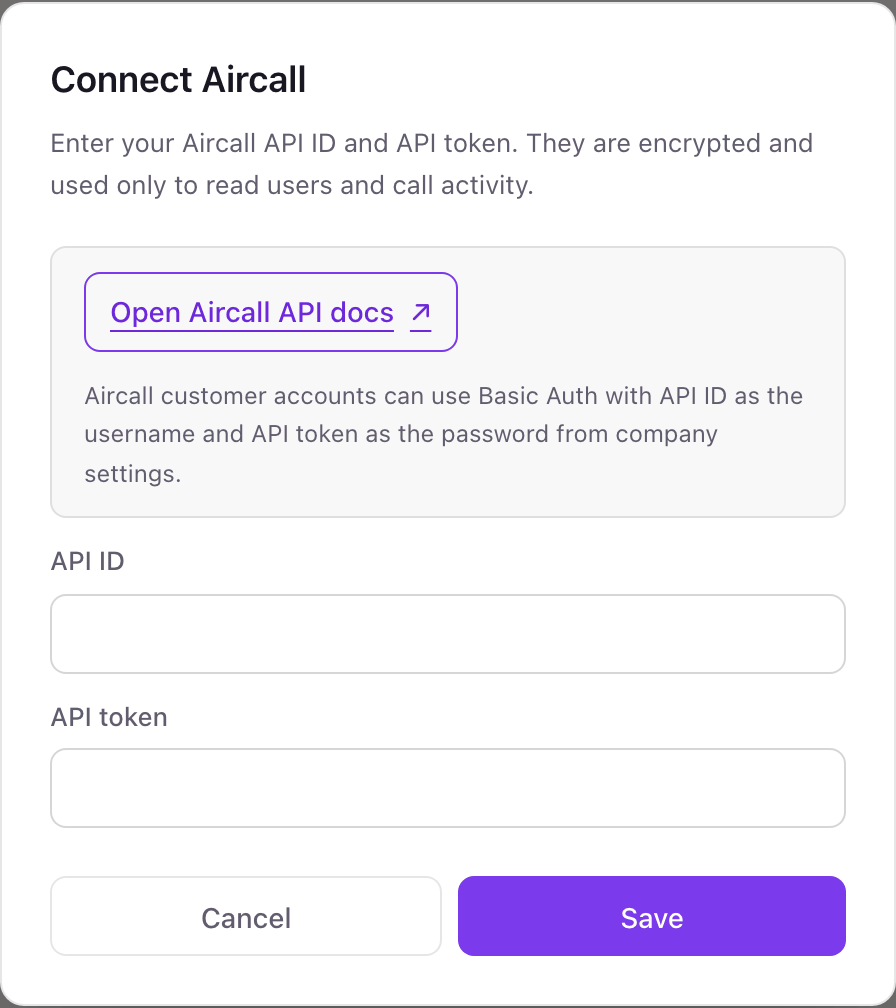
- 1In Dance Party, click Connect Aircall on the Integrations page; the pop-up asks for API ID and API token.
- 2In the Aircall Dashboard, open Integrations, then API keys, and click Generate an API key.Open Aircall API keys ↗
- 3Name the key Dance Party, then copy both the API ID and the API token before you confirm. The token is not shown again.
- 4Paste them into API ID and API token and click Save.
- 5Dance Party checks the pair with Aircall, and the Aircall card shows Connected.
One Aircall connection per workspace
A workspace connects one Aircall company. Every user and team in that company is available to your screens, so one connection covers support and sales lines alike.
An Aircall API key has company-wide access, and Aircall does not offer a read-only key. Dance Party only reads and never places, transfers, or tags a call. Delete the key under Integrations, API keys in the Aircall Dashboard to revoke it.
From Aircall to your office display
Once Aircall shows Connected, the rest happens in plain English. No code, no drag-and-drop.
1. Describe it. Tell DJ Agent what you want to see.
New dashboard+ WidgetDescribe a widget in DJ Agent, or click + WidgetDJ AgentDATA SOURCESAircallConnectedShow how many Aircall users are available, available by working hours, and unavailable right now, with breaks and lunch counted separately.Send2. It gets built. The widget lands on your board with real Aircall data.
New dashboard+ WidgetCoverage nowLiveAvailable14By working hours5Unavailable6Break or lunch3DJ AgentDATA SOURCESAircallConnectedShow how many Aircall users are available, available by working hours, and unavailable right now, with breaks and lunch counted separately.Send3. Put it on a screen. Pair an Apple TV with the six-character code it shows, then assign the dashboard.

Aircall dashboard questions
Can I show my Aircall team's availability on a TV?
Yes. Connect Aircall, ask DJ Agent for a team status wall, and assign it to the Apple TV on the phone floor. Status tiles can refresh every 5 minutes.
Can it show missed calls or call volume from Aircall?
Not yet. Today the Aircall connection is built for team availability. Missed-call, call-volume, and wait-time boards are not supported.
Does it show who is on a call right now?
No. It shows the status each person set in Aircall, such as available, out for lunch, or in training. Live in-call and after-call work states are not read.
Who can create an Aircall API key?
An Aircall Admin, from Integrations, then API keys, in the Aircall Dashboard. Agents cannot open that page.
Can Dance Party make or change calls in Aircall?
No. It only reads. It cannot dial, transfer, tag, comment on, or delete a call, and it never changes a user.
More integrations
Put Aircall on every office display
Connect Aircall, describe the dashboard, and it runs on an Apple TV, refreshing on its own.
Get Started