
Trello board dashboards on an Apple TV in the office
Trello boards work because everyone can see the cards, until the board scrolls off the screen. Dance Party reads a board's open cards, with their due dates, labels, and checklists, and turns them into a dashboard on the office display, running on an Apple TV where the whole team can see what is late.
- Read-only
- API key connection
- One connection per workspace
Trello dashboard examples
What teams running Trello put on the screen, and what you would ask DJ Agent to get it.
Overdue cards on the board
For project leads and small agency teams
A red due-date badge is easy to miss on a card in the fourth list. Naming the late cards on the shared screen gets them handled in the morning stand-up.
- Open cards past their due date, most overdue first
- Cards due in the next seven days
- Labels on each card, such as the client or priority
Ask DJ Agent“List the overdue cards on our Trello Client Work board, most overdue first, with their labels and how many days late.”
Cards by label
For product and support teams that triage with labels
Teams use Trello labels as their categories: bug, feature, urgent, a client name. Counting open cards per label shows where the work is piling up without anyone filtering the board.
- Open cards carrying each label
- Cards with no label yet
- Overdue cards within each label
Ask DJ Agent“Show open cards on our Trello Product board counted by label as columns, with Urgent first.”
Launch checklist progress
For a team shipping a launch or an event
Launch boards in Trello are mostly checklists inside cards. Adding up checked items across the board gives one progress number the whole team can watch rise toward launch day.
- Checklist items checked across all open cards
- Total checklist items on the board
- Cards whose checklists are complete
Ask DJ Agent“Add up checklist items checked versus total across our Trello Fall Launch board and show it as progress toward launch.”
What Dance Party reads from Trello
Dance Party reads Trello through its REST API with the API key and token you paste. It sees the boards the token's Trello member can see, and only sends read requests.
Boards
Trello API docs ↗- Your boardsName, link, and last activity for each board the member belongs to.
Cards
Trello API docs ↗- Open cardsName, due date, whether the due date is marked complete, and last activity, up to 100 cards per read.
- LabelsEach card's label names and colors.
- Card badgesChecklist items checked and total, comment counts, and attachments.
How to connect Trello
Before you start
- An owner or admin of your Dance Party workspace makes the Trello connection.
- A Trello account that is a member of the boards you want on screen, because the token sees what that member sees
- A Power-Up created in Trello's Power-Up admin portal, which is where Trello issues API keys
- Both halves: the API key and a token generated from it. Either one alone is rejected.
- 1Open Trello's Power-Up admin portal, click New, name it Dance Party, pick a Trello Workspace, and create it.Open Trello Power-Up admin ↗
- 2On the Power-Up's API key page, generate an API key and copy it. You do not need the secret.
- 3Click the Token link beside the key, approve access for your Trello account, and copy the token Trello shows.
- 4In Dance Party, open Integrations, click Connect Trello, and paste them into API key and API token.
- 5Click Save. Dance Party checks the pair by listing your boards, and the card shows Connected.
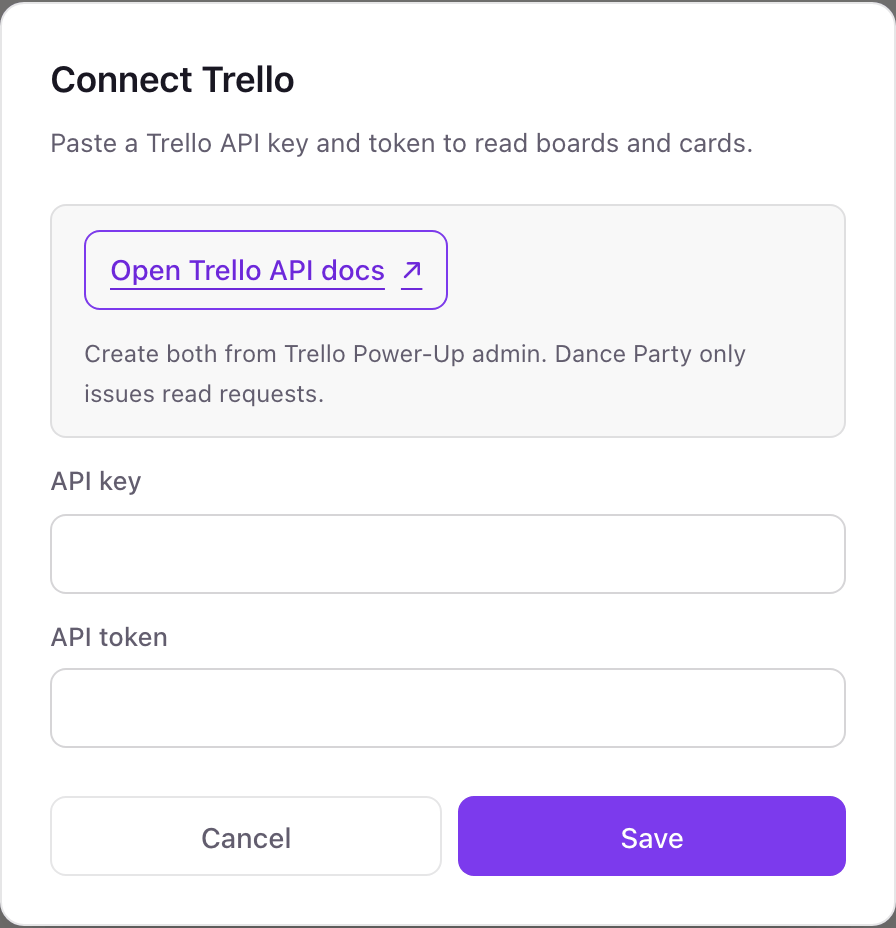
One Trello connection per workspace
A workspace connects one Trello key and token, which act as one Trello member. Every board that member belongs to is available, across all their Trello Workspaces, so the simplest way to add a board is to add that member to it.
Trello's standard token can read and write, but Dance Party only sends GET requests for boards and cards, and never moves, edits, or comments. The token is stored encrypted. Revoke it anytime with the Revoke button under Applications in your Trello account settings.
From Trello to your office display
Once Trello shows Connected, the rest happens in plain English. No code, no drag-and-drop.
1. Describe it. Tell DJ Agent what you want to see.
New dashboard+ WidgetDescribe a widget in DJ Agent, or click + WidgetDJ AgentDATA SOURCESTrelloConnectedList the overdue cards on our Trello Client Work board, most overdue first, with their labels and how many days late.Send2. It gets built. The widget lands on your board with real Trello data.
New dashboard+ WidgetOverdue on Client WorkLive5 days lateHomepage hero copy v2Northwind · Copy3 days lateSocial calendar for NovemberBloom Cafe · Social1 day lateInvoice template updateInternalDue todayProduct shoot shot listKestrel · PhotoDue FriMonthly SEO reportNorthwind · SEODJ AgentDATA SOURCESTrelloConnectedList the overdue cards on our Trello Client Work board, most overdue first, with their labels and how many days late.Send3. Put it on a screen. Pair an Apple TV with the six-character code it shows, then assign the dashboard.

Trello dashboard questions
Can I show a Trello board on a TV in the office?
Yes. Connect Trello, name the board, and describe what to show. DJ Agent builds the dashboard and the Dance Party Apple TV app keeps it on screen.
Can it show how many cards are in each Trello list?
Not by list name yet. Dance Party reads cards with their due dates, labels, and checklists, but not your list names, so a To Do, Doing, Done board is best shown by label or due date for now.
Does it show who each card is assigned to?
No. Trello returns member IDs on cards and Dance Party does not look up member names yet. Labels are the practical way to show an owner or client on screen.
Can Dance Party move or edit Trello cards?
No. It only reads. The token Trello issues could write, but Dance Party never sends anything except read requests.
Which Trello boards can Dance Party see?
The boards the connecting Trello member belongs to, in any of their Workspaces. Archived cards are not included.
Do I need a paid Trello plan?
No. API keys and tokens work on Trello's Free plan, and Dance Party reads the same boards and cards that plan already shows you.
More integrations
Put Trello on every office display
Connect Trello, describe the dashboard, and it runs on an Apple TV, refreshing on its own.
Get Started