
Turn Airtable bases into office display dashboards on Apple TV
Airtable is where operations teams keep the tracker that actually runs the week: the content calendar, the stock list, the request log. Dance Party turns one of those views into a dashboard on the office display, so the people who never open the base still see the status, running on an Apple TV all day.
- Read-only
- API key connection
- One connection per workspace
Popular Airtable dashboards
What teams running Airtable put on the screen, and what you would ask DJ Agent to get it.
Content calendar, this week
For marketing and content teams
The calendar lives in one Airtable view that only the editor checks. On the wall, a writer sees on Monday that Thursday's post is still in Draft.
- Pieces with a publish date in the next seven days
- Status of each piece, from your single select field
- Channel and owner for each piece
- Pieces past their publish date that are not marked Published
Ask DJ Agent“From our Airtable content calendar base, list pieces publishing in the next 7 days with channel, owner, and status, and flag anything overdue.”
Stock below reorder point
For operations, warehouse, and purchasing
An inventory base knows when a count drops under its reorder level, but nobody gets told. A tile that turns amber on the stockroom screen gets the order placed a week earlier.
- Quantity on hand for each item in your inventory table
- Items at or below their reorder point, from a filtered view
- Supplier and last received date for low items
Ask DJ Agent“Show our Airtable inventory items that are at or below their reorder point, with quantity on hand and supplier, amber when low and red at zero.”
Request intake queue
For IT, facilities, and internal ops desks
Airtable forms are a common front door for internal requests. Putting the open count by status on the team's screen keeps new submissions from sitting unassigned overnight.
- New requests from your form that nobody has picked up
- Requests in progress and waiting on a vendor
- Requests closed this week, by a date field
Ask DJ Agent“Show our Airtable requests table as a queue: New, In progress, Waiting on vendor, and Done this week, with New in red when it is over 5.”
Hiring pipeline in an Airtable base
For founders and hiring managers
Plenty of small teams run recruiting from an Airtable base instead of an ATS. A stage-by-stage view on the wall keeps interviewers aware of who is coming through this week.
- Active candidates in each stage of your single select
- Candidates per open role, from a Role field on each record
- Interviews with a date this week
Ask DJ Agent“Show our Airtable candidates as a funnel by Stage for active candidates, with how many are in each stage for each open role.”
What Dance Party reads from Airtable
Dance Party reads Airtable through its Web API with the personal access token you paste. It sees only the bases you add to that token's access list, and only reads. Each read returns up to 100 records, so large tables are best shown through a filtered view.
Bases
Airtable API docs ↗- Base listEvery base the token can reach, by name and your permission level.
Tables, fields, and views
Airtable API docs ↗- TablesEach table in a base, so DJ Agent can find the one you describe.
- Fields and typesSingle select options, dates, numbers, checkboxes, collaborators, and linked records.
- Saved viewsThe views on each table, including the filters and order you set in Airtable.
Records
Airtable API docs ↗- Records from a viewUp to 100 rows per read, in the view's own filter and order.
- Formula filtersNarrow rows with an Airtable formula, such as a status or a date range.
- Chosen fieldsOnly the columns the widget needs.
How to connect Airtable
Before you start
- An owner or admin of your Dance Party workspace makes the Airtable connection.
- An Airtable personal access token with the scopes data.records:read and schema.bases:read
- The bases you want on screen added to that token's Access list. The token can only reach bases your Airtable user can open.
- Any Airtable plan works. The Free plan allows 1,000 API calls a month, so keep refreshes infrequent there.
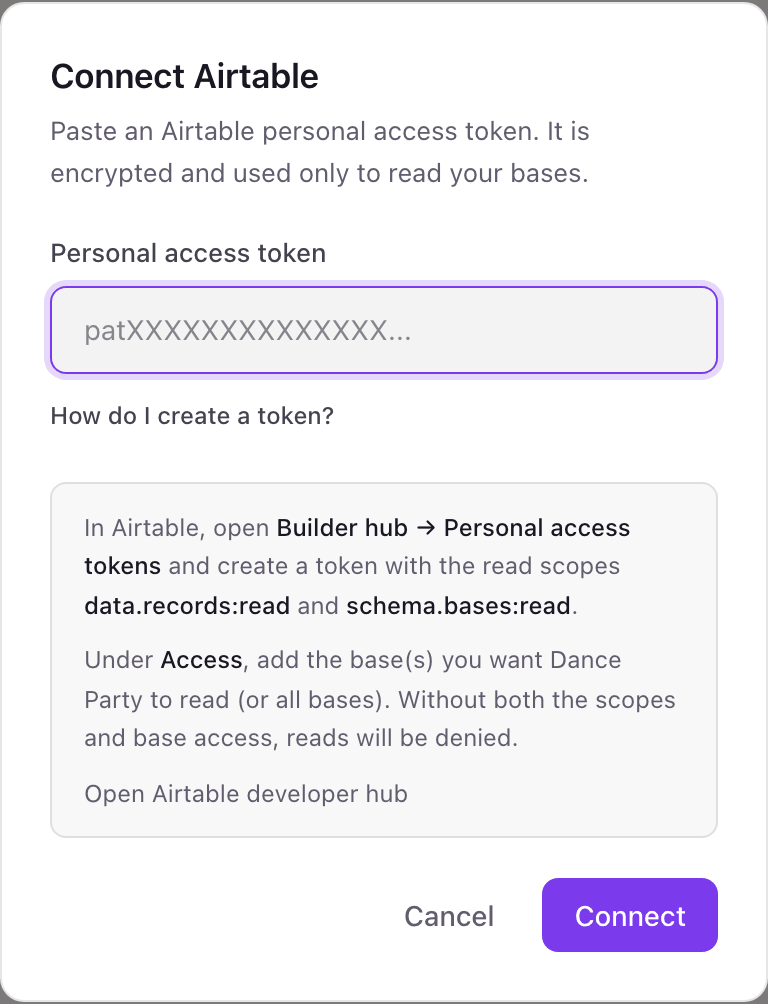
- 1In Airtable, open the Builder hub and choose Personal access tokens, then Create token.Open Airtable personal access tokens ↗
- 2Add the scopes data.records:read and schema.bases:read. Leave every write scope off.
- 3Under Access, add the bases Dance Party should read, or all of your bases. Create the token and copy it; it starts with pat.
- 4On the Dance Party Integrations page, click Connect Airtable and paste the pat token into Personal access token.
- 5Click Connect. Dance Party checks the token by listing your bases, then the card shows Connected.
One Airtable connection per workspace
A workspace holds one Airtable token. That token can cover many bases, even across several Airtable workspaces, as long as you add each one to its Access list. To add a base later, edit the token in Airtable; there is nothing to reconnect.
Read-only by design. With only data.records:read and schema.bases:read, the token cannot create, edit, or delete a record, even if someone tried. It is stored encrypted, and you can revoke it anytime from Personal access tokens in the Airtable Builder hub.
From Airtable to your office display
Once Airtable shows Connected, the rest happens in plain English. No code, no drag-and-drop.
1. Describe it. Tell DJ Agent what you want to see.
New dashboard+ WidgetDescribe a widget in DJ Agent, or click + WidgetDJ AgentDATA SOURCESAirtableConnectedFrom our Airtable content calendar base, list pieces publishing in the next 7 days with channel, owner, and status, and flag anything overdue.Send2. It gets built. The widget lands on your board with real Airtable data.
New dashboard+ WidgetPublishing this weekLiveTue · ScheduledQ4 pricing page refreshWeb · MayaWed · In editCustomer story: NorthwindBlog · TheoThu · DraftOctober newsletterEmail · InesFri · ScheduledWebinar recap clipsLinkedIn · SamFri · ApprovedIntegration launch postBlog · MayaDJ AgentDATA SOURCESAirtableConnectedFrom our Airtable content calendar base, list pieces publishing in the next 7 days with channel, owner, and status, and flag anything overdue.Send3. Put it on a screen. Pair an Apple TV with the six-character code it shows, then assign the dashboard.

Airtable dashboard questions
Can I put an Airtable base on a TV in the office?
Yes. Connect Airtable, tell DJ Agent which base and view to show, and assign the dashboard to a screen running the Dance Party Apple TV app.
Which Airtable token scopes does Dance Party need?
Two: data.records:read and schema.bases:read. Without both, and without the base on the token's Access list, Airtable denies the read.
Is there a limit on how many Airtable records a widget can show?
Yes, 100 records per read. For a bigger table, point the widget at a filtered view, such as open requests or items below reorder point, so the count stays accurate.
Will a dashboard use up my Airtable API call limit?
It uses one or two calls per refresh. On the Free plan's 1,000 calls a month, set the widget to refresh hourly or slower; Team and Business plans have far more headroom.
Does it use my Airtable views and filters?
Yes. Name a saved view and Dance Party reads its records with the filters and order you set in Airtable, so the screen matches what your team already maintains.
Can Dance Party show my Airtable Interface pages?
No. It reads the tables underneath, not Interface layouts. DJ Agent rebuilds the view you want as a widget designed to be read from across a room.
Can Dance Party change records in Airtable?
No. It only calls Airtable's read endpoints, and a token with read scopes cannot write even if asked to.
More integrations
Put Airtable on every office display
Connect Airtable, describe the dashboard, and it runs on an Apple TV, refreshing on its own.
Get Started