
ClickUp task dashboards for the office display, running on Apple TV
ClickUp Dashboards are built for the person at the desk clicking into a card. The team wall needs fewer, bigger things: how much open work sits in each status, which tasks slipped past their due date, and who has too much assigned. Dance Party reads that from ClickUp and runs it as a TV dashboard on an Apple TV.
- Read-only
- API key connection
- One connection per workspace
Popular ClickUp dashboards
What teams running ClickUp put on the screen, and what you would ask DJ Agent to get it.
Workflow status board
For project managers and delivery teams
A pile-up in review is the earliest sign a sprint will slip. Counting open ClickUp tasks in each of your own statuses puts that pile-up where the whole team walks past it.
- Open tasks in each of your ClickUp statuses
- Tasks in a blocked or waiting status
- Total open tasks the connected user can see
Ask DJ Agent“Show our open ClickUp tasks grouped by status as a queue, with review and blocked highlighted when they grow.”
Overdue and due this week
For team leads and account managers
ClickUp shows a red due date inside the task. On the wall, the five tasks that slipped are named with their assignee and List, so the follow-up happens in the stand-up instead of by chat later.
- Open tasks past their due date, oldest first
- Tasks due in the next seven days
- Assignee and List for each task
Ask DJ Agent“List our overdue ClickUp tasks with assignee, List name, and days late, then the tasks due in the next 7 days.”
Open tasks per assignee
For managers balancing a team's workload
ClickUp's Workload view lives on one manager's screen. A simple ranking of open tasks per person on the team display makes an overloaded teammate obvious before they say so.
- Open tasks assigned to each person
- Overdue tasks within each person's load
- Unassigned open tasks
Ask DJ Agent“Rank our team by open ClickUp tasks assigned, and show how many of each person's tasks are overdue.”
Quarterly Goals progress
For leadership and the whole company
Goals in ClickUp roll task and number targets up into one percentage. Showing that percentage in the office keeps the quarter's priorities in view between planning meetings.
- Percent complete for each ClickUp Goal
- Each Goal's due date
- Goals furthest behind as the due date nears
Ask DJ Agent“Show our ClickUp Goals for this quarter with percent complete and due date, and put the furthest-behind Goal first.”
What Dance Party reads from ClickUp
Dance Party reads ClickUp through its v2 API with a personal API token. The token sees exactly what the ClickUp user who made it can see, and Dance Party only sends read requests.
Tasks
ClickUp API docs ↗- Open tasksName, status, assignees, due date, and List, up to 100 per read. Closed tasks and subtasks are left out.
- Status countsOpen tasks grouped by your own status names.
- FiltersBy status name or by one assignee.
Goals
ClickUp API docs ↗- GoalsName, percent complete, and due date for each Goal in the Workspace.
Time tracking
ClickUp API docs ↗- Tracked hoursTime entries over the last 1 to 31 days. ClickUp returns the token owner's own entries.
Workspaces and Spaces
ClickUp API docs ↗- WorkspacesThe Workspaces the token can reach, with member counts.
- SpacesThe Spaces inside the connected Workspace.
How to connect ClickUp
Before you start
- An owner or admin of your Dance Party workspace makes the ClickUp connection.
- A ClickUp personal API token, which starts with pk_. Any ClickUp user can generate one under Settings, Apps.
- A ClickUp user who can see the Spaces and Lists you want on screen, because the token inherits that user's access
- Optional: the Workspace ID, the number after app.clickup.com/ in your browser, if you belong to more than one Workspace
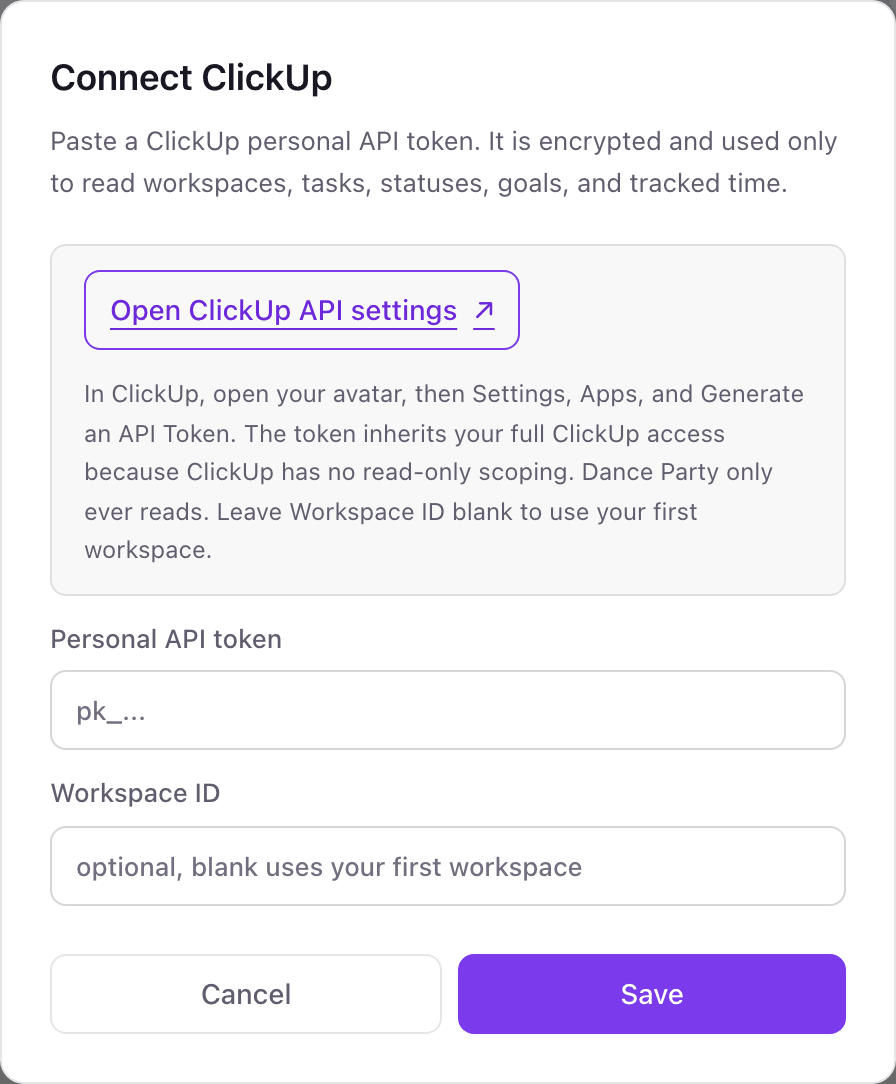
- 1In ClickUp, click your avatar, open Settings, then Apps, and click Generate under API Token. Copy the token.Open ClickUp API settings ↗
- 2Back in Dance Party, find the ClickUp card on the Integrations page and click Connect ClickUp.
- 3Paste the token into Personal API token.
- 4Enter a Workspace ID only if the dashboard should read a Workspace other than your first one. Leave it blank otherwise.
- 5Click Save. Dance Party checks the token by listing your Workspaces, and the card shows Connected.
One ClickUp connection per workspace
A Dance Party workspace connects one ClickUp token, pointed at one ClickUp Workspace: the ID you enter, or your first Workspace if you leave it blank. An agency with a separate ClickUp Workspace per client would use a Dance Party workspace per client.
ClickUp has no read-only token, so the token carries the full access of the person who made it. Dance Party only sends GET requests and stores the token encrypted. To revoke it, click Regenerate under API Token in ClickUp Settings, Apps, and the old token stops working.
From ClickUp to your office display
Once ClickUp shows Connected, the rest happens in plain English. No code, no drag-and-drop.
1. Describe it. Tell DJ Agent what you want to see.
New dashboard+ WidgetDescribe a widget in DJ Agent, or click + WidgetDJ AgentDATA SOURCESClickUpConnectedShow our open ClickUp tasks grouped by status as a queue, with review and blocked highlighted when they grow.Send2. It gets built. The widget lands on your board with real ClickUp data.
New dashboard+ WidgetWhere the work isLive31in progress17review5blocked11ready to shipDJ AgentDATA SOURCESClickUpConnectedShow our open ClickUp tasks grouped by status as a queue, with review and blocked highlighted when they grow.Send3. Put it on a screen. Pair an Apple TV with the six-character code it shows, then assign the dashboard.

ClickUp dashboard questions
Can ClickUp tasks run on a TV screen at the office?
Yes. Connect ClickUp, describe the board you want, and assign it to a screen. It runs on the Dance Party Apple TV app and refreshes on the schedule you pick, as often as every five minutes.
Does it mirror my ClickUp Dashboards?
No. It reads tasks, statuses, and Goals directly and DJ Agent builds new widgets from them, sized to be read from across the room.
Is there a read-only ClickUp API token?
No. ClickUp personal tokens inherit the full access of the user who creates them. Dance Party only reads, and a dedicated ClickUp user with access to just the right Spaces keeps the exposure small.
Can it show closed or completed ClickUp tasks?
Not today. Dance Party reads open tasks, up to 100 per read, so it suits status, overdue, and workload boards rather than a count of tasks completed.
Can it show sprint burndown or velocity?
No. Dance Party does not read ClickUp Sprint data yet. It can show the open tasks in each status, which is the closest view today.
Can it show time tracked by the whole team?
Not yet. ClickUp returns only the token owner's own time entries by default, so a team timesheet board would show one person's hours.
What if we have more than one ClickUp Workspace?
Enter the Workspace ID when you connect. Without it, Dance Party reads the first Workspace the token can see.
More integrations
Put ClickUp on every office display
Connect ClickUp, describe the dashboard, and it runs on an Apple TV, refreshing on its own.
Get Started