
Asana project lists and milestones on an Apple TV dashboard
Asana holds the plan: which projects are running, the milestones in the launch project, the tasks behind each one. Dance Party reads Asana projects and task names with a personal access token and puts them on an Apple TV dashboard for the office display. Today that read is names only, and this page says exactly what that covers.
- Read-only
- API key connection
- One connection per workspace
Popular Asana dashboards
What teams running Asana put on the screen, and what you would ask DJ Agent to get it.
Launch milestones list
For the launch team and the rest of the company
Asana marks milestones as their own task type, so the launch project's milestones can be pulled out from the hundred smaller tasks around them. On a screen they remind everyone what the launch is building toward.
- Tasks of type milestone in one Asana project
- Task names exactly as written in Asana
- Up to 100 tasks scanned per project
Ask DJ Agent“List the milestones in our Fall Launch Asana project.”
Projects in flight for the team area
For a department and the people who work with it
People outside a team rarely know what it is working on. A list of that team's Asana projects on the wall answers the question before someone has to ask it in Slack.
- Project names in an Asana workspace
- Filtered by name, such as projects starting with Marketing
- Up to 100 projects per read
Ask DJ Agent“List the Asana projects in our workspace whose names start with Marketing.”
Task count by project
For project managers and team leads
The number of tasks in each Asana project is a rough read on scope. Bars side by side show which project has grown past the others. The count includes finished tasks, so treat it as size, not backlog.
- Tasks listed in each of up to five projects, open and completed together
- Counted up to 100 per project
- The largest project as the headline
Ask DJ Agent“Chart how many tasks are in each of our five Asana launch projects.”
What Dance Party reads from Asana
Dance Party reads Asana's REST API with the personal access token you save, and only sends GET requests. It reads compact records: names and types. It does not read due dates, assignees or whether a task is complete.
Workspaces and projects
Asana API docs ↗- WorkspacesThe Asana workspaces or organizations the token's user belongs to.
- ProjectsProject names in a workspace, up to 100 per read.
- Token ownerThe Asana user behind the token. Dance Party reads it when you click Save to check the token.
Tasks
Asana API docs ↗- Tasks in a projectTask names, up to 100 per read, including completed ones.
- Task typeWhether each task is a regular task, a milestone or an approval.
How to connect Asana
Before you start
- An owner or admin of your Dance Party workspace makes the Asana connection.
- An Asana user who can see the projects you want on screen. The token sees exactly what that user sees.
- Permission to create personal access tokens. On Enterprise tiers, an Asana admin can restrict them.
- 1In Asana, open the developer console, click Create new token, name it Dance Party, and copy the token.Open Asana developer apps ↗
- 2Open Integrations in Dance Party, then click Connect Asana to open the pop-up.
- 3Paste the token into Personal access token.
- 4Click Save. Dance Party reads your Asana user once to check the token, then the card shows Connected.
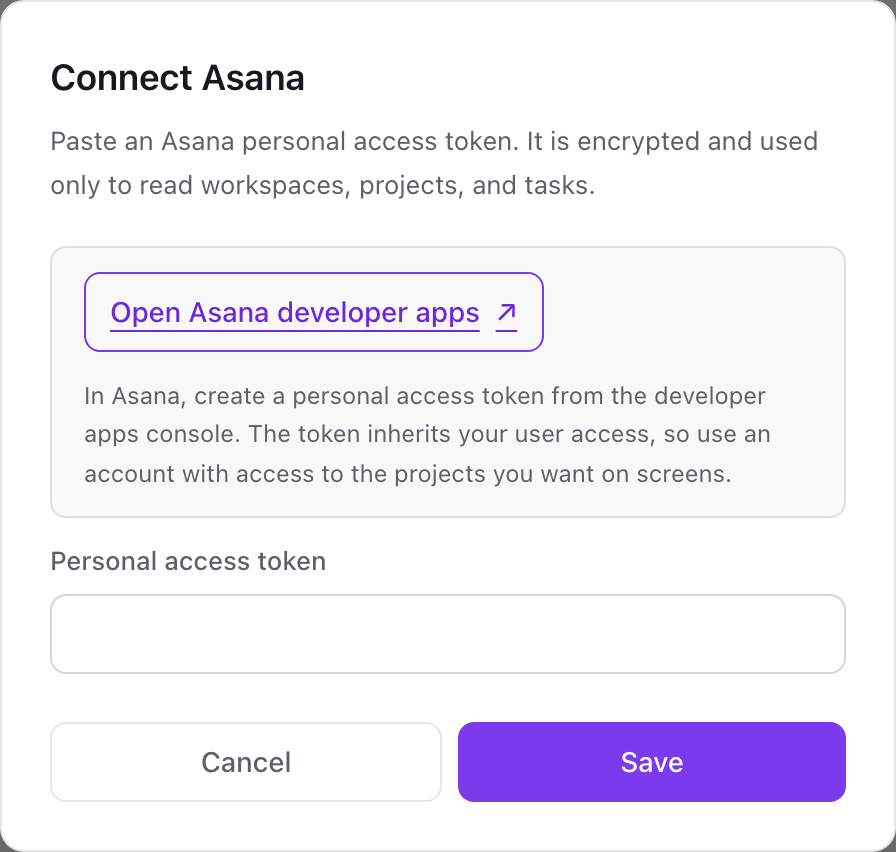
One Asana connection per workspace
One Asana token per Dance Party workspace, and it sees what its user sees. Create the token as someone who is a member of every project you want on screen, since a project that user cannot open will not appear.
An Asana personal access token acts as you, with the same access you have in Asana. Dance Party encrypts it at rest and never sends anything but GET requests. To cut it off, open the Asana developer console and deauthorize the Dance Party token.
From Asana to your office display
Once Asana shows Connected, the rest happens in plain English. No code, no drag-and-drop.
1. Describe it. Tell DJ Agent what you want to see.
New dashboard+ WidgetDescribe a widget in DJ Agent, or click + WidgetDJ AgentDATA SOURCESAsanaConnectedList the milestones in our Fall Launch Asana project.Send2. It gets built. The widget lands on your board with real Asana data.
New dashboard+ WidgetFall launch milestonesLiveMilestoneBeta opens to 20 customersMilestonePricing page liveMilestoneSales enablement doneMilestonePress briefingMilestoneGeneral availabilityDJ AgentDATA SOURCESAsanaConnectedList the milestones in our Fall Launch Asana project.Send3. Put it on a screen. Pair an Apple TV with the six-character code it shows, then assign the dashboard.

Asana dashboard questions
Can I show Asana projects on a TV in the office?
Yes. Paste an Asana personal access token, ask DJ Agent for a project's milestones or a list of projects, and assign it to a screen running the Dance Party Apple TV app.
Can it show overdue Asana tasks or who owns each task?
Not today. The Asana connection reads task and project names and task types, not due dates, assignees or completion, so overdue and workload views are not available yet.
Does the task count include finished tasks?
Yes. Asana lists completed tasks alongside open ones, and Dance Party does not yet read which is which, so a count is the size of the project.
Where do I create an Asana personal access token?
In the Asana developer console at app.asana.com/0/my-apps. Click Create new token, give it a name, and copy it. Asana shows it only once.
Why is one of our Asana projects missing?
The token's user is not a member of it. The token sees exactly what that user can open, so add them to the project or create the token as someone who can.
Can Dance Party change tasks in Asana?
No. It only sends GET requests to Asana. It cannot create, complete, assign or comment on a task.
More integrations
Put Asana on every office display
Connect Asana, describe the dashboard, and it runs on an Apple TV, refreshing on its own.
Get Started