
Stripe dashboard on Apple TV: MRR, payments, and balance on the office display
Stripe is the first place a founder looks each morning, usually on a phone, and usually alone. Dance Party reads Stripe with a restricted, read-only key and turns it into an Apple TV dashboard for the office display: estimated MRR against the goal, each payment as it lands, failed charges that need a follow-up, and the balance waiting to pay out.
- Read-only
- API key connection
- One connection per workspace
Popular Stripe dashboards
What teams running Stripe put on the screen, and what you would ask DJ Agent to get it.
Stripe payments feed
For founders, finance, and customer success
Seeing each charge land is the most direct signal a business has. Failed charges in red next to the successes turn a missed card update into a same-day email instead of a churned account next month.
- The most recent charges with amount, currency, and time
- Status of each charge: succeeded, pending, or failed
- The charge description and the Stripe customer it belongs to
Ask DJ Agent“Show our last six Stripe charges with amount, description, and status, and mark failed charges in red.”
Large payment celebration
For the whole company
A new annual plan is a moment the sales and product teams both earned. Putting the latest large payment on the wall makes the win visible to the people who never open Stripe.
- The latest succeeded charge above an amount you set
- Its description, amount, and currency
- The time it landed
Ask DJ Agent“Celebrate the latest Stripe charge over $1,000 with its amount and description.”
Stripe cash and payment health
For the founder and the finance lead
Available balance is what Stripe can pay out now, and pending is what is still clearing. Next to how many recent charges failed, it answers both cash questions before the next payroll run.
- Available balance, by currency
- Pending balance, by currency
- Succeeded and failed charges among the most recent payments
Ask DJ Agent“Show our Stripe available and pending balance in USD, plus how many of the last 50 charges succeeded and how many failed.”
New Stripe customers this week
For growth and sales teams
A new Stripe customer is a signup that became a paying account. Counting them by day shows whether a launch or a campaign moved paid conversions, not just trials.
- Customers created per day, from the most recent 100 customers
- New customers this week
- Active subscription count
Ask DJ Agent“Show new Stripe customers per day for the last 7 days as bars, with this week's total.”
What Dance Party reads from Stripe
Dance Party reads Stripe's API with a restricted key over GET requests only. It reads four areas of your account and nothing else. Stripe has no MRR endpoint, so MRR is estimated from your active subscriptions.
Balance
Stripe API docs ↗- Available and pendingFunds available to pay out and funds still pending, in each currency.
Charges
Stripe API docs ↗- Recent chargesUp to the 100 most recent charges with amount, currency, status, time, description, and customer ID.
Customers
Stripe API docs ↗- Recent customersUp to the 100 most recently created customers with email and created date, and whether more exist.
Subscriptions
Stripe API docs ↗- Active subscriptionsUp to 100 active subscriptions with each one's monthly amount.
- Estimated MRRMonthly recurring revenue estimated from active subscription prices, with yearly, weekly, and daily prices normalized to a month.
How to connect Stripe
Before you start
- An owner or admin of your Dance Party workspace makes the Stripe connection.
- A Stripe user who can create API keys, such as an Administrator or Developer
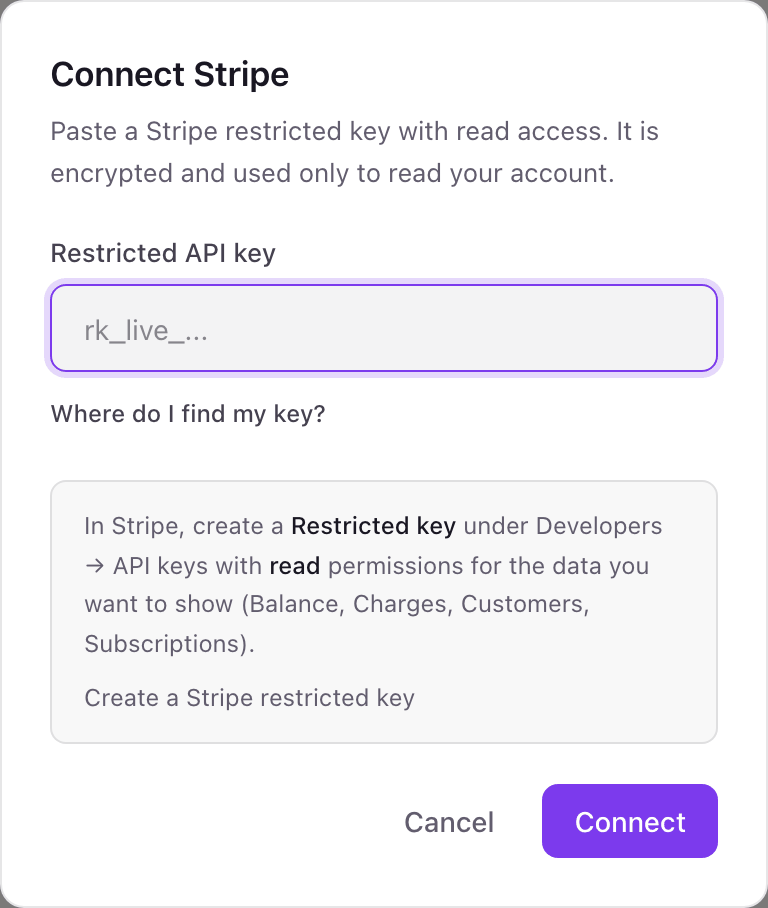
- A restricted key (rk_live_...) with Read access to Balance, Charges, Customers, and Subscriptions. Do not paste your secret key
- 1On the Integrations page in Dance Party, click Connect Stripe.
- 2Click Where do I find my key?, then Create a Stripe restricted key. In Stripe, name the key Dance Party.Create a Stripe restricted key ↗
- 3Set Balance, Charges, Customers, and Subscriptions to Read, leave everything else at None, and create the key.
- 4Paste the key into Restricted API key and click Connect.
- 5Dance Party reads your balance to check the key, then the Stripe card shows Connected.
One Stripe connection per workspace
A workspace connects one Stripe account. A business with a second Stripe account, such as a separate entity or a separate product, connects it in a second Dance Party workspace. On a Stripe Connect platform, the key reads the platform account, not your connected accounts.
Read-only. A restricted key set to Read on four resources cannot refund, charge, cancel a subscription, or pay out, and Dance Party only sends GET requests. Roll or delete the key on Stripe's API keys page whenever you want to cut access.
From Stripe to your office display
Once Stripe shows Connected, the rest happens in plain English. No code, no drag-and-drop.
1. Describe it. Tell DJ Agent what you want to see.
New dashboard+ WidgetDescribe a widget in DJ Agent, or click + WidgetDJ AgentDATA SOURCESStripeConnectedShow our last six Stripe charges with amount, description, and status, and mark failed charges in red.Send2. It gets built. The widget lands on your board with real Stripe data.
New dashboard+ WidgetLatest Stripe chargesLive$4,800.00Pro plan, annualSucceeded · 9:42 a.m.$490.00Team plan, monthlySucceeded · 9:18 a.m.$490.00Team plan, monthlyFailed · 8:55 a.m.$49.00Starter plan, monthlySucceeded · 8:31 a.m.$12,500.00Invoice 2026-0914Pending · 8:02 a.m.DJ AgentDATA SOURCESStripeConnectedShow our last six Stripe charges with amount, description, and status, and mark failed charges in red.Send3. Put it on a screen. Pair an Apple TV with the six-character code it shows, then assign the dashboard.

Stripe dashboard questions
Can I show a Stripe dashboard on an office screen through Apple TV?
Yes. Connect Stripe with a restricted key, describe the dashboard to DJ Agent, and assign it to any screen running the Dance Party Apple TV app.
How does Dance Party calculate Stripe MRR?
It estimates it. Stripe has no MRR endpoint, so Dance Party adds up active subscription prices and converts yearly, weekly, and daily prices to a monthly figure. Tiered prices and discounts are not included, and it reads up to 100 active subscriptions.
Can it show total revenue for the month?
Only for lower volumes. Dance Party reads the 100 most recent charges, so a month total is exact only if the month has 100 charges or fewer.
Can it show churn or MRR movements?
No. Dance Party reads active subscriptions, not cancellations or upgrades over time. For new, expansion, and churned MRR, connect ChartMogul alongside Stripe.
Should I use my Stripe secret key?
No. Create a restricted key with Read access to Balance, Charges, Customers, and Subscriptions. A secret key can move money, and Dance Party never needs that.
Can I connect two Stripe accounts?
Not in one workspace. Each workspace holds one Stripe connection, so a second account goes in a second workspace.
More integrations
Put Stripe on every office display
Connect Stripe, describe the dashboard, and it runs on an Apple TV, refreshing on its own.
Get Started