
Shopify dashboards that keep today's orders on the Apple TV office display
A Shopify store's day is orders in and boxes out. Dance Party puts both on the office display: today's orders and sales in your store's own time zone, the unfulfilled backlog, and the products about to run out, as a Shopify dashboard running on an Apple TV.
- Read-only
- API key connection
- One connection per workspace
Popular Shopify dashboards
What teams running Shopify put on the screen, and what you would ask DJ Agent to get it.
Fulfillment backlog
For the warehouse, packing, and operations teams
Shopify's order search already knows what has not shipped. A count of unfulfilled and on-hold orders on the packing-room screen tells the team whether they are ahead of the day or behind it.
- Orders with fulfillment status unfulfilled
- Partially fulfilled orders
- Orders on hold
- Orders with payment still pending
Ask DJ Agent“Show a Shopify fulfillment queue: unfulfilled orders, partially fulfilled, on hold, and payment pending, each as a count.”
Order ticker
For the whole company, especially right after a launch or an email send
Watching order numbers tick past after a product drop is the moment a small brand feels its own momentum. The feed shows the order number, total, and status, and never a customer's name.
- The newest orders, with order number and time placed
- Order total in your store currency
- Payment status and fulfillment status of each order
Ask DJ Agent“Show the latest 6 Shopify orders as a feed with order number, total, and payment and fulfillment status. No customer names.”
Low-stock watchlist
For merchandising and purchasing
A bestseller that hits zero on a Friday costs a weekend of sales. Products with the lowest total inventory, on a screen the buyer walks past, get reordered before they sell out.
- Active products with total inventory under a threshold you pick
- Units on hand across all locations for each product
- Product status, active or draft
Ask DJ Agent“List active Shopify products with fewer than 10 units in total inventory, lowest first.”
Customer milestone
For founders and the marketing team
The customer count only goes up, which makes it a good number for a wall. A goal like 20,000 customers gives the team something to cheer when the store crosses it.
- Total customers in your Shopify store
- Progress toward a customer goal you set
- Orders placed today
Ask DJ Agent“Show our Shopify customer count as progress toward 20,000 customers.”
What Dance Party reads from Shopify
Dance Party reads Shopify through the GraphQL Admin API with a custom app token you create. Every request is a query. Mutations are refused before they are sent, and customer names, emails, and addresses are never requested.
Orders and sales
Shopify API docs ↗- Sales todayToday's exact order count and the summed order total, in your store's time zone. The total sums up to 100 orders and is marked partial on busier days.
- Order countsAn exact count for any Shopify order search, such as fulfillment_status:unfulfilled.
- Recent ordersOrder number, time placed, total, payment status, and fulfillment status.
Products and inventory
Shopify API docs ↗- ProductsTitle, vendor, status, and total inventory across locations, most recently updated first.
Store and customers
Shopify API docs ↗- ShopStore name, domains, currency, time zone, and plan.
- Customer countHow many customers the store has. Only the number, never the people.
How to connect Shopify
Before you start
- An owner or admin of your Dance Party workspace makes the Shopify connection.
- Your store's .myshopify.com domain, even if customers shop on a custom domain
- A Shopify custom app created in your admin, with read_orders, read_products, and read_customers, and its Admin API access token (shpat_). The store owner or a staff member with permission to develop apps can create one.
- Shopify stopped letting stores create new admin custom apps on January 1, 2026. Apps built since then live in the Dev Dashboard, and their tokens expire every 24 hours, so use a token from an existing admin custom app where you have one.
- 1In Shopify admin, open Settings, then Apps and sales channels, then Develop apps, and create a custom app.Open Shopify custom apps ↗
- 2Under Admin API scopes, tick read_orders, read_products, and read_customers. Nothing else is needed.
- 3Install the app and copy the Admin API access token that starts with shpat_. Shopify shows it only once.
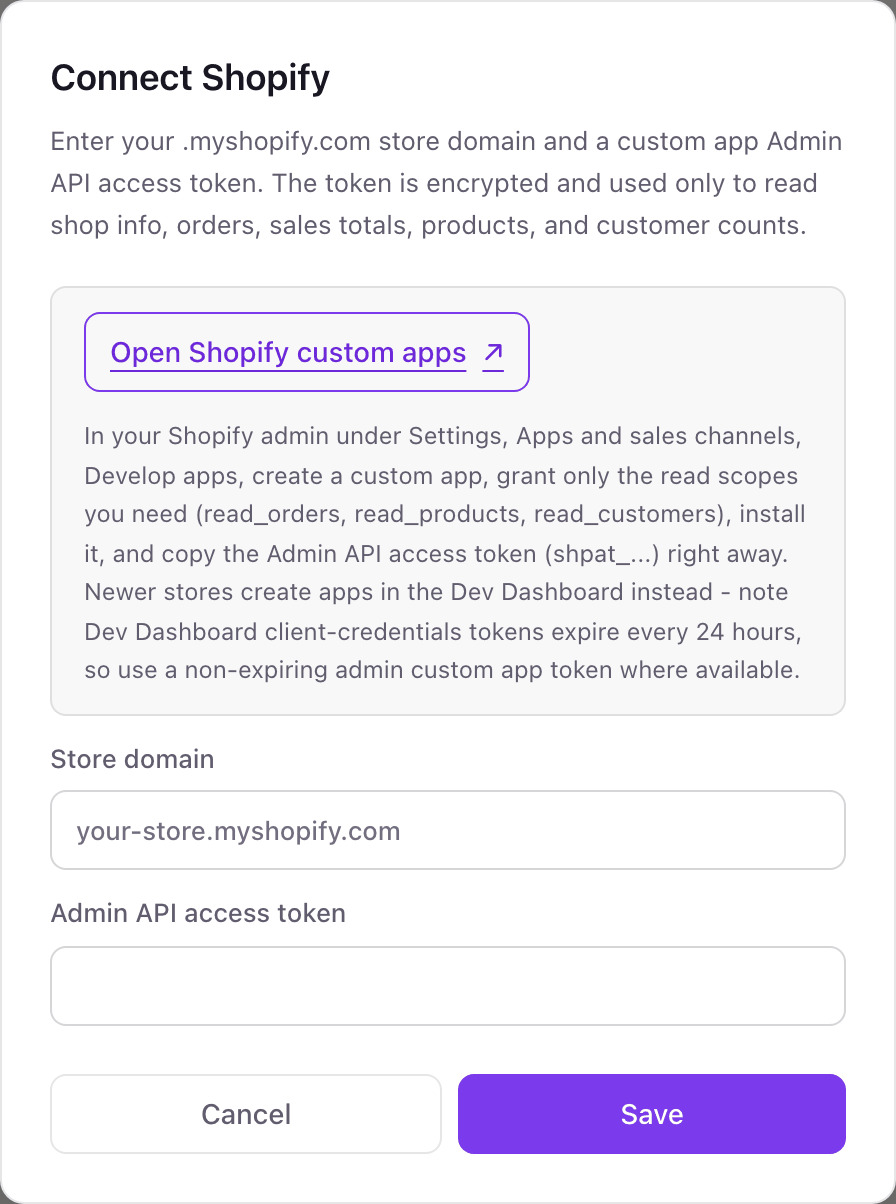
- 4In Dance Party, click Connect Shopify. Enter your your-store.myshopify.com address in Store domain and paste the token into Admin API access token.
- 5Click Save. Dance Party reads your shop's name to check the token, and the card shows Connected.
One Shopify connection per workspace
One Shopify store per workspace. A brand with a second store, such as a separate wholesale or international store, connects it in a second Dance Party workspace.
The token only has the read scopes you tick on the custom app, and Dance Party only sends query documents with it. To cut access, uninstall the custom app in Shopify under Settings, Apps and sales channels. The token stops working immediately.
From Shopify to your office display
Once Shopify shows Connected, the rest happens in plain English. No code, no drag-and-drop.
1. Describe it. Tell DJ Agent what you want to see.
New dashboard+ WidgetDescribe a widget in DJ Agent, or click + WidgetDJ AgentDATA SOURCESShopifyConnectedShow a Shopify fulfillment queue: unfulfilled orders, partially fulfilled, on hold, and payment pending, each as a count.Send2. It gets built. The widget lands on your board with real Shopify data.
New dashboard+ WidgetFulfillment backlogLive38Unfulfilled6Partially fulfilled3On hold9Payment pendingDJ AgentDATA SOURCESShopifyConnectedShow a Shopify fulfillment queue: unfulfilled orders, partially fulfilled, on hold, and payment pending, each as a count.Send3. Put it on a screen. Pair an Apple TV with the six-character code it shows, then assign the dashboard.

Shopify dashboard questions
Can I show a Shopify sales dashboard on an Apple TV?
Yes. Connect your store, ask DJ Agent for the dashboard in a sentence, and assign it to a screen running the Dance Party Apple TV app.
Does sales today use my store's time zone?
Yes. Today starts at midnight in the time zone set on your Shopify store, not the viewer's and not UTC.
Is sales today the same as Shopify's net sales?
No. It sums each order's current total, which includes tax and shipping and reflects edits and refunds. Shopify Analytics net sales removes those, so the two numbers will differ.
Why can't a widget see orders older than 60 days?
Shopify limits apps to the last 60 days of orders unless the app also has the read_all_orders scope. Add that scope to the custom app if you want longer history.
Will customer names or emails show on the screen?
No. Dance Party never requests customer names, emails, or addresses from Shopify. Order feeds show order numbers and totals.
I only see the Dev Dashboard, not Develop apps. Will it work?
Not reliably yet. Dev Dashboard apps get tokens that expire every 24 hours, and Dance Party stores one token, so the dashboard would stop the next day. It needs a token from an admin custom app.
Can Dance Party edit my Shopify catalog or orders?
No. The token only carries read scopes, and Dance Party refuses to send any GraphQL mutation.
More integrations
Put Shopify on every office display
Connect Shopify, describe the dashboard, and it runs on an Apple TV, refreshing on its own.
Get Started