
Chargebee subscription dashboards on an Apple TV office display
Chargebee runs the billing, and the questions the team asks it are always the same: who started a trial, who converted, who cancelled, and which invoices have not been paid. Dance Party answers them on the office display with a Chargebee dashboard running on an Apple TV.
- Read-only
- API key connection
- One connection per workspace
Popular Chargebee dashboards
What teams running Chargebee put on the screen, and what you would ask DJ Agent to get it.
Trial conversion board
For sales, customer success, and the founder
In a trial-led business, the week's revenue is decided by which trials convert. Trials ending in the next few days, on a shared screen, are the accounts sales should be calling today.
- Subscriptions in trial and their trial end dates
- Trials ending in the next 7 days
- Trials that became active this week
- Trials cancelled before converting
Ask DJ Agent“From recent Chargebee subscriptions, show how many are in trial, how many trials end in the next 7 days, and how many converted to active this week.”
Payment due watch
For finance and whoever runs dunning follow-up
Chargebee's dunning retries in the background, but the invoices sitting in payment due are revenue at risk. Listing them with the amount owed puts a name on every failed card before it becomes churn.
- Invoices with status payment due or not paid
- Amount due on each invoice
- Invoice date and due date
- The customer the invoice belongs to
Ask DJ Agent“List Chargebee invoices in payment due or not paid, largest amount due first, with the customer and due date.”
New subscription bell
For the whole company
A new paid subscription is the clearest win a subscription company has. Showing the customer and plan as soon as the subscription appears in Chargebee gives the team a reason to look up from their desks.
- The newest subscription, its plan, and its amount
- The customer's company name
- New subscriptions created this week
Ask DJ Agent“Celebrate each new Chargebee subscription with the customer's company, the plan, and the amount.”
Invoices paid this week
For finance and leadership
Collected cash is the number a subscription business runs on. Paid invoices by day show whether renewals are landing on schedule or bunching up behind failed payments.
- Invoices paid per day over the last week
- Total amount paid in the week
- Invoices voided in the same week
Ask DJ Agent“Chart Chargebee invoices paid per day for the last 7 days, with the total amount paid as the headline.”
What Dance Party reads from Chargebee
Dance Party reads Chargebee with a read-only API key. Each read returns up to the 100 most recent customers, subscriptions, or invoices, so a widget summarizes your latest records rather than your whole history.
Subscriptions
Chargebee API docs ↗- SubscriptionsStatus (in trial, active, non renewing, paused, cancelled), plan items, trial end, start, and cancellation dates.
Invoices
Chargebee API docs ↗- InvoicesStatus, total, amount paid, amount due, invoice date, due date, and paid date.
Customers
Chargebee API docs ↗- CustomersCompany name and when each customer was created, for new-customer counts.
How to connect Chargebee
Before you start
- An owner or admin of your Dance Party workspace makes the Chargebee connection.
- A Chargebee user who can open Settings, Configure Chargebee, API Keys and Webhooks
- A Read-Only Key. Read-only: All works, or Read-only: Restricted with transactional data access.
- Your site name, the part before .chargebee.com. Live and test sites use different keys.
- 1In Chargebee, open Settings, then Configure Chargebee, then API Keys and Webhooks, and click Add API Key.Chargebee API keys guide ↗
- 2Choose Read-Only Key, pick All or Restricted with transactional data, and click Create Key. Copy the key.
- 3In Dance Party, click Connect Chargebee. Enter only your site prefix in Chargebee site, such as acme for acme.chargebee.com, and paste the key into API key.
- 4Click Save. Dance Party reads a single Chargebee customer as a test, then the card reads Connected.
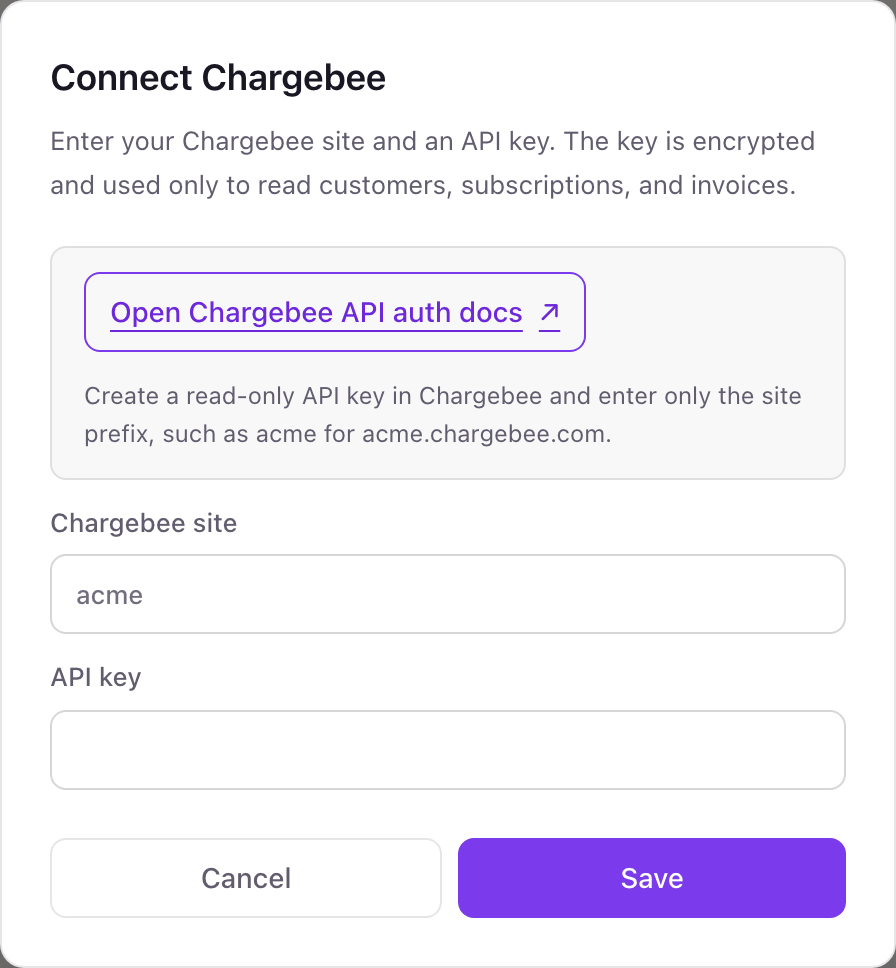
One Chargebee connection per workspace
One Chargebee site per workspace. Your live site and your test site (acme-test) are separate sites with separate keys, so pick the one the screen should show.
A Chargebee Read-Only Key cannot create subscriptions, issue credits, or charge a card, and Dance Party only sends GET requests with it. Delete the key under API Keys and Webhooks in Chargebee to revoke it.
From Chargebee to your office display
Once Chargebee shows Connected, the rest happens in plain English. No code, no drag-and-drop.
1. Describe it. Tell DJ Agent what you want to see.
New dashboard+ WidgetDescribe a widget in DJ Agent, or click + WidgetDJ AgentDATA SOURCESChargebeeConnectedFrom recent Chargebee subscriptions, show how many are in trial, how many trials end in the next 7 days, and how many converted to active this week.Send2. It gets built. The widget lands on your board with real Chargebee data.
New dashboard+ WidgetTrials this weekLiveIn trial23Ending in 7 days9call theseConverted6+2 vs last weekCancelled in trial2DJ AgentDATA SOURCESChargebeeConnectedFrom recent Chargebee subscriptions, show how many are in trial, how many trials end in the next 7 days, and how many converted to active this week.Send3. Put it on a screen. Pair an Apple TV with the six-character code it shows, then assign the dashboard.

Chargebee dashboard questions
Can I put a Chargebee dashboard on a TV?
Yes. Connect Chargebee with a read-only key, describe the dashboard, and assign it to a screen running the Dance Party Apple TV app.
Can it show my Chargebee MRR?
Not as a company-wide figure. Dance Party reads recent subscriptions, not Chargebee's revenue reports. For true MRR, ARR, and churn, connect ChartMogul, which imports from Chargebee.
Does it read my whole subscription history?
No. Each read returns up to the 100 most recent records. For a younger company that is often everything; for a larger one, widgets describe the latest activity.
What goes in the Chargebee site field?
Only the prefix. For acme.chargebee.com, enter acme. For your test site, enter acme-test and use a test site key.
Which key type should I create?
A Read-Only Key. Read-only: All works, and so does Read-only: Restricted with transactional data access turned on.
Can Dance Party change anything in Chargebee?
No. A read-only key cannot write, and Dance Party only sends GET requests for customers, subscriptions, and invoices.
More integrations
Put Chargebee on every office display
Connect Chargebee, describe the dashboard, and it runs on an Apple TV, refreshing on its own.
Get Started