
Paddle billing on the office display: an Apple TV dashboard for your SaaS
Paddle is the merchant of record for your SaaS, so every checkout, renewal, and failed payment runs through it. Dance Party puts that activity on an office display: new transactions as they complete, subscriptions by status, and the renewals that need rescuing, as a Paddle dashboard on an Apple TV.
- Read-only
- API key connection
- One connection per workspace
Popular Paddle dashboards
What teams running Paddle put on the screen, and what you would ask DJ Agent to get it.
Subscription health
For founders and the whole product team
Paddle's subscription statuses are the simplest read on the business: how many are paying, trialing, paused, or past due. On a shared screen, a jump in past due gets noticed the day it happens.
- Subscriptions by Paddle status: active, trialing, past due, paused
- Subscriptions canceled recently
- Subscriptions created this week
Ask DJ Agent“Count our recent Paddle subscriptions by status: active, trialing, past due, and paused.”
Past-due renewals
For customer success and support
Paddle retries failed renewals on its own, but a customer with an expired card often needs one friendly email. The list of past-due subscriptions is that outreach queue.
- Subscriptions with status past due
- Plan and billing interval of each
- Price of the plan being renewed
- The subscription's next billed date
Ask DJ Agent“List Paddle subscriptions that are past due with plan, amount, and next billed date, oldest first.”
Scheduled cancellations
For customer success and the founder
A Paddle subscription with a scheduled cancel is still active and still reachable. Seeing who clicked cancel, and when access ends, gives the team days to save the account instead of reading about it afterward.
- Active subscriptions with a scheduled change to cancel
- The date the cancellation takes effect
- Plan and price of each
Ask DJ Agent“Show Paddle subscriptions with a scheduled cancellation, soonest first, with plan and the date it takes effect.”
New Paddle customers by day
For marketing and growth
Every Paddle checkout creates a customer, so new customers per day is a clean read on whether last week's launch or campaign did anything.
- New customers created per day over the last week
- New customers this week in total
- Transactions completed from checkout versus renewals
Ask DJ Agent“Chart new Paddle customers per day for the last 7 days, with the weekly total as the headline.”
What Dance Party reads from Paddle
Dance Party reads Paddle Billing with an API key you create. Each read returns your most recent records, newest first: up to 100 customers or subscriptions, and up to 30 transactions, the most Paddle returns in one page.
Transactions
Paddle API docs ↗- TransactionsStatus, origin (checkout or subscription renewal), items, currency, totals, and when each was billed.
Subscriptions
Paddle API docs ↗- SubscriptionsStatus, plan items and prices, billing interval, next billed date, and any scheduled change such as a cancel or pause.
Customers
Paddle API docs ↗- CustomersName and creation date, for new-customer counts.
How to connect Paddle
Before you start
- An owner or admin of your Dance Party workspace makes the Paddle connection.
- A Paddle Billing account. Paddle Classic accounts use a different API and are not supported.
- A Paddle user who can open Developer tools and create API keys
- An API key with the customer.read, subscription.read, and transaction.read permissions
- 1In Paddle, open Developer tools, then Authentication, click the API keys tab, and click New API key.Paddle API key permissions ↗
- 2Name the key, set an expiry date, and grant read permission for customers, subscriptions, and transactions only. Copy the key. Paddle shows it once.
- 3Back in Dance Party, click Connect Paddle and paste the pdl_live_ key into the API key field.
- 4Leave Environment blank or type production. Type sandbox only for a key from a Paddle sandbox account (it starts pdl_sdbx_).
- 5Click Save. Dance Party reads one customer to check the key, and the card shows Connected.
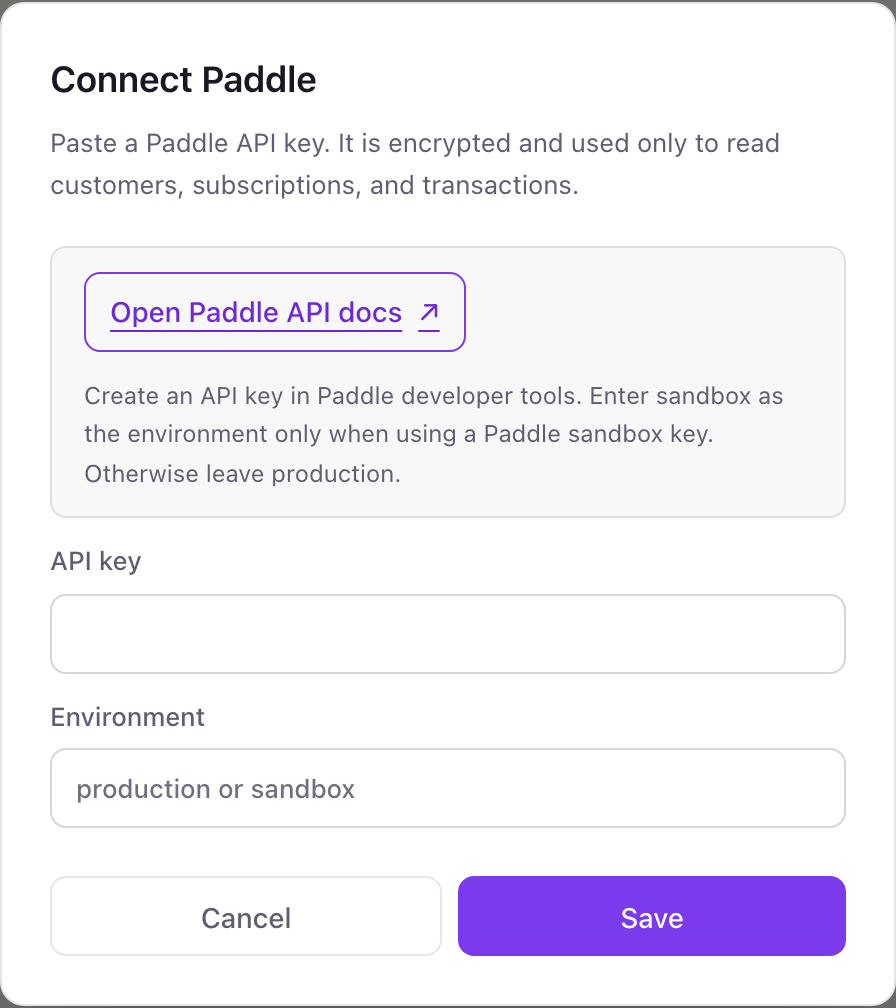
One Paddle connection per workspace
One Paddle account per workspace, either live or sandbox. Paddle sandbox is a separate account with separate keys, so a sandbox dashboard needs its own workspace.
Grant the key read permissions only and it cannot refund, cancel, or change a price. Dance Party only sends GET requests with it either way. Revoke the key under Developer tools, Authentication in Paddle and access ends.
From Paddle to your office display
Once Paddle shows Connected, the rest happens in plain English. No code, no drag-and-drop.
1. Describe it. Tell DJ Agent what you want to see.
New dashboard+ WidgetDescribe a widget in DJ Agent, or click + WidgetDJ AgentDATA SOURCESPaddleConnectedCount our recent Paddle subscriptions by status: active, trialing, past due, and paused.Send2. It gets built. The widget lands on your board with real Paddle data.
New dashboard+ WidgetSubscriptions by statusLive84Active12Trialing3Past due1PausedDJ AgentDATA SOURCESPaddleConnectedCount our recent Paddle subscriptions by status: active, trialing, past due, and paused.Send3. Put it on a screen. Pair an Apple TV with the six-character code it shows, then assign the dashboard.

Paddle dashboard questions
Can I show Paddle billing on an Apple TV in the office?
Yes. Connect a Paddle API key, describe the dashboard to DJ Agent, and assign it to an Apple TV running Dance Party.
Why did my Paddle dashboard stop updating?
The key probably expired. Paddle API keys expire after 90 days by default. Create a new key with a later expiry and reconnect Paddle.
Does it work with Paddle Classic?
No. Dance Party uses the Paddle Billing API. Accounts still on Paddle Classic cannot connect.
Can it show Paddle MRR?
Not as a true MRR figure. Dance Party reads recent subscriptions and transactions, not a revenue report. For MRR and churn, connect ChartMogul, which imports Paddle data.
Which permissions does the Paddle key need?
Read access to customers, subscriptions, and transactions: customer.read, subscription.read, and transaction.read. Nothing else.
Can Dance Party change subscriptions or issue refunds?
No. Dance Party only sends read requests, and a key with only read permissions cannot make changes in Paddle.
More integrations
Put Paddle on every office display
Connect Paddle, describe the dashboard, and it runs on an Apple TV, refreshing on its own.
Get Started