
Vercel deployments on an Apple TV dashboard the whole team sees
Vercel teams push to production many times a day, and every deploy carries a branch, a commit message, and a build time. Dance Party turns that stream into a Vercel dashboard on the office display: what just went live, what failed to build, and which projects build slowly, running on Apple TV.
- Read-only
- API key connection
- One connection per workspace
Popular Vercel dashboards
What teams running Vercel put on the screen, and what you would ask DJ Agent to get it.
Production release feed
For engineering, product, and support
When a deploy reaches production, the commit message on the wall tells product and support what just changed. Nobody has to post it in a channel, and a release that went out at 4 p.m. is visible at 4 p.m.
- Latest production deployments with project, branch, and commit message
- State of each deploy: ready, building, error, queued, or canceled
- Who triggered each deploy
Ask DJ Agent“Show our last 10 Vercel production deployments with project, commit message, who shipped it, and whether it is ready.”
Deploy outcomes board
For developers waiting on preview builds
A failed preview build blocks whoever is waiting on review. Counting recent deploys by state shows whether errors are one bad branch or a pattern across projects.
- Recent deploys that are ready, in error, building, or canceled
- Production and preview deploys counted separately
- The branch and commit behind each failed deploy
Ask DJ Agent“From our last 100 Vercel deployments, count ready, error, building, and canceled, and list the branches whose latest deploy failed.”
Build time by project
For platform and frontend engineers
Build minutes creep up one dependency at a time. Average build duration per project, taken from recent deploys, shows which app got slow before the team feels it in every pull request.
- Average build duration per project
- Time from deploy created to ready
- Framework Vercel detected for each project
Ask DJ Agent“Chart average Vercel build time per project across recent deployments, slowest first.”
Production deploys per day
For engineering leads
Deploy frequency is one of the four DORA metrics. A daily count of production deploys over the last two weeks shows the team's shipping rhythm, and a quiet stretch shows up while it is still happening.
- Production deploys per day, counted from your last 100 deploys
- Change against the week before
- Share of deploys that reached ready
Ask DJ Agent“Show Vercel production deploys per day over the last 14 days as a trend, with this week against last week.”
What Dance Party reads from Vercel
Dance Party reads projects and deployments from the Vercel REST API with an access token you create, up to 100 at a time, using GET requests only. It does not read Web Analytics, Speed Insights, logs, domains, or environment variables.
Deployments
Vercel API docs ↗- Deploy stateReady, building, error, queued, or canceled for each deployment.
- TargetWhether each deploy went to production or is a preview.
- Branch and commitThe Git branch, commit SHA, and commit message from GitHub, GitLab, or Bitbucket.
- DurationsBuild time, and total time from created to ready.
- Creator and sourceWho triggered the deploy and whether it came from Git, the CLI, or a redeploy.
Projects
Vercel API docs ↗- ProjectsEvery project the token can see, with its name and framework.
How to connect Vercel
Before you start
- An owner or admin of your Dance Party workspace makes the Vercel connection.
- A Vercel account that belongs to the team whose projects you want to show
- A Vercel access token scoped to that team with All Projects. A single-project token will not connect, because Dance Party checks the token against your Vercel user.
- A Team ID only if you use a Full Account token and the projects live under a team
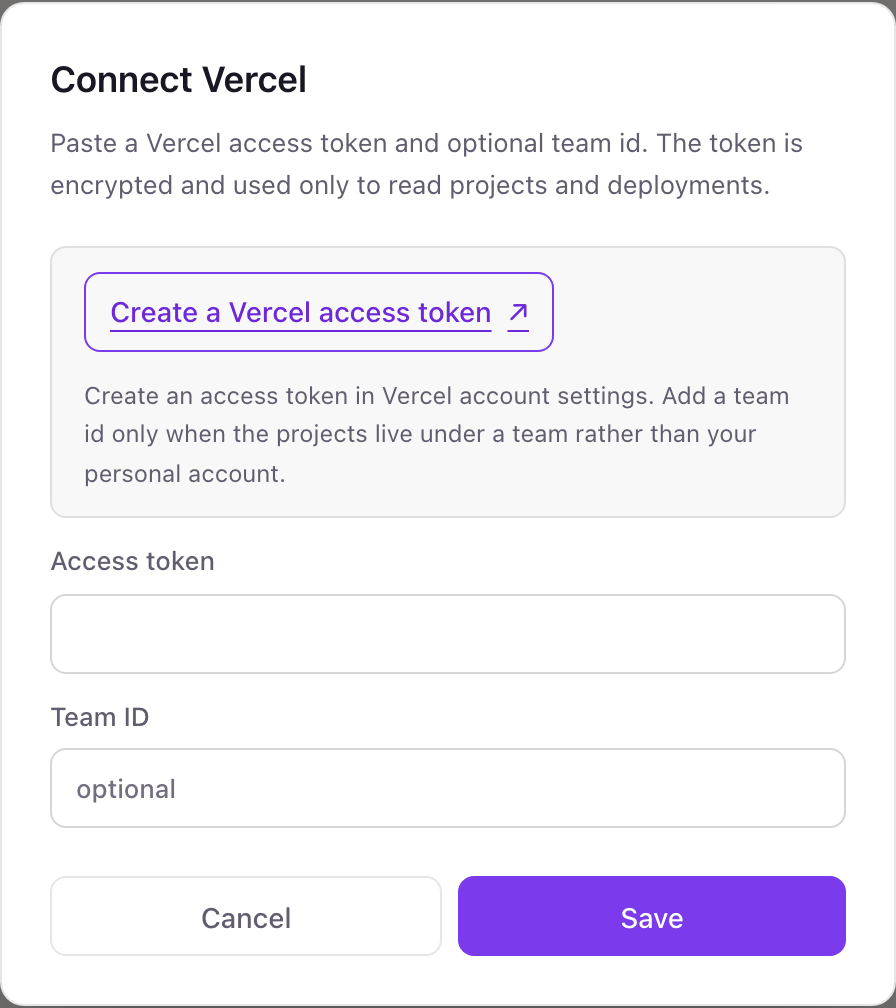
- 1From Dance Party's Integrations page, click Connect Vercel to open the token pop-up.
- 2Open Vercel's Account Tokens page, name the token Dance Party, and under Scope pick your team, then All Projects.Create a Vercel access token ↗
- 3Choose an expiration and click Create, then paste the token into Access token. Vercel shows it once.
- 4Leave Team ID blank for a team-scoped token. With a Full Account token, paste the Team ID from your team's Settings, General page.
- 5Click Save. Dance Party reads your Vercel user to check the token, and the card shows Connected.
One Vercel connection per workspace
A workspace connects one Vercel token, which covers one team or your personal account. An agency with client projects spread across several Vercel teams needs a Dance Party workspace per team.
Vercel tokens cannot be made read-only, so the limit is on Dance Party's side: it only calls the list endpoints for projects and deployments, and it stores the token encrypted. Scope the token to one team, and delete it on the Account Tokens page to cut access.
From Vercel to your office display
Once Vercel shows Connected, the rest happens in plain English. No code, no drag-and-drop.
1. Describe it. Tell DJ Agent what you want to see.
New dashboard+ WidgetDescribe a widget in DJ Agent, or click + WidgetDJ AgentDATA SOURCESVercelConnectedShow our last 10 Vercel production deployments with project, commit message, who shipped it, and whether it is ready.Send2. It gets built. The widget lands on your board with real Vercel data.
New dashboard+ WidgetShipped to productionLive2 min agoweb-appfix checkout tax rounding, by dana38 min agodocsadd API pagination guide, by sam1 h agodashboardnew usage chart on billing page, by priya3 h agoweb-appmove search to edge config, by marcusDJ AgentDATA SOURCESVercelConnectedShow our last 10 Vercel production deployments with project, commit message, who shipped it, and whether it is ready.Send3. Put it on a screen. Pair an Apple TV with the six-character code it shows, then assign the dashboard.

Vercel dashboard questions
Can I show Vercel deployments on an Apple TV?
Yes. Connect Vercel with an access token, ask DJ Agent for a deploy feed, and assign it to a screen running the Dance Party Apple TV app.
Does it show Vercel Web Analytics or Speed Insights?
No. The connection reads projects and deployments only, so page views and Core Web Vitals from Vercel are not available today.
Do I need to fill in the Vercel Team ID?
Only with a Full Account token. A token scoped to a team already points at that team, so Team ID can stay blank.
Can I use a project-scoped Vercel token?
No. Dance Party checks the token by reading your Vercel user when you save, and Vercel refuses user-level reads for project-scoped tokens. Scope it to the team with All Projects.
What happens when the Vercel token expires?
The widgets keep their last result and show when it was fetched, until you reconnect with a new token. Pick an expiration that matches how long the screen should run.
Can Dance Party redeploy, roll back, or change settings in Vercel?
No. It only lists projects and deployments. Promotions, rollbacks, environment variables, and domains stay in Vercel.
More integrations
Put Vercel on every office display
Connect Vercel, describe the dashboard, and it runs on an Apple TV, refreshing on its own.
Get Started