
Sentry errors and issues as an Apple TV dashboard on the engineering office display
Sentry catches every exception, but its issue stream only helps the person who has it open. Dance Party reads your Sentry organization and builds an Apple TV dashboard for the engineering office display: error events in the last 24 hours, the unresolved issues hitting the most users, and anything new or regressed since this morning.
- Read-only
- API key connection
- One connection per workspace
Sentry dashboard examples
What teams running Sentry put on the screen, and what you would ask DJ Agent to get it.
Top unresolved issues by users affected
For the engineering team and on-call
Event counts overweight one noisy bot; users affected is what customers feel. The five unresolved issues hitting the most users, with their short IDs, give standup a fix list that maps to real people.
- Unresolved issues sorted by users affected
- Short ID, title, and project for each
- Events and users per issue over the period you choose
- When each issue was first and last seen
Ask DJ Agent“List the top 5 unresolved Sentry issues from the last 24 hours sorted by users affected, with short ID, title, and user count.”
Error events by project
For engineering managers and platform teams
When error volume jumps, the first question is which service. Accepted error events per Sentry project for the last day ranks them, so the owner of the loudest one knows before anyone files a ticket.
- Accepted error events per project over 24 hours or 7 days
- Unresolved issues per project
- Organization-wide error events for the same period
Ask DJ Agent“Rank our Sentry projects by accepted error events in the last 24 hours, with the organization total on top.”
New issues per project today
For the team that just shipped
A new issue in the hour after a deploy is almost always the deploy. One tile per project, counting issues first seen today, goes amber or red on the wall while the change is still fresh in someone's head.
- Unresolved issues first seen in the last 24 hours, per project
- Highest level among them, such as error or fatal
- Projects with no new issues, shown green
Ask DJ Agent“For each Sentry project, count unresolved issues first seen in the last 24 hours as status tiles, green at zero, red at 3 or more.”
Issue triage queue
For the on-call engineer
Sentry marks issues as new, regressed, or escalating so triage can start with the ones that changed. Four counts from those searches tell on-call where to look first without opening the issue stream.
- Issues new in the last 24 hours
- Regressed issues, resolved before and back again
- Escalating issues
- Unresolved issues with no assignee
Ask DJ Agent“Show four Sentry counts for today: new issues, regressed issues, escalating issues, and unassigned unresolved issues.”
What Dance Party reads from Sentry
Dance Party reads one Sentry organization on sentry.io through Sentry's REST API, with an auth token that has read scopes only. Every request is a GET, and totals come from Sentry's own event counts rather than a sample of issues.
Issues
Sentry API docs ↗- Issues by searchAny Sentry issue search, like is:unresolved or is:regressed, over a period such as 24h or 14d. Up to 100 issues per widget.
- Issue detailsShort ID, title, level, status, events, users affected, first and last seen, and project.
- Unresolved issue countUnresolved issues in the period, counted page by page and marked when the count is incomplete.
Event counts
Sentry API docs ↗- Accepted error eventsErrors Sentry accepted in the period, for the whole organization or chosen projects.
Projects
Sentry API docs ↗- ProjectsEvery project the token can see, with slug, name, and platform.
How to connect Sentry
Before you start
- An owner or admin of your Dance Party workspace makes the Sentry connection.
- A Sentry organization on sentry.io. Self-hosted Sentry is not supported.
- A Sentry personal auth token with org:read, project:read, and event:read, created by a member who can see the projects you want to show
- 1Click Connect Sentry on the Sentry card in Dance Party Integrations.
- 2Enter your Organization slug: the part before .sentry.io, or after /organizations/ in your Sentry URL.
- 3In Sentry, open Personal Tokens from the account menu and create a new token with org:read, project:read, and event:read, nothing more. Copy it.Create a Sentry auth token ↗
- 4Paste it into Auth token and click Connect. The Sentry card shows Connected.
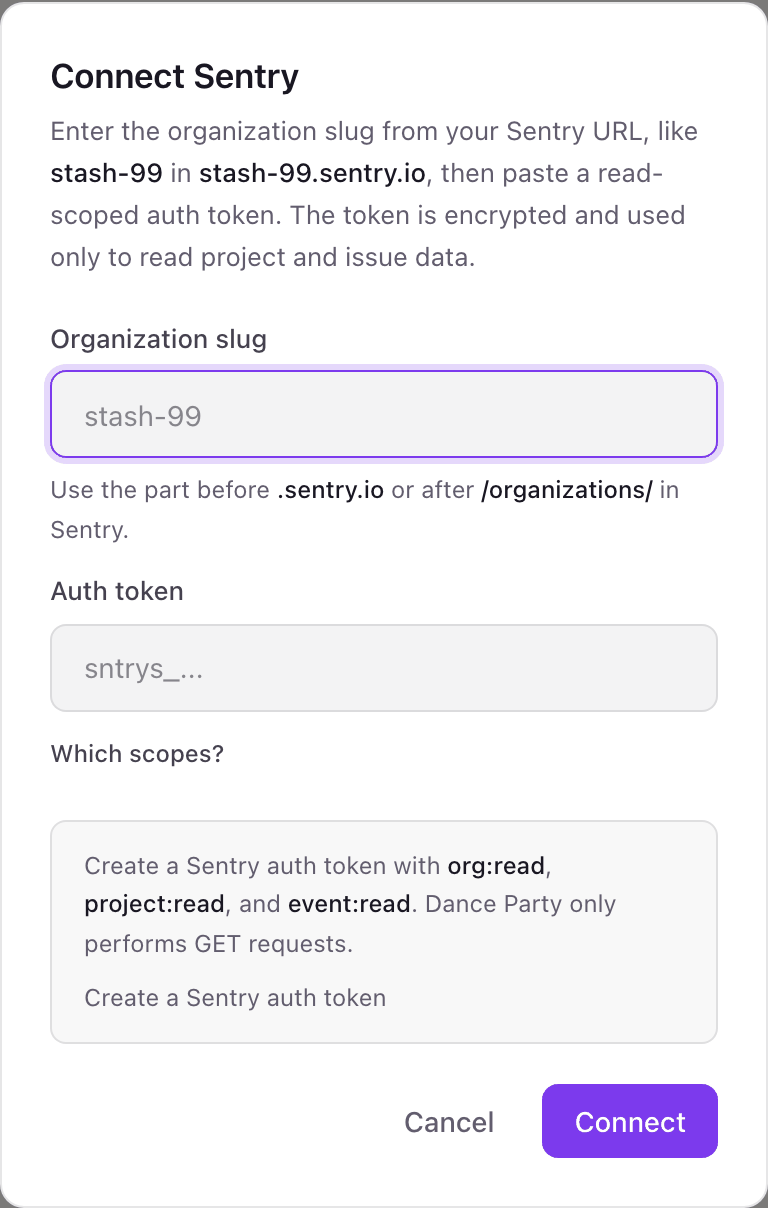
One Sentry connection per workspace
A workspace connects one Sentry organization, named by its slug. If your company runs separate Sentry organizations, such as one per product, each needs its own Dance Party workspace.
Read-only. With only org:read, project:read, and event:read, the token cannot resolve, assign, or delete an issue, and Dance Party only sends GET requests. Revoke it on Sentry's Personal Tokens page.
From Sentry to your office display
Once Sentry shows Connected, the rest happens in plain English. No code, no drag-and-drop.
1. Describe it. Tell DJ Agent what you want to see.
New dashboard+ WidgetDescribe a widget in DJ Agent, or click + WidgetDJ AgentDATA SOURCESSentryConnectedList the top 5 unresolved Sentry issues from the last 24 hours sorted by users affected, with short ID, title, and user count.Send2. It gets built. The widget lands on your board with real Sentry data.
New dashboard+ WidgetMost users affected, 24hLive1,284 usersTypeError: Cannot read 'total' of undefinedWEB-3F2 · checkout612 usersTimeoutError: upstream payments requestAPI-1KQ · api388 usersChunkLoadError: Loading chunk 412 failedWEB-3D9 · web97 usersOperationalError: too many connectionsAPI-1K4 · worker41 usersNSInvalidArgumentException in FeedViewIOS-7M · iosDJ AgentDATA SOURCESSentryConnectedList the top 5 unresolved Sentry issues from the last 24 hours sorted by users affected, with short ID, title, and user count.Send3. Put it on a screen. Pair an Apple TV with the six-character code it shows, then assign the dashboard.

Sentry dashboard questions
Can Sentry issues run on a TV dashboard in the engineering office?
Yes. Connect Sentry with a read-scoped token, describe the view, and assign it to an Apple TV running Dance Party. Widgets can refresh as often as every 5 minutes.
What scopes does the Sentry auth token need?
Three read scopes: org:read, project:read, and event:read. Together they cover projects, issues, and event counts, and none of them can change anything.
Are the Sentry error totals exact?
Error events are exact, from Sentry's own event counts. Unresolved issue counts are counted page by page and marked when a very large backlog makes them incomplete.
Does it show Sentry release health or crash-free sessions?
No. Dance Party reads issues, error events, and projects. Release health and session data stay in Sentry.
Does it work with self-hosted Sentry?
No. Dance Party connects to organizations on sentry.io only.
Can Dance Party resolve or assign Sentry issues?
No. It only reads. It cannot resolve, ignore, assign, or merge an issue.
More integrations
Put Sentry on every office display
Connect Sentry, describe the dashboard, and it runs on an Apple TV, refreshing on its own.
Get Started