
Put PostHog on the office display: saved insights and flag rollouts as an Apple TV dashboard
PostHog is where engineers who ship the product also watch how it is used: saved insights, funnels, retention and the feature flags gating this week's release. Dance Party puts those on an office display as an Apple TV dashboard, next to the team rolling the flag from 10% to 100%.
- Read-only
- API key connection
- One connection per workspace
PostHog dashboard examples
What teams running PostHog put on the screen, and what you would ask DJ Agent to get it.
Saved PostHog funnel insight
For product engineers and PMs
The team already built the activation funnel as a PostHog insight. Showing that exact insight on the wall means a conversion drop after Tuesday's deploy is seen by the people who can revert it.
- Count at each step of a saved funnel insight
- Conversion between steps
- The insight's own date range and filters
Ask DJ Agent“Show our saved PostHog insight Activation funnel with the count and conversion at each step.”
Feature flag rollout board
For engineering and release managers
Flags let a team ship dark and roll out in steps, which also makes it easy to lose track. A list of flags with active state and rollout percentage shows who is at 10% and what was left at 100% for a month.
- Each feature flag's key and name
- Whether the flag is active
- Rollout percentage of the flag's first release condition
- How many flags are active in the project
Ask DJ Agent“List our PostHog feature flags with whether each is active and its rollout percentage.”
Weekly active users and events
For founders and the whole team
Two numbers from PostHog, distinct people and total events over the last 7 days, tell a small team whether usage is growing without anyone opening a dashboard.
- Distinct people with any event in the last 1, 7 or 30 days
- Total events in the same window
- Active people per day across the window
Ask DJ Agent“Show PostHog active users and total events for the last 7 days as two big numbers.”
Retention from a saved insight
For product leadership and growth
A retention insight in PostHog shows whether this month's sign-ups come back. Putting the week-by-week curve on the wall keeps the team honest about the metric that outlasts launches.
- Cohort size from the saved retention insight
- Share of the cohort returning in each period
- The insight's own start and return events
Ask DJ Agent“Show our saved PostHog retention insight Weekly retention as bars from week 0 to week 5.”
What Dance Party reads from PostHog
Dance Party reads one PostHog project with a personal API key limited to read scopes. It reads saved insights, a bounded active-user count and feature flags. It never captures events, edits insights or changes a flag.
Saved insights
PostHog API docs ↗- Insight listYour saved insights by name and type: trends, funnels, retention, paths, stickiness and lifecycle.
- Insight resultsThe computed result of one saved insight, refreshed if stale.
Active users
PostHog API docs ↗- Active peopleDistinct people and total events over the last 1, 7 or 30 days, from a bounded query Dance Party writes itself.
- Daily seriesActive people per day across the same window.
Feature flags
PostHog API docs ↗- FlagsEach flag's key, name and active state.
- RolloutThe rollout percentage of each flag's first release condition, and a count of active flags.
How to connect PostHog
Before you start
- An owner or admin of your Dance Party workspace makes the PostHog connection.
- A PostHog personal API key (starts with phx_) with insight:read, query:read, feature_flag:read and project:read
- The project's numeric Project ID
- US Cloud, EU Cloud, or a self-hosted PostHog reachable from the internet over https
- 1In PostHog, click your avatar, open Account settings, then Personal API keys, and create a key scoped to this project.Open PostHog personal API keys ↗
- 2Give it only read scopes: insight:read, query:read, feature_flag:read and project:read. Copy the key.
- 3Copy the Project ID from Project settings.
- 4In Dance Party, click Connect PostHog and fill in Personal API key and Project ID. Under Where is your PostHog? pick US Cloud, EU Cloud or Self-hosted, and add the Self-hosted URL if needed.
- 5Click Save. Dance Party reads your feature flags once to test the key, and the card shows Connected.
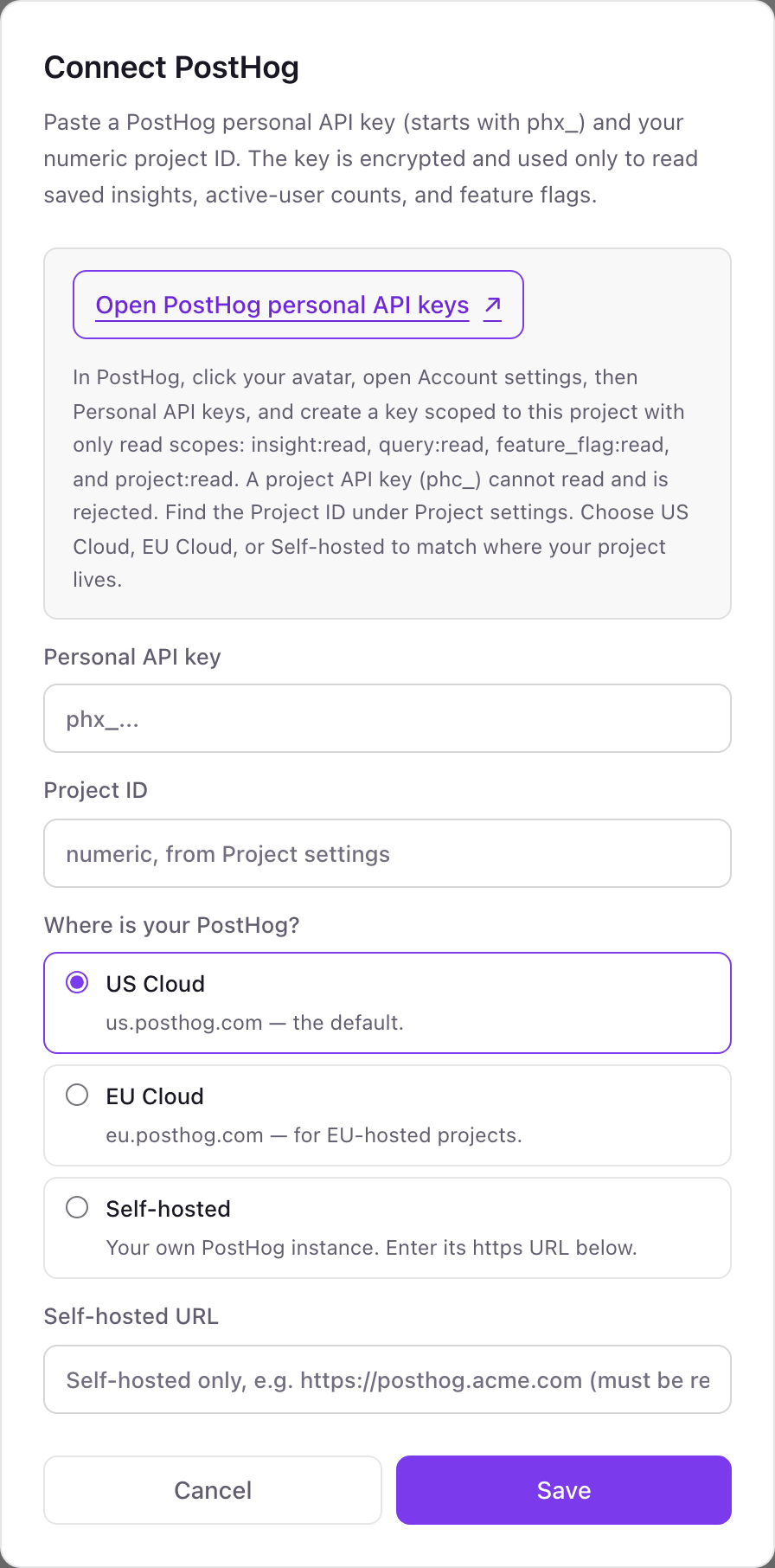
One PostHog connection per workspace
A workspace connects one PostHog project. Teams with a separate project per product or environment should connect the one the office watches, and use another Dance Party workspace for a second project.
Read-only. With only read scopes, the personal API key cannot capture events, create insights or change feature flags. Delete it under Account settings, Personal API keys to revoke it.
From PostHog to your office display
Once PostHog shows Connected, the rest happens in plain English. No code, no drag-and-drop.
1. Describe it. Tell DJ Agent what you want to see.
New dashboard+ WidgetDescribe a widget in DJ Agent, or click + WidgetDJ AgentDATA SOURCESPostHogConnectedShow our saved PostHog insight Activation funnel with the count and conversion at each step.Send2. It gets built. The widget lands on your board with real PostHog data.
New dashboard+ WidgetActivation funnelLivesigned_up2,180 · 100%project_created1,613 · 74.0%first_event_ingested1,047 · 48.0%insight_saved566 · 26.0%DJ AgentDATA SOURCESPostHogConnectedShow our saved PostHog insight Activation funnel with the count and conversion at each step.Send3. Put it on a screen. Pair an Apple TV with the six-character code it shows, then assign the dashboard.

PostHog dashboard questions
Can PostHog insights run on an Apple TV?
Yes, insight by insight. Dance Party shows your saved PostHog insights, active users and feature flags as widgets on the Dance Party Apple TV app.
Can I use a PostHog project API key (phc_)?
No. Project API keys can only send events. Dance Party needs a personal API key, which starts with phx_.
Does it work with PostHog EU Cloud or self-hosted?
Yes. Pick EU Cloud or Self-hosted when you connect. A self-hosted instance must be reachable from the internet over https.
Which PostHog insight types can it show?
Any saved insight: trends, funnels, retention, paths, stickiness and lifecycle. Dance Party reads the computed result and shapes it into a widget.
Can Dance Party turn a PostHog feature flag on or off?
No. It only reads flags. A key with feature_flag:read cannot change rollout, conditions or state.
Does it count against PostHog API rate limits?
Yes, lightly. PostHog allows 240 analytics requests a minute and 1,200 an hour across your whole organization, and each widget refresh uses one or two.
More integrations
Put PostHog on every office display
Connect PostHog, describe the dashboard, and it runs on an Apple TV, refreshing on its own.
Get Started