
Mixpanel funnels and retention as an Apple TV dashboard for the product team
Mixpanel is where product teams find out whether people finish sign-up and come back in week two. Dance Party puts those answers on an office display: a saved Mixpanel funnel, a retention curve and today's top events, running as an Apple TV dashboard beside the team that ships the changes.
- Read-only
- API key connection
- One connection per workspace
Mixpanel dashboard examples
What teams running Mixpanel put on the screen, and what you would ask DJ Agent to get it.
Saved trial-to-paid funnel
For product managers and growth engineers
A funnel only changes behavior when people see it after a release. With the saved Mixpanel funnel on the wall, a drop at Data Source Connected the morning after a deploy gets noticed by the team that shipped it.
- Count at each step of a saved funnel
- Conversion from the first step to each later step
- The same funnel over 7, 30 or 90 days
Ask DJ Agent“Show our saved Mixpanel Trial to Paid funnel for the last 30 days with the count and conversion at each step.”
Week-over-week retention
For product leadership
Acquisition numbers look good on their own. A Mixpanel retention view shows how many of last month's new users still did something this week, which is the number that decides next quarter.
- Users in the starting cohort, by the event that defines them
- Share of that cohort returning in each following week
- Retention by day, week or month
Ask DJ Agent“Show Mixpanel weekly retention for users who did Sign Up in the last 60 days, returning with any Report Viewed event.”
Today's top Mixpanel events
For the product and engineering floor
Mixpanel's top events list ranks today's volume with the change against yesterday, so a new feature's event climbing the list, or a core event falling off it, shows up while the team can still act.
- Today's events ranked by volume
- Percent change for each event
- Unique or total counts, your choice
Ask DJ Agent“Rank today's top Mixpanel events by volume and show the percent change next to each one.”
Daily active users on a key event
For founders and product leads
Most teams define an active user by one Mixpanel event that proves value. Unique users on that event per day, over 30 days, is the trend line everyone can agree on.
- Unique users per day for one named event
- The same count by week or month
- One event broken out by a property such as plan or platform
Ask DJ Agent“Show unique users per day who did Report Viewed in Mixpanel over the last 30 days as a trend line.”
What Dance Party reads from Mixpanel
Dance Party reads one Mixpanel project through Mixpanel's Query API, using a service account with the read-only Consumer role. Every call is a GET. It never sends events, edits reports or touches user profiles.
Events
Mixpanel API docs ↗- Top eventsToday's events ranked by volume, with percent change.
- Event countsDaily, weekly or monthly counts for up to 10 named events, total or unique.
- SegmentationOne event broken out by a property, over 1 to 90 days.
Funnels
Mixpanel API docs ↗- Saved funnelsThe funnels saved in the project, by name.
- Funnel resultsStep counts and conversion for one saved funnel, per period.
Retention
Mixpanel API docs ↗- Cohort retentionHow many users from a starting event came back with a returning event, by day, week or month.
How to connect Mixpanel
Before you start
- An owner or admin of your Dance Party workspace makes the Mixpanel connection.
- Owner or Admin in your Mixpanel organization, the roles that can add service accounts
- A Mixpanel service account with the Consumer role on the one project you want to show
- The project's numeric Project ID and its data residency: United States, European Union or India
- 1In Mixpanel, open Organization settings, then Service Accounts, and add a service account with the Consumer role on just this project.Open Mixpanel service accounts ↗
- 2Copy the username and the secret as soon as they appear. Mixpanel never shows the secret again.
- 3Open Project settings, then Overview, and copy the numeric Project ID.
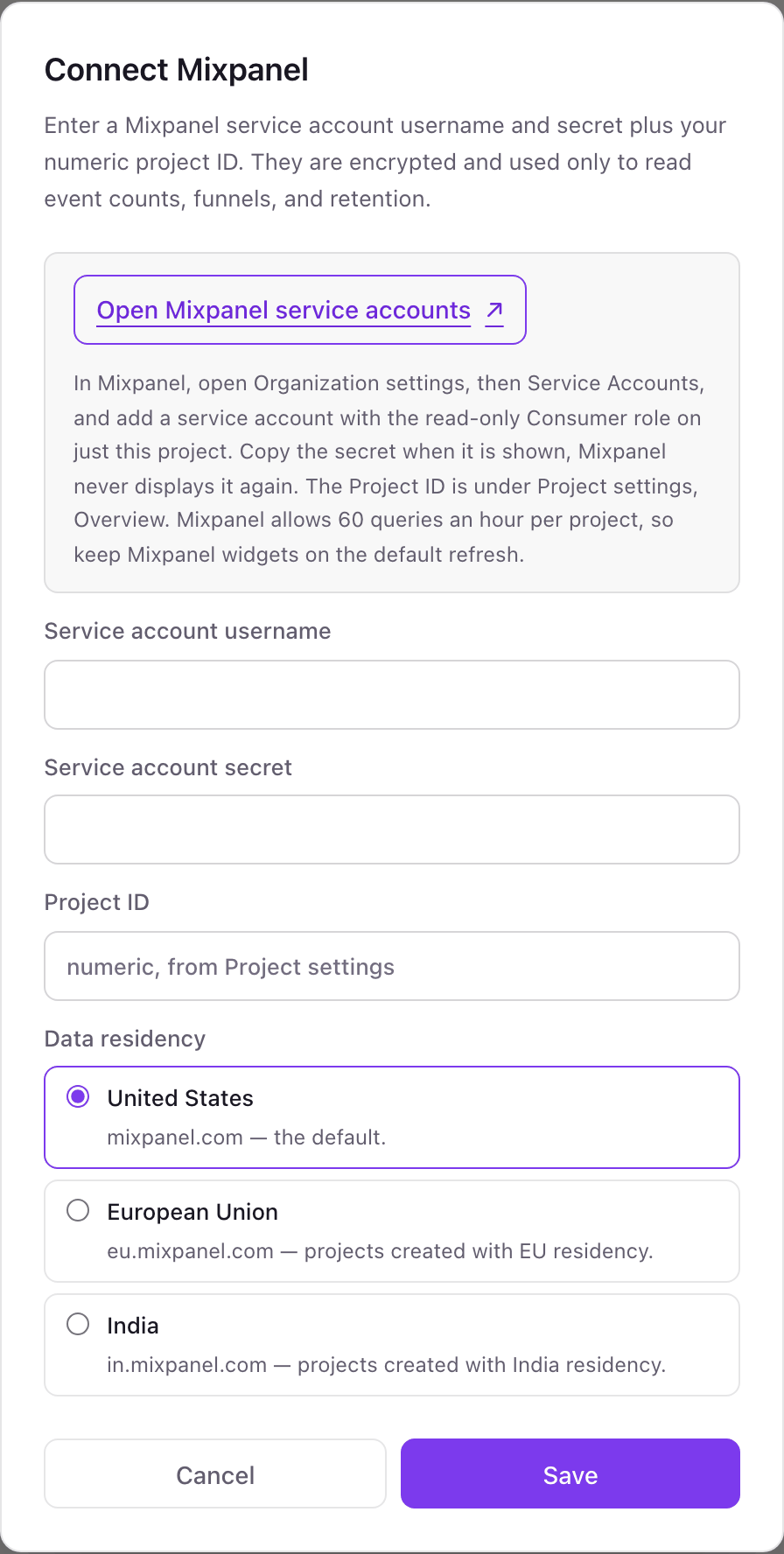
- 4In Dance Party, click Connect Mixpanel, then fill in Service account username, Service account secret and Project ID.
- 5Under Data residency, pick United States, European Union or India to match the project, then click Save. Dance Party reads your saved funnels once to test it, and the card shows Connected.
One Mixpanel connection per workspace
A workspace connects one Mixpanel project through one service account. If you run separate Mixpanel projects for web and mobile, pick the one the office should watch, or connect the other from a second Dance Party workspace.
Read-only. The Consumer role lets the service account view reports but not change them, and Dance Party only sends GET requests to the Query API. Delete the service account in Mixpanel's Organization settings to revoke it.
From Mixpanel to your office display
Once Mixpanel shows Connected, the rest happens in plain English. No code, no drag-and-drop.
1. Describe it. Tell DJ Agent what you want to see.
New dashboard+ WidgetDescribe a widget in DJ Agent, or click + WidgetDJ AgentDATA SOURCESMixpanelConnectedShow our saved Mixpanel Trial to Paid funnel for the last 30 days with the count and conversion at each step.Send2. It gets built. The widget lands on your board with real Mixpanel data.
New dashboard+ WidgetTrial to paid, last 30 daysLiveTrial Started1,240 · 100%Data Source Connected868 · 70.0%Dashboard Shared402 · 32.4%Upgrade Clicked171 · 13.8%Subscription Started118 · 9.5%DJ AgentDATA SOURCESMixpanelConnectedShow our saved Mixpanel Trial to Paid funnel for the last 30 days with the count and conversion at each step.Send3. Put it on a screen. Pair an Apple TV with the six-character code it shows, then assign the dashboard.

Mixpanel dashboard questions
Can I show a Mixpanel board on an Apple TV?
Yes, one report at a time. Dance Party rebuilds Mixpanel funnels, retention and event counts as widgets on an Apple TV dashboard rather than mirroring a Mixpanel board.
Which Mixpanel role does the service account need?
Consumer, on the one project you want to show. It can read reports and cannot change anything.
Does the Mixpanel 60 queries an hour limit matter?
It can. Mixpanel allows 60 Query API calls an hour per project, and each Mixpanel widget uses one per refresh, so keep Mixpanel widgets on the default refresh. If Mixpanel says slow down, the screen keeps the last good numbers.
Can I use funnels I already built in Mixpanel?
Yes. Dance Party lists the project's saved funnels by name and shows step counts and conversion for the one you pick.
Does it work with EU or India data residency?
Yes. Pick European Union or India in the Connect pop-up and Dance Party reads from eu.mixpanel.com or in.mixpanel.com.
Can I use a Mixpanel project token instead of a service account?
No. Project tokens can only send events. Reading reports needs a service account username and secret.
More integrations
Put Mixpanel on every office display
Connect Mixpanel, describe the dashboard, and it runs on an Apple TV, refreshing on its own.
Get Started