
Plausible visitor counts on an Apple TV dashboard
Plausible gives a whole team one simple view of a website without cookies or personal data. Dance Party reads that site's headline numbers from Plausible's Stats API and shows them as an Apple TV dashboard on the office display: unique visitors, pageviews, and bounce rate for the last seven days.
- Read-only
- API key connection
- One connection per workspace
Plausible dashboard examples
What teams running Plausible put on the screen, and what you would ask DJ Agent to get it.
Weekly website pulse
For the whole company
Plausible's appeal is that anyone can read it. Putting the site's three headline numbers on a shared screen keeps that promise for people who never log in, like sales, support, and the founder walking past.
- Unique visitors over the last 7 days
- Pageviews over the last 7 days
- Bounce rate for the same week
- Pages per visitor, from pageviews divided by visitors
Ask DJ Agent“Show our Plausible visitors, pageviews and bounce rate for the last 7 days as big tiles, plus pages per visitor.”
Launch week visitor goal
For marketing during a launch or campaign
A launch has a traffic target, and the team wants to see how close the last seven days are to it. A progress bar on the wall does more for morale than a number in a Slack thread.
- Unique visitors in the last 7 days against the target you set
- Percent of the target reached
- Pageviews alongside, for context
Ask DJ Agent“Show Plausible unique visitors for the last 7 days as progress toward a 20,000 visitor launch goal.”
Content engagement check
For the content and web team
Visitors alone can hide a problem. If bounce rate climbs and pages per visitor fall in the same week, the new traffic is landing on the wrong page, and the team can see it before the monthly report.
- Bounce rate for the last 7 days against a threshold you choose
- Pages per visitor
- Unique visitors and pageviews
Ask DJ Agent“Show Plausible bounce rate and pages per visitor for the last 7 days as status tiles, amber when bounce rate passes 60% and red past 70%.”
What Dance Party reads from Plausible
Dance Party sends Plausible one read-only Stats API query for the site you connect. It returns three totals for the last seven days, and every Plausible widget is built from those.
Site stats
Plausible API docs ↗- VisitorsUnique visitors to the site over the last 7 days.
- PageviewsTotal pageviews over the same 7 days.
- Bounce rateThe share of visits that viewed one page, as Plausible counts it.
How to connect Plausible
Before you start
- An owner or admin of your Dance Party workspace makes the Plausible connection.
- A Plausible plan that includes the Stats API, which Plausible offers on its Business plan
- A Plausible role that can create API keys: Owner, Admin, Editor, or Billing. Viewers cannot.
- A site hosted on plausible.io. Self-hosted Community Edition is not supported.
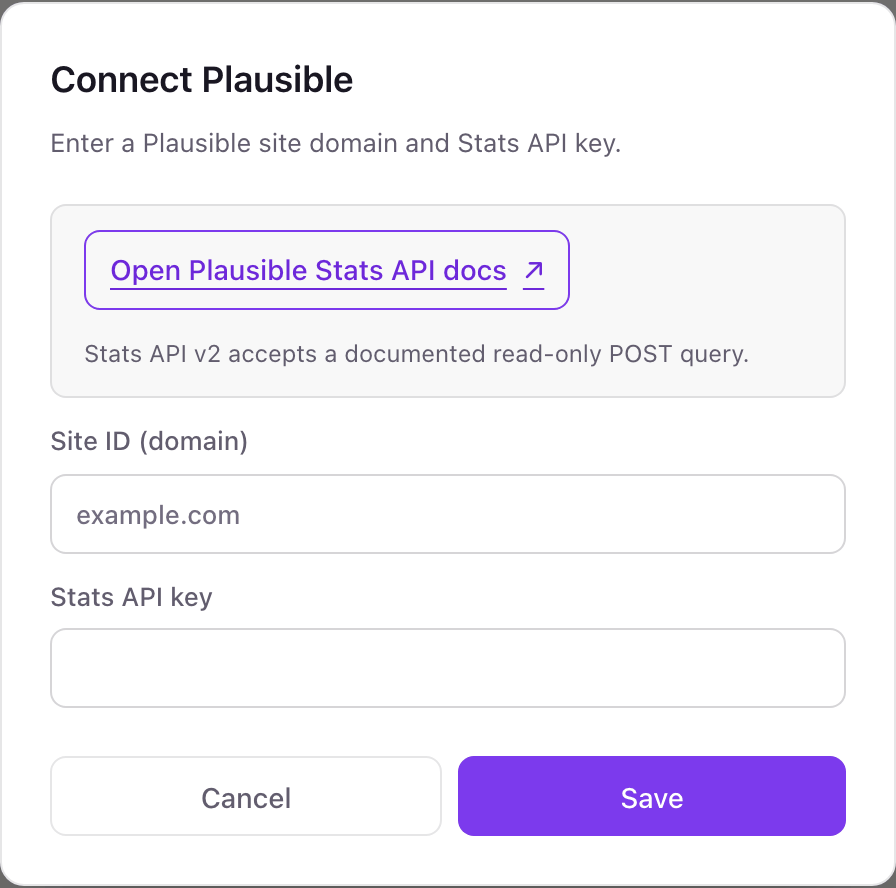
- 1Go to Integrations in Dance Party and click the Plausible card's Connect Plausible button. The pop-up has two fields, Site ID (domain) and Stats API key.
- 2In Plausible, pick the team that owns the site, open your account settings, go to API Keys, click New API Key, and choose Stats API. Plausible shows the key once, so copy it.Open Plausible API keys ↗
- 3Enter the site's domain exactly as Plausible lists it, such as example.com, in Site ID (domain), and paste the key into Stats API key.
- 4Click Save. Dance Party runs a seven-day stats query for that site to check both values, and the card shows Connected.
One Plausible connection per workspace
A workspace connects one Plausible site, the domain you enter at connect. Plausible accounts often hold several sites; to show a second one, connect it in a second Dance Party workspace.
Read-only. A Stats API key can only query statistics, and Dance Party uses it for one fixed query. Delete the key under API Keys in your Plausible account settings to end access.
From Plausible to your office display
Once Plausible shows Connected, the rest happens in plain English. No code, no drag-and-drop.
1. Describe it. Tell DJ Agent what you want to see.
New dashboard+ WidgetDescribe a widget in DJ Agent, or click + WidgetDJ AgentDATA SOURCESPlausibleConnectedShow our Plausible visitors, pageviews and bounce rate for the last 7 days as big tiles, plus pages per visitor.Send2. It gets built. The widget lands on your board with real Plausible data.
New dashboard+ WidgetOur website this weekLiveVisitors12,480Pageviews31,906Bounce rate58%Pages per visitor2.6DJ AgentDATA SOURCESPlausibleConnectedShow our Plausible visitors, pageviews and bounce rate for the last 7 days as big tiles, plus pages per visitor.Send3. Put it on a screen. Pair an Apple TV with the six-character code it shows, then assign the dashboard.

Plausible dashboard questions
Can I show Plausible Analytics on an Apple TV?
Yes. Connect your site with a Stats API key, describe the dashboard to DJ Agent, and assign it to a screen running the Dance Party Apple TV app.
Which Plausible plan do I need?
One with the Stats API. Plausible makes the Stats API a Business plan feature, and the key must be a Stats API key.
What Plausible numbers can the dashboard show?
Unique visitors, pageviews, and bounce rate for the last seven days, plus anything calculated from them, like pages per visitor. Top pages, sources, countries, goals, and realtime visitors are not read today.
Does it work with self-hosted Plausible?
No. Dance Party queries plausible.io, so the site must live on Plausible's hosted service.
Can I show more than one Plausible site?
Not in one workspace. The connection is tied to the one domain you enter. A second site needs a second Dance Party workspace.
Does Dance Party receive personal data from Plausible?
No. Plausible collects no personal data, and Dance Party receives only three site-wide totals.
Can Dance Party change my Plausible settings?
No. The Stats API is read-only. It cannot edit sites, goals, or shared links.
More integrations
Put Plausible on every office display
Connect Plausible, describe the dashboard, and it runs on an Apple TV, refreshing on its own.
Get Started