
Metabase saved questions as an Apple TV dashboard on any office display
In Metabase, the analyst already wrote the question and got the numbers right. Dance Party runs that saved question and puts the answer on an office display, so revenue by month or orders stuck in review becomes an Apple TV dashboard the whole floor can see.
- Read-only
- API key connection
- One connection per workspace
Popular Metabase dashboards
What teams running Metabase put on the screen, and what you would ask DJ Agent to get it.
Weekly business review numbers
For leadership and the whole company
The Monday metrics meeting already runs off one Metabase question. Showing its headline row all week means nobody quotes last month's number in a hallway conversation.
- Each column of a saved question's first row, as a headline figure
- The question's own filters and joins, unchanged
- Up to four KPIs from one question
Ask DJ Agent“Run our Metabase question Weekly KPIs and show new customers, revenue, churned accounts and NPS as four big numbers.”
Sign-ups by week
For growth and marketing
A time-series question in Metabase becomes a row of bars the whole team can read from across the room, so the effect of a pricing page change shows up the following Monday.
- Rows of a time-series question, one bar per period
- The latest period as the headline
- Any question grouped by week, month or day
Ask DJ Agent“Run the Metabase question Signups by week and show the last 8 weeks as bars with this week's total on top.”
Top accounts by revenue
For sales and customer success
Account managers argue less when the ranking comes from the same Metabase question finance uses. A top-five list on the wall keeps the biggest accounts, and any that slipped, in view.
- Rows of a question grouped by customer, region or product
- The measure the question sorts by
- The top rows only, as a ranked list
Ask DJ Agent“Run the Metabase question Revenue by account this quarter and rank the top 5 accounts.”
Operations queue from a native query
For operations and fulfillment
A SQL question counting orders by status is the fastest way to see a backlog. On the office display, a jump in Awaiting review is visible to the people who clear it.
- Counts per status from a grouped question
- Values for a native query's parameters, such as a warehouse or region
- Rows refreshed each time the widget refreshes
Ask DJ Agent“Run the Metabase question Orders by status for the Austin warehouse and show the four statuses as a queue.”
What Dance Party reads from Metabase
Dance Party reads your Metabase instance through its API with an API key you create for it. It runs saved questions and lists your collections and dashboards. It never creates, edits or deletes a question, a dashboard or a user.
Saved questions
Metabase API docs ↗- Question listEvery saved question the key can see, by name and collection.
- Question resultsThe rows a saved question returns when it runs, with its filters and logic intact.
- ParametersValues for a question's parameters, such as a date or region, when you ask for them.
Collections and dashboards
Metabase API docs ↗- CollectionsYour collections, so DJ Agent can find questions by where they live.
- DashboardsThe names of your dashboards, as a map to the questions behind them.
- Connected userThe identity behind the API key, checked when you connect.
How to connect Metabase
Before you start
- An owner or admin of your Dance Party workspace makes the Metabase connection.
- Metabase 49 or later, Cloud or self-hosted, reachable from the internet over https
- A Metabase admin to create the API key
- A Metabase group with view access to the collections and data behind the questions you want
- 1In Metabase, open Admin settings, then Settings, Authentication, API keys, and click Create API key.Open Metabase API key docs ↗
- 2Name it Dance Party and pick a group that can view the collections and data you want on screen, not Administrators. Copy the key; Metabase shows it once.
- 3In Dance Party, click Connect Metabase and enter your Metabase URL, such as https://metabase.acme.com.
- 4Paste the Metabase key into the API key field and click Save. Dance Party reads the key's own user to test it, and the card shows Connected.
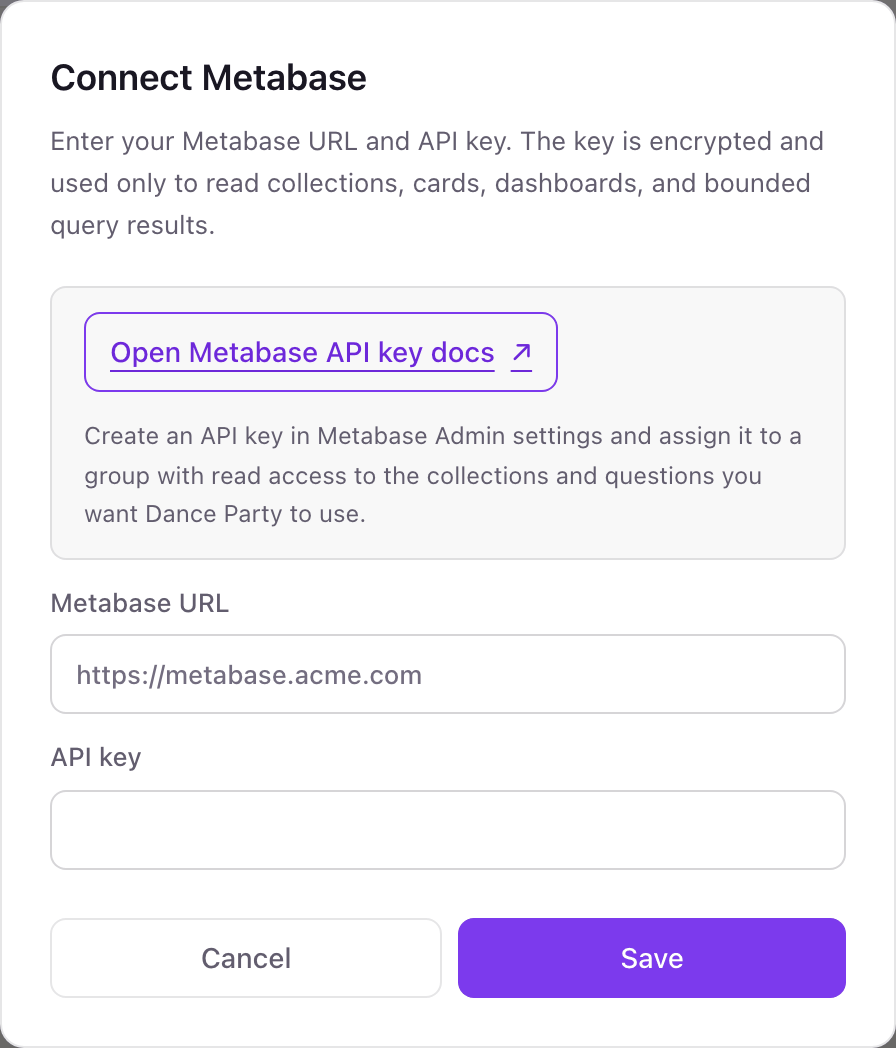
One Metabase connection per workspace
A workspace connects one Metabase instance with one API key. The key sees whatever its group can see, so one connection can cover every collection you grant it.
What the key can see is set by its Metabase group, so a group with view-only access keeps it read-only. Dance Party only lists and runs saved questions. Revoke the key under Admin settings, Authentication, API keys.
From Metabase to your office display
Once Metabase shows Connected, the rest happens in plain English. No code, no drag-and-drop.
1. Describe it. Tell DJ Agent what you want to see.
New dashboard+ WidgetDescribe a widget in DJ Agent, or click + WidgetDJ AgentDATA SOURCESMetabaseConnectedRun our Metabase question Weekly KPIs and show new customers, revenue, churned accounts and NPS as four big numbers.Send2. It gets built. The widget lands on your board with real Metabase data.
New dashboard+ WidgetWeekly KPIsLiveNew customers64+12Revenue$441K+6.2%Churned accounts3-2NPS47+4DJ AgentDATA SOURCESMetabaseConnectedRun our Metabase question Weekly KPIs and show new customers, revenue, churned accounts and NPS as four big numbers.Send3. Put it on a screen. Pair an Apple TV with the six-character code it shows, then assign the dashboard.

Metabase dashboard questions
Can I put a Metabase dashboard on an Apple TV?
Yes, question by question. Each Dance Party widget runs one saved Metabase question, so you rebuild the dashboard you care about from its questions and show it on the Apple TV app.
Do I need to give Dance Party the question ID?
No. Ask for the question by name. DJ Agent finds it in your saved questions and only asks when two names match.
Does it work with self-hosted Metabase?
Yes, if the instance is reachable from the internet over https. A Metabase that only answers on a private network or VPN cannot be read.
Which Metabase version do I need?
Metabase 49 or later. That release added API keys, which is how Dance Party signs in.
Which Metabase group should the API key use?
A group that can view the collections and data behind your questions and nothing more. Avoid Administrators, because the key gets its group's full permissions.
Can Dance Party edit my Metabase questions?
No. It runs saved questions and reads lists. It does not create, change or delete questions, dashboards, collections or users.
More integrations
Put Metabase on every office display
Connect Metabase, describe the dashboard, and it runs on an Apple TV, refreshing on its own.
Get Started