
Snowflake queries on the office display: a warehouse-backed Apple TV dashboard
Snowflake is where your cleaned-up numbers already live, modeled by the data team and trusted by finance. Dance Party runs a SELECT against it and puts the result on an office display as an Apple TV dashboard, so the whole company sees the same KPIs the data team signs off on.
- Read-only
- API key connection
- One connection per workspace
Popular Snowflake dashboards
What teams running Snowflake put on the screen, and what you would ask DJ Agent to get it.
Company KPIs from the modeled tables
For leadership and the whole company
The data team spent months agreeing on one definition of revenue. Reading it straight from the mart in Snowflake means the wall and the board deck never disagree.
- Daily orders or revenue from a fact table you name
- The same figure over the last 30 or 90 days
- Any column a SELECT on your tables can return
Ask DJ Agent“Run a SELECT on ANALYTICS.MARTS.FCT_ORDERS for net revenue per day over the last 30 days and show it as a trend with yesterday's total.”
Warehouse credit burn
For data platform team and finance
Snowflake bills by credits, and one oversized warehouse left running can double the month. Credits used per warehouse over 30 days, on a screen the data team sees, catches it before the invoice does.
- Credits used per warehouse over the last 30 days
- The top 20 warehouses by credits
- Account, user and warehouse behind the connection
Ask DJ Agent“Rank our Snowflake warehouses by credits used in the last 30 days.”
Pipeline freshness board
For analytics engineers
A dashboard built on stale tables is worse than none. Tiles showing when each key table last received rows turn a stuck Fivetran sync or a failed dbt run into a red square on the wall.
- Latest load timestamp in each key table
- Hours since each table was last updated
- Row counts for today's loads
Ask DJ Agent“For RAW.STRIPE.CHARGES, RAW.HUBSPOT.DEALS, MARTS.FCT_ORDERS and MARTS.DIM_CUSTOMERS, show hours since the latest _LOADED_AT, red if over 6 hours.”
Query health in the last 24 hours
For data platform on-call
If your role can read ACCOUNT_USAGE, the query history view shows failures and long runners. Counting them on the wall tells the platform team when a dashboard or job starts timing out.
- Queries that succeeded and failed in the last 24 hours
- Queries that queued for more than a minute
- Queries that ran longer than 10 minutes
Ask DJ Agent“From SNOWFLAKE.ACCOUNT_USAGE.QUERY_HISTORY, count the last 24 hours of queries: succeeded, failed, queued over a minute, and ran over 10 minutes.”
What Dance Party reads from Snowflake
Dance Party reads Snowflake through the Snowflake SQL API, signed in as the user you create for it. It only runs statements that start with SELECT, and it can only see what that user's default role can see.
Your tables
Snowflake API docs ↗- SELECT resultsRows from any SELECT the role can run, with a 30-second limit per query.
- Query contextThe warehouse, database and schema you set at connect time, used as defaults.
- Connection checkThe current account, user and warehouse, read when you connect.
Account usage
Snowflake API docs ↗- Warehouse creditsCredits used per warehouse over the last 30 days, top 20. Snowflake updates this view with up to 3 hours of delay.
- Other ACCOUNT_USAGE viewsQuery history and the rest, through a SELECT, if the role has been granted access.
How to connect Snowflake
Before you start
- An owner or admin of your Dance Party workspace makes the Snowflake connection.
- A Snowflake user for Dance Party whose default role has SELECT only on the schemas you want to show
- Someone with OWNERSHIP of that user, or the MODIFY PROGRAMMATIC AUTHENTICATION METHODS privilege, to attach its public key
- An unencrypted private key (a .p8 file made without a passphrase)
- For warehouse credits, access to the SNOWFLAKE database's ACCOUNT_USAGE views
- 1Generate a key pair, then run ALTER USER with SET RSA_PUBLIC_KEY to attach the public key to the Dance Party user. Snowflake's key-pair guide has both commands.Open Snowflake key-pair auth docs ↗
- 2In Dance Party, click Connect Snowflake. Enter your Account identifier (for example myorg-myaccount) and the User name.
- 3Paste the whole private key, including its BEGIN and END lines, into Private key.
- 4Optionally fill Warehouse, Database and Schema. They become the default context, so a query can say FCT_ORDERS instead of the full path.
- 5Click Save. Dance Party reads the current account and user to test the key, then the card shows Connected.
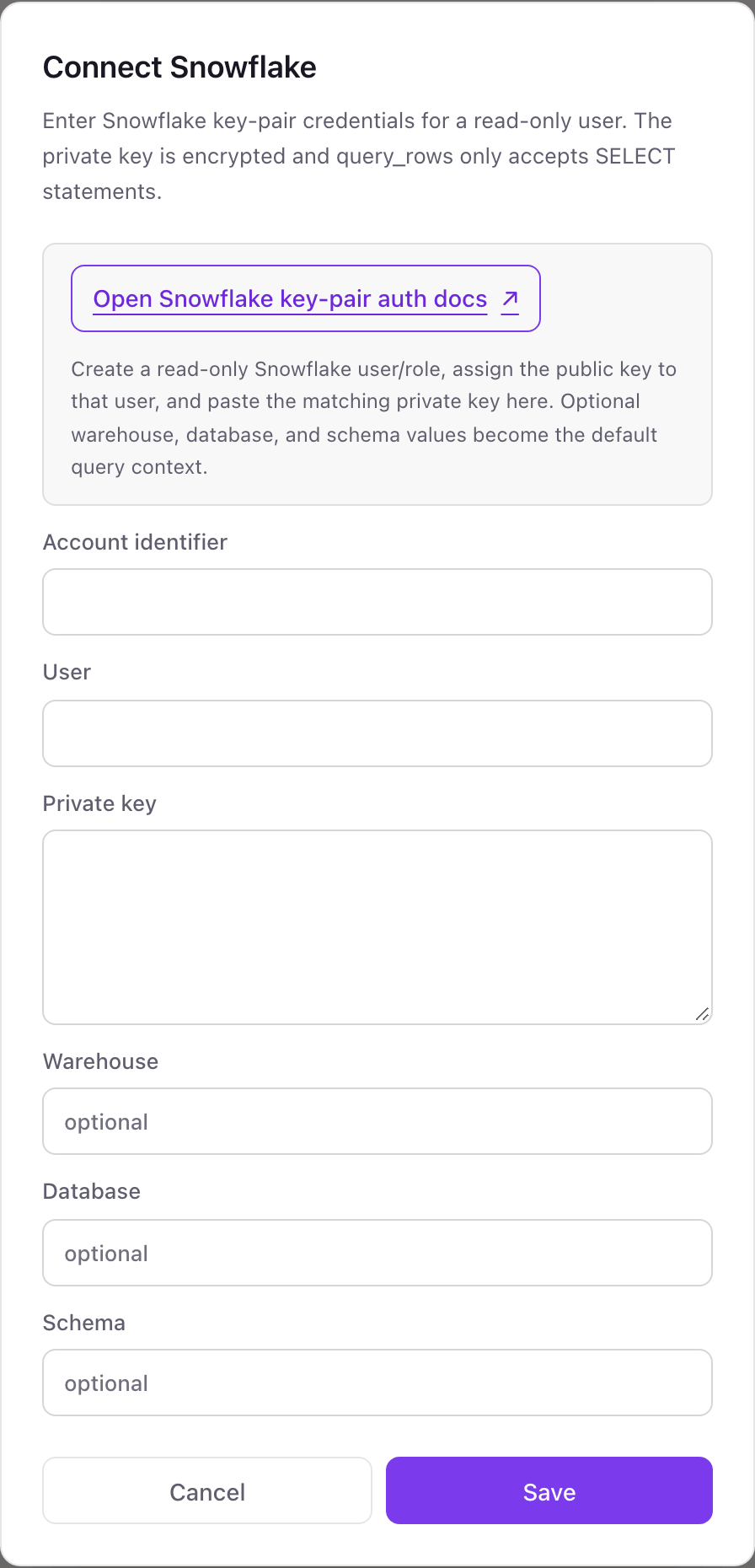
One Snowflake connection per workspace
A workspace connects one Snowflake user in one account. That user can still read every database its role can see, so one connection usually covers raw, staging and mart schemas alike.
Read-only in two layers. Dance Party refuses any statement that does not start with SELECT, and the role you grant decides which tables it can see at all. Unset the user's RSA public key in Snowflake to revoke access at once.
From Snowflake to your office display
Once Snowflake shows Connected, the rest happens in plain English. No code, no drag-and-drop.
1. Describe it. Tell DJ Agent what you want to see.
New dashboard+ WidgetDescribe a widget in DJ Agent, or click + WidgetDJ AgentDATA SOURCESSnowflakeConnectedRun a SELECT on ANALYTICS.MARTS.FCT_ORDERS for net revenue per day over the last 30 days and show it as a trend with yesterday's total.Send2. It gets built. The widget lands on your board with real Snowflake data.
New dashboard+ WidgetNet revenue per dayLive$412,560+5.4% vs prior dayDJ AgentDATA SOURCESSnowflakeConnectedRun a SELECT on ANALYTICS.MARTS.FCT_ORDERS for net revenue per day over the last 30 days and show it as a trend with yesterday's total.Send3. Put it on a screen. Pair an Apple TV with the six-character code it shows, then assign the dashboard.

Snowflake dashboard questions
Can I put a Snowflake query on an Apple TV dashboard?
Yes. Describe the number or table you want, DJ Agent writes or uses your SELECT, and the result shows on the Dance Party Apple TV app on its own refresh schedule.
Does a Snowflake dashboard on the office display cost credits?
Yes. Each refresh runs the SELECT on your warehouse, which resumes it if it is suspended. An X-Small warehouse and an hourly refresh keep the cost small.
Can Dance Party change data in Snowflake?
No. It rejects any statement that is not a SELECT, and the role you give its user should only have SELECT grants anyway.
Why must the Snowflake private key have no passphrase?
Dance Party signs each request with the key and has nowhere to enter a passphrase. It stores the key encrypted instead.
How long can a Snowflake query take?
Up to 30 seconds. For heavy logic, point the widget at a summary table or view that your pipeline already builds.
Can I pick the Snowflake role Dance Party uses?
Yes, through the user. Dance Party does not send a role, so Snowflake uses the user's default role. Set that role to the read-only one you created.
More integrations
Put Snowflake on every office display
Connect Snowflake, describe the dashboard, and it runs on an Apple TV, refreshing on its own.
Get Started