
Chili Piper dashboards: inbound demos and no-shows on an Apple TV office display
Chili Piper decides, in the seconds after a form fill, which rep gets the demo. Dance Party reads those Concierge routing logs and the meetings they produce, and puts them on a Chili Piper dashboard for an Apple TV: how many inbound leads booked, who is taking the demos this week, and how many never showed, on the office display.
- Read-only
- API key connection
- One connection per workspace
Popular Chili Piper dashboards
What teams running Chili Piper put on the screen, and what you would ask DJ Agent to get it.
Concierge inbound conversion
For demand generation and marketing ops
Marketing's job ends when a form fill becomes a booked demo. Counting router runs against the ones that produced a meeting shows the conversion Chili Piper exists to raise, per router.
- Concierge router runs over the last 1 to 30 days
- Runs that ended with a booked meeting
- Booked share for each router you name
Ask DJ Agent“For our Chili Piper inbound demo router, count router runs in the last 7 days and how many booked a meeting, and show it as a funnel.”
Demos booked per rep this week
For account executives and their manager
Round-robin is supposed to be fair. A leaderboard of meetings assigned per rep over the last 7 days shows whether it is, and who is carrying the week.
- Meetings assigned to each rep in the last 7 days
- Upcoming meetings per rep for the next 7 days
- Team totals
Ask DJ Agent“Rank our reps by Chili Piper meetings assigned to them in the last 7 days, using their names from Chili Piper.”
No-show and cancellation watch
For SDR and AE teams
A booked demo that never happens costs a rep an hour. Showing held, no-show, and canceled meetings side by side makes reminder and confirmation habits a team topic.
- Meetings in the last 7 days by status: Completed, NoShow, Canceled
- Active meetings still ahead this week
- No-show share of meetings that should have happened
Ask DJ Agent“Show Chili Piper meetings from the last 7 days by status: completed, no-show, and canceled, plus active meetings coming up.”
Next demos on the calendar
For the sales floor
A list of the next meetings, with the rep and attendee count, tells the floor who is about to be on a call and keeps the room quiet at the right moments.
- Upcoming meetings in the next 7 days with start time
- The rep each meeting is assigned to
- Number of attendees on each
Ask DJ Agent“List the next 5 upcoming Chili Piper meetings with start time, assigned rep, and number of attendees.”
What Dance Party reads from Chili Piper
Dance Party reads Chili Piper through its Edge API with the token you paste. It uses read calls only and leaves out every endpoint that books, cancels, or marks a no-show.
Meetings
Chili Piper API docs ↗- MeetingsUp to 100 meetings in a 7-day window, upcoming or recent, with status (Active, Completed, NoShow, Canceled), start time, assigned rep, and attendee count.
Concierge routing
Chili Piper API docs ↗- RoutersEach Concierge router's name and whether it is accepting routing.
- Router logsUp to 100 runs of one router over the last 1 to 30 days: status, trigger, time, guest email, and the meeting it booked.
People
Chili Piper API docs ↗- UsersNames for the rep leaderboard, and each user's workspaces.
- Teams and workspacesTeam names and member counts, and workspace names for filtering.
How to connect Chili Piper
Before you start
- An owner or admin of your Dance Party workspace makes the Chili Piper connection.
- An Admin in Chili Piper's Command Center. Workspace Managers cannot open API Access Tokens.
- A token with Ping, plus Read on the sections you want on screen: meetings, users, teams, workspaces, and Concierge
- 1In Dance Party, open Integrations and click Connect ChiliPiper. The pop-up has one API token field and an Open ChiliPiper integrations settings link.
- 2In the Chili Piper Command Center, open Integrations, then API Access Tokens, and click Generate Token.Open Chili Piper integrations settings ↗
- 3Tick Ping and Read for the sections you want on dashboards. Leave Modify and Remove unticked. Click Generate and copy the token, which is shown once.
- 4Paste it into API token and click Save. Dance Party pings Chili Piper to check the token, and the card shows Connected.
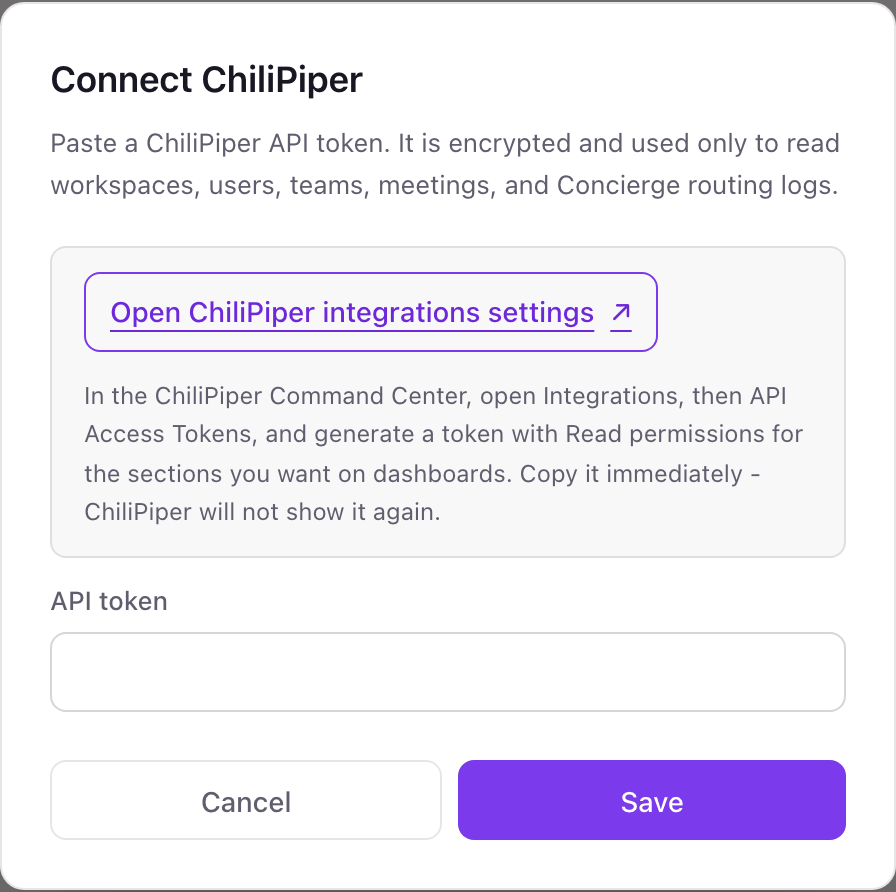
One Chili Piper connection per workspace
A workspace connects one Chili Piper org token. It covers every Chili Piper workspace in your org, and each widget can filter to one workspace, such as inbound sales or customer success.
Chili Piper lets you set permissions per token, so a token with only Ping and Read cannot book, cancel, or reassign anything. Dance Party reads with it and stores it encrypted. Revoke it on the API Access Tokens page in the Command Center.
From Chili Piper to your office display
Once Chili Piper shows Connected, the rest happens in plain English. No code, no drag-and-drop.
1. Describe it. Tell DJ Agent what you want to see.
New dashboard+ WidgetDescribe a widget in DJ Agent, or click + WidgetDJ AgentDATA SOURCESChili PiperConnectedFor our Chili Piper inbound demo router, count router runs in the last 7 days and how many booked a meeting, and show it as a funnel.Send2. It gets built. The widget lands on your board with real Chili Piper data.
New dashboard+ WidgetDemo request routerLiveForm submissions routed212 · 100%Booked on the spot131 · 62%Not booked81 · 38%DJ AgentDATA SOURCESChili PiperConnectedFor our Chili Piper inbound demo router, count router runs in the last 7 days and how many booked a meeting, and show it as a funnel.Send3. Put it on a screen. Pair an Apple TV with the six-character code it shows, then assign the dashboard.

Chili Piper dashboard questions
Can I put Chili Piper meetings on a TV for the sales floor?
Yes. Connect Chili Piper with an API token, describe the board, and assign it to an Apple TV running Dance Party. It refreshes hourly by default, and can go as often as every 5 minutes.
Can it show our Concierge inbound conversion rate?
Yes. Dance Party reads Concierge router logs for up to the last 30 days and can compare router runs with the runs that booked a meeting.
Who can create the Chili Piper API token?
An Admin in the Command Center. Workspace Managers do not see the API Access Tokens page.
How far back can Chili Piper meeting widgets look?
Seven days for meetings, because Chili Piper's meetings query caps the window at 7 days. Router logs go back up to 30 days.
Will guest emails appear on the screen?
Only if you ask for them. Router logs include the guest email, so leave it out of your prompt for a board on a shared office display.
Can Dance Party cancel or reassign Chili Piper meetings?
No. The connector never calls Chili Piper's cancel, no-show, or scheduling endpoints, and a Read-only token could not use them anyway.
More integrations
Put Chili Piper on every office display
Connect Chili Piper, describe the dashboard, and it runs on an Apple TV, refreshing on its own.
Get Started