
Apollo prospecting dashboards for the sales team's Apple TV office display
Apollo is where outbound teams size a market before they write a single sequence. Dance Party searches Apollo's database with your API key and turns the answers into an Apollo dashboard on an Apple TV: how many VPs of Sales sit in your territory, what your tier-one accounts look like, and how close your API usage is to its limits.
- Read-only
- API key connection
- One connection per workspace
Popular Apollo dashboards
What teams running Apollo put on the screen, and what you would ask DJ Agent to get it.
Territory size by seniority
For SDR managers and whoever plans territories
Before you carve up territories, you need to know how many buyers live in each one. Apollo's people search answers that with a count, and the count costs no credits.
- People in Apollo matching a location, by seniority
- Total matches for each job title you name
- Matches at a list of target company domains
Ask DJ Agent“Count Apollo people located in Texas at each seniority from Director up to Owner, and chart them largest first.”
Tier-one account board
For account executives working named accounts
A named-account team should know its targets cold. Apollo's company profile gives headcount, funding stage, and industry for each one, so the wall doubles as a briefing sheet.
- Estimated employees for each target company
- Latest funding stage and total funding
- Industry and headquarters city
Ask DJ Agent“For our five Apollo target accounts, show estimated employees and latest funding stage for each, in a list.”
Apollo API headroom
For RevOps and the engineers who run enrichment jobs
If your CRM sync or enrichment scripts call Apollo all day, hitting the daily limit stalls them quietly. A status wall of each endpoint's usage shows the squeeze before a job fails.
- Calls used today against the daily limit, per endpoint
- Hourly and per-minute usage against their limits
- Endpoints closest to their cap
Ask DJ Agent“Show Apollo API usage for each endpoint today against its daily limit, green under 60%, amber under 90%, red above.”
What Dance Party reads from Apollo
Dance Party reads Apollo's database with your API key, through Apollo's search and lookup endpoints. It never reads or shows emails or phone numbers, and it never saves, enriches, or exports a record.
People search
Apollo API docs ↗- Match countsTotal people in Apollo matching job titles, seniorities, locations, or company domains. Uses no Apollo credits.
- PreviewsFirst name, title, and company for a page of matches, with the last name hidden and flags for whether an email or direct phone exists.
Companies
Apollo API docs ↗- Company searchCompanies by name, domain, location, or employee range, with website and founded year. Apollo charges credits for this search.
- Company profileIndustry, estimated employees, annual revenue, total funding, latest funding stage, and location for one company.
API usage
Apollo API docs ↗- Usage and limitsCalls consumed and remaining per endpoint, by day, hour, and minute.
How to connect Apollo
Before you start
- An owner or admin of your Dance Party workspace makes the Apollo connection.
- An Apollo plan that includes API access. Apollo ties API access to the plan.
- A master API key for people search, company profiles, and usage stats. In Apollo that is the Set as master key toggle when you create the key.
- 1Under Integrations in Dance Party, Connect Apollo opens a short form: a note on master keys and credits, an Open Apollo API keys link, and one API key box.
- 2In Apollo, open Settings, then Integrations, then API Keys, and click Create new key. Name it Dance Party.Open Apollo API keys ↗
- 3Turn on Set as master key, click Create API key, and copy the key.
- 4Paste it into API key and click Save. Dance Party asks Apollo to confirm the key is live, and the card shows Connected.
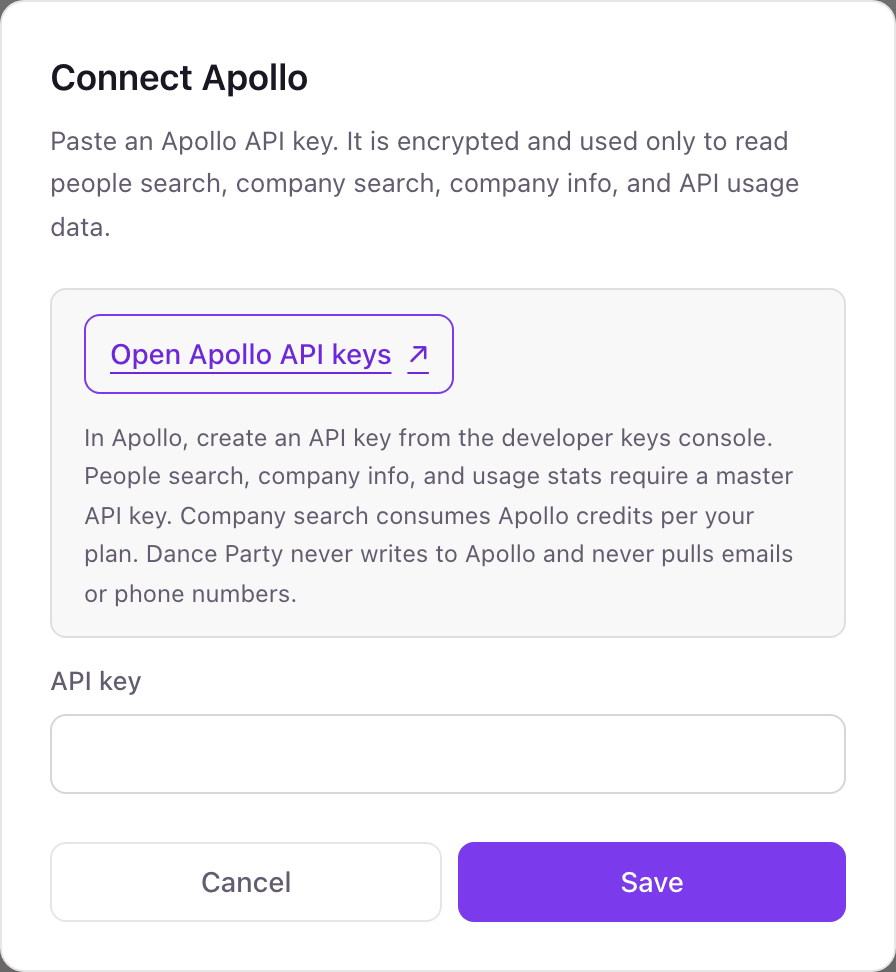
One Apollo connection per workspace
A workspace connects one Apollo API key, so one Apollo team. All Apollo widgets in that workspace search and count through the same key.
A master key can reach every Apollo endpoint, including ones that write. Dance Party's Apollo connector calls only search, lookup, and usage endpoints, and never pulls emails or phone numbers. Delete the key in Apollo's API Keys settings to cut access.
From Apollo to your office display
Once Apollo shows Connected, the rest happens in plain English. No code, no drag-and-drop.
1. Describe it. Tell DJ Agent what you want to see.
New dashboard+ WidgetDescribe a widget in DJ Agent, or click + WidgetDJ AgentDATA SOURCESApolloConnectedCount Apollo people located in Texas at each seniority from Director up to Owner, and chart them largest first.Send2. It gets built. The widget lands on your board with real Apollo data.
New dashboard+ WidgetTexas buyers by seniorityLive61,480director and aboveDirectorHeadVPC-suiteFounderOwnerDJ AgentDATA SOURCESApolloConnectedCount Apollo people located in Texas at each seniority from Director up to Owner, and chart them largest first.Send3. Put it on a screen. Pair an Apple TV with the six-character code it shows, then assign the dashboard.

Apollo dashboard questions
Can I show an Apollo dashboard on an Apple TV?
Yes. Once the Apollo key is saved, DJ Agent builds persona counts or account boards from a sentence, and any Apple TV paired to Dance Party can show them.
Does it show sequence open rates, replies, or meetings booked from Apollo?
No. Dance Party reads Apollo's people and company database and your API usage. Sequence, email, and meeting analytics are not part of what it reads today.
Does an Apollo dashboard use my credits?
Only company search does. People search counts use no credits, and company profiles and usage stats need a master key but not credits.
Why does Apollo need a master key?
Apollo's people search, company profile, and usage endpoints accept only master keys. A key scoped to fewer endpoints connects but cannot power those widgets.
Will contact emails or phone numbers appear on the screen?
No. People search returns obfuscated previews, and Dance Party never requests emails or phone numbers from Apollo.
Can Dance Party add contacts or start sequences in Apollo?
No. It only searches and reads. It cannot save a contact, add anyone to a sequence, or spend credits on enrichment.
More integrations
Put Apollo on every office display
Connect Apollo, describe the dashboard, and it runs on an Apple TV, refreshing on its own.
Get Started