Gong call activity and coaching dashboards on Apple TV, for the sales floor
Gong records every sales call, and managers use its activity stats to see who is on the phone and who is being coached. Dance Party reads those counts and runs them as a Gong dashboard on an Apple TV office display: calls recorded this week, reps ranked by calls hosted, and scorecards completed, with no transcript or customer name ever on screen.
- Read-only
- API key connection
- One connection per workspace
Gong dashboard examples
What teams running Gong put on the screen, and what you would ask DJ Agent to get it.
Calls hosted leaderboard
For account executives, SDRs, and their managers
Calls hosted is the cleanest activity signal Gong has, because it counts only calls the rep ran. A weekly ranking on the wall makes a quiet week visible by Wednesday.
- Calls hosted per rep over the last 7 days, or up to 90
- Calls attended per rep
- Team total of calls hosted
Ask DJ Agent“Rank our reps by Gong calls hosted over the last 7 days, top 8, with calls attended beside each name.”
Weekly call volume trend
For sales leadership and RevOps
One week of calls tells you little. Eight weeks of calls hosted, week by week, shows whether a new territory plan or a hiring class actually changed how much the team talks to buyers.
- Calls hosted per week, weeks starting Monday
- Reps active in each week
- Calls attended per week
Ask DJ Agent“Chart Gong calls hosted per week for the last 8 weeks, and show last week's total as the headline.”
Manager coaching activity
For frontline sales managers and the VP of Sales
Gong's coaching value depends on managers actually listening. Showing calls reviewed and feedback given per manager keeps coaching a weekly habit rather than a quarterly intention.
- Other reps' calls listened to, per manager
- Calls given feedback
- Scorecards filled
Ask DJ Agent“Rank our Gong users by other people's calls listened to in the last 30 days, and show feedback given next to each.”
Scorecard results
For enablement and sales managers
Scorecards turn call reviews into a number. The count completed and the average overall score for each scorecard show whether a new discovery framework is sticking.
- Scorecards answered in the last 30 days
- Average overall score for each scorecard
- Answered count per scorecard name
Ask DJ Agent“Show each Gong scorecard answered in the last 30 days with how many were completed and the average overall score.”
What Dance Party reads from Gong
Dance Party reads Gong with an access key and secret, and only through five read operations. It sees counts, durations, and user names. It never reads transcripts, recordings, call titles, participants, or customer names.
Calls
Gong API docs ↗- Calls recordedCount of calls in the last 1 to 90 days, with total and average minutes. Counts grow as Gong finishes processing each call.
- Call splitsCalls by direction (inbound, outbound, conference), by internal or external, and by meeting system.
- WorkspacesYour Gong workspaces, so a widget can count one team's calls.
Activity stats
Gong API docs ↗- Per-user activityCalls hosted, attended, listened to, shared, commented on, and given feedback, per user, for complete days through yesterday.
- Activity by periodThe same counters added up by day, week, or month, with active users per period.
- User namesDisplay names for the leaderboard. Emails are never read.
Scorecards
Gong API docs ↗- Answered scorecardsHow many were completed, by scorecard, with the average overall score. Reviewers appear as IDs only.
How to connect Gong
Before you start
- An owner or admin of your Dance Party workspace makes the Gong connection.
- A Gong Tech admin to create the key. API keys are available on every Gong plan.
- Your company's regional API base URL, only if Gong's API page shows one such as https://us-12345.api.gong.io
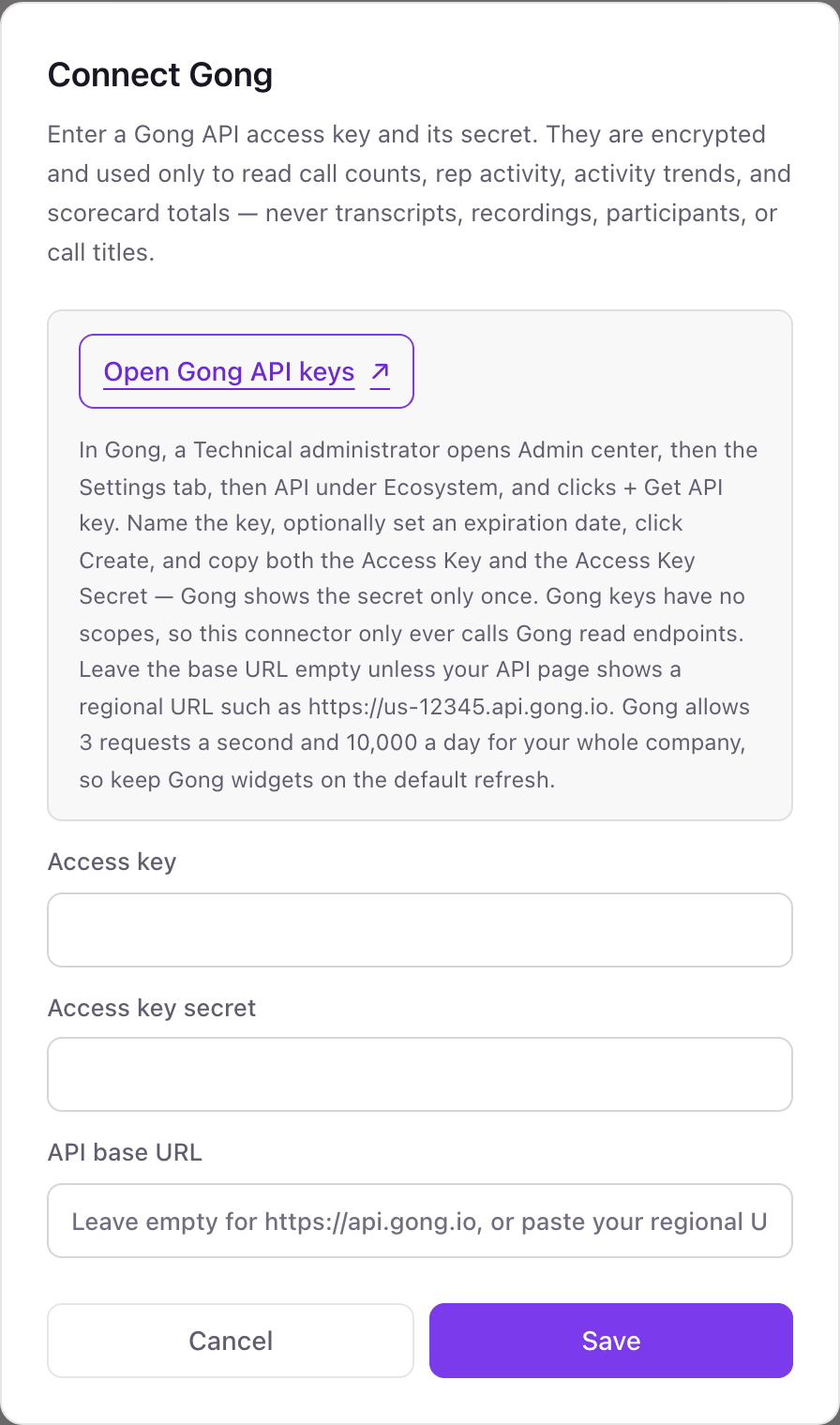
- 1Click Connect Gong on the Gong card under Integrations in Dance Party. The pop-up asks for an Access key, an Access key secret, and an optional API base URL.
- 2In Gong, open Admin center, then the Settings tab, then API under Ecosystem, and click + Get API key. Name it Dance Party and create it.Open Gong API keys ↗
- 3Copy the access key and the access key secret right away. Gong shows the secret once.
- 4Paste them into Access key and Access key secret. Leave API base URL empty unless Gong's API page shows a regional URL, then paste that.
- 5Click Save. Dance Party makes one small read to prove the pair works, and the Gong card shows Connected.
One Gong connection per workspace
A workspace connects one Gong company with one access key pair. Several Gong workspaces inside that company all come through the same key, and a widget can count calls for one of them.
Gong API keys cannot be scoped, so read-only comes from Dance Party's side: the connector only calls Gong's read endpoints, and never transcripts or recordings. Revoke the key any time under Admin center, Settings, API in Gong, or give it an expiration date when you create it.
From Gong to your office display
Once Gong shows Connected, the rest happens in plain English. No code, no drag-and-drop.
1. Describe it. Tell DJ Agent what you want to see.
New dashboard+ WidgetDescribe a widget in DJ Agent, or click + WidgetDJ AgentDATA SOURCESGongConnectedRank our reps by Gong calls hosted over the last 7 days, top 8, with calls attended beside each name.Send2. It gets built. The widget lands on your board with real Gong data.
New dashboard+ WidgetCalls hosted, last 7 daysLive1Jordan Blake412Mei Tanaka363Carlos Rivera334Ashley Grant275Owen Fischer22DJ AgentDATA SOURCESGongConnectedRank our reps by Gong calls hosted over the last 7 days, top 8, with calls attended beside each name.Send3. Put it on a screen. Pair an Apple TV with the six-character code it shows, then assign the dashboard.

Gong dashboard questions
Can I put Gong stats on a TV in the sales office?
Yes. Connect Gong with an API key, ask DJ Agent for the board, and assign it to an Apple TV running Dance Party. Gong widgets refresh once an hour.
Will call transcripts or customer names show up on the screen?
No. Dance Party never reads transcripts, recordings, call titles, or participants from Gong. It reads counts, durations, and your reps' display names.
Who in Gong can create the API key?
A Tech admin. They create it under Admin center, Settings, Ecosystem, API, and the secret is shown only once.
Why do Gong widgets refresh only hourly?
Gong allows 3 requests a second and 10,000 a day for your whole company, shared with every other tool. Hourly refresh keeps Dance Party a small share of that budget.
Why don't today's calls show up yet?
Gong counts a call once it finishes processing it, so calls appear with a delay. Activity stats cover complete days through yesterday in your company's time zone.
Can it show talk ratio or deal risk from Gong?
No. Dance Party reads call counts, activity stats, and scorecards. Talk ratio, trackers, and Gong deal boards are not part of what it reads.
More integrations
Put Gong on every office display
Connect Gong, describe the dashboard, and it runs on an Apple TV, refreshing on its own.
Get Started