
Appfigures app store metrics as an Apple TV dashboard
Appfigures pulls App Store and Google Play reports into one place, which is why studios with several apps live in it. Dance Party reads that combined data and shows it as an Apple TV dashboard on the office display: downloads and revenue across stores, where each app ranks in its category, how ratings are trending, and where the stores featured you.
- Read-only
- API key connection
- One connection per workspace
Appfigures dashboard examples
What teams running Appfigures put on the screen, and what you would ask DJ Agent to get it.
Revenue by app
For studio founders and finance
A portfolio hides which app actually pays the bills. Ranking every app by revenue, with App Store and Google Play combined, settles where the next sprint goes.
- Revenue by app for the last 30 days, all stores combined
- Downloads by app for the same period
- Revenue split by store for each app
Ask DJ Agent“Rank our Appfigures apps by revenue for the last 30 days, App Store and Google Play combined, with downloads next to each.”
Category rank tracker
For growth and ASO
Category rank is the number app marketers refresh most, because it moves with every feature, ad push, and update. Appfigures tracks it by country, hourly or daily, so the screen shows a climb as it happens.
- Rank in your category for one country, hourly or daily
- Rank over the last 7 days
- Places gained or lost since yesterday
Ask DJ Agent“Show our main app's Appfigures daily rank in Health & Fitness in the US for the last 7 days, with places gained since yesterday.”
Ratings by star
For product and support
The average hides the shape. A jump in one-star ratings after a release shows up in the breakdown days before it moves a 4.6 average, and that is the signal a team can act on.
- New ratings in the period for each star level
- Average rating and total ratings
- The latest reviews, filterable by stars and country
Ask DJ Agent“Chart new Appfigures ratings for the last 30 days by star level, 1 to 5, with the average rating above the bars.”
Featured on the stores
For the whole team
Getting featured by Apple or Google is a team win that usually goes unseen. Appfigures records where and when each app was featured, so the wall can show it the day it happens.
- Where each app was featured in the last 7 days
- Country and placement for each feature
- How many features per week
Ask DJ Agent“List where our apps were featured on the App Store and Google Play in the last 7 days, from Appfigures, with country under each.”
What Dance Party reads from Appfigures
Dance Party reads the apps linked to your Appfigures account through the Appfigures API v2, with read-only requests. It sees what Appfigures already collects from your store accounts, across App Store, Google Play, and the other stores you linked.
Sales and revenue
Appfigures API docs ↗- SalesDownloads, updates, returns, and revenue per app, country, store, device, or day.
- Revenue and subscriptionsAppfigures' revenue and subscription reports for the same breakdowns.
- Ads and usageAd performance, and usage analytics for apps that include the Appfigures SDK.
Ratings and reviews
Appfigures API docs ↗- RatingsAverage rating, total ratings, the per-star breakdown, and new ratings in a period.
- ReviewsTitle, text, stars, author, date, app, country, and version, sortable by date, stars, or country.
Ranks and featuring
Appfigures API docs ↗- RanksCategory rank positions by country, hourly or daily.
- FeaturedWhere and when your apps were featured, and how often per day or week.
How to connect Appfigures
Before you start
- An owner or admin of your Dance Party workspace makes the Appfigures connection.
- An Appfigures account with your store accounts linked, since Dance Party reads the apps Appfigures tracks for you
- An Appfigures API client with read access to the data you want on screen, plus its client key and a personal access token
- Appfigures API quota: every account includes 1,000 API requests a day
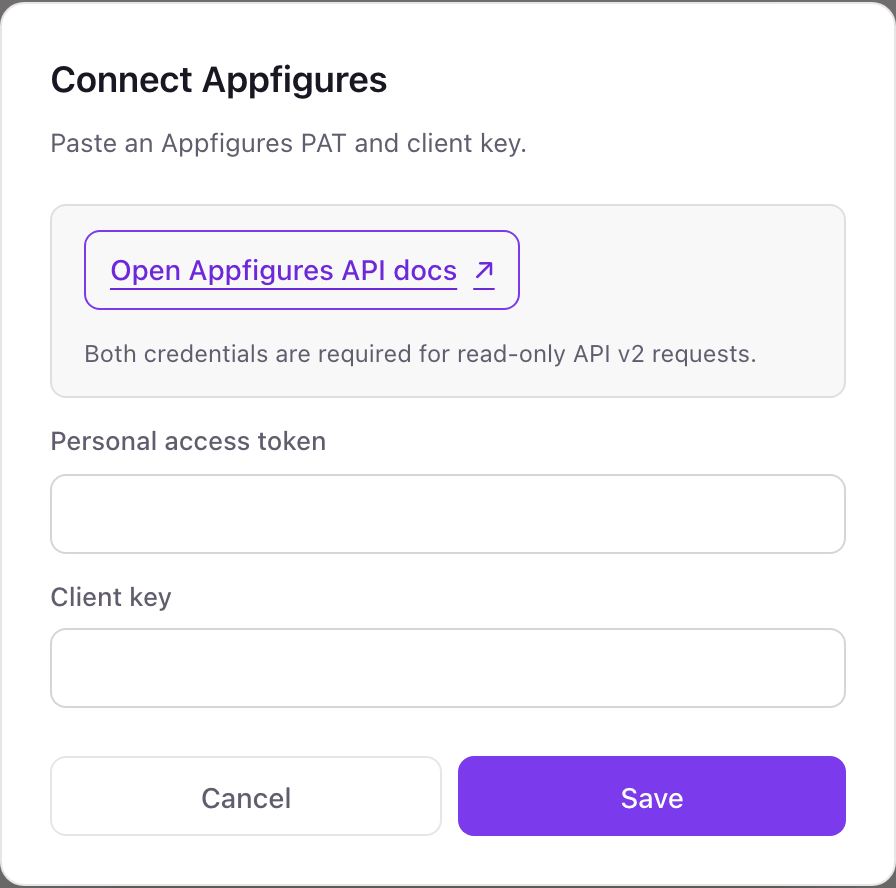
- 1In Dance Party's Integrations list, open the Appfigures card and click Connect Appfigures. It asks for two values, Personal access token and Client key.
- 2In Appfigures, open the API clients page, choose Create a new API client, name it Dance Party, pick the data sets it can read, and click Make me an app.Open Appfigures API clients ↗
- 3Copy the client key from the new client, then click Create Personal Access Token and copy the token.
- 4Paste the token into Personal access token and the key into Client key, then click Save. Dance Party lists your apps to check both, and the card shows Connected.
One Appfigures connection per workspace
A workspace connects one Appfigures account, and every app linked to it is available, across all its stores. A studio that tracks its whole portfolio in one Appfigures account needs only one connection.
Read-only. Dance Party only makes GET requests to the Appfigures API and stores the token encrypted. Delete the Dance Party API client in Appfigures to revoke the token and client key together.
From Appfigures to your office display
Once Appfigures shows Connected, the rest happens in plain English. No code, no drag-and-drop.
1. Describe it. Tell DJ Agent what you want to see.
New dashboard+ WidgetDescribe a widget in DJ Agent, or click + WidgetDJ AgentDATA SOURCESAppfiguresConnectedRank our Appfigures apps by revenue for the last 30 days, App Store and Google Play combined, with downloads next to each.Send2. It gets built. The widget lands on your board with real Appfigures data.
New dashboard+ WidgetRevenue by app, last 30 daysLive1Stride: Habit Tracker$184,2102Stride Journal$61,9403Focus Timer Pro$38,4054Sleep Sounds by Stride$12,8825Stride Widgets$3,120DJ AgentDATA SOURCESAppfiguresConnectedRank our Appfigures apps by revenue for the last 30 days, App Store and Google Play combined, with downloads next to each.Send3. Put it on a screen. Pair an Apple TV with the six-character code it shows, then assign the dashboard.

Appfigures dashboard questions
Can I show Appfigures data on an Apple TV?
Yes. Connect your personal access token and client key, describe the dashboard to DJ Agent, and assign it to a screen running the Dance Party Apple TV app.
Does it include Google Play as well as the App Store?
Yes. Dance Party reads whatever stores you linked in Appfigures, and a widget can combine them or split them by store.
Should I connect Appfigures or App Store Connect?
Appfigures if you want ranks, featuring, and more than one store in one place. The App Store Connect integration reads Apple's own sales reports and reviews directly, with no service in between.
Will Dance Party use up my Appfigures API requests?
Yes, a little. Every refresh is an API request, and each Appfigures account includes 1,000 requests a day, so refreshing every few minutes across many widgets adds up.
Can it show usage data like sessions or active users?
Only for apps that include the Appfigures SDK. Appfigures' usage report comes from that SDK, and apps without it have no usage data to show.
Can Dance Party change anything in Appfigures?
No. It only reads. It cannot edit apps, reply to reviews, or change tracked keywords.
More integrations
Put Appfigures on every office display
Connect Appfigures, describe the dashboard, and it runs on an Apple TV, refreshing on its own.
Get Started