
App Store Connect sales and reviews on an Apple TV dashboard
App Store Connect is where Apple reports what your apps sold and what customers wrote about them. Dance Party connects to it directly with your API key and turns Sales and Trends reports and new reviews into an Apple TV dashboard on the office display, with no third-party analytics service in between.
- Read-only
- API key connection
- One connection per workspace
Popular App Store Connect dashboards
What teams running App Store Connect put on the screen, and what you would ask DJ Agent to get it.
Yesterday's App Store numbers
For the mobile team and founders
Apple closes each sales day on Pacific time, and most app teams check Sales and Trends first thing. A board with yesterday's downloads and proceeds answers that question before anyone opens a laptop.
- First-time downloads from yesterday's daily Sales report
- Updates and redownloads, counted separately
- In-app purchase units
- Developer proceeds, in the currencies Apple reports
Ask DJ Agent“Show yesterday's App Store Connect sales report as tiles: first-time downloads, updates, in-app purchases, and proceeds in USD for the US storefront.”
Downloads by country
For growth and localization
Apple's report breaks every download out by storefront. Ranking countries shows where an App Store feature or a local press mention landed, and which markets deserve localized screenshots.
- First-time downloads by country code for one day, week, or month
- The top storefronts ranked by units
- Each country's share of the total
Ask DJ Agent“Rank App Store Connect first-time downloads by country for last week, top 6 countries.”
Newest App Store reviews
For product, support, and the whole team
A one-star review after a release is the fastest bug report you will get. Showing the newest reviews with their stars and country puts customer voice where engineers see it the same day.
- The latest customer reviews, newest first
- Star rating, title, and territory for each
- Filtering to one rating, such as only one and two stars
- Total number of written reviews for the app
Ask DJ Agent“Show the 5 newest App Store reviews for our app with star rating, title and country, one- and two-star reviews in red.”
Weekly downloads, last five weeks
For leadership and the mobile team
Daily numbers swing with weekends and featuring. Five weekly Sales reports side by side show whether the trend is really moving after a release or a price change.
- First-time downloads per week from Apple's weekly reports
- Up to five weeks, one report per bar
- The latest week's total above the chart
Ask DJ Agent“Chart App Store Connect first-time downloads for each of the last five complete weeks as bars.”
What Dance Party reads from App Store Connect
Dance Party signs every request to Apple's App Store Connect API with your own key, and every request is a read. It reads your app list, Sales and Trends summary reports, and customer reviews. It never submits builds, edits metadata, or replies to reviews.
- App listEvery app in the account with its Apple ID, name, bundle ID, SKU, and primary language.
Sales and Trends
App Store Connect API docs ↗- Sales reportsDaily, weekly, monthly, or yearly summary reports: units by product type, country, and device, with developer proceeds.
- PeriodsOne report period per widget source. Trends combine up to five periods.
Customer reviews
App Store Connect API docs ↗- ReviewsNewest first, with star rating, title, text, reviewer nickname, date, and territory, filtered by country or rating.
How to connect App Store Connect
Before you start
- An owner or admin of your Dance Party workspace makes the App Store Connect connection.
- An App Store Connect Admin, since only Admins can generate team API keys
- A key role that fits the board: Sales covers apps, downloads and proceeds. Apple shows customer reviews only to roles such as Admin, App Manager, Customer Support, Developer, or Marketing, so a key that must do both needs Admin.
- Your vendor number from Payments and Financial Reports
- 1Open the App Store Connect card on Dance Party's Integrations page and click Connect App Store Connect. Four fields appear: Issuer ID, Key ID, Private key (.p8 contents), and Vendor number, with Apple's steps under How to get these credentials.
- 2In App Store Connect, open Users and Access, then Integrations, then App Store Connect API. Click the plus button, name the key Dance Party, pick its access role, and click Generate.Open App Store Connect API keys ↗
- 3Copy the Issuer ID shown above the key list and the Key ID in the new key's row into the first two fields.
- 4Click Download API Key. Apple allows one download. Open the .p8 file in a text editor and paste all of it, BEGIN and END lines included, into Private key (.p8 contents).
- 5Open Payments and Financial Reports and copy the vendor number at the top left, under your legal entity name. It looks like 85000000.
- 6Click Save. Dance Party lists your apps to check the key, and the card shows Connected.
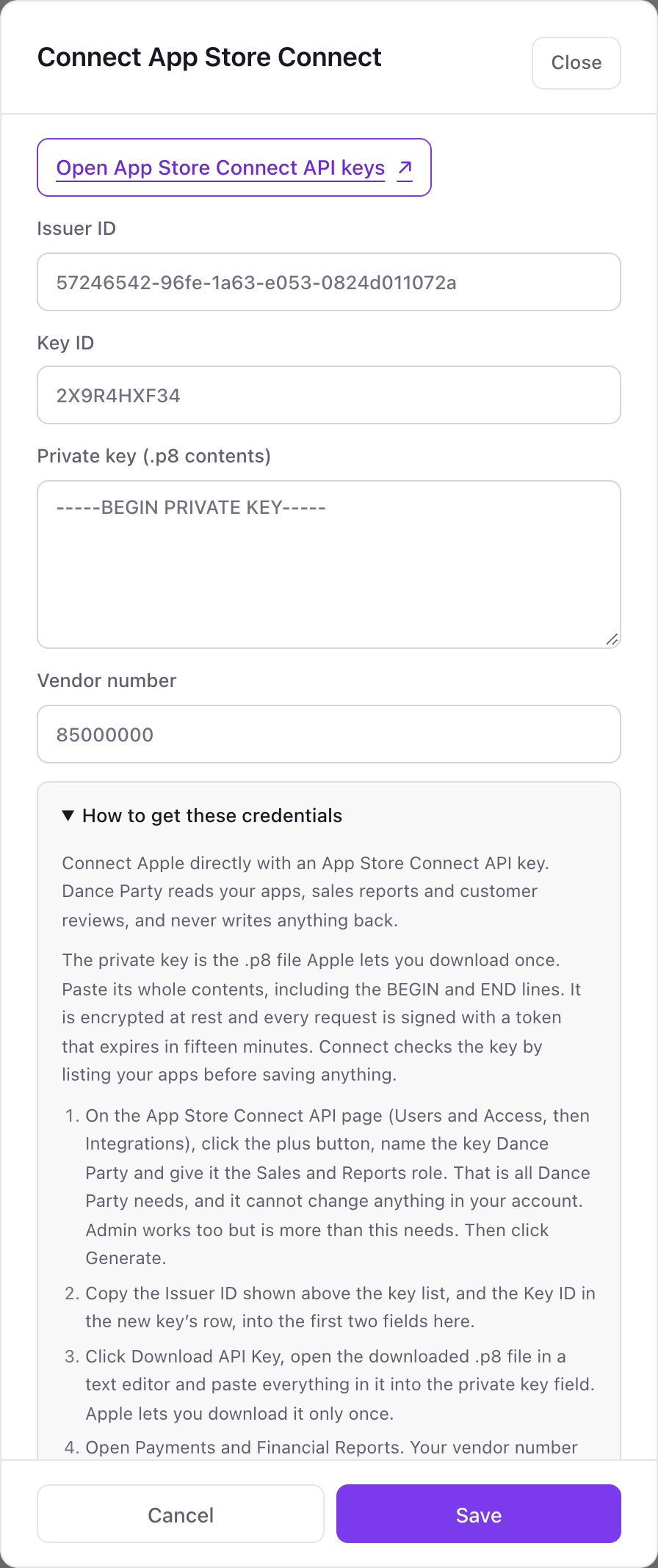
One App Store Connect connection per workspace
A workspace connects one App Store Connect team with one API key, and every app in that team is available, so a studio with ten apps gets all ten. A second Apple developer team, such as a client's account, needs its own Dance Party workspace.
The .p8 private key is stored encrypted, and each request is signed with a token that expires in fifteen minutes. Dance Party only reads. Revoke the Dance Party key on the App Store Connect API page and access ends immediately.
From App Store Connect to your office display
Once App Store Connect shows Connected, the rest happens in plain English. No code, no drag-and-drop.
1. Describe it. Tell DJ Agent what you want to see.
New dashboard+ WidgetDescribe a widget in DJ Agent, or click + WidgetDJ AgentDATA SOURCESApp Store ConnectConnectedShow yesterday's App Store Connect sales report as tiles: first-time downloads, updates, in-app purchases, and proceeds in USD for the US storefront.Send2. It gets built. The widget lands on your board with real App Store Connect data.
New dashboard+ WidgetApp Store, yesterdayLiveDownloads3,184Redownloads742In-app purchases611US proceeds$4,812DJ AgentDATA SOURCESApp Store ConnectConnectedShow yesterday's App Store Connect sales report as tiles: first-time downloads, updates, in-app purchases, and proceeds in USD for the US storefront.Send3. Put it on a screen. Pair an Apple TV with the six-character code it shows, then assign the dashboard.

App Store Connect dashboard questions
Can I show App Store Connect downloads on an Apple TV?
Yes. Connect your App Store Connect API key, describe the dashboard to DJ Agent, and assign it to a screen running the Dance Party Apple TV app.
Why can't I see today's App Store downloads?
Apple publishes sales by completed day, and its day closes on Pacific time. Yesterday's report is the newest one, and a day with no transactions has no report at all.
Can it show sessions, crashes, impressions, or retention?
No, not yet. Those come from Apple's separate Analytics Reports, which Dance Party does not read today. Downloads, proceeds, and reviews come from Sales and Trends and customer reviews.
Does it show my average star rating?
No. Apple's API returns written customer reviews, not the store's overall rating. Dance Party can show the newest reviews and filter them by stars.
Where do I find my vendor number?
In Payments and Financial Reports, at the top left under your legal entity name. It is usually eight digits starting with 8, and no API returns it, so you paste it in.
Are proceeds converted into one currency?
No. Apple's Sales report lists developer proceeds in each storefront's currency, and Dance Party shows them as Apple reports them, such as US proceeds in USD.
Can Dance Party change anything in App Store Connect?
No. Every call is a read. It cannot submit a build, change prices, edit metadata, or respond to reviews.
More integrations
Put App Store Connect on every office display
Connect App Store Connect, describe the dashboard, and it runs on an Apple TV, refreshing on its own.
Get Started