
Wistia video library dashboards for the marketing team's Apple TV
Marketing teams keep every webinar, demo, and customer story in Wistia folders, and the library grows faster than anyone tracks. A Wistia dashboard on an Apple TV shows the shape of it on the office display: how many videos sit in each folder, what the team updated this week, and which folders are shared publicly.
- Read-only
- API key connection
- One connection per workspace
Popular Wistia dashboards
What teams running Wistia put on the screen, and what you would ask DJ Agent to get it.
Largest video folders
For content and video marketing teams
A Wistia folder usually maps to a program: webinars, product demos, customer stories. Ranking folders by video count shows where the team's output really goes, which is rarely where the plan said it would.
- Videos in each folder, largest first
- Total videos across the library
- Folders with no videos yet
Ask DJ Agent“Rank our Wistia folders by number of videos, largest first, with the library total as the headline.”
This week in the library
For the marketing team and its video producer
Wistia records when each folder was last updated. Listing the most recent ones is a lightweight production log: the launch folder moving to the top tells everyone the launch assets are landing.
- Folders updated most recently, newest first
- Video count in each of those folders
- Folders created this month
Ask DJ Agent“List our Wistia folders updated in the last 7 days, newest first, with how many videos each holds.”
Folder sharing check
For marketing ops and whoever owns brand safety
A Wistia folder can be made public so anyone with the link can browse it. A tile per folder showing public or private catches the unreleased launch video sitting in a public folder.
- Each folder's sharing setting, public or private
- Count of public folders
- Public folders updated in the last 7 days
Ask DJ Agent“Show our Wistia folders as tiles, amber when the folder is public and green when private, with the public count in the title.”
What Dance Party reads from Wistia
Dance Party reads Wistia's Data API with a token you create in your account settings. It reads the folder list and the media list, up to 100 of each per widget, and only sends read requests.
Folders
Wistia API docs ↗- FoldersName, how many videos each holds, created and updated dates, and whether it is public. Wistia's API calls these projects.
Videos and media
Wistia API docs ↗- MediaName, type, duration, folder, and processing status (queued, processing, ready, failed). Up to 100 per widget, so complete for smaller libraries.
How to connect Wistia
Before you start
- An owner or admin of your Dance Party workspace makes the Wistia connection.
- The Wistia Account Owner, since only they can open the API tokens page
- 1On the Dance Party Integrations page, click Connect Wistia to open a pop-up with a single API token field.
- 2In Wistia, signed in as the Account Owner, open Account Settings and go to the API tab. Click New token.Open Wistia API docs ↗
- 3Name it Dance Party and give it the Read all project and video data permission. Copy the token straight away; Wistia only lets you copy it once.
- 4Paste it into API token and click Save.
- 5Dance Party reads one folder to check the token, and the Wistia card shows Connected.
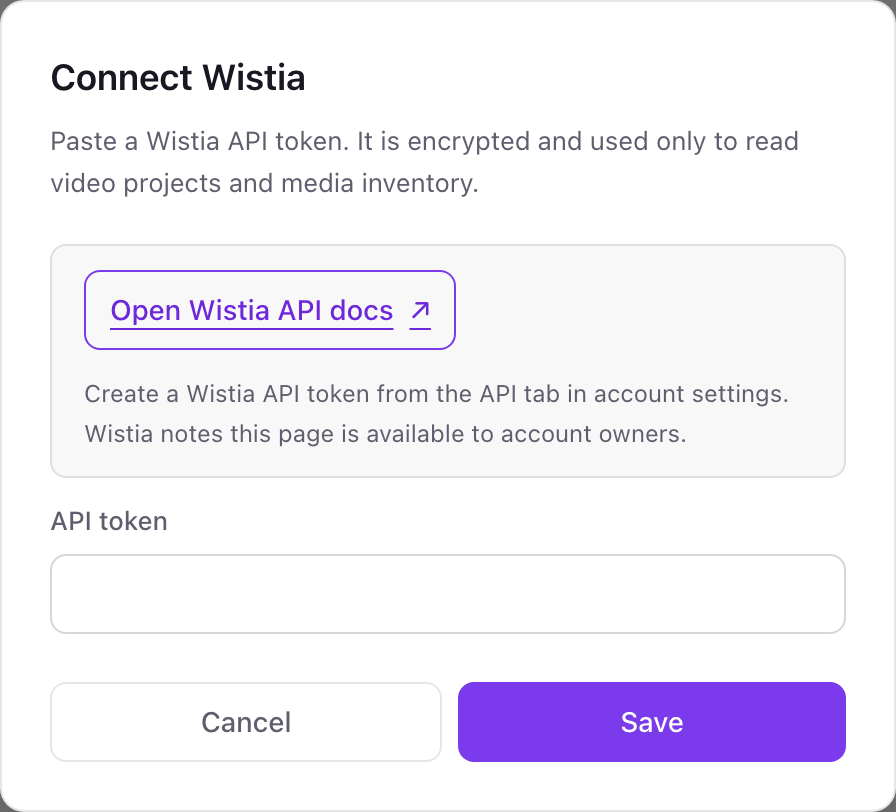
One Wistia connection per workspace
A workspace connects one Wistia account. An agency that manages several client Wistia accounts needs one Dance Party workspace per account.
With the Read all project and video data permission the token can read folders and media but not change, upload, or delete them. Dance Party only reads. Delete the token from the API tab in Wistia's Account Settings to revoke it.
From Wistia to your office display
Once Wistia shows Connected, the rest happens in plain English. No code, no drag-and-drop.
1. Describe it. Tell DJ Agent what you want to see.
New dashboard+ WidgetDescribe a widget in DJ Agent, or click + WidgetDJ AgentDATA SOURCESWistiaConnectedRank our Wistia folders by number of videos, largest first, with the library total as the headline.Send2. It gets built. The widget lands on your board with real Wistia data.
New dashboard+ WidgetVideos per folderLive1Webinars3122Product demos1883Customer stories1414Sales enablement975Social cutdowns64DJ AgentDATA SOURCESWistiaConnectedRank our Wistia folders by number of videos, largest first, with the library total as the headline.Send3. Put it on a screen. Pair an Apple TV with the six-character code it shows, then assign the dashboard.

Wistia dashboard questions
Can I show our Wistia library on an office display?
Yes. Connect Wistia with an API token, describe the dashboard, and pick the office display it should run on.
Can it show Wistia plays, engagement, or heatmaps?
No. Dance Party reads folders and media, not Wistia's stats. Plays, play rate, engagement, and heatmaps stay in Wistia.
Which Wistia token permission should I choose?
Read all project and video data. It covers everything Dance Party reads and nothing it does not need.
Why can only the account owner create the token?
Wistia limits the API tokens page to the Account Owner. Ask them to create the token, or to connect Wistia in Dance Party themselves.
Can Dance Party upload or change Wistia videos?
No. It only reads. It never uploads, renames, moves, or deletes a video or folder.
More integrations
Put Wistia on every office display
Connect Wistia, describe the dashboard, and it runs on an Apple TV, refreshing on its own.
Get Started