
Your Mailchimp dashboard, on the office Apple TV
Mailchimp grades every send against the average for your industry, and most teams only see that grade when someone opens the report. Dance Party puts it on an office display: the last campaign's opens and clicks, how your audience is holding up, and what is scheduled next, as a Mailchimp dashboard running on Apple TV.
- Read-only
- API key connection
- One connection per workspace
Popular Mailchimp dashboards
What teams running Mailchimp put on the screen, and what you would ask DJ Agent to get it.
Mailchimp last send vs industry average
For the email marketer and the marketing lead
A 38 percent open rate means little on its own. Mailchimp reports the average for your industry beside every campaign, and putting both on the wall answers whether the send was good in one glance.
- Open rate and click rate for the most recent sent campaign
- Mailchimp's industry average open and click rate for your account
- Unsubscribes, hard bounces and abuse reports on that send
Ask DJ Agent“Show our latest sent Mailchimp campaign's open rate and click rate beside Mailchimp's industry averages, plus unsubscribes and bounces.”
Mailchimp audience health
For growth and lifecycle marketing
An audience shrinks quietly through unsubscribes and cleaned addresses. Seeing subscribed, unsubscribed, cleaned and new since the last send together shows whether sign-ups are keeping up.
- Subscribed members in each audience
- Unsubscribed and cleaned contacts
- New subscribers since the last campaign
- Mailchimp's average monthly subscribe and unsubscribe rate
Ask DJ Agent“Show our main Mailchimp audience: subscribed, unsubscribed, cleaned, and new members since the last send.”
Mailchimp click-rate leaderboard
For content and email writers
Clicks are the Mailchimp number Apple Mail Privacy Protection does not inflate. Ranking recent sends by click rate shows which subject and content actually got people to act.
- Click rate for each recent sent campaign
- Open rate for the same campaigns
- Emails sent per campaign
Ask DJ Agent“Rank our last five sent Mailchimp campaigns by click rate and show each one's open rate.”
Mailchimp send schedule
For everyone who writes or approves email
Mailchimp campaigns sit as drafts, scheduled or sent. A running list on the wall means nobody is surprised by what went out on Tuesday or what is due to go out Thursday.
- Campaigns with their status: draft, scheduled or sent
- Send time for sent and scheduled campaigns
- Recipients for each sent campaign
Ask DJ Agent“List our Mailchimp campaigns with their status and send time, scheduled ones first, then the latest sent.”
What Dance Party reads from Mailchimp
Dance Party reads Mailchimp's Marketing API with your API key, sending GET requests to your account's own data center (the server prefix). It reads reports and counts, not your subscribers' email addresses.
Campaigns
Mailchimp API docs ↗- Campaign listTitle, subject line, status, send time and emails sent.
- Report summaryOpens, open rate, clicks and click rate carried on each sent campaign.
Campaign reports
Mailchimp API docs ↗- EngagementUnique opens, clicks, forwards and unsubscribes for one campaign.
- DeliverabilityHard and soft bounces and abuse reports.
- Industry averagesMailchimp's open, click and bounce averages for your industry.
- E-commerceOrders and revenue for campaigns sent from a connected store.
Audiences and account
Mailchimp API docs ↗- Audience statsSubscribed, unsubscribed and cleaned counts, members since last send, and average monthly subscribe and unsubscribe rates.
- AccountAccount name and total subscribers, read once to prove the key works.
How to connect Mailchimp
Before you start
- An owner or admin of your Dance Party workspace makes the Mailchimp connection.
- A Mailchimp user at Manager level or above. Owners, Admins and Managers can create API keys. Authors and Viewers cannot.
- The API key and its server prefix, such as us21
- 1In Mailchimp, open your profile, then Extras, then API keys, and click Create A Key. Name it Dance Party and copy it.Open Mailchimp API keys ↗
- 2In Dance Party, open Integrations and click Connect Mailchimp.
- 3Paste the key into API key. In Server prefix, enter the part after the dash at the end of the key, for example us21 from abc123-us21.
- 4Click Save. Dance Party reads your account back from Mailchimp, and the card shows Connected.
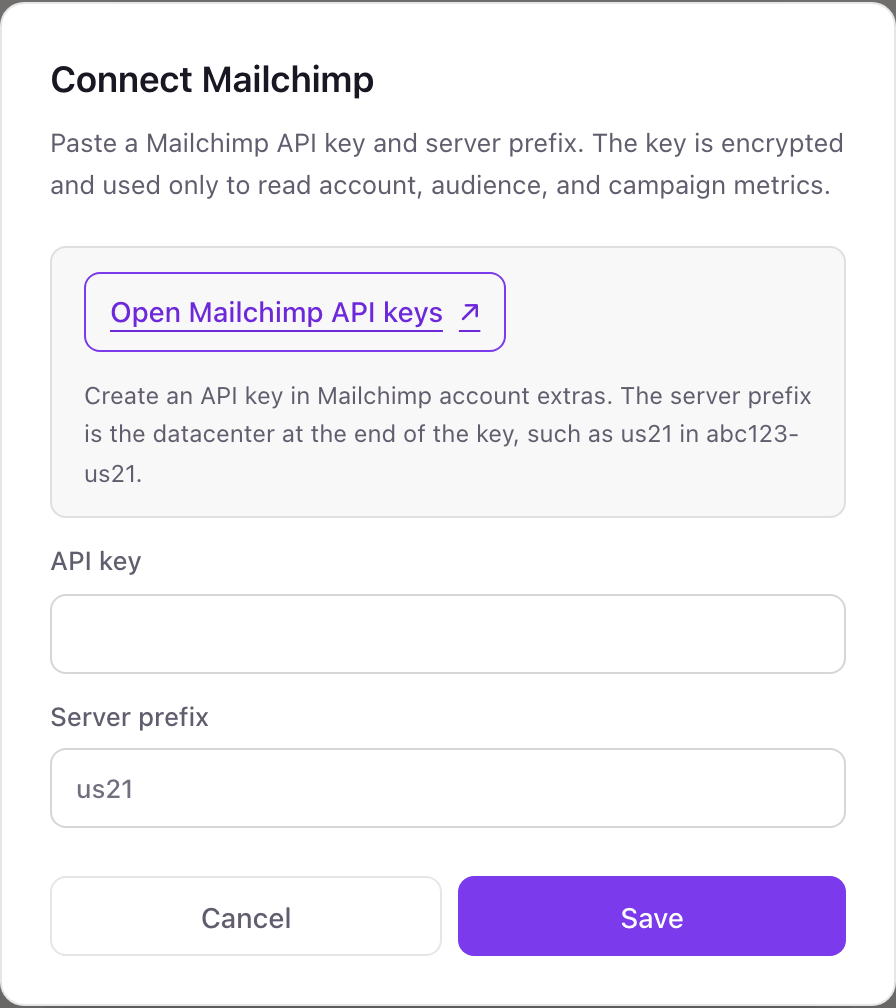
One Mailchimp connection per workspace
A workspace connects one Mailchimp account, and every audience in it is available to your dashboards. An agency with several client Mailchimp accounts uses one Dance Party workspace per client.
Mailchimp API keys have no read-only mode, so a key can do what its user can do. Dance Party only sends GET requests with it. Delete the key from the same API keys page in Mailchimp to cut access immediately.
From Mailchimp to your office display
Once Mailchimp shows Connected, the rest happens in plain English. No code, no drag-and-drop.
1. Describe it. Tell DJ Agent what you want to see.
New dashboard+ WidgetDescribe a widget in DJ Agent, or click + WidgetDJ AgentDATA SOURCESMailchimpConnectedShow our latest sent Mailchimp campaign's open rate and click rate beside Mailchimp's industry averages, plus unsubscribes and bounces.Send2. It gets built. The widget lands on your board with real Mailchimp data.
New dashboard+ WidgetNewsletter #112 vs industryLiveOpen rate38.6%Industry 35.1%Click rate2.1%Industry 2.3%Unsubscribes54Abuse reports1DJ AgentDATA SOURCESMailchimpConnectedShow our latest sent Mailchimp campaign's open rate and click rate beside Mailchimp's industry averages, plus unsubscribes and bounces.Send3. Put it on a screen. Pair an Apple TV with the six-character code it shows, then assign the dashboard.

Mailchimp dashboard questions
Can I show Mailchimp campaign results on a TV?
Yes. Connect Mailchimp, tell DJ Agent what to show, and assign the dashboard to an Apple TV running Dance Party.
Where do I find my Mailchimp server prefix?
At the end of your API key, after the dash, for example us21. It is also the start of your address bar when you are signed in to Mailchimp.
Are Mailchimp open rates reliable on a wall screen?
They are Mailchimp's own numbers, unchanged. Apple Mail Privacy Protection inflates opens, which is why many teams put click rate first.
Can one dashboard show several Mailchimp audiences?
Yes. Dance Party reads every audience in the connected account, so you can show each audience's subscribed count side by side.
Can it chart audience growth over the past year?
Not as a history. Dance Party reads current audience counts and Mailchimp's average monthly subscribe rate, not the month-by-month growth report.
Can Dance Party send or schedule a Mailchimp campaign?
No. It only reads. It cannot send, schedule, edit campaigns or change your audience.
More integrations
Put Mailchimp on every office display
Connect Mailchimp, describe the dashboard, and it runs on an Apple TV, refreshing on its own.
Get Started