
GitLab pipelines and merge requests as an office display dashboard on Apple TV
GitLab runs the whole path from merge request to production, and the pipeline graph is what every engineer checks first. Dance Party reads it with a read_api token and builds an Apple TV dashboard for the office display: the latest pipeline on each project's default branch, merge requests still open, and how often you deploy to production.
- Read-only
- API key connection
- One connection per workspace
Popular GitLab dashboards
What teams running GitLab put on the screen, and what you would ask DJ Agent to get it.
Pipeline status wall
For developers and release engineers
A failed pipeline on the default branch blocks every merge train behind it. One tile per project, taken from GitLab's latest pipeline, turns red on the office display before the second person rebases onto a broken main.
- Latest pipeline status per project: passed, failed, running, or canceled
- The branch or tag it ran on and the commit SHA
- When the pipeline last updated
Ask DJ Agent“Show the latest GitLab pipeline on the default branch for platform/api, platform/web, platform/worker, mobile/app, platform/infra, and platform/docs as status tiles.”
Open merge requests
For the engineering team
Merge requests age in silence. The oldest open ones, with drafts left out, give standup a concrete list to unblock instead of a vague sense that reviews are slow.
- Open merge requests across projects, oldest first
- Project, !iid, author, and target branch
- Whether each merge request is a draft
- Count of open merge requests in total
Ask DJ Agent“List open GitLab merge requests across our projects that are not drafts, oldest first, with project, !iid, and how long each has been open.”
GitLab production deployments per day
For engineering leadership and the platform team
Deployment frequency is the DORA metric most teams can move first. Successful deployments to the production environment, day by day, show whether small, frequent releases are actually happening.
- Successful deployments to production per day
- The latest production deployment's ref and finish time
- Deployments to staging for comparison
Ask DJ Agent“Chart successful GitLab deployments to the production environment of platform/api per day for the last week, with the total.”
Open issues by label
For product and QA
GitLab labels are how teams sort bugs from features. Open versus closed counts for the bug label, per project, show whether the backlog is shrinking or quietly growing.
- Open issues with a label, such as bug, per project
- Closed issues with the same label
- All open issues in a project
Ask DJ Agent“Show open and closed GitLab issues labeled bug for platform/api and platform/web as four tiles.”
What Dance Party reads from GitLab
Dance Party reads GitLab's REST API with a personal access token that has only the read_api scope, on GitLab.com or your own instance. Each request asks for one bounded page, and nothing is ever written back.
Merge requests
GitLab API docs ↗- Merge requestsOpen, merged, or closed, with title, author, source and target branch, draft flag, and created date. Up to 100 per widget.
- ProjectsThe projects the token can read, with path, visibility, and default branch.
Pipelines and deployments
GitLab API docs ↗- Latest pipelineStatus, ref, commit SHA, and update time for a project's default branch or a branch you name.
- DeploymentsRecent successful deployments, filtered by environment, with ref, SHA, and finish time.
Issues
GitLab API docs ↗- Issue statisticsOpen, closed, and total issue counts for a project, optionally filtered by labels.
How to connect GitLab
Before you start
- An owner or admin of your Dance Party workspace makes the GitLab connection.
- A GitLab user who can see the projects you want on screen, on any GitLab tier
- A legacy personal access token with only the read_api scope. It expires, a year at most by default.
- For self-hosted GitLab, an instance URL that is reachable from the internet
- 1In Dance Party Integrations, click Connect GitLab on the GitLab card.
- 2Click Create a GitLab access token. In GitLab, open Edit profile, then Access, then Personal access tokens, and choose Legacy token from the Generate token menu (Add new token on older versions).Create a GitLab access token ↗
- 3Name it Dance Party, set an expiry date, tick only read_api, and click Generate token. Copy the token.
- 4Paste it into Personal access token. Fill Instance URL only if you self-host GitLab, such as https://gitlab.acme.com.
- 5Click Save. The GitLab card shows Connected.
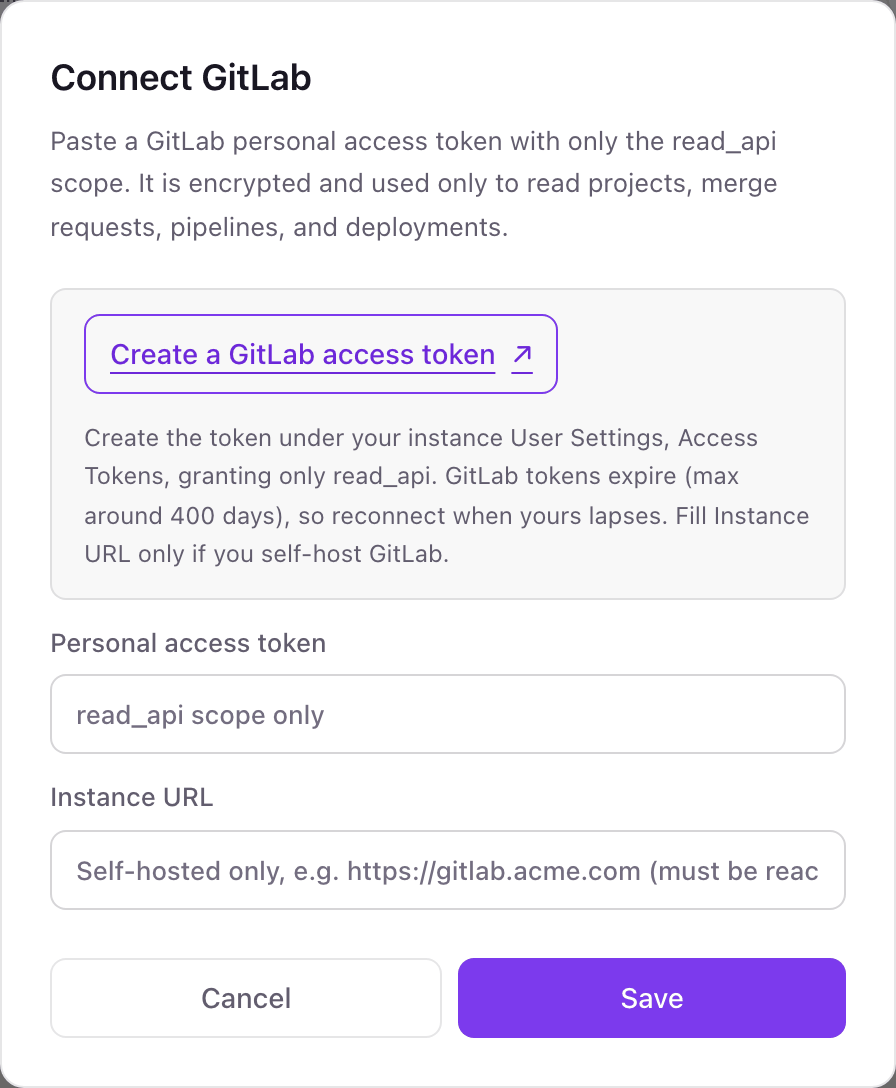
One GitLab connection per workspace
A workspace connects one GitLab instance with one token, either GitLab.com or your self-hosted URL. Every group and project the token's user can see is available, so one token usually covers the whole company.
Read-only. A read_api token can read the API but cannot push code, merge, or change settings. Revoke it in GitLab under Edit profile, Access, Personal access tokens.
From GitLab to your office display
Once GitLab shows Connected, the rest happens in plain English. No code, no drag-and-drop.
1. Describe it. Tell DJ Agent what you want to see.
New dashboard+ WidgetDescribe a widget in DJ Agent, or click + WidgetDJ AgentDATA SOURCESGitLabConnectedShow the latest GitLab pipeline on the default branch for platform/api, platform/web, platform/worker, mobile/app, platform/infra, and platform/docs as status tiles.Send2. It gets built. The widget lands on your board with real GitLab data.
New dashboard+ WidgetDefault branch pipelinesLiveplatform/apipassed 4 min agoplatform/webpassed 18 min agoplatform/workerrunningmobile/appfailed 9 min agoplatform/infrapassed 2 hr agoplatform/docspassed 1 day agoDJ AgentDATA SOURCESGitLabConnectedShow the latest GitLab pipeline on the default branch for platform/api, platform/web, platform/worker, mobile/app, platform/infra, and platform/docs as status tiles.Send3. Put it on a screen. Pair an Apple TV with the six-character code it shows, then assign the dashboard.

GitLab dashboard questions
Can I show GitLab pipeline status on a TV in the office?
Yes. Connect GitLab, name the projects, and each gets a tile with its latest pipeline on the Apple TV running Dance Party. Tiles refresh as often as every 5 minutes.
Does it work with self-managed GitLab?
Yes, if the instance is reachable from the internet. Enter its address in Instance URL when you connect; an instance behind a VPN with no public address cannot be read.
Which GitLab token scope does Dance Party need?
Only read_api. It is the narrowest scope that reads projects, merge requests, pipelines, deployments, and issue counts.
Why did my GitLab dashboard stop updating?
The token most likely expired. GitLab personal access tokens always have an expiry date, so create a new read_api token and reconnect.
Can it show merge request approvals or time to merge?
No. Dance Party reads merge request titles, authors, branches, draft state, and created dates, but not approvals or merge times.
Can Dance Party trigger or retry a GitLab pipeline?
No. The read_api scope cannot run pipelines, and Dance Party only sends GET requests.
More integrations
Put GitLab on every office display
Connect GitLab, describe the dashboard, and it runs on an Apple TV, refreshing on its own.
Get Started