
Typeform survey and form response dashboards, live on an Apple TV
Typeform is where customers, leads, and attendees answer you. Dance Party reads your forms' completed responses and puts the part that matters on a TV dashboard: the latest NPS score, the latest demo requests, or registrations against capacity, running on an Apple TV in the office.
- Read-only
- API key connection
- One connection per workspace
Typeform dashboard examples
What teams running Typeform put on the screen, and what you would ask DJ Agent to get it.
NPS from the latest Typeform responses
For customer success and product teams
Most NPS surveys are a Typeform with a 0 to 10 Opinion Scale. Scoring the most recent responses on a shared screen keeps the number, and the latest comment, in front of the people who can move it.
- NPS calculated from the 0 to 10 answers in the latest responses
- Share of promoters and detractors
- Total completed responses on the form
- The most recent written reason from a detractor
Ask DJ Agent“Calculate NPS from the latest responses to our Typeform customer NPS survey, and show promoters, detractors, and total responses.”
New demo requests
For sales development and founders
When a demo form is the front door, the team wants to see each new request arrive. A feed of the latest submissions, showing company and team size but not personal details, keeps response time short.
- The latest completed submissions, newest first
- Chosen answers such as company, team size, or use case
- Submissions received today
Ask DJ Agent“List the latest 5 submissions to our Typeform demo request form with company name, team size, and time submitted. Leave out email addresses.”
Event registrations against capacity
For events, marketing, and office managers
Typeform is a common registration form for meetups, webinars, and company offsites. A progress bar toward the room's capacity tells the organizer when to close sign-ups or book a bigger space.
- Total completed registrations on the form
- Your capacity target, typed into the prompt
- Registrations received this week
Ask DJ Agent“Show total completed responses to our Typeform Fall Meetup registration form against a capacity of 250.”
How people answered one question
For marketing and research teams
Questions like how did you hear about us come back as a multiple choice count. Showing the split on the office display answers the channel question without anyone opening the Results tab.
- Count of each choice for one multiple choice question
- Share of the latest responses picking each choice
- Responses counted
Ask DJ Agent“Break down answers to 'How did you hear about us?' in our Typeform signup survey as columns across the latest responses.”
What Dance Party reads from Typeform
Dance Party reads Typeform through its Create and Responses APIs with a personal access token. It reads forms and completed responses, up to the latest 100 per form per read, and never changes a form or a response.
Forms
Typeform API docs ↗- Your formsTitle, when each was created and last updated, and whether it is public, up to 100 forms.
Responses
Typeform API docs ↗- Completed responsesThe latest 100 submitted responses for one form, with when each was started and submitted.
- Total responsesThe count of all completed responses on the form.
- AnswersChoices, ratings, Opinion Scale and NPS scores, numbers, dates, and text for each question.
- Hidden fields and scoresHidden field values you pass in, and calculated quiz scores.
How to connect Typeform
Before you start
- An owner or admin of your Dance Party workspace makes the Typeform connection.
- A Typeform personal access token from a user who can see the forms you want on screen
- Read scopes on the token: forms:read and responses:read are enough
- 1In Typeform, open your account settings and choose Personal tokens, then Generate a new token.Open Typeform personal tokens ↗
- 2Name it Dance Party, choose custom scopes, and select only forms:read and responses:read. Copy the token.
- 3In Dance Party, open Integrations, click Connect Typeform, and paste it into Personal access token.
- 4Click Save. Dance Party checks the token by listing your forms, and the card shows Connected.
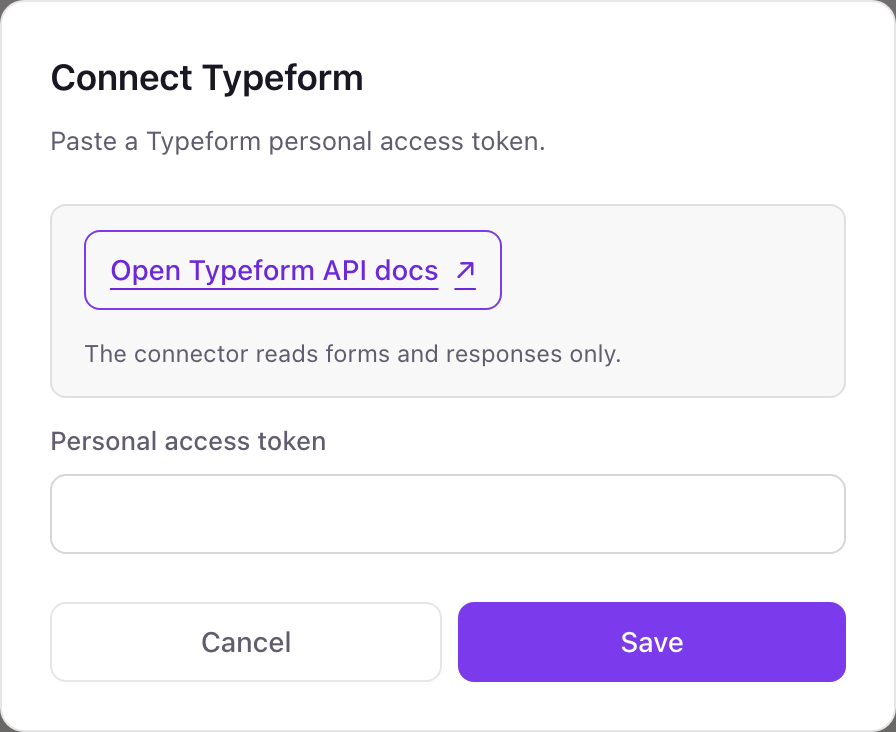
One Typeform connection per workspace
A workspace connects one Typeform token, which reads every form that token's Typeform user can access. Forms in a teammate's private Typeform workspace appear only once they share that workspace with the connecting user.
With only forms:read and responses:read, the token cannot edit a form, delete a response, or create anything. Dance Party stores it encrypted and only sends read requests. Delete the token under Personal tokens in Typeform to cut access immediately.
From Typeform to your office display
Once Typeform shows Connected, the rest happens in plain English. No code, no drag-and-drop.
1. Describe it. Tell DJ Agent what you want to see.
New dashboard+ WidgetDescribe a widget in DJ Agent, or click + WidgetDJ AgentDATA SOURCESTypeformConnectedCalculate NPS from the latest responses to our Typeform customer NPS survey, and show promoters, detractors, and total responses.Send2. It gets built. The widget lands on your board with real Typeform data.
New dashboard+ WidgetCustomer NPS surveyLiveNPS+46Promoters58%Detractors12%Total responses1,284DJ AgentDATA SOURCESTypeformConnectedCalculate NPS from the latest responses to our Typeform customer NPS survey, and show promoters, detractors, and total responses.Send3. Put it on a screen. Pair an Apple TV with the six-character code it shows, then assign the dashboard.

Typeform dashboard questions
Can I show Typeform results on a TV in the office?
Yes. Connect Typeform, tell DJ Agent which form and which answers to show, and assign the dashboard to a screen running the Dance Party Apple TV app.
How many Typeform responses does a widget read?
The latest 100 completed responses per read, plus the form's total response count. NPS and answer breakdowns are calculated from those latest responses.
Does it include partial Typeform responses?
No. Typeform returns completed submissions by default, and that is what Dance Party reads.
Can it show completion rate or drop-off?
No. Views, completion rate, and time to complete live in Typeform's Insights, which Dance Party does not read. It shows responses and their answers.
Will respondents' emails end up on the screen?
Only if you ask for them. Tell DJ Agent which answers to show, such as company and team size, and leave personal details off a screen visitors can see.
Which scopes does the Typeform token need?
Two read scopes, forms:read and responses:read. Typeform lets you pick scopes when you generate a personal token, and read scopes are all Dance Party uses.
Can Dance Party change my Typeform forms?
No. It never creates, edits, or deletes forms or responses. It only reads them to refresh your dashboards.
More integrations
Put Typeform on every office display
Connect Typeform, describe the dashboard, and it runs on an Apple TV, refreshing on its own.
Get Started