
Twenty CRM dashboards on Apple TV, custom objects included
Teams choose Twenty because they can shape the CRM around their business, often with custom objects the standard CRMs never had. Dance Party reads your Twenty workspace, custom objects included, and builds a Twenty dashboard for an Apple TV: opportunities by stage, users per product, and the tasks still open, on the office display.
- Read-only
- API key connection
- One connection per workspace
Popular Twenty dashboards
What teams running Twenty put on the screen, and what you would ask DJ Agent to get it.
Twenty opportunities by stage
For founders and the sales team
Twenty's opportunity board is the team's working view. On the wall, the count in Proposal is a daily number everyone sees, not something a founder checks at night.
- Opportunity count in each stage, using your own stage names
- Amount by stage across your latest 60 opportunities
- Opportunities created this week
Ask DJ Agent“Show Twenty opportunities as a funnel by stage with the count in each, from New through Customer.”
Custom object counts, like users per product
For product and customer success
If you model products, subscriptions, or installs as custom objects in Twenty, the question the office cares about is a count per parent. Dance Party counts child records per parent without any export.
- Records of a custom object counted per related parent, up to 30 parents
- An optional filter, such as only paid users
- The overall total
Ask DJ Agent“In Twenty, count apps per product and rank the products by paid users, most first.”
Open tasks and latest notes
For the whole team
Twenty ties tasks and notes to every company and deal. A feed of open tasks with due dates keeps follow-ups visible to the people who share them.
- Open tasks with status and due date
- The most recent notes by title
- Total tasks and notes in the workspace
Ask DJ Agent“List our open Twenty tasks with their due dates, soonest first, and flag the overdue ones.”
CRM at a glance
For founders and operators
Early teams watch how the database grows: companies added, people in it, opportunities open. Four totals on one tile show the CRM is being used, not just installed.
- Total people, companies, and opportunities
- Total tasks and notes
- Counts for any custom object you name
Ask DJ Agent“Show Twenty totals for people, companies, opportunities, and tasks as four big numbers.”
What Dance Party reads from Twenty
Dance Party reads Twenty through its REST API with the API key you paste, on Twenty Cloud or your own server. It sends GET requests only, and sees what the key's role allows.
Opportunities, companies, and people
Twenty API docs ↗- OpportunitiesName, amount, currency, stage, close date, and company, newest first, up to 60 per read.
- Pipeline by stageCount and amount per stage across the latest 60 opportunities, with exact per-stage counts available through filtered counts.
- Companies and peopleCompany names and domains, and people with name, email, and company, newest first.
Tasks and notes
Twenty API docs ↗- Open tasksTitle, status, and due date for tasks not marked done.
- NotesThe most recent note titles, with totals.
Custom objects
Twenty API docs ↗- Object modelEvery active standard and custom object, its fields, and select options, when the key's role has settings access.
- Any object's recordsRecords and filtered counts for any object by its plural API name.
- Counts per relationChild records counted for up to 30 parents, such as users per product.
How to connect Twenty
Before you start
- An owner or admin of your Dance Party workspace makes the Twenty connection.
- A Twenty member who can open Settings, API & Webhooks to create a key
- Self-hosted only: an https instance URL that Dance Party's servers can reach from the internet
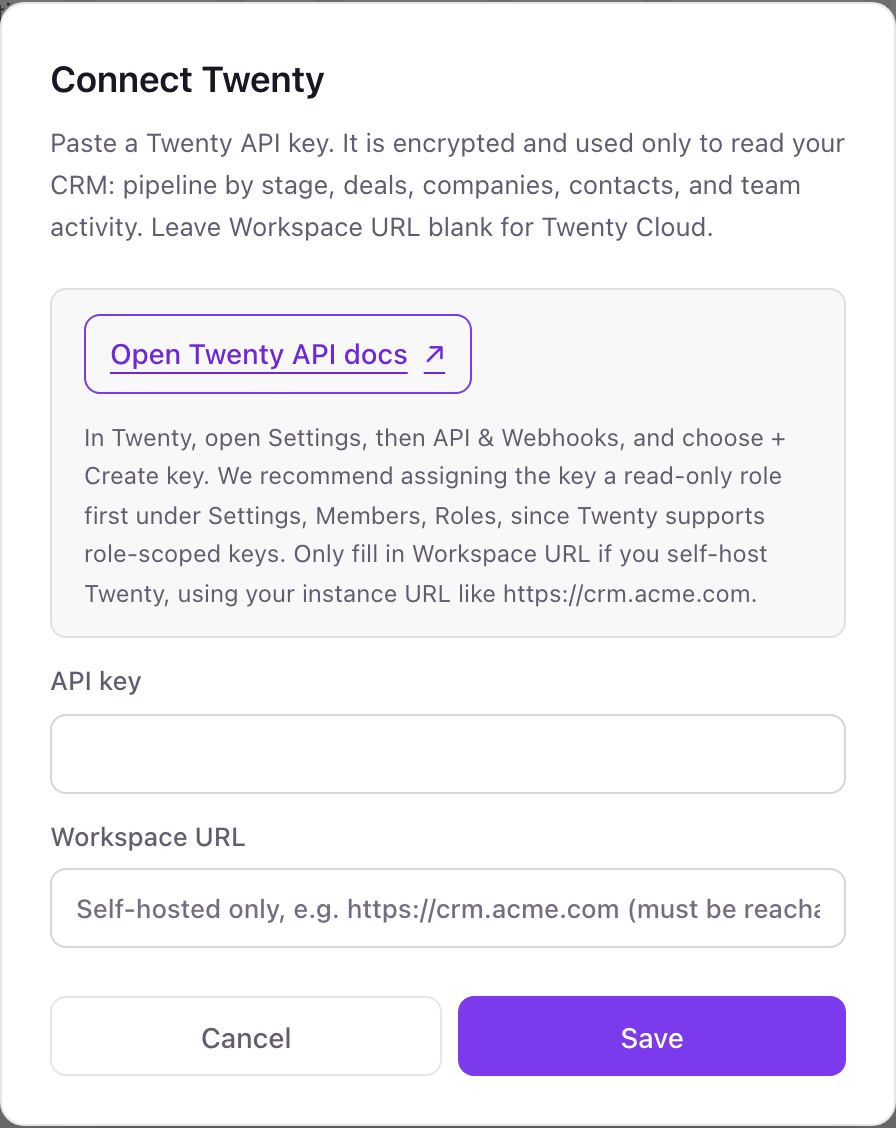
- 1On Dance Party's Integrations page, Connect Twenty opens a form that asks for an API key and, if you self-host, a Workspace URL.
- 2In Twenty, open Settings, then API & Webhooks, and choose + Create key. Copy the key, which Twenty shows once.Open Twenty API docs ↗
- 3Optional but recommended: under Settings, Members, Roles, assign the key a read-only role.
- 4Paste the key into API key. Leave Workspace URL blank on Twenty Cloud, or enter your instance URL, like https://crm.example.com.
- 5Click Save. Dance Party reads one company to confirm the key and the server, and the card shows Connected.
One Twenty connection per workspace
A workspace connects one Twenty workspace, cloud or self-hosted, through one API key. A second Twenty workspace, such as a staging instance, needs its own Dance Party workspace.
Twenty keys follow the role you assign, so a read-only role makes the key unable to change a record even outside Dance Party. Dance Party itself only sends GET requests. Delete the key under Settings, API & Webhooks to cut access.
From Twenty to your office display
Once Twenty shows Connected, the rest happens in plain English. No code, no drag-and-drop.
1. Describe it. Tell DJ Agent what you want to see.
New dashboard+ WidgetDescribe a widget in DJ Agent, or click + WidgetDJ AgentDATA SOURCESTwentyConnectedShow Twenty opportunities as a funnel by stage with the count in each, from New through Customer.Send2. It gets built. The widget lands on your board with real Twenty data.
New dashboard+ WidgetPipeline this quarterLiveScreening31 · $455KMeeting22 · $348KProposal11 · $207KCustomer9 · $164KDJ AgentDATA SOURCESTwentyConnectedShow Twenty opportunities as a funnel by stage with the count in each, from New through Customer.Send3. Put it on a screen. Pair an Apple TV with the six-character code it shows, then assign the dashboard.

Twenty dashboard questions
Can I show a Twenty CRM dashboard on an Apple TV?
Yes. Connect Twenty with an API key, describe the view to DJ Agent, and assign it to a screen running the Dance Party Apple TV app. Twenty widgets refresh each hour by default, or every 5 minutes if you ask, well under Twenty's 100 requests a minute.
Does it work with self-hosted Twenty?
Yes, if the server is reachable over https from the internet. Enter your instance URL in Workspace URL. A server on a private network or VPN cannot be reached.
Can Dance Party read my custom objects in Twenty?
Yes. It reads any object by its API name, counts records with Twenty's own filters, and counts child records per parent, such as users per product.
Why can't it list my Twenty object model?
Twenty ties the object model to settings permission, not record permission. A read-only role can still read records if you name the object, or you can give the role settings read access.
Does it use my Twenty stage names?
Yes. Stages are whatever your workspace defines, and Dance Party groups by the values it finds rather than a fixed list.
Can Dance Party edit records in Twenty?
No. The connector sends only GET requests. With a read-only role on the key, Twenty would refuse a write anyway.
More integrations
Put Twenty on every office display
Connect Twenty, describe the dashboard, and it runs on an Apple TV, refreshing on its own.
Get Started