
Put your Pipedrive deals on an office display: dashboards for Apple TV
Pipedrive is built around the pipeline view, and small sales teams keep it open all day. Dance Party takes the numbers behind it, open deal value, weighted value, and the deals just marked won, and runs them as a Pipedrive dashboard on an Apple TV where the whole office can see them.
- Read-only
- API key connection
- One connection per workspace
Popular Pipedrive dashboards
What teams running Pipedrive put on the screen, and what you would ask DJ Agent to get it.
Weighted value against the quarter target
For the founder or sales manager and the reps
Pipedrive weights every open deal by its stage probability. Showing the weighted total next to the number you need is a more honest read than the raw pipeline value.
- Weighted value of all open deals, or of one pipeline
- Total open deal value and open deal count
- A target you set in the prompt
Ask DJ Agent“Show Pipedrive weighted value for open deals in our New business pipeline as progress toward a $600K target.”
Win rate by Pipedrive pipeline
For sales leadership
Teams that run separate pipelines for new business, renewals, and partners close at very different rates. Ranking them side by side shows which motion deserves the next hire.
- Won and lost deal counts for each pipeline
- Win rate per pipeline, won divided by won plus lost
- Total won value per pipeline
Ask DJ Agent“For each Pipedrive pipeline, count won and lost deals and rank the pipelines by win rate.”
Deal won bell
For the whole office
In a small team every won deal is news. The screen puts the deal title and value up on its next refresh after the deal is marked won in Pipedrive, so the whole room sees it.
- The most recent won deal: title, value, and currency
- The pipeline it was won in
- Recently added won deals with their won date
Ask DJ Agent“When a Pipedrive deal is marked won, show its title and value big on screen, with a list of recent won deals underneath.”
Today's activities
For the rep or founder whose Pipedrive token is connected
Pipedrive runs on activities: every open deal should have a next call or meeting. A screen by the desk listing what is due today, and what is still undone, keeps the day on track.
- Activities due today by type: call, meeting, email, task
- Which of them are done and which are still open
- Activities linked to a deal
Ask DJ Agent“List my Pipedrive activities due today with their type, and mark which ones are done.”
What Dance Party reads from Pipedrive
Dance Party reads Pipedrive with the personal API token you paste, using read requests only. It sees the deals that token's user can see in Pipedrive, and it never creates, edits, or moves a deal.
Deal totals
Pipedrive API docs ↗- Deals summaryCount, total value, and weighted value of open, won, or lost deals, for the whole company or one pipeline. Totals are current, not by date range.
- Recent dealsUp to 100 of the most recently added deals: title, value, currency, status, stage, pipeline, and won date.
Pipelines
Pipedrive API docs ↗- Pipeline listThe name and ID of each pipeline, so a widget can filter to one.
Activities
Pipedrive API docs ↗- ActivitiesUp to 100 activities with subject, type, due date, done status, and linked deal. Pipedrive returns the token owner's own activities.
Account
Pipedrive API docs ↗- Connected userThe user and company name behind the token, used to confirm the connection.
How to connect Pipedrive
Before you start
- An owner or admin of your Dance Party workspace makes the Pipedrive connection.
- Any Pipedrive plan, and a permission set with Use API turned on. If Personal preferences shows no API tab, a Pipedrive admin enables it under Manage users, Permission sets.
- A Pipedrive user who can see the deals you want on screen. The token sees exactly what that user sees, so an admin's token covers the whole company.
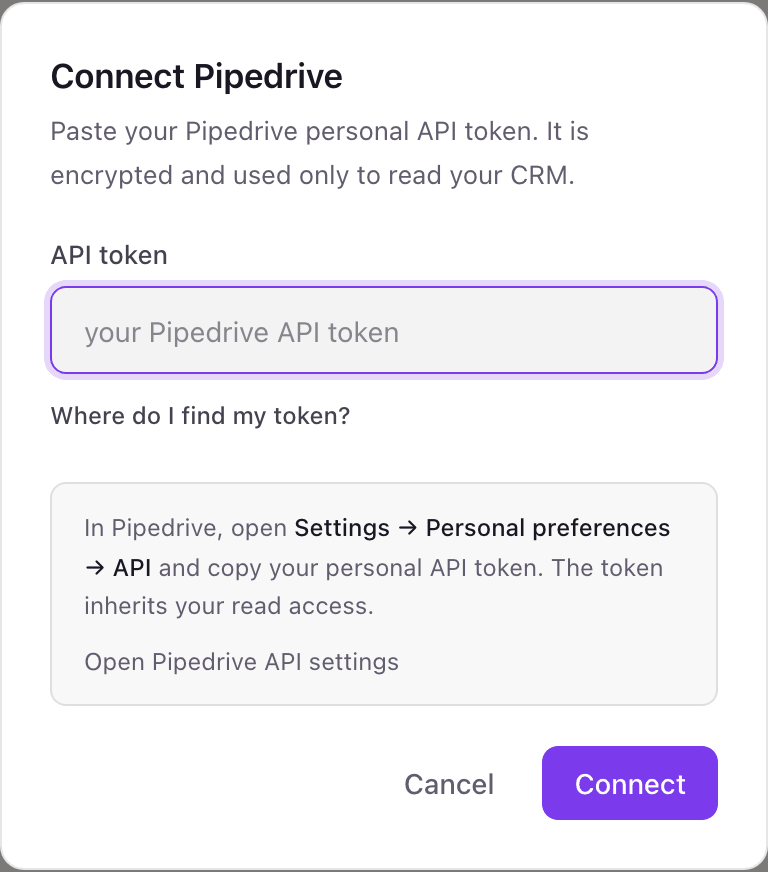
- 1On the Dance Party Integrations page, the Pipedrive card has a Connect Pipedrive button. It opens a pop-up with a single API token field.
- 2In Pipedrive, open Settings, then Personal preferences, then API, and copy your personal API token. The pop-up's Where do I find my token? link opens the same page.Open Pipedrive API settings ↗
- 3Paste the token into API token and click Connect.
- 4Dance Party checks the token with Pipedrive, stores it encrypted, and the card shows Connected.
One Pipedrive connection per workspace
A workspace holds one Pipedrive token, so one Pipedrive company. Deal totals cover everything that user can see, while activities are that user's own. A second Pipedrive company needs its own Dance Party workspace.
Pipedrive tokens are not scoped, so the token itself could write. Dance Party's Pipedrive connector only sends read requests, stores the token encrypted, and never shows it again. To cut access, regenerate the token under Personal preferences, API in Pipedrive.
From Pipedrive to your office display
Once Pipedrive shows Connected, the rest happens in plain English. No code, no drag-and-drop.
1. Describe it. Tell DJ Agent what you want to see.
New dashboard+ WidgetDescribe a widget in DJ Agent, or click + WidgetDJ AgentDATA SOURCESPipedriveConnectedShow Pipedrive weighted value for open deals in our New business pipeline as progress toward a $600K target.Send2. It gets built. The widget lands on your board with real Pipedrive data.
New dashboard+ WidgetNew business, weightedLiveWeighted open value$487K/ $600K81% to goalDJ AgentDATA SOURCESPipedriveConnectedShow Pipedrive weighted value for open deals in our New business pipeline as progress toward a $600K target.Send3. Put it on a screen. Pair an Apple TV with the six-character code it shows, then assign the dashboard.

Pipedrive dashboard questions
Can I show a Pipedrive dashboard on a TV in the office?
Yes. Connect Pipedrive with an API token, describe the screen to DJ Agent, and assign it to an Apple TV running Dance Party. Pipedrive widgets update every hour unless you ask DJ Agent for a faster cadence, down to 5 minutes.
Where is my Pipedrive API token?
In Pipedrive, under Settings, Personal preferences, API. The direct page is app.pipedrive.com/settings/api, and each user has their own token.
Whose token should I use?
An admin's, for company-wide numbers. The token sees only what its user can see, so a rep's token can leave out deals hidden by visibility groups.
Can it show deals won this month?
Partly. Deal totals from Pipedrive are current totals, not by date, but Dance Party can list recently added won deals with their won date and count the ones from this month.
Can it rank reps by deals won?
Not today. Dance Party reads deal totals and recent deals without the deal owner, so a per-rep leaderboard is not available from Pipedrive yet.
Can Dance Party change deals in Pipedrive?
No. The connector only reads. It cannot move a deal between stages, mark it won or lost, or add an activity.
More integrations
Put Pipedrive on every office display
Connect Pipedrive, describe the dashboard, and it runs on an Apple TV, refreshing on its own.
Get Started