
A Toast dashboard for the back office: tonight's sales on Apple TV
Toast knows every check the moment it closes, but that view lives in Toast Web on the manager's laptop. Dance Party puts one location's business day on an office display: net sales, guests, sales by hour, the dishes that are moving, and hours on the clock, as a Toast dashboard on an Apple TV.
- Read-only
- API key connection
- One connection per workspace
Toast dashboard examples
What teams running Toast put on the screen, and what you would ask DJ Agent to get it.
Sales by hour
For general managers and shift leads
Toast's hourly sales view is how managers decide when to cut a server or call one in. On the back-office screen, the lunch rush and the dinner ramp are visible without anyone pulling a report mid-shift.
- Net sales per hour of the business day, in restaurant-local time
- Orders per hour
- Net sales so far today
Ask DJ Agent“Chart today's Toast net sales by hour for our location, with total net sales so far as the headline.”
Top sellers tonight
For the chef, kitchen manager, and front-of-house team
When the short rib is outselling everything by 8 p.m., the kitchen wants to know before it 86es. A ranked list of menu items by sales tells the line what to prep and tells servers what to push.
- Menu items ranked by sales for the business day
- Quantity sold of each item
- Number of orders each item appeared on
Ask DJ Agent“Rank today's top 5 Toast menu items by sales, with quantity sold beside each.”
Hours on the clock
For general managers and the owner
Overtime is where labor budgets leak. Seeing who is clocked in right now and how many overtime hours the day has already logged lets a manager send someone home before it shows up on payroll.
- Staff clocked in right now
- Regular hours and overtime hours for the business day
- Hours by job, such as server, line cook, or host
Ask DJ Agent“Show Toast labor for today: how many people are clocked in, regular hours, overtime hours, and total hours.”
Dining option mix
For owners and whoever manages delivery and online ordering
Dine-in and delivery carry very different margins. Splitting the day's sales by Toast dining option shows whether tonight is a room night or a delivery night.
- Net sales by dining option, using your own dining option names
- Order count by dining option
- Share of the day's sales each option carries
Ask DJ Agent“Split today's Toast sales by dining option, dine in, takeout, delivery, and online, with order counts.”
What Dance Party reads from Toast
Dance Party reads Toast with Standard API access credentials, which Toast itself limits to read-only requests. Totals follow your restaurant's business day, using its time zone and closeout hour, not the calendar day.
Orders and sales
Toast API docs ↗- Sales summaryNet sales, orders, checks, guests, tax, tips, refunds, and average check for one business day, today or up to 30 days back.
- By hour and by dining optionNet sales and orders per hour, and per dining option such as dine in or delivery.
- Top itemsMenu items ranked by sales, with quantity sold and the number of orders they were on.
Labor
Toast API docs ↗- Time entriesPeople clocked in, regular hours, overtime hours, total hours, and hours by job. No names, wages, or tips.
Restaurant and locations
Toast API docs ↗- Restaurant infoLocation name, city, time zone, closeout hour, currency, and the current business date.
- LocationsUp to 25 locations in your management group, when you add the group GUID.
How to connect Toast
Before you start
- An owner or admin of your Dance Party workspace makes the Toast connection.
- A Toast Web user with the Manage Integrations permission
- Standard API access, which comes with Restaurant Management Suite Essentials in the US and is billed separately in other countries
- Read scopes on the credential: restaurants:read and orders:read, plus labor:read for hours and config:read for dining option names
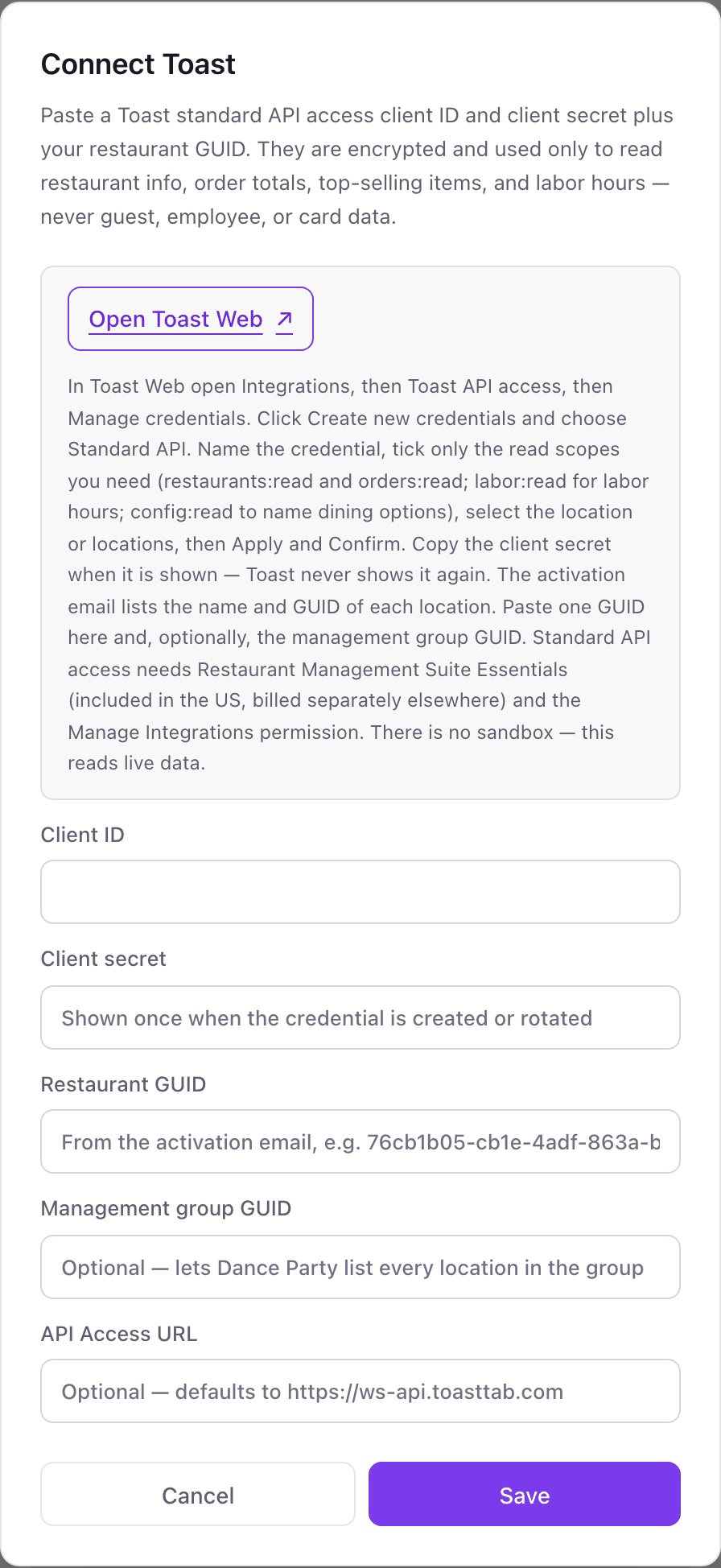
- 1In Toast Web, open Integrations, then Toast API access, then Manage credentials, and click Create new credentials. Choose Standard API.Open Toast Web ↗
- 2Name the credential, tick restaurants:read and orders:read, add labor:read and config:read if you want hours and dining option names, pick the location, then Apply and Confirm.
- 3Copy the client secret right away. Toast never shows it again. The activation email lists each location's name and GUID.
- 4In Dance Party, click Connect Toast. Fill in Client ID, Client secret, and Restaurant GUID. Management group GUID and API Access URL are optional.
- 5Click Save. Dance Party logs in and reads your restaurant's info, and the card shows Connected.
One Toast connection per workspace
One Toast connection per workspace, reading one location's sales, items, and labor. Add the management group GUID and the dashboard can also list every location in the group. A second location's sales need their own workspace.
Standard API access credentials cannot write. Toast rejects any change they attempt, and Dance Party only asks for the scopes above. Delete the credential under Manage credentials in Toast Web and the dashboard loses access.
From Toast to your office display
Once Toast shows Connected, the rest happens in plain English. No code, no drag-and-drop.
1. Describe it. Tell DJ Agent what you want to see.
New dashboard+ WidgetDescribe a widget in DJ Agent, or click + WidgetDJ AgentDATA SOURCESToastConnectedChart today's Toast net sales by hour for our location, with total net sales so far as the headline.Send2. It gets built. The widget lands on your board with real Toast data.
New dashboard+ WidgetNet sales by hourLive$8,420so far today11a12p1p5p6p7p8pDJ AgentDATA SOURCESToastConnectedChart today's Toast net sales by hour for our location, with total net sales so far as the headline.Send3. Put it on a screen. Pair an Apple TV with the six-character code it shows, then assign the dashboard.

Toast dashboard questions
Can I show Toast sales on a TV in the back office or kitchen?
Yes. Connect Toast, describe the screen to DJ Agent, and assign it to an Apple TV running Dance Party. It can sit in the office, the kitchen, or behind the bar.
Does today follow my closeout hour?
Yes. The business day uses your restaurant's time zone and closeout hour from Toast, so a check closed after midnight but before closeout counts toward the night it belongs to.
Can it show labor cost as a percentage of sales?
No. Dance Party reads hours from time entries but never wages or tips, so it shows hours and overtime, not labor dollars.
Can I see all of my locations on one screen?
Partly. One connection reads sales, items, and labor for one location. With a management group GUID it can also list every location in the group, up to 25.
What happens on a very busy day?
Totals cover the first 500 orders of the business day. Past that, the widget is marked partial rather than showing a number that looks complete.
Is there a Toast sandbox to test with?
No. Standard API access has no sandbox, so the dashboard reads your live restaurant data from the first connection.
Can Dance Party change my menu or orders?
No. Toast's Standard API access is read-only by design, and Dance Party only reads sales, items, labor hours, and location details.
More integrations
Put Toast on every office display
Connect Toast, describe the dashboard, and it runs on an Apple TV, refreshing on its own.
Get Started