
WooCommerce order dashboards for the office display, on Apple TV
WooCommerce stores run on WordPress, so the orders and the site itself both need watching. Dance Party puts both on the office display: new orders and their status, products running out, and whether the store's WooCommerce and WordPress setup is healthy, as a WooCommerce dashboard on an Apple TV.
- Read-only
- API key connection
- One connection per workspace
WooCommerce dashboard examples
What teams running WooCommerce put on the screen, and what you would ask DJ Agent to get it.
Order status board
For the people who pack and ship
In WooCommerce, Processing means paid and waiting to ship, and On hold usually means a bank transfer to confirm. Counting each status on the packing-room screen tells the team where the day's work is.
- Recent orders in Processing, On hold, and Pending payment
- Orders marked Completed today
- Failed and cancelled orders
Ask DJ Agent“From our latest WooCommerce orders, count how many are processing, on hold, pending payment, and completed today.”
Today's takings
For the owner and the team
A small store feels every sale. The order count and total for today, from WooCommerce's own order totals, is the number the owner otherwise checks on their phone ten times a day.
- Orders placed today
- Order total for today in your store currency
- Average order value today
- Refunded orders today
Ask DJ Agent“Show today's WooCommerce order count, order total, and average order value from our latest orders.”
Stock watch
For purchasing and whoever reorders
WooCommerce marks a product out of stock the moment its count hits zero, and the storefront stops selling it. Seeing low counts on the wall gives purchasing a day or two of warning.
- Products marked out of stock
- Products with a low stock quantity
- Stock status and quantity for each product
Ask DJ Agent“List WooCommerce products that are out of stock or have fewer than 5 in stock, lowest first.”
Store health wall
For the developer or agency that maintains the site
WooCommerce's system status report shows the versions and settings that break stores when they drift. An agency looking after several shops can put each one's status on a screen instead of logging into wp-admin.
- WooCommerce, WordPress, and PHP versions
- Whether the site uses a secure connection
- Whether WP-Cron is enabled
- Number of active plugins
Ask DJ Agent“Show our WooCommerce system status as tiles: WooCommerce, WordPress and PHP versions, HTTPS, WP-Cron, and active plugin count.”
What Dance Party reads from WooCommerce
Dance Party reads your WooCommerce store's REST API with a consumer key and secret, using only GET requests. Orders and products come back newest first, up to 100 per read, so busy stores see their latest activity rather than full history.
Orders
WooCommerce API docs ↗- Recent ordersOrder number, status, total, currency, payment method, date created, and date completed.
Products
WooCommerce API docs ↗- Recent productsName, price, status, stock status, and stock quantity.
- System statusWooCommerce, WordPress, and PHP versions, WP-Cron, HTTPS, currency, and active plugins.
How to connect WooCommerce
Before you start
- An owner or admin of your Dance Party workspace makes the WooCommerce connection.
- A WordPress user who can manage WooCommerce, such as an Administrator, to create the key and to own it
- A WooCommerce REST API key with Read permission: the consumer key (ck_) and consumer secret (cs_)
- A store at a public https address with no port number. Staging sites behind a login or on a private network cannot be reached.
- 1In WordPress, open WooCommerce, Settings, Advanced, REST API, and click Add key.WooCommerce REST API keys guide ↗
- 2Add a description such as Dance Party, choose an administrator as the User, set Permissions to Read, and click Generate API key.
- 3Copy the Consumer key and Consumer secret. WooCommerce shows them only once.
- 4In Dance Party, click Connect WooCommerce. Enter your store's address in Store URL, starting with https://, and paste the Consumer key and Consumer secret.
- 5Click Save. Dance Party reads the system status to check the key, and the card shows Connected.
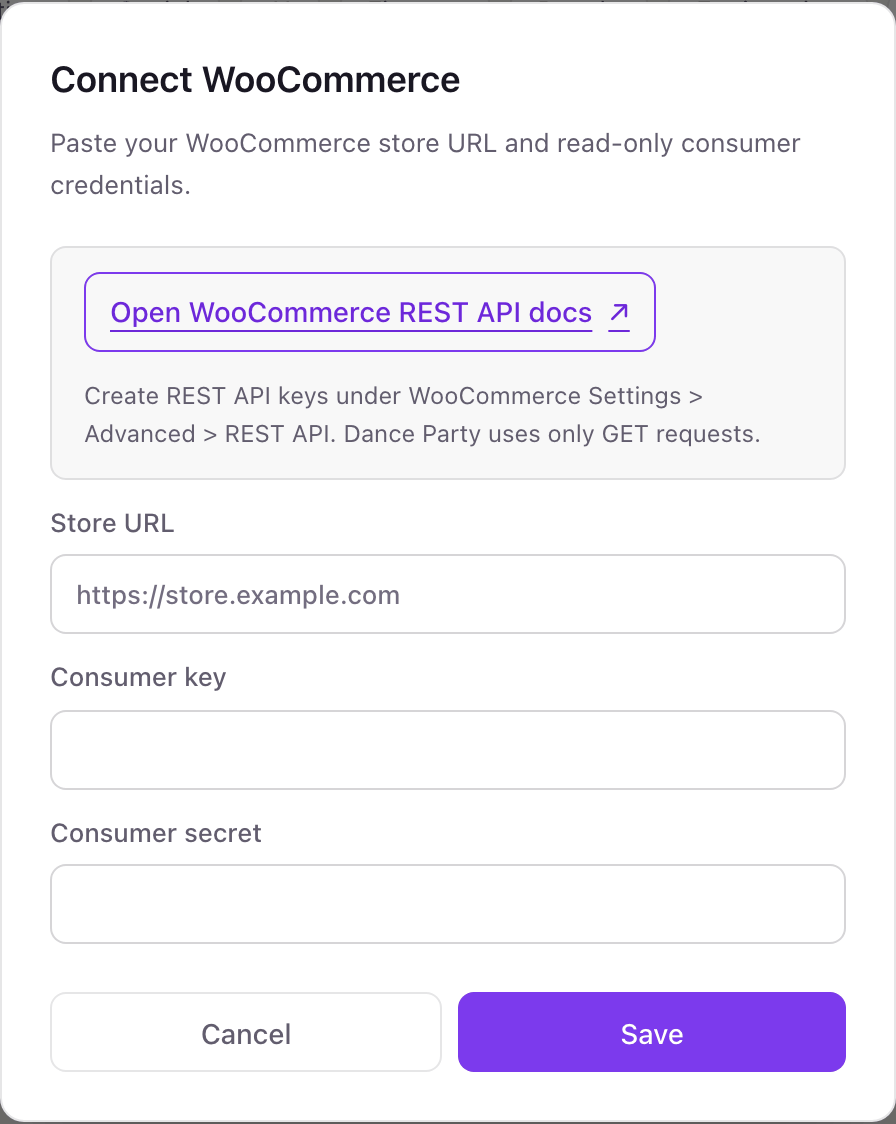
One WooCommerce connection per workspace
One WooCommerce store per workspace. An agency or brand running several WordPress stores connects each one in its own Dance Party workspace.
A key with Read permission cannot edit orders, change prices, or touch stock, and Dance Party only sends GET requests with it. Revoke the key under WooCommerce, Settings, Advanced, REST API to cut access.
From WooCommerce to your office display
Once WooCommerce shows Connected, the rest happens in plain English. No code, no drag-and-drop.
1. Describe it. Tell DJ Agent what you want to see.
New dashboard+ WidgetDescribe a widget in DJ Agent, or click + WidgetDJ AgentDATA SOURCESWooCommerceConnectedFrom our latest WooCommerce orders, count how many are processing, on hold, pending payment, and completed today.Send2. It gets built. The widget lands on your board with real WooCommerce data.
New dashboard+ WidgetOrders by statusLive27Processing4On hold6Pending payment41Completed todayDJ AgentDATA SOURCESWooCommerceConnectedFrom our latest WooCommerce orders, count how many are processing, on hold, pending payment, and completed today.Send3. Put it on a screen. Pair an Apple TV with the six-character code it shows, then assign the dashboard.

WooCommerce dashboard questions
Can I show WooCommerce orders on a TV in the office?
Yes. Connect your store with a read key, describe the screen to DJ Agent, and assign it to an Apple TV running Dance Party.
Which WooCommerce permission should the key have?
Read. Dance Party only reads orders, products, and system status, so Write and Read/Write are never needed.
Does it read every order in my store?
No. Each read returns up to the 100 newest orders. That covers a day for most stores, and busier stores see their latest orders rather than a complete daily total.
Why does the connection fail on my staging site?
Dance Party can only reach stores at a public https address. A site on http, on a custom port, behind a password, or on a private network is refused.
Will customer names and addresses show on the screen?
Only if you ask for them. Order widgets default to order numbers, totals, and status, and you choose what each widget displays.
Can Dance Party change my store?
No. It sends only GET requests, and a Read key cannot make changes even if asked.
More integrations
Put WooCommerce on every office display
Connect WooCommerce, describe the dashboard, and it runs on an Apple TV, refreshing on its own.
Get Started