
Ramp spend dashboards on Apple TV for the finance office display
Ramp already codes every card swipe to a department and a merchant. Dance Party puts the totals on the office display: spend by department, the vendors you pay most, your available card limit, and reimbursements waiting to go out. It runs as a Ramp dashboard on an Apple TV and shows company totals, never who spent what.
- Read-only
- API key connection
- One connection per workspace
Ramp dashboard examples
What teams running Ramp put on the screen, and what you would ask DJ Agent to get it.
Spend by department
For the CFO, controller, and department heads
Budget owners rarely log into Ramp to check their own pace. A ranked view of card spend by department, visible to everyone, starts the budget conversation before the month closes instead of after.
- Cleared card spend by Ramp department over a window you choose
- Total spend net of refunds
- Number of transactions in the window
Ask DJ Agent“Rank Ramp card spend by department for the last 30 days, with total spend as the headline.”
Top merchants
For finance and whoever owns software and vendor spend
The top of the merchant list is where renegotiations and forgotten subscriptions hide. Seeing that AWS and ad platforms take half of card spend makes the vendor review obvious.
- Top 10 merchants by card spend in the window
- Spend by Ramp category, such as software or travel
- Spend per day across the window
Ask DJ Agent“Show our top 6 Ramp merchants by card spend over the last 30 days, largest first.”
Card limit and statement
For the controller and whoever manages cash
How much of the Ramp limit is left and when the next statement bills are the two numbers cash planning keeps asking for. On a screen, nobody has to open the Ramp home page to answer them.
- Available card limit against the total card limit
- Balance including pending charges
- Latest statement: charges, payments, and ending balance
- Next billing date
Ask DJ Agent“Show our Ramp available card limit, balance including pending, latest statement ending balance, and the next billing date.”
Reimbursements queue
For finance operations and every employee waiting to be paid back
Out-of-pocket expenses are the part of Ramp employees feel personally. A count of reimbursements awaiting payment keeps the finance team honest about turnaround, and it never shows whose claim is whose.
- Reimbursements awaiting payment, count and total
- Reimbursements already paid in the window, count and total
- The average amount waiting per claim
Ask DJ Agent“Show Ramp reimbursements awaiting payment versus reimbursed in the last 30 days, as counts and totals.”
What Dance Party reads from Ramp
Dance Party reads Ramp through a developer app you create in your own Ramp account, with read-only scopes. Every figure is a company-level total. Transactions are read to be summed and then discarded, so no cardholder name, card number, memo, or single transaction reaches a screen.
Card spend
Ramp API docs ↗- Spend summaryCleared spend net of refunds over the last 1 to 90 days, with transaction count and a per-day series. Up to the newest 500 transactions per read.
- By department and categorySpend totals per Ramp department and per spend category.
- Top merchantsThe 10 merchants with the most card spend in the window.
Balance and statements
Ramp API docs ↗- BalanceAvailable card limit, total limit, balance including pending, statement balance, and billing dates.
- Latest statementOpening balance, charges, credits, payments, and ending balance.
- Business profileCompany name and whether reimbursements are turned on.
Reimbursements and people
Ramp API docs ↗- ReimbursementsAwaiting payment and reimbursed, as counts and totals. Never an employee's name.
- Headcount and cardsActive users and activated physical and virtual cards. Ramp marks the card endpoints beta, so the card count can be missing.
How to connect Ramp
Before you start
- An owner or admin of your Dance Party workspace makes the Ramp connection.
- A Ramp Admin or Business Owner, since they can create developer apps
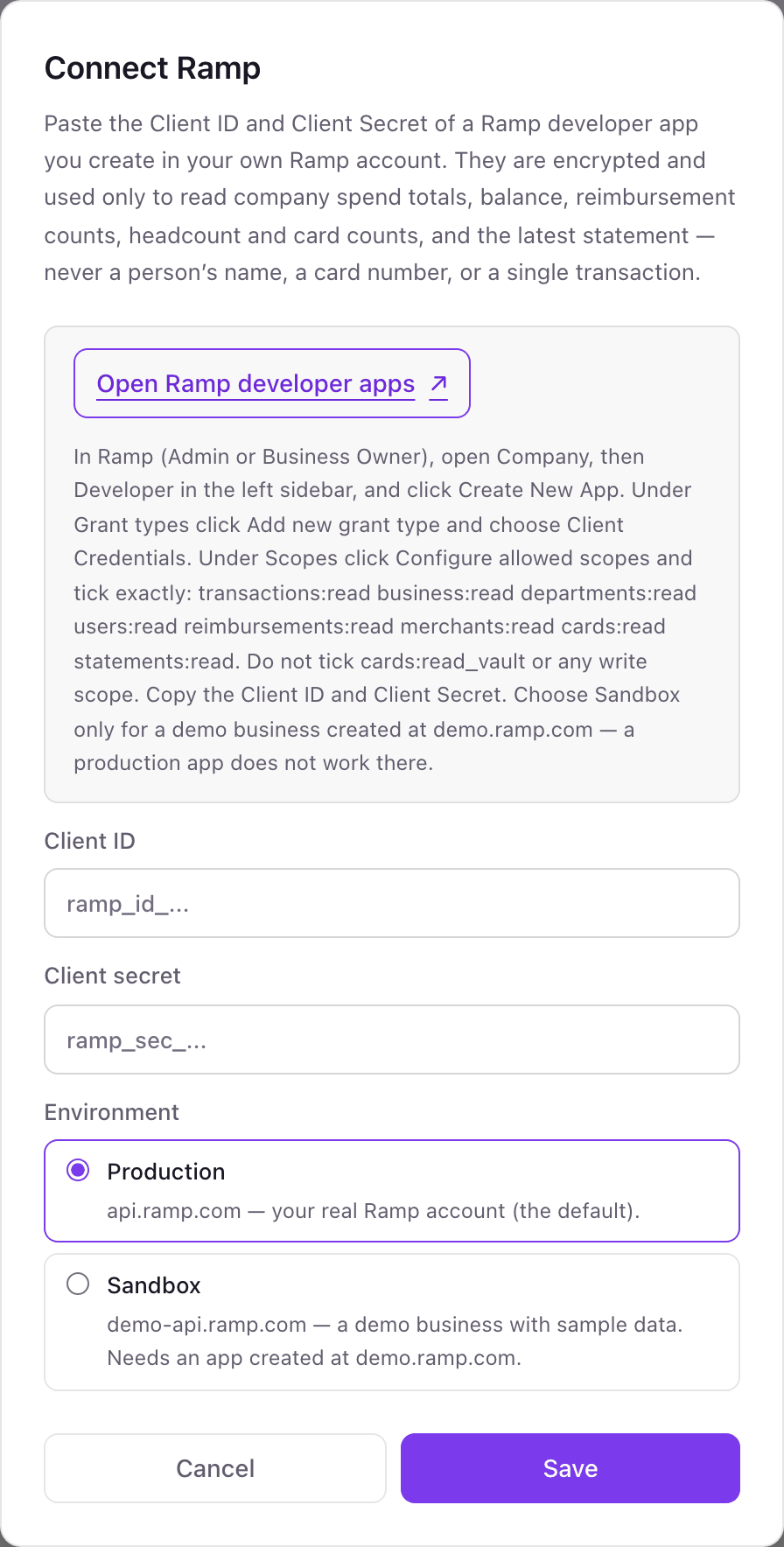
- A Ramp developer app with the Client Credentials grant type and exactly these scopes: transactions:read, business:read, departments:read, users:read, reimbursements:read, merchants:read, cards:read, statements:read
- Do not tick cards:read_vault or any write scope. Dance Party does not ask for them.
- 1In Ramp, open Company, then Developer, and click Create New App.Open Ramp developer apps ↗
- 2Under Grant types, click Add new grant type and choose Client Credentials.
- 3Under Scopes, click Configure allowed scopes and tick the eight read scopes listed above. Copy the Client ID and Client Secret.
- 4In Dance Party, click Connect Ramp. Paste Client ID and Client secret, and leave Environment on Production unless the app lives in a demo.ramp.com sandbox.
- 5Click Save. Dance Party requests a token and reads your business profile, and the card shows Connected.
One Ramp connection per workspace
One Ramp business per workspace. If your Ramp account has several business entities, the latest statement sums them, and spend totals cover the whole company.
The developer app carries only read scopes, and Dance Party requests only those scopes each time it asks Ramp for a token. It cannot see full card numbers, move money, or approve anything. Delete the app under Company, Developer in Ramp to revoke access.
From Ramp to your office display
Once Ramp shows Connected, the rest happens in plain English. No code, no drag-and-drop.
1. Describe it. Tell DJ Agent what you want to see.
New dashboard+ WidgetDescribe a widget in DJ Agent, or click + WidgetDJ AgentDATA SOURCESRampConnectedRank Ramp card spend by department for the last 30 days, with total spend as the headline.Send2. It gets built. The widget lands on your board with real Ramp data.
New dashboard+ WidgetSpend by department, 30 daysLive1Engineering$48,2102Marketing$36,9053Sales$24,6604Operations$17,3405People$8,115DJ AgentDATA SOURCESRampConnectedRank Ramp card spend by department for the last 30 days, with total spend as the headline.Send3. Put it on a screen. Pair an Apple TV with the six-character code it shows, then assign the dashboard.

Ramp dashboard questions
Can I show Ramp spend on a TV in the office?
Yes. Connect a Ramp developer app, describe the dashboard to DJ Agent, and assign it to an Apple TV running Dance Party.
Will it show who spent what?
No. Dance Party only produces company totals: by department, category, and merchant. There is no top-spenders board, and names, emails, and memos are never shown.
Does Ramp spend include pending transactions?
No. Spend totals count cleared transactions, net of refunds. Pending charges show up in the balance figure instead.
Can it track budgets or bill payments?
Not today. Dance Party reads card transactions, balance, statements, and reimbursements. Ramp budgets and Bill Pay are not part of the connection.
Can I try it against a Ramp sandbox?
Yes. Create the app in a demo business at demo.ramp.com and choose Sandbox in the Environment setting. A production app does not work there.
What if we have a very busy month?
Each spend read covers up to the newest 500 transactions. When a window holds more, the widget says so, and a shorter window gives a complete total.
Can Dance Party move money or change cards in Ramp?
No. The app has read scopes only, and Dance Party never asks for write access or for full card numbers.
More integrations
Put Ramp on every office display
Connect Ramp, describe the dashboard, and it runs on an Apple TV, refreshing on its own.
Get Started