
A Spotify now-playing dashboard for your desk or office display on Apple TV
Spotify listening is personal, so this Spotify dashboard starts at one desk: the track you are playing, with its artwork, on the screen beside you. Dance Party reads it from Last.fm, which Spotify sends your plays to once you link the two, and runs it on an Apple TV or any office display. No Spotify key or password is involved.
- Read-only
- API key connection
- Personal or workspace connection
- Pink + White· Frank Ocean
- Midnight City· M83
- Genesis· Grimes
Popular Spotify dashboards
What teams running Spotify put on the screen, and what you would ask DJ Agent to get it.
Desk display now playing
For anyone with a screen at their desk
It turns an idle monitor into something that looks alive, and it answers the question every nearby teammate asks: what is this song?
- The track playing now, or your most recent play
- Artist, album, and album artwork
- Whether it is playing now or was the last thing played
Ask DJ Agent“Show what I am playing on Spotify right now with the album art large, and fall back to my last played track when nothing is on.”
- Sofia· Clairo
- Nights· Frank Ocean
This week's Spotify top artists
For the team member who runs the office music
A weekly chart is a conversation starter on a shared display, and on an office account it shows what the room has actually been listening to.
- Top artists over the last 7 days, with play counts
- Top tracks for the week or the month
- Artists ranked over 3, 6, or 12 months for a longer view
Ask DJ Agent“Rank the top 5 artists on our office Spotify account over the last 7 days, with play counts.”
Recently played on Spotify
For desk displays and small team rooms
The last few songs with the time each was played read like a playlist of the afternoon, which suits a narrow screen better than one big cover.
- The last 5 to 100 plays, newest first
- The time each track was played
- Artist and album for each play
Ask DJ Agent“List my last 6 Spotify plays with artist and the time each one played.”
Listening stats card
For music people who like their numbers
Total plays since you joined Last.fm and your top track this month make a small, personal stat card that changes every day.
- Total plays recorded on your Last.fm profile
- Top artist over the last 7 days
- Top track over the last month
- The date your listening history starts
Ask DJ Agent“Make a Spotify stats card with my total plays, top artist this week, top track this month, and when my history starts.”
What Dance Party reads from Spotify
Dance Party reads Spotify listening from Last.fm, not from Spotify's own API. Once your Spotify account is linked to Last.fm, every play is recorded on your public Last.fm profile, and Dance Party reads that profile by username with its own Last.fm key.
Now playing and recent plays
Spotify API docs ↗- Now playingThe current track, or the most recent one, with artist, album, and artwork.
- Recent playsUp to 100 plays, newest first, each with the time it was played.
Top charts
Spotify API docs ↗- Top artistsRanked with play counts for 7 days, 1, 3, 6, or 12 months, or all time.
- Top tracksRanked with artist and play counts over the same periods.
Profile
Spotify API docs ↗- Listening totalsTotal plays on the profile and the date it was created.
How to connect Spotify
Before you start
- Any Dance Party member can connect their own Spotify. Connecting one for the whole workspace takes an owner or admin.
- A free Last.fm account with your Spotify account linked to it
- Your Last.fm username. No Spotify password, Spotify API key, or Last.fm password.
- Spotify played on the Spotify app for phone, desktop, or web. Plays through Sonos speakers are not sent to Last.fm.
- 1Create a free Last.fm account if you do not have one.Join Last.fm ↗
- 2In Last.fm, open Settings, then Applications, and click Connect next to Spotify. Approve the request on Spotify. The pop-up's Connect Spotify to Last.fm link leads to the same Connect button.Open Last.fm Settings, Applications ↗
- 3Keep Hide recent listening information turned off in Last.fm's privacy settings. Play a song and check that it appears on your Last.fm profile.
- 4In Dance Party, open Integrations, click Connect Spotify, and enter your Last.fm username. Owners and admins choose Just for me or Whole workspace.
- 5Click Save. Dance Party looks up the Last.fm profile, and the card shows Connected, or Connected · only you for a personal connection.
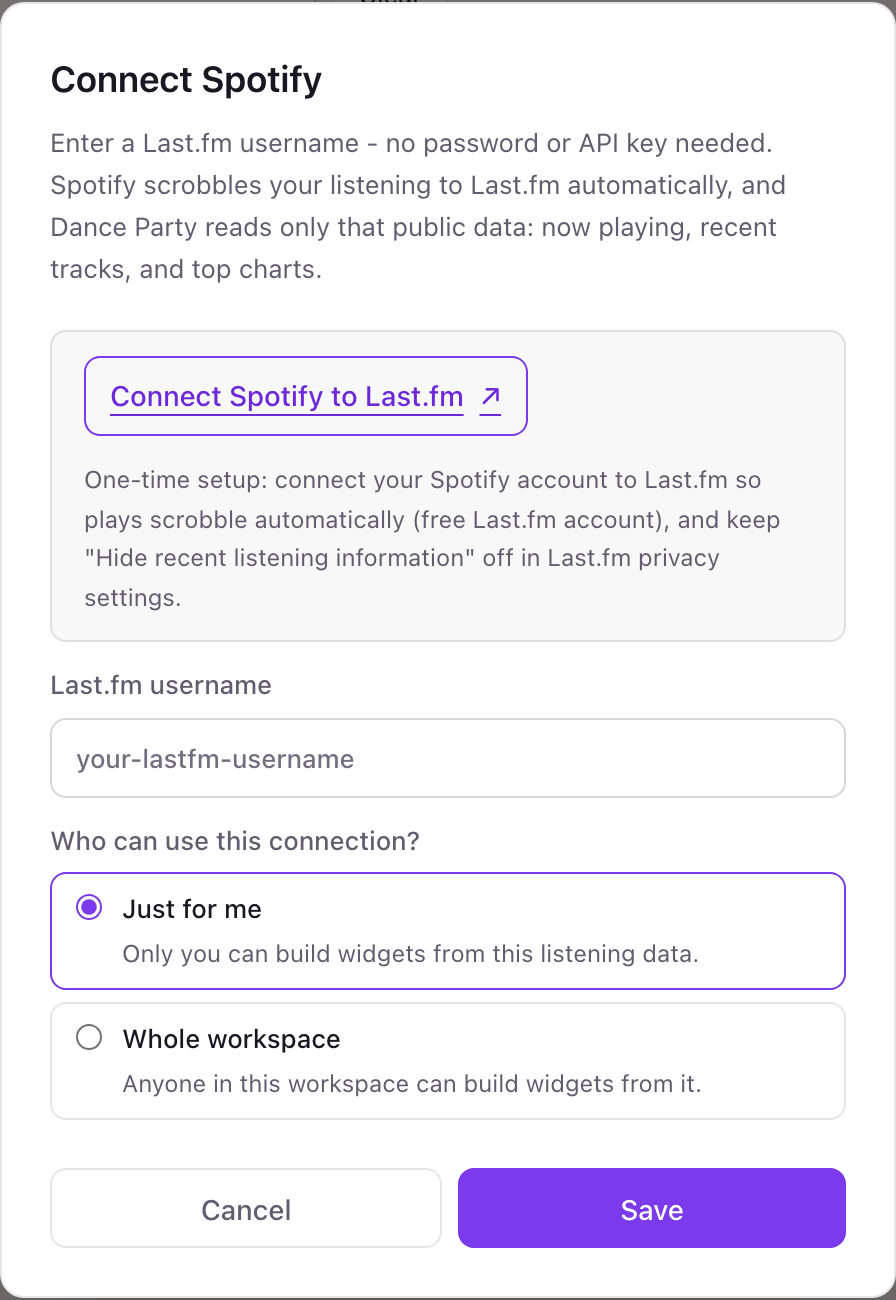
Your own Spotify or the whole workspace
Every member can connect their own Last.fm username just for themselves, so each desk display shows its owner's music. An owner or admin can also connect one username for the whole workspace, such as a shared office Spotify account, which anyone can then build widgets from.
Nothing secret changes hands. Dance Party stores only your Last.fm username and reads the listening history your Last.fm profile already shows publicly. It cannot play, pause, or queue music. Disconnect in Dance Party to stop, or disconnect Spotify under Last.fm Settings, Applications to stop recording plays.
From Spotify to your office display
Once Spotify shows Connected, the rest happens in plain English. No code, no drag-and-drop.
1. Describe it. Tell DJ Agent what you want to see.
New dashboard+ WidgetDescribe a widget in DJ Agent, or click + WidgetDJ AgentDATA SOURCESSpotifyConnectedShow what I am playing on Spotify right now with the album art large, and fall back to my last played track when nothing is on.Send2. It gets built. The widget lands on your board with real Spotify data.
New dashboard+ WidgetOn my SpotifyLiveNOW PLAYINGEverything In Its Right PlaceRadioheadRecently played- Sofia· Clairo
- Nights· Frank Ocean
DJ AgentDATA SOURCESSpotifyConnectedShow what I am playing on Spotify right now with the album art large, and fall back to my last played track when nothing is on.Send3. Put it on a screen. Pair an Apple TV with the six-character code it shows, then assign the dashboard.

Spotify dashboard questions
Do I need a Spotify API key to show Spotify on a screen?
No. You enter a Last.fm username. Dance Party reads your Spotify plays from Last.fm, so there is no Spotify key, password, or developer account involved.
Why does the Spotify connection go through Last.fm?
Spotify's own API is not open to Dance Party, but Spotify officially sends your plays to Last.fm once you link the accounts. Last.fm makes that listening history readable by username.
Does it work when Spotify plays through Sonos?
No. Sonos does not send plays to Last.fm, so Spotify played on Sonos speakers never shows up. Playing from the Spotify app on a phone, computer, or web player does.
Why is my Spotify widget empty?
Usually one of three things. Spotify is not linked under Last.fm Settings, Applications; Hide recent listening information is on in Last.fm; or you are in a Spotify Private Session, which blocks plays from reaching Last.fm.
Can other people in my workspace see my listening?
Not in Dance Party unless you choose Whole workspace. Just for me, the default, means only you can build widgets from it. Your Last.fm profile itself is public.
How current is the now-playing track?
It updates on the widget's refresh schedule, which can be as often as every five minutes. Between refreshes it shows the last track it read.
Can Dance Party control Spotify playback?
No. It only reads listening data from Last.fm. It cannot play, skip, pause, or change what is playing.
More integrations
Put Spotify on every office display
Connect Spotify, describe the dashboard, and it runs on an Apple TV, refreshing on its own.
Get Started